



$600 Notebook Roundup - Crowning the Affordability King
by Anand Lal Shimpi on November 29, 2005 10:38 AM EST- Posted in
- Laptops
Battery Life - Business Applications
While the performance of these laptops was very similar when running on AC power, unplugging them and focusing on battery life and performance changes the landscape dramatically. For our battery life tests, we turn to MobileMark 2005, which offers a total of four battery life measurement tools - the first one being the Office Productivity 2002SE benchmark.
The Office Productivity 2002SE benchmark does the following:
The workloads in this category model a mobile professional at a fictitious automobile company. The worker creates documents using Microsoft Word, Excel and PowerPoint, accesses email, and creates graphics and animation with Photoshop and Flash to include in a multimedia presentation. An Internet browser is used to view presentations. The user also invokes file compression and virus detection in the background.
It was also surprising to find out that neither of the Sempron based notebooks were really competitive at all in terms of battery life. The real race was between the Compaq Presario V2000 and the Gateway NX200S, which the Gateway won by just over 10%.
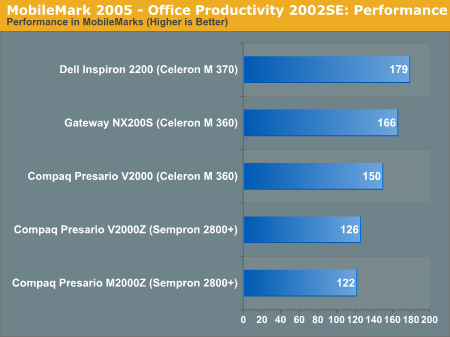
MobileMark 2005's Office Productivity 2002SE test also produces a performance score, to accompany the battery life metric in showing you how fast the notebooks were while on battery power:
While the performance of these laptops was very similar when running on AC power, unplugging them and focusing on battery life and performance changes the landscape dramatically. For our battery life tests, we turn to MobileMark 2005, which offers a total of four battery life measurement tools - the first one being the Office Productivity 2002SE benchmark.
The Office Productivity 2002SE benchmark does the following:
The workloads in this category model a mobile professional at a fictitious automobile company. The worker creates documents using Microsoft Word, Excel and PowerPoint, accesses email, and creates graphics and animation with Photoshop and Flash to include in a multimedia presentation. An Internet browser is used to view presentations. The user also invokes file compression and virus detection in the background.
Microsoft Word 2002: The user starts Microsoft Word and opens an eight-page assembly manual document for a new transmission system. The user sets paragraph formatting, font configuration and adds text to the document. The user inserts an image, a table of contents and a table of figures. Twenty additional images, ranging in size from 3 Kb to 15 Kb are inserted throughout the document. The user then adds a watermark to the document and performs a global find and replace. The document is printed and the user inserts a hyperlink into the document and adds more text. The user inserts a training video, changes the theme and saves the document in web page format. Later, the user returns to Word and opens a book to read. The user auto-summarizes the book to generate a shorter synopsis.
Microsoft Excel 2002: The user starts Microsoft Excel and opens a large spreadsheet (a 12 megabyte file with approximately 3000 rows and 248 columns of data). The user selects a group of formulae for data analysis. The user selects the data and performs a sort, using three key fields. This data is then used to create a chart, which is exported to a web page. The user then opens a different spreadsheet (an 8.5 megabyte file with approximately 2100 rows and 248 columns of data), and performs similar operations, resulting in another web page.
Microsoft PowerPoint 2002: The user starts Microsoft PowerPoint and opens a 24 slide presentation of the previous quarter's news and sales. The user moves through the presentation inserting and positioning several images (47 to 57 kilobytes in size). Upon completing this, the presentation is checked for spelling errors. The user then applies different themes/backgrounds to the presentation and selects one. Finally, the user reviews the material in slide show mode and exports the finished presentation to web page format.
Microsoft Outlook 2002: The user starts Microsoft Outlook and opens the inbox, changing the view mode to show the first lines of each message. The email editor, Word, is launched, and a document is opened, printed, and sent to an email recipient. The user then opens one of the documents in the inbox, adds a picture as an attachment, and emails it. Moving to the Draft folder, the user opens three email messages: the first has its spelling checked and is sent, the second is sent and the third is checked for spelling, summarized and sent. Three more messages are created and sent with attached images. Finally, the user compresses the Outlook offline folder.
Netscape Communicator 6.01: The user opens the Netscape browser and loads an HTML version of a Word document. The source HTML code is then viewed. The user also views two charts exported to HTML from an Excel file. Finally, the user browses through a 15-page PowerPoint slide show that was saved in HTML format.
WinZip Computing WinZip 8.0: The user creates a compressed data file from a set of bitmap files (7.6 megabytes total size) in a specific folder. The resulting .zip file is 54% of the size of the original group of files. Once started, the user moves this to the background and works with other applications.
McAfee VirusScan 5.13: The user scans program files (3,110 files and 438MB) for the presence of viruses. This is run in the background as the user works.
Adobe Photoshop 6.0.1: The user starts Adobe Photoshop and sets the workplace. A 7.12MB high-definition source file is opened and the image is sized to fit in the window. The user performs image manipulations, including Smart Blur, Distort Wave, and rotation. Finally, the user re-sizes the image and adjusts the image color levels before saving the image as a web-friendly 20kilobyte JPEG file.
Macromedia Flash 5: The user creates a Flash animation using text, graphics and still images. The user works in an existing Flash animation, adding, then manipulating and positioning a new image to appear appropriately within the final animation. To do this, the user starts Macromedia Flash and opens a preconfigured project (FLA) file, containing 23 different layers. The user moves down to one of the layers in the project file, deletes the key frame and imports a new image of a person in a kayak (a 24-bit color, 72 dpi, 300 x 211 resolution PNG format image with transparency). This image is then manipulated (rotated, flipped) and positioned appropriately within the frame and is then grouped into an instance. Finally, the user exports the animation to a web ready SWF file using 100 percent jpeg compression.
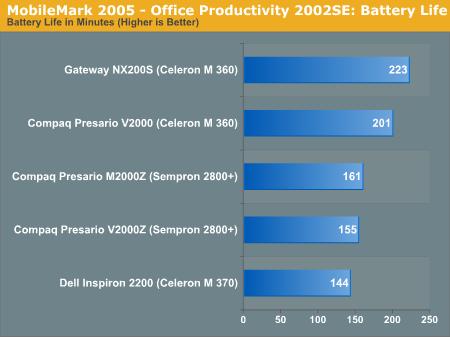
It was also surprising to find out that neither of the Sempron based notebooks were really competitive at all in terms of battery life. The real race was between the Compaq Presario V2000 and the Gateway NX200S, which the Gateway won by just over 10%.
MobileMark 2005's Office Productivity 2002SE test also produces a performance score, to accompany the battery life metric in showing you how fast the notebooks were while on battery power:


 Facebook
 Twitter
 RSS
RSS


50 Comments
View All Comments
trexpesto - Wednesday, December 14, 2005 - link
Didn't notice much about screen quality.cactux - Wednesday, November 30, 2005 - link
Hello,Such articles are great, but you say nothing about the Linux compatibility of these PCs.
In only 5 minutes, you could test them, using for example a Knoppix. This Linux distribution boots are works from one CD.
This would allow you to say what works and what fails (sound, screen, nouse, etc.)
Regards
Yann
CB1 - Wednesday, November 30, 2005 - link
Want Linux? Get an Acer. A version of the Acer TravelMate TM2312LCi has been sold briefly with a Linux boot disk and no OS. There is an Asian linux distro linked at Acer's website.HP has had an Ubuntu option available in Europe.
I've just booted a Compaq X1000 from the latest Ubuntu live disk, and it produces a perfectly working desktop, at the correct screen resolution. I wasn't in a location to check the modem or wireless, but I doubt there would be problems. Win 2K wouldn't give me the proper screen res or colours without the Compaq driver disk.
Short of gaming, you'll have as many issues with Win as Linux. I don't think it requires special consideration in the test.
nullpointerus - Wednesday, November 30, 2005 - link
I'd love to see a test like this, too.In the meantime you take a look at building your own laptop from Linux-compatible parts:
http://www.anandtech.com/news/default.aspx?newdate...">http://www.anandtech.com/news/default.aspx?newdate...
artifex - Wednesday, November 30, 2005 - link
...because a couple of weeks ago, we bought my sister a v2000z, with a 3000+ chip, for $400 or so after rebates. I think the office supply company that sold it to us figured out they screwed up, because it hasn't been that low, since :) Anyway, at these prices, look at the Sunday ads before you buy, because if one is substantially cheaper than the Gateway, like ours was, go for it instead.Myrandex - Wednesday, November 30, 2005 - link
I have seen plenty of laptops for sale under $600 with 512MB ram. Well at least on a sale and not a regular price. I wouldn't buy a machine w/ 256MB of ram at all anymore :-/bupkus - Wednesday, November 30, 2005 - link
What's with these 90 day warranties?unclebud - Tuesday, November 29, 2005 - link
heartily enjoyed!and also printing out to share with my coworkers -- the most asked question for me "is how good is this laptop?"
can just give this to them (to read) instead...
MacLean - Tuesday, November 29, 2005 - link
You can't review low price great bang for the buck laptops without including a model from Acer. The Acer AS3003 is AMD Sempron based, has WI-FI and all the of the specifications reviewed for the other models.I am very interested to find out how the integrated SIS Mirage 2 graphics go head to head vs. Intel and ATI.
Hardly a beauty contest if you don't invite all the contestants.
CB1 - Wednesday, November 30, 2005 - link
I too was surprised by the absence of a model from Acer. They are ubiquitous in the market here in Vancouver, and have a good reputation for quality. Their bottom end models, both Cel M and Sempron, use SiS chipsets. I could care less about gaming capabilities of the onboard video, but would really like to know about the performance and battery life of the Cel M Acers with an SiS chipset.Please include one when you test the new Dell model.
Otherwise, this was a very well done and thorough test, up to the usual Anandtech standards. The idea of testing the loss leader versions was brilliant.
Bottom end model locally is the Acer TravelMate TM2312LCi-H.