



Dell Inspiron Mini 9 Reviewed: Refining the Netbook Market
by Anand Lal Shimpi on September 4, 2008 12:00 AM EST- Posted in
- Laptops
Innovation at the Keyboard Level
I’ve got the same problem with the Inspiron Mini that I had with the Eee PC, it’s simply too small to be ergonomic. With only an 8.9” display you end up looking down at the screen if you’re using it while sitting upright, much more than you would a normal notebook with a larger screen. This is hardly ideal as I find myself over tensioning my neck and upper back. While it’s a great way of getting a backrub from your favorite masseuse/friend it’s not exactly the most comfortable notebook to use.
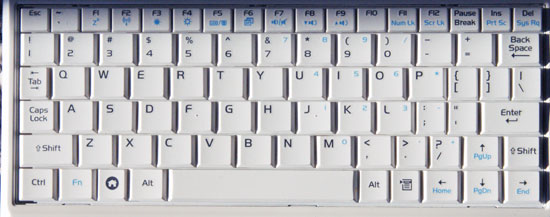
The Eee PC 901 keyboard
All of these netbooks have an insufficient amount of space for a full keyboard, so sacrifices must be made. On the Eee PC ASUS attempted to preserve the standard keyboard layout and just made all of the keys very small. The benefit here is that you know where everything is, and switching between a normal keyboard and the Eee PC isn’t difficult, the downside being that you often fat-finger the keys.
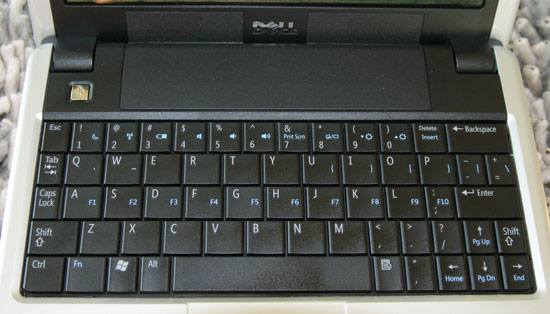
The Inspiron Mini 9 keyboard
Dell chose a different route. It got rid of the row of function keys at the top and reorganized some of the punctuation keys, making the main letter keys significantly larger. On the Inspiron Mini 9 you’re far less likely to mistype a word, but throw in some punctuation (apostrophes, quotes, etc...) and your typing speed/accuracy goes down considerably.
The function keys moved to the home row on the keyboard, which means to close a window using the keyboard you have to hit ALT + Fn + F (which doubles as the F4 key when you hold down the Fn key). Thankfully it’s convoluted and different enough that you won’t get used to it and try to do it on a normal keyboard, and not annoying enough to really be a pain on the Mini. I’d say that’s quite possibly the most frequently used function key combination, the rest don’t really come up as much so I wasn’t too bothered.
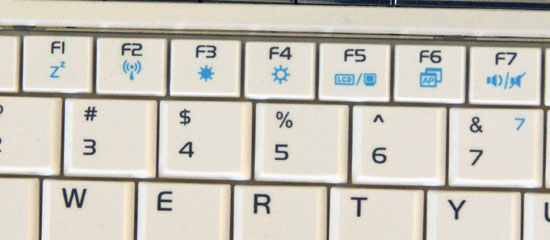
The function keys on the Eee PC's keyboard
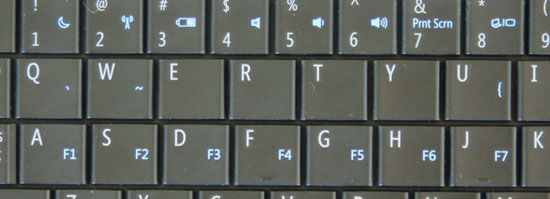
The function keys on the Mini's keyboard, note how they share the same keys as the home row
The keys that really bothered me the most were the hyphen, comma, colon and apostrophe keys. The colon/semicolon key is now directly to the left of the Enter, while the apostrophe/quote key is to the left of the left arrow key. If your big on leaving out apostrophes (see what I did there?) and don’t mind not quoting, ever, then the keyboard is livable. Otherwise, if you’re typing for accuracy, it’ll drive you insane - just in a different way from the Eee PC’s keyboard.
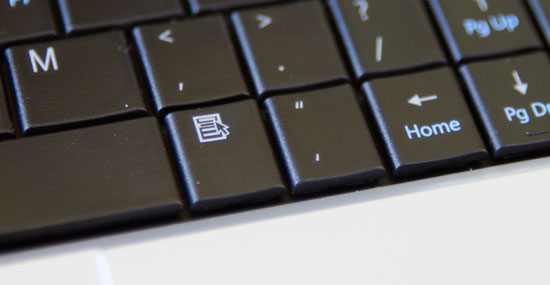
I'm sorry, what are you doing down there?
Dell makes the argument that after about 15 minutes you’ll get used to it. I agree. Except for the fact that in theory you’ll be going back to a normal keyboard at some point, and whichever you use the most will make the other one feel quite awkward. My money is on the fact that you’ll use a normal keyboard more than the Mini, in which case getting used to the funky comma positioning isn’t going to help anything.
That being said, I need to have some sort of a stance here so here it goes: if you’re just having casual IM conversation, facebooking or generally not doing any serious writing, I’d say the preference should be for the Dell keyboard - you can actually type words on it better than you can on the Eee. But for overall typing speed, the ASUS solution is better if you’re going to be switching between your netbook and other keyboards on a regular basis.
|
Apple MacBook Air
|
ASUS Eee PC 901
|
Dell Inspiron Mini 9
|
 |
 |
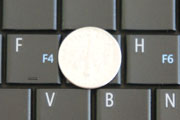 |
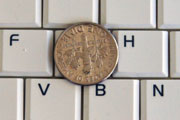
The table above should put things in perspective. On the MacBook Air, the dime is about the same size, if not smaller, than a single key. On the Eee PC the dime covers more than just a single key. The Inspiron Mini is closer to the Air than it is the Eee PC in its key sizes.
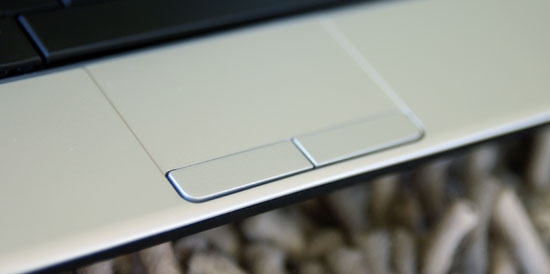
There's a tiny trackpad below the keyboard on the Mini, similar to the Eee PC. The Mini's trackpad supports scrolling, but only with a single finger along the right edge of the trackpad. ASUS' design is much better as you just use two fingers to scroll, with no stipulations on where you have to put them. I suspect that this is more of a cost issue as the Eee PC 901 is priced a good $200 over the Inspiron Mini 9.


 Facebook
 Twitter
 RSS
RSS


55 Comments
View All Comments
jrinco11 - Thursday, September 25, 2008 - link
for those interested in how it is w/XP, I wrote a bit about it here http://www.jrin.net/2008_09_25/dell-inspiron-mini-...">http://www.jrin.net/2008_09_25/dell-inspiron-mini-...in my opinion, it matches the acer aspire one except for it's better battery life and webcam (in low light), but the keyboard layout kinda sucks
goobersnotch - Tuesday, September 23, 2008 - link
I got my inspiron mini yesterday. 16 gig ssd version. it had 1 gig of ram but i swapped in a 1 gig ram stick (should've ordered 512 megs and saved $25). with webcam and bluetooth it came to $430 after an employee discount coupon.my thoughts? i love the system. it is a lot faster than the acer aspire one that i played around with at circuit city (but granted that was the low end 4 gig ssd linux version). it takes 20 seconds to boot up and comes out of sleep mode in 3-4 seconds. the acer takes 30 seconds to come out of sleep mode (and on linux no less).
The keyboard? well due to the strange way i type, typing letters on my left hand is flawless, words that primarily rest on the left side i type fast and without typoes. right hand side on the other hand is a disaster. i have trouble getting used to anything that requires the right pinky other than the enter key. and i have trouble hitting the o and p keys. i hate where the ' key as well, as i have to pause and consciously find it in order to use it.
however i feel like i can get used to it. after all, i'm not using this thing for anything other than web browsing, including working on docs in google docs. the hard drive space is a nonfactor, i still have 11 gigs out of 16 free and i don't see myself using much more since any local docs/images/music/etc that i download i am putting on a 16 gig sd card and most of my important docs are online on my box.net storage acct and in google docs. and my email is done in gmail because its way more convenient than using a local email client.
no 3g? well I didn't want to pay $50 a month for slow internet anywhere, anyway. there's tons of wireless hotspots in austin.
I would also recommend that anyone who gets a mini to put 2 gigs of ram in there, as it seems to considerably help in the # of apps you can run, or browser windows you can open.
Overall, i love this system and dont regret paying extra for it when i could have gotten a cheaper, but inferior, acer aspire or asus eeepc.
goobersnotch - Tuesday, September 23, 2008 - link
whoops, in the first sentence, meant to say that i swapped a 2 gig ram stick in. it was only $46 from crucial.comDeadpanScience - Saturday, September 13, 2008 - link
I't looks really nice. 8.9 inch screen, LED backlighting, convertible tablet mode, all for $699. Plus none of the reviews from laptop mag/umpcportal have really gone in-depth with their reviews. Give me some numbers please!J Beck - Sunday, September 7, 2008 - link
Nice review, well done!! As others suggested, you ought to look at the Acer Aspire One. I have the Atom processor, XP, 120GB HDD, 1GB "150" model, for the same $349. It is killer. The only limitation is battery life as I have the 3 cell version and get only about 2 1/2 to 3 hours. But, I rarely use it "unplugged" anyway and a 6 cell battery is available. It lacks built-in Bluetooth, but a tiny Kensington Bluetooth usb dongle took care of that and with 3 usb ports, no worries.I can touch type very easily with no adjustment or learning curve and I am 6' with fairly large hands. The keys are all in the right places (it has regular punctuation and "F" keys and with great key sizes (especially the right hand "enter" and "shift" keys being larger as with full size keyboards). The touchpad has this amazing function. In addition to scrolling (along the right edge of the touchpad), you can zoom using touch strokes like the iPhone and Mac Air.
The 120GB drive makes this really usable for the long run. I can't imagine 4GB, 8GB or even 16GB. My iTunes library alone would almost use any of those that. The screen is a backlit LED screen and it is super at the same resolution as the Dell. The build is as good as my newly acquired Dell XPS M1330.
I thought this was going to be a toy or for really occasional use as this review sort of suggests the netbook category "must be". But, when I started using it, I found I can put everything I do on it and virtually carry my office anywhere around my house, my office or, for that matter around the world. The 120GB (with 2 memory card slots to boot!!) allows me to do that and not worry about a connection to the web or the security issues of "Cloud computing".
kenbx84 - Friday, September 12, 2008 - link
Sorry but this review is all wrong on prices. EEE PC 901 is now $499 with more bells and whistles and the EEE PC 1000H is $449 now with a lot better specs.ed21x - Sunday, September 7, 2008 - link
With the Dell, you don't have a 1.3 mp camera, bluetooth, upgradeable SSD, or 6 cell battery that comes standard on the Asus. Once you upgrade all those options on the Dell, the prices come out to about the same. Add in $50, and you can step up to a 10'' screen and larger keyboard (Asus 1000H) which is a much better deal, and makes more sense, as that extra inch really makes the keyboard feel like a fullsize. I think comparing the prices of a low-spec'ed Dell to a full-spec'ed Asus is definitely biasing against the Asus.Igor37 - Wednesday, September 10, 2008 - link
ed21x wrote: "With the Dell, you don't have a 1.3 mp camera, bluetooth, upgradeable SSD, or 6 cell battery that comes standard on the Asus. Once you upgrade all those options on the Dell, the prices come out to about the same."Personally, I like having the option, since I don't need Bluetooth or the camera, and could care less about upgrading the RAM or having a larger battery.
Pixy - Friday, September 5, 2008 - link
Despite the recent improvement I still like the design of the HP Mini-Note.I am still waiting for the Netbook market to mature before I casting aside my Sony SZ. Hopefully the internal hardware will improve enough for a fanless version which produces little heat to come out soon. Two things I hate most about laptops: heat and noise!
I wonder whether Nvidia could have an advantage here because of their CUDA concept. Basically, it would create a Netbook with superb graphics capabilities and is able to run simple program, which is what the average consumer needs anyway.
Intel and VIA, hurry up with the new chips. AMD... keep trying... and hopefully you can surprise me.
weihlmus - Friday, September 5, 2008 - link
dell already tried the fanless approach on the latitude X1 and for all the whole system was only using 10W or so (no battery) according to my power meter it still got feindishly hot after a few hours use - theres nothing worse than trying to type on a small format laptop with sweaty fingers!also when reviewing netbooks can you compare the power adapters? its one think having a 1 kilo netbook but then having the best part of a kilo of power adapter and leads to carry around is another... sureley the atom laptops can run from a wall wart not a standard 60W laptop power pack?!