



Biostar TPower i55 – Super Middle Weight Contender
by Rajinder Gill on November 25, 2009 12:00 PM EST- Posted in
- Motherboards
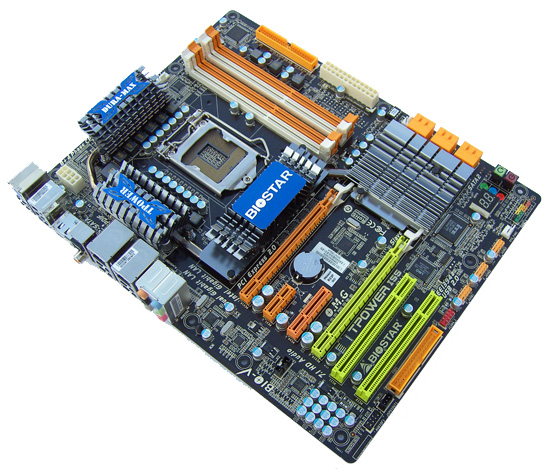
After our review of the MSI GD-65, it was clear that we had a very good board on our hands but one that was lacking the final layers of polish that segregate the really good from the very best. Needless to say there are other candidates available that may fit the bill or improve in areas where the MSI GD-65 is lacking. Biostar thinks one of those options is the TPower i55. The TPower i55 comes in around $180, which is around $25 higher than MSI’s GD-65. However, we think Biostar is aiming to upstage the top-end P55 boards by offering similar overclocking features, quality, and performance at a lower price. Of course, $180 is encroaching on the lower-end X58 price territory, so Biostar has a difficult sale on their hands. However, we think Biostar hit their target for the most part.
Overview/Conclusion
We’ve thrown our standard test suite at the TPower i55, testing gaming performance and day to day usability. In terms of overall compatibility, this board came out of the blocks well ahead of what you expect from a tier “B” supplier. All of our testing was performed on the current public BIOS and completed without a glitch. It’s the first time in a long time we’ve not had to request fixes for peripherals or BIOS issues/tweaks to complete a benchmark, a welcome change indeed! It not the perfect BIOS in every regard, but this is one extremely solid board when it comes to stability and compatibility.
It’s when you look past the BIOS related stuff that you’ll probably find a couple of things to groan about. Firstly, the lack of on-board fan headers; 3 in total, one of which is for the CPU, while one of the others becomes obscure as soon as you place a long GPU like the 4870X2 in the primary PEG slot. The remaining header will likely be used to cool the onboard heatsink array, leaving no additional options for case fans. .
Given how sensitive overclockers are about component/case operating temperatures, we find the limited fan header count an odd choice on BIOSTAR’s part. After all, high temperatures and overclocking generally don’t mix very well.
The second gripe is one you’ll only encounter if you change video cards or add-in cards often, so you could say we’re nit-picking. The PCI/e retention latches are a royal pain to unlock once a card is inserted in the slot. We found our 4870X2 was un-removable by hand unless we used a pair of long nose pliers to wedge the retention latch away from the card. It’s not a deal breaker, but there are better ways of latching cards into slots as ASUS has shown us recently. If you have to remove such a card when the board is placed in a case, we’re sure it'll be accompanied with a fair share of choice words.
Lastly, we were going to add the lack of a CMOS clear button on the rear I/O panel to the list of gripes but found we did not have to use the onboard jumper at all during the test period. BIOSTAR has done an incredible job at BIOS recovery in the event of a failed overclock or incorrect setting. Our test board recovered from everything we threw at it, coming back to post in safe mode so that the offending BIOS setting could be corrected with minimal trouble.
On the overclocking front, getting 2000MHz+ memory speeds is relatively straight forwards (with the right CPU and memory kit!) other than the fact we had to change tRFC manually to 80 as the BIOS defaults to a tight 74 when left to its own devices using our Corsair 2200 8-8-8-24 4Gb kit (could be down to the SPD). Our GSkill and Kingston DDR3-2133 8GB C9 kits operated fine with the tRFC at the default 74. Running 2000+ memory speeds always requires a little end-user leg work on these platforms, so simply changing four voltages and setting primary memory timings is certainly nothing to moan about.
The basic essentials like S3 sleep mode properly resuming, even with BCLK’s north of 215MHz, worked extremely well on this board. This is a big plus for those that like to utilize sleep states with the boards overclocked. Automated overclocking is also available for users who prefer one touch overclocking. Three presets are available, which raise BCLK by up to 12MHz (145BCLK effective with 24x Turbo Mode on the 750 that resulted in 3.4GHz speeds at full load) at the touch of a button. Not the most impressive increase but voltage ramping is very moderate and we found the presets to be completely stable on our test hardware without any compatibility problems.
If you are considering one of the top-end P55 boards from ASUS, Gigabyte, MSI or EVGA; we think you should take a hard look at the TPower i55 before you spend more money elsewhere. Other than the fan header count, it does not appear to give up anything to more expensive boards when faced with the rigors of daily use or when overclocking on air or water. Against mid-range boards, the BIOSTAR appears to be a little better suited for pushing hard by virtue of its over engineered power rails (something the lower priced boards tend to skimp on) and component quality. To sum it up, the TPower i55 is not quite perfect, but it’s close enough for most. Call us impressed.


 Facebook
 Twitter
 RSS
RSS


39 Comments
View All Comments
bccloth00998 - Friday, December 18, 2009 - link
http://www.bccloth.com">http://www.bccloth.comzengqunhai2 - Saturday, December 12, 2009 - link
www.find68.comChristmas sale, free shipping discounts are beautifully gift
Christmas is approaching, your Christmas gifts ready? wownicesales
mall for you, which involves a number of well-known brands from the
Asia-Pacific region the trend of merchandise. Promotional discounts
should be, come SHOPPING bar!
In order to meet the arrival of Christmas. Our company has been in
order to return the old customers of the Company for their support.
Overall direct sales business. Wholesale price of a rare opportunity.
You are still hesitant about. Chance only once.
Not to be missed.
(I)Our Company is Online store, and we vogu emalls offer top quality
sport shoes, famous brand shoes and sportswear at good price.
(II) I n the past 6 years, we have sent great many products to the
customers in USA, Europe, ASIA and other area, also we have lots of
experience in dealing with online business oversea
(III) Generally, Goods are delivered in fast and safety way Of
course, shoes and clothing will be packaged in original box with tags
www.find68.com
New to Hong Kong : Winter Dress
---**** NHL Jersey Woman $ 40 ---**** NFL Jersey $ 35
---**** NBA Jersey $ 34 ---**** MLB Jersey $ 35
---**** Jordan Six Ring_m $36 ---**** Air Yeezy_m $ 45
---**** T-Shirt_m $ 25 ---**** Jacket_m $ 36
---**** Hoody_m $ 50 ---**** Manicure Set $ 20 ... ...
granulated - Friday, December 4, 2009 - link
I want to know how why the AMD board murders the rest in two games when it's in it's more usual 'bringing up the rear' position in the rest.ta2 - Monday, November 30, 2009 - link
Seems like you've been using a pretty crappy i5 chip. For it to top out as 4.1GHz is incredibly bad. I manage 4GHz on a GA-P55-UD4 with ALL voltages at stock except VCore at 1.30V. You have not really pushed the BCLK on this board and for you to need 1.36V for 4.1GHz is pretty terrible. I consider myself a novice overclocker, but either you're using a very bad chip or this board isn't so hot."We could run our memory at DDR3-2152". This board is officially rated up to 2600MHz for memory... so we haven't even tried to get close to the spec speed.
Rajinder Gill - Tuesday, December 1, 2009 - link
It's an average 750 CPU. There are plenty out there that top out early.With regards to 2600 MHz memory, I don't know of any CPU's that can hold 2600MHz speeds fully application stable. That's a benchmarking claim for users who run processors with sub zero cooling or like to post suicide shots. This article is focused on daily PC use. A BCLK of 215 is perfectly respectable for everyday usage scenarios (especialy with S3 resume working).
later
Raja
lopri - Friday, November 27, 2009 - link
The board looks really awesome. I mean, the fact one of the main gripes is the lack of clear CMOS button in the rear I/O panel says a lot. I like that Biostar used the Intel ethernet PHY to take advantage of ICH10R's built-in network controller. So many times I see CPU usages going 20~30% when there is heavy network trafficking, and I wondered why my experiences are so different from what I see in the reviews. Granted different packets show different performance characteristics and anti-virus is probably half of that CPU load, but the CPU usage wasn't as severe on my BadAxe 2 (which I use for WHS) so I do believe the Intel NIC/PHY is superior to that of Realtek.Another welcome news is the flawless S3 functionality under overclocking, and I applaud it very, very much. Board's layout looks extremely clean and logical as well. For me the downside of this board are the lack of fan headers and the price tag which can be (hopefully) rectified in the future.
Thank you for a thorough review (for a split second I thought Gary was the author, but please don't take offense ;) ) and I just might have found my next motherboard.
lopri - Saturday, November 28, 2009 - link
Well, actually I do have one more gripe. I am not a fan of daisy chained heatsinks, and on this board the heatsink with 'Biostar' written on it kinda sticks out. I'm guessing what's underneath are those 4 PCIe blocks often found bare on other boards. (?) How hot do they get and do you think it's justified to having a heatsink over it based on that? If not, I'd prefer to have more room for CPU HSF installation and video card installation.Rajinder Gill - Saturday, November 28, 2009 - link
Hi,The BIOSTAR logo sink does not really cover anything other than to add mass to the enitire assembly. Stock operating conditions, you could get away with passive use. If overclocking and raising PWM switching frequency(for whatever reason), while runnign a 'hot' GPU in the first slot, you'll probably want to cool the HS assembly depending on what kind of case you have. The lack of fan headers obviously does not help.
regards
Raja
lopri - Tuesday, December 1, 2009 - link
Thank you for the clarification. That said, since the board is kind of heavy on use of heatsinks, maybe they can use real screws instead of plastic push-pins? Faced with the Almighty AnandTech editors' advice, who knows? Biostar might listen. *wink* *wink*yuhong - Friday, November 27, 2009 - link
"It’s the first time in a long time we’ve not had to request fixes for peripherals or BIOS issues/tweaks to complete a benchmark, a welcome change indeed!"Yep, remember this:
http://www.anandtech.com/showdoc.aspx?i=3471">http://www.anandtech.com/showdoc.aspx?i=3471