



ASUS ROG Rampage Formula: Why we were wrong about the Intel X48
by Kris Boughton on January 25, 2008 4:30 AM EST- Posted in
- Motherboards
The Basics of Strap Selections, Dividers and Derived Memory Speeds
We have discussed MCH Read Delay (tRD) and its effects on memory read performance before. About a year ago, this particular setting allowed some vendors to design boards that seemed to outperform competing companies' products consistently on a clock-for-clock basis. This was around the time that the enthusiast community first realized the importance of "straps". Some found that by setting a lower strap while running an equivalent Front Side Bus (FSB) that they were able to achieve better performance, higher frame rates, and better benchmark completion times all without the help of any additional tuning.
For those that are unfamiliar with what we mean by strap, consider the following example. Suppose you have two different CPUs, each with a different default FSB, as is the case with first-generation Core 2 processors (266MHz) and current 45nm Core 2 processors (333MHz). If you were to install these processors in identical systems each would be capable of running the same memory speeds (at least DDR2-667 and DDR2-800), regardless of the processor's default FSB. For the 266MHz default FSB processor, this would require a 5:4 and 3:2 divider respectively, while the 333MHz FSB variant would need 1:1 and 6:5. These ratios are necessary in order for the motherboard to set up allowable memory subsystem to system data bus interface configurations.
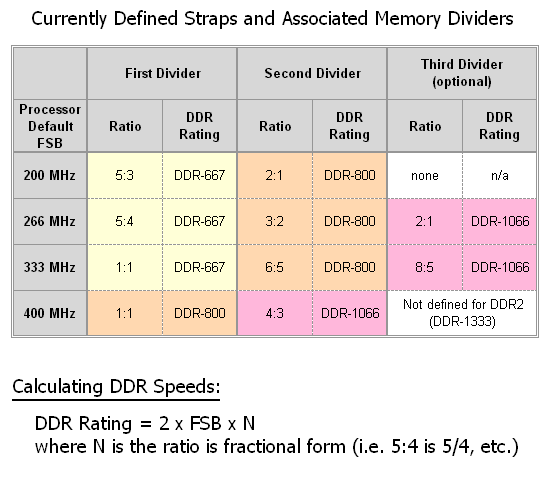
Because of this, the motherboard does not need to know anything about the installed processor and memory, other than the default FSB and the memory's SPD rating, which are both read programmatically prior to Power On Self Test (POST). For example, a 266 FSB processor paired with DDR2-800 memory will make use of the associated 266 strap's second divider - as would a 333 FSB processor. Would you be surprised to learn this works exactly the same way for a 200 FSB processor? Well, it does, and in fact it does not matter which processor type is installed - all combinations work and allow for the same exact memory speeds - DDR2-667 and DDR2-800 (and sometimes DDR2-1066).
If slower memory is detected the system simply uses the first divider in order to achieve DDR2-667 speeds. In the case of faster memory, the third divider is used for DDR2-1066 - which is sometimes available, depending on the strap in use. (All 266, 333, and the upcoming 400 MHz FSB parts will be able to make use of this new official memory speed, as recently announced by JEDEC.) One final note, "down" dividers are no longer possible with Intel platforms and as such the lowest supported memory speed for systems that will make use of the QX9770 (when it arrives) will be DDR2-800, unless the user chooses to underclock the FSB.
As we can see, this system allows for maximum component interchangeability and configuration flexibility all through the use of relatively straightforward selection logic. Check the table below for more information on how to derive these numbers.
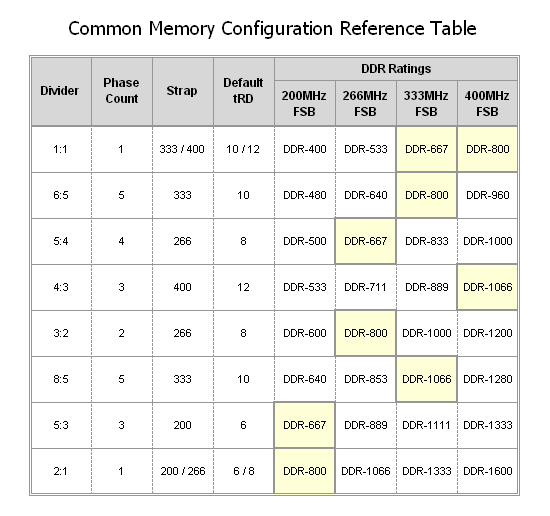
Now that we know a little more about what straps are and how they work, we are ready to discuss what they mean when overclocking. Let's say you have an E6700 that makes use of a default FSB of 266MHz - pushing the FSB to 400 while making use of the processor's default strap's second divider (3:2) results in a final memory speed of DDR2-1200, a goal that might be outside the realm of normal achievement unless you have memory capable of this speed. By selecting the 400 strap the 1:1 and 4:3 dividers become available and we are able to set a more modest speed of either DDR2-800 or even DDR2-1066. Alternatively, choosing the 266 strap permits use of the 5:4 divider for DDR2-1000.
The point is that the freedom to choose any strap we want, regardless of CPU type installed, gives us the choice to make use of a whole myriad of memory speed settings that would otherwise be unavailable. Take note of the "Default tRD" column; you will see that each strap has an associated value (6 at the 200 strap, 8 for 266, etc.) We will discuss this particular setting in detail a little later.
Until now, choosing a memory divider in order to set a final memory speed was easy. Most users focus solely on achieving maximum CPU frequency, letting the memory speed fall where it will. Although it is possible for memory to be the limiting component when overclocking, this is unlikely considering the low cost and high availability of today's performance DDR2 modules. Thus it's easy to pick a memory divider that places the memory operating point near a maximum without ever considering what could be done in order to further improve performance.
Perhaps too many users feel the time they need to invest in fine-tuning their memory settings is not worth the effort. While this might not be far from the truth, we find this hard to believe. Major memory manufactures like OCZ, Corsair, Cell Shock, G.Skill, and Team Group have entire departments of support personnel that work hard every day to provide users the assistance they need to make the most of their purchase. These groups are inundated with requests for help, from both experienced users and novices alike.
Going back to what we said before, what does all of this have to do with better performance on a clock-for-clock basis? In a word: everything! We would like to provide some solid information on the subject as to why the age-old quest for maximum FSB is not always the best approach; in fact, it is often the wrong approach. Our hope is that once allowed an opportunity to make use of this information, users will begin to understand the true limitations of their system components better and might perhaps stop inappropriately blaming overclocking failures on perfectly good hardware. Better yet, they'll stop buying boards based solely on FSB capability when overall system performance is much more important.
Now that we have had a chance to review the basics on memory straps let's move on to something a little more interesting - MCH clock crossing operation and the associated MCH Read Delay (tRD).


 Facebook
 Twitter
 RSS
RSS


73 Comments
View All Comments
DragonStefan - Tuesday, June 9, 2009 - link
Hello all.I have:
- motherboard: ASUS Rampage Formula (Intel X48) (logical) and
- Corsair XMS2 Dominator Series 2x2048MB Kit PC2-8500 CL5-5-5-15 (TWIN2X4096-8500C5D)
Should i go for the following setup in bios:
FSB: 400
tRD: 5
Trd: 12,5
Divider: 3:2
tCL: 5
VDDR: High
Allowed: Yes.
Or should i go for a different setup?
If i understand correctly, this is possible..
What do i forget?
I made the calculation, and the answer of the Question if it is possible Yes or No, is 1,67 > 1,33. 1,67 is higher than 1,33. So yes..
Greets From DS
danderson00 - Thursday, October 23, 2008 - link
Hi,I realise this article is quite old now, but found it very useful for tuning my Rampage Formula. Have achieved significantly increased memory performance from this setting. The board seems to configure them fairly well on the auto setting, but there are some cases where manually tweaking them can give a good performance boost.
I am curious about one thing - I would have thought that running a 1:1 divider would allow the lowest tRD value as the two clocks are running at the same speed. Data should be able to be passed between the two buses without delay, whereas if the memory clock is running faster, it might need the delay to prevent 'overlapping' with the previous data transfer. However, according to the formula (and indeed a couple of quick tests confirm it), a 1:1 divider is actually the worst for tRD, the wider the ratio the better.
Any ideas why this is?
Great article anyways!
Dale
Maxxxx - Sunday, June 14, 2009 - link
Yes, you are right about 1:1 divider and tRD. This article incorrectly describes work of the memory controller.geok1ng - Sunday, August 3, 2008 - link
I have a P5WDH a 975X mobo. if i am understand correctly this chipset would apply the TRD from the basic table and my best options would be a Trd of 6 or 8? Is there any way of knowing what Trd number is being applyed? I am running an E4300 at 9x329Mhz and 4 1GB sticks of DDR1100 at 987Mhz Cas 5/6/6/18/21. everest gave me a memo latency of 55.5ns ( better than quite a few 45nm/P35 owners here). Any use going for the Trd 6 option (8:5 divider i believe) since neither my my mobo can reach FSB above 1333 nor my memo can go above 1000mhz and keeping CAS 5 ( it is rated at cas 5/7/7/25/32 but the P5WDH just cant go above 5/6/6/6/18/21). Using a 8:5 divider bellow 1000Mhz memory mean runing the CPU at 2,7Ghz...and using crazy DDR/MCH voltages.Sarsbaby - Wednesday, July 16, 2008 - link
Wow, I just learned alot, I think.Very nice article! Well written and presented.
I'll definately have to clear my CMOS for this one.
jamstan - Friday, July 11, 2008 - link
I would have liked a review of the board itself instead of page after page about clocking. I have this board ready to build my rig today with 2 4870s in CF and I would have liked to read about the crossfire setup, the sound card, etc instead of page after page about clocking. Althou informative I feel the review should have remained focused on the board itself and the clocking crap should have been in a different article. It's a nice feature on this board but its like doing a review of a Corvette and wasting the whole review on its transmission.Sarsbaby - Wednesday, July 16, 2008 - link
You know, this is only one of many reviews for this board, and only one of many on this forum.Try some more searching, and maybe educate yourself more before calling most of this article "Crap". This is probably one of the most useful articles on this motherboard I have found.
With all these new options open to ROG owners, i'm glad someone is taking the time to explain what they mean and why we have paid for them.
And have you ever re-built a transmision? Or tuned an LSD? It's alot more complicated than you think apparently.
DEFLORATOR - Tuesday, May 27, 2008 - link
Why does the author says that the board revision is 1.03G while it is clearly seen on the photoes that it's 1.00G (imprinted between PCIe slots)? Please owners of the board confirm that 1.00G is the latest revision of Rampage Formula (gonna order that tomorrow)viqarqadir2 - Monday, April 21, 2008 - link
HelloI am very new to this stuff and havent been able to make a lot of sense of the configurations despite reading the article several times.
I have the following setup:
Intel Q6600@2.4 Ghertz
Kingston Ram 8500 (5.5.15) 1X4 Gigs - 1066Mh
XFX Geforce 8800GTX XXX edition. (I guess this doesnt matter)
What sort of configuration should I apply?
I also wanted to know if someone has had problems with the MB temperature and whether 51 Centigrades after playing STALKER for about one hour is normal. Any help will be appreciated.
viqarqadir2 - Thursday, April 24, 2008 - link
hmm...I dont know if I've done something wrong but for some reason, 3dMark is showing the memory at 1.9 Ghertz. It's a DDR2 rated at 1066 and I am running it at (according to my calculation) 1000.
The pc feels ridiculously fast. All MB lights are green. The 3d Mark app is giving a score of about 11000. I am not a techie but is it possible that I have discovered something? Is there a way to post screenshots in the comments area?