



ASUS Maximus Extreme - the Extreme Benchmarker's Choice?
by Rajinder Gill on December 10, 2007 8:00 AM EST- Posted in
- Motherboards
BIOS, Continued
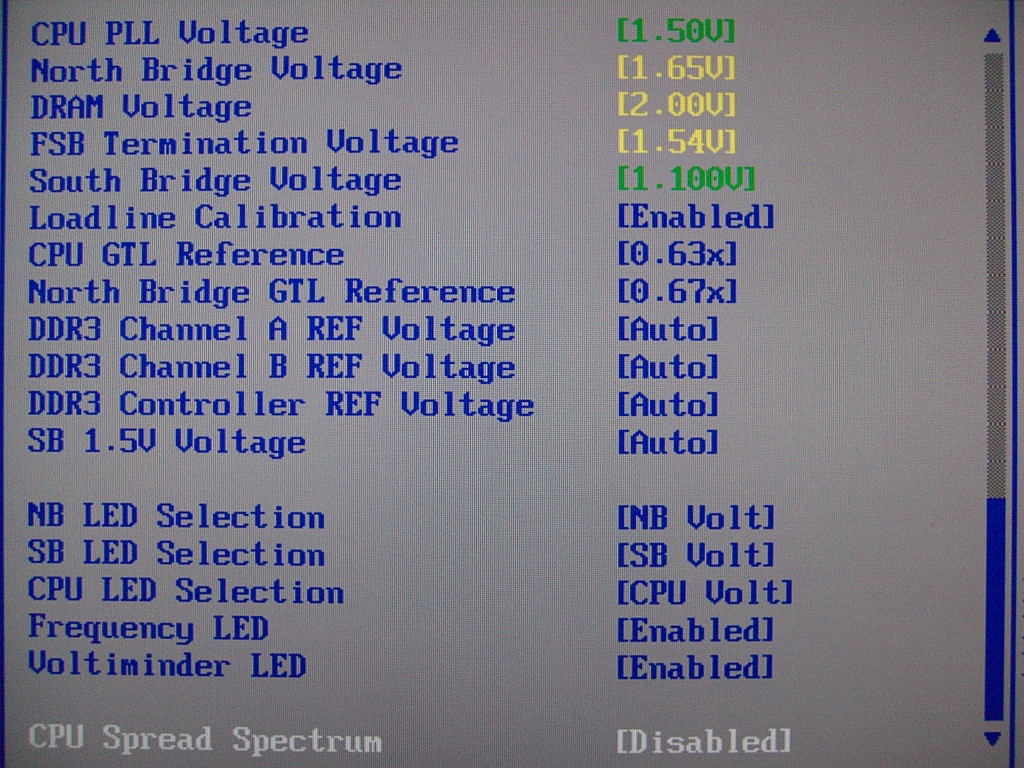 |
CPU PLL Voltage: Scale range is 1.5-3V in 0.02V increments. Stock is 1.5V, and although overvolting can bring increases to FSB limits, we do not recommend using past 1.75V for long-term use.
North Bridge Voltage: Scale range is 1.25V-2.05v. NB temperatures greatly affect stability, and temps over 47C are prone to failures during longer Prime torture test runs. We recommend active cooling of the NB for overclocking. A combination of air- and water-cooling generates the best results when using the stock ASUS water block and heatsink combo. Voltages around 1.61V-1.65V are required for overclocking past 440FSB.
DRAM Voltage: ASUS provides us with a 1.5V-3.04V scale. The 0803 BIOS does overvolt by around 0.05V, and users are advised to subtract this value from the BIOS setting to stay within warranty voltages for memory. (Yes, we said that with a straight face!)
FSB Termination Voltage: Voltage scale runs from 1.2V-2V. Quad-core CPU overclocking is especially dependent upon VTT and GTL voltage ratios. We found a setting of 1.54V to be a sweet spot on our board for speeds over 440FSB.
Loadline Calibration: Available options are Auto, Disabled, and Enabled. Use "Enabled" for overclocking. This function reduces Vcore voltage sag. With Loadline Calibration "Enabled", we measured a load droop of around 0.02V using the 0803 BIOS.
CPU GTL Reference: This setting is a derivative or ratio of the applied VTT voltage. A setting of 0.63x provides the most headroom for overclocking quad-core processors.
Northbridge GTL Reference: A value of 67% generally provides the best level of stability on this motherboard.
DDR3 Controller REF Voltage: This setting works off a principal percentage of DRAM voltage - 50%. Altering either Channel A or B values away from DDR3_REF generally creates instability issues. There may however be gains in applying an overvolt to DDR3 Controller REF Voltage if attempting to reach high FSB/memory speeds.
450FSB Stability Test and BIOS settings
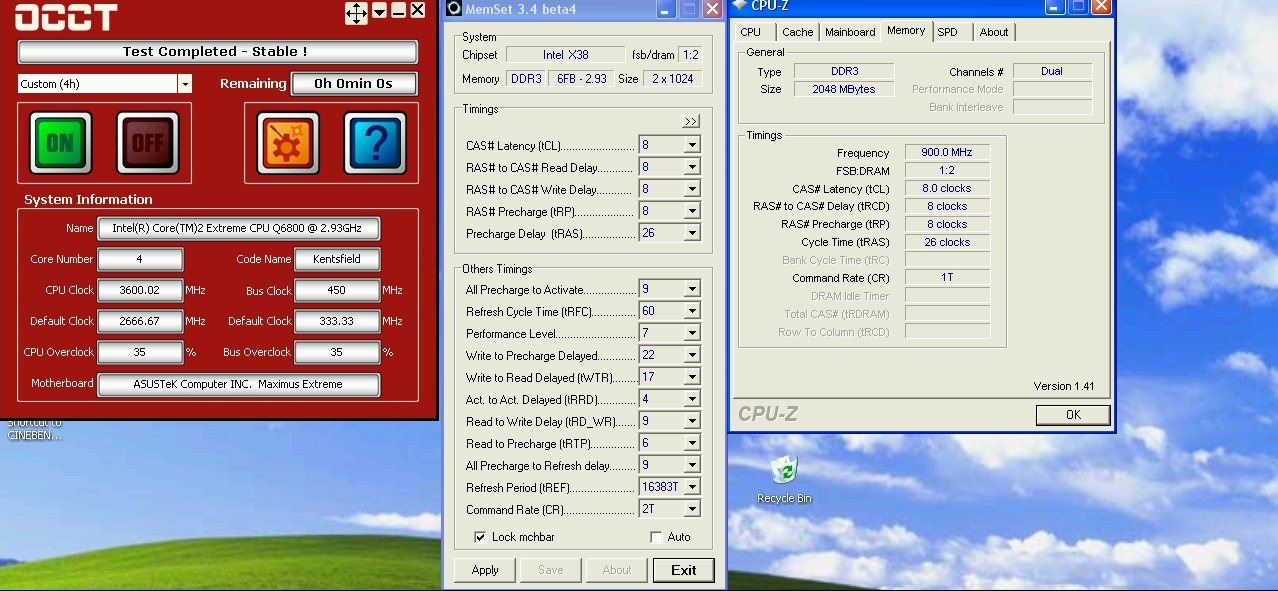
In order to provide users with a starting point for a decent overclock we provide our BIOS settings, together with a 4-hour pass of OCCT @ 8x450FSB with our QX6800 processor.
 |
| 450FSB Quad-Core BIOS Settings | |
| CPU Settings | |
| CPU Feature Ai Overclock Tuner | [Manual] |
| OC From CPU Level Up | [Auto] |
| OC From Memory Level Up | [Auto] |
| CPU Ratio Setting | [8.0] |
| FSB Frequency | [450] |
| FSB Strap to North Bridge | [333MHz] |
| PCI/E Frequency | [110] |
| DRAM Settings | |
| DRAM Frequency | [DDR3-1801MHz] |
| DRAM Command Rate | [1T] |
| DRAM Timing Control | [Manual] |
| CAS# Latency | [8] |
| RAS# to CAS Delay | [8] |
| RAS# Precharge | [8] |
| RAS# Active Time | [26] |
| RAS# To Ras# Delay | [4] |
| Row Refresh Cycle Time | [60] |
| Write Recovery Time | [9] |
| Read To Precharge Time | [6] |
| Read To Write Delay(S/D) | [9] |
| Write To Read Delay(S) | [5] |
| Write To Read Delay(D) | [6] |
| Read To Read Delay(S) | [4] |
| Read To Read Delay(D) | [7] |
| Write To Write Delay(S) | [4] |
| Write To Write Delay(D) | [7] |
| DRAM Static Read Control | [Disabled] |
| Dram Dynamic Write Control | [Disabled] |
| Ai Clock Twister | [Strong] |
| Transaction Booster | [Enabled] |
| Boost Level | [2] |
| Voltage Settings | |
| CPU Voltage | [1.43125v] |
| CPU PLL Voltage | [1.5V] |
| North Bridge Voltage | [1.61v] |
| DRAM Voltage | [2.06v] |
| FSB Termination Voltage | [1.54v] |
| South Bridge Voltage | [Auto] |
| Loadline Calibration | [Enabled] |
| CPU GTL Reference | [0.63x] |
| North Bridge GTL Reference | [0.67x] |
| DDR2 Channel A REF Voltage | [Auto] |
| DDR2 Channel B REF Voltage | [Auto] |
| DDR2 Controller REF Voltage | [DDR2_REF] |
| SB 1.5V Voltage | [Auto] |


 Facebook
 Twitter
 RSS
RSS


27 Comments
View All Comments
markglh - Sunday, January 13, 2008 - link
Does the Thermalright Ultra-120 Extremem fit ok on this motherboard in a position so that it blows air out of the case? I was worried that the fusion waterblock and the heatsink at the top of the board might be too tall.thanks.
astronaute - Wednesday, December 26, 2007 - link
Can someone explain please why in BIOS screenshots we can see FSB 400 and QX6600 FSB is more then 1000 ?Sorry if my question is stupid :)
Rajinder Gill - Sunday, December 30, 2007 - link
The BIOS screenshots shown are provided only to illustrate which BIOS functions are available for the user. They have no direct correlation whatsoever with a Q6600 or it's FSB.regards
Raja
qquizz - Thursday, December 13, 2007 - link
With a name like Maximus Extreme the board better be one bad mofo, err... i mean mobo.Zak - Monday, December 10, 2007 - link
Something's not right, C2D Extreme and 8800Ultra??? I get over 12000 in 3D Mark 2006 with a $99 Gigabyte mobo, 3GHz C2D @3.8Ghz with Tuniq Tower, 800MHz DDR2 and 8800GTX slightly overclocked.Z.
Azured - Monday, December 10, 2007 - link
No that seems allright. The test is run with a Q6600 (actually a QX6850 with a lower multiplier to simulate the Q6600) at stock 2.4GHz. considerably slower than your C2D at 3.8GHz.Zak - Monday, December 10, 2007 - link
Oh, I must have misread something then, thanks:)Z.
takumsawsherman - Monday, December 10, 2007 - link
Now this blows me away. $350 and still no Firewire800! How much money should you have to pay before you get a feature that was commercially introduced 4 years ago. Instead, you get the slower variant that first saw real action 8 years ago. What's next, USB 1.1?Maybe I didn't read the Newegg price tag correctly, but if I did, this is a travesty. And of course, no room for a PS/2 mouse port. I mean, a single PS/2 port, in a non-standard position. At first, it may seem to be no big deal, but why make it different that almost every other config? So when muscle-memory leads you blindy around the back of the case when you install a keyboard, you have to hunt around more. Not to mention that most PS/2 devices are pretty static in that people aren't switching them all the time. USB, on the other hand, is more frequently connected and disconnected. Having the PS/2 keyboard plugged in gives you limited room to change USB stuff, especially if you have another USB device plugged in. If the PS/2 port was on the bottom, you can stack a USB connector on top and still have finger room to add or remove another, without risking disconnection of another cable (PS/2 for example).
A ridiculous board, at a ridiculous price.
retrospooty - Monday, December 10, 2007 - link
not to burst your bubble but, Firewire 800 is never going to take off. Before it got started it was surpassed and totally obsoleted by eSATA. You wont ever see it as a standard feature on even high end motherboards. If you have use for it, you need to by an adaptor card for it.Etern205 - Monday, December 10, 2007 - link
Yes, eSATA is faster than Firewire 800 which is why eSATA is gaining popularity than Fire800. As for only 1 PS/2 port, if those articles or rumors are correct, then by the time ICH10 comes out we'll not see anymore PS/2 ports or PCI slots.In a question unrelated to this article, for those of you that have a usb wireless mouse or keyboard are you able to switch between the OSes if you guy have a dual or mult-boot system?
Thanks!