



Gigabyte GA-965P-DS3: Lab Testing Update
by Gary Key on January 4, 2007 9:00 AM EST- Posted in
- Motherboards
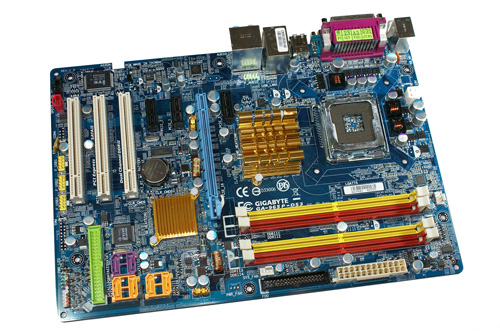
One of our favorite P965 boards in the labs over the past couple of months has been the Gigabyte GA-965P-DS3. Our experience with this particular motherboard has ranged from joyous moments regarding its performance and stability to downright disappointment with its quirks at launch and continuing Micron D9 memory compatibility issues. The latter has been a hindrance to extreme overclocking... until very recently. As a recap, our first experiences with the board were mainly positive but like most first release motherboards based upon new chipsets, it did have a fair share of issues that have since been solved for the most part. In early testing we encountered some memory compatibility issues, the JMicron IDE controller caused most optical drives to be stuck in PIO mode, there were sporadic overclocking issues with USB peripherals, and booting at various FSB speeds didn't always work right.
These were the most common issues with the F1 or F2 BIOS release. The memory issue was a show stopper at times due to the board not wanting to boot with memory that did not provide 1.8V compatibility. The F3 BIOS release solved the majority of these first release issues along with greatly improving memory capability. While the F3 BIOS was very stable and addressed many issues, the overclocking capability of the board was still not up to par with its technical specifications. The F4 BIOS improved overclocking for the vast majority of users, but the E6600, E6700, and X6800 CPUs were still not clocking to the same levels as on 975X motherboards. Of course, we continued to recommend the E6300 or E6400 CPUs as they are best suited for the P965 chipset. This is especially true for those who want to overclock these processors as the P965 chipset has proven itself up to the 550FSB level to date, although the memory performance penalty at these levels is horrendous at times. The F5, F6, and F7 BIOS releases resulted in additional memory compatibility, performance tweaking, improved overclocking of the 4MB equipped Core 2 Duos, and other minor fixes but the overall overclocking aspects were not really improved when compared to the F4 BIOS. Overall, we found the F5 BIOS offered the best mix of performance, compatibility, and stability of the various BIOS releases but we knew Gigabyte could do better.
During our testing of these BIOS releases we continued to experience overclocking issues once we passed the 450FSB mark. The overclocking limit was due to issues with memory modules based on Micron D9 (G). The Micron D9 (G) IC continues to be the performance leader in the upper end memory market and is generally a requirement at this time for DDR2 modules exceeding 900MHz on a regular basis. Since the lowest memory ratio offered by the Intel P965 chipset at this time is 1:1 Micron D9 (G) based memory is a requirement for overclocking past 450FSB rates. Gigabyte continued to promise overclocking improvements when using Micron D9 based memory modules in each BIOS release but it was not until the F8I beta release that we truly noticed any improvements.
The F8I BIOS cured most of the overclocking issues along with providing some other updates, but it seemed as if the final F8 BIOS release lost some overclocking capability and introduced cold boot issues in certain systems. It did offer overclocking profiles in the BIOS along with Creative X-FI compatibility fixes, but the DS3 still wasn't as good as some alternative P965 motherboard offerings. After hearing our complaints and those of users, Gigabyte quickly followed up with the F9 BIOS release. Our testing to date reveals the F9 BIOS has once again improved the overclocking of this board at the expense of memory timings at the upper end, but performance does not suffer significantly when compared to other motherboards in the same price range. Other improvements in the F9 BIOS include further Kentsfield tweaks along with official support for the upcoming 1333FSB rated processors. We have also noted that certain cold boot issues such as overclocking settings disappearing have been solved in our test bed configuration, but we still feel like the memory timings need some fine tuning.
Let's take a quick look at the overclocking performance of the DS3 with the F9 BIOS now.
These were the most common issues with the F1 or F2 BIOS release. The memory issue was a show stopper at times due to the board not wanting to boot with memory that did not provide 1.8V compatibility. The F3 BIOS release solved the majority of these first release issues along with greatly improving memory capability. While the F3 BIOS was very stable and addressed many issues, the overclocking capability of the board was still not up to par with its technical specifications. The F4 BIOS improved overclocking for the vast majority of users, but the E6600, E6700, and X6800 CPUs were still not clocking to the same levels as on 975X motherboards. Of course, we continued to recommend the E6300 or E6400 CPUs as they are best suited for the P965 chipset. This is especially true for those who want to overclock these processors as the P965 chipset has proven itself up to the 550FSB level to date, although the memory performance penalty at these levels is horrendous at times. The F5, F6, and F7 BIOS releases resulted in additional memory compatibility, performance tweaking, improved overclocking of the 4MB equipped Core 2 Duos, and other minor fixes but the overall overclocking aspects were not really improved when compared to the F4 BIOS. Overall, we found the F5 BIOS offered the best mix of performance, compatibility, and stability of the various BIOS releases but we knew Gigabyte could do better.
During our testing of these BIOS releases we continued to experience overclocking issues once we passed the 450FSB mark. The overclocking limit was due to issues with memory modules based on Micron D9 (G). The Micron D9 (G) IC continues to be the performance leader in the upper end memory market and is generally a requirement at this time for DDR2 modules exceeding 900MHz on a regular basis. Since the lowest memory ratio offered by the Intel P965 chipset at this time is 1:1 Micron D9 (G) based memory is a requirement for overclocking past 450FSB rates. Gigabyte continued to promise overclocking improvements when using Micron D9 based memory modules in each BIOS release but it was not until the F8I beta release that we truly noticed any improvements.
The F8I BIOS cured most of the overclocking issues along with providing some other updates, but it seemed as if the final F8 BIOS release lost some overclocking capability and introduced cold boot issues in certain systems. It did offer overclocking profiles in the BIOS along with Creative X-FI compatibility fixes, but the DS3 still wasn't as good as some alternative P965 motherboard offerings. After hearing our complaints and those of users, Gigabyte quickly followed up with the F9 BIOS release. Our testing to date reveals the F9 BIOS has once again improved the overclocking of this board at the expense of memory timings at the upper end, but performance does not suffer significantly when compared to other motherboards in the same price range. Other improvements in the F9 BIOS include further Kentsfield tweaks along with official support for the upcoming 1333FSB rated processors. We have also noted that certain cold boot issues such as overclocking settings disappearing have been solved in our test bed configuration, but we still feel like the memory timings need some fine tuning.
Let's take a quick look at the overclocking performance of the DS3 with the F9 BIOS now.


 Facebook
 Twitter
 RSS
RSS


14 Comments
View All Comments
WooTzu - Monday, January 22, 2007 - link
Look on the overclocked boards picture on the last page of the review, what is up with that fancy mobo at the bottom. Why can't I find this board anywhere, it's number 1, it should be in a brown box being under the arm of a cute UPS girl heading to my house.Where oh where can I buy this board???
handydave - Tuesday, January 9, 2007 - link
I purchased one of these boards and I've had on and off problems. When I originally got it, it wouldn't boot. I removed everything from the system other than the memory, video card, and processor, and it still wouldn't boot. Since I didn't have any other components to test, I took it to a local tech store. Turns out, the bios wouldn't work with the 1Gig of PC2-6700 memory (1x1Gig Patriot PEP21G6400LL). It was Bios Ver 3. So I ended up purchasing 512Meg of PC2-4200 Memory (Generic) so I could atleast work on the machine. I returned the memory and picked up a different brand of PC2-6700 memory(2x1Gig Crucial Technology Ballistix BL2KIT12864AA804). That wouldn't work either. But then Gigabyte released a new BIOS which allowed the new memory to work, so I thought.That didn't solve my problem. The new memory worked, but the machine was very unstable. It would reboot 2-4 times a week with unknown driver errors. I couldn't encode any videos(Divx, PSPVideo 9 and others) as it would crash 1/2 way through the processes. I tried every bios out there with the same results. So this weekend, I picked up some PNY Optima 2x512Meg PC2-5300 and it seems to work ok. At least is hasn't bluescreened and my videos are encoding.
This was one of the worst experiences I ever had with building a system in my 20+ years and I have all this extra memory I needed to puchase to get it to work. If your going to buy this board, be very careful of the memory you use.
Zoomer - Monday, January 15, 2007 - link
That's a well documented problem. Just increase Vmem to 2.1v or so and you'll be fine.damolinx - Sunday, January 7, 2007 - link
F9 was a no go for me. I tried the same settings I have been using with F7 (which are not even the maximum I have stably achieved) and i would not work. My problem seems with te video card, as the computer seems to boot and you can "listen" to the booting process in the HDD, but no video at all; the video card fan will stay at its maximum speed.Last time I experienced this behavior was because I was not locking the PCIe speed at 100MHZ, and my ATI X1800XL seems to be very sensitive about it (not a god overclocker on its own either).
I tried setting the PCIe frequency to AUTO and to 100MHz with no luck. Have anyone tested frequency locking is working?
For the time being, is back to F7.
oldhoss - Thursday, January 4, 2007 - link
Gary, any chance on doing a follow-up of the S3? Was thinking of pulling the trigger on that one, since the DS3 is still out of stock at a certain large online retailer. Also, it was mentioned in a previous article that the Crucial 10th anniversary memory was highly recommended for the platform. It is no longer available. Could you or someone recommend a reasonably priced alternative to Geil?Thanks much!
oldhoss
Baked - Thursday, January 4, 2007 - link
Been using this mobo since its debut. I'm currently running F6 BIOS, and don't plan to update to the newer BIOS unless I run into problems. It's been rock solid for me. You can find my system spec in my profile.Let's just say if you can't get this mobo stable, you should probably go buy a pre-built. :rolleyes;
tayhimself - Thursday, January 4, 2007 - link
How much is AT being paid by Gigabyte to write glowing and gushing articles about bios releases for their boards?You say its one of your favourite boards, but forget to mention why? Why would anyone get this over an P5B Deluxe?
imaheadcase - Thursday, January 4, 2007 - link
They said in the article why its a favorite board..as why it is to lots of people.HomeChicken - Thursday, January 4, 2007 - link
Even though anandtech recommends the E6300 and E6400 chips for the DS3, does anyone know if there are any improvements for E6600 overclocking with the F9 BIOS?Right now I can't seem to reach 400x9 so I have to settle for 390x9. I have a DS3 F7, E6600, custom water cooling (keeps temps below 45C load), and OCZ 2GB PC6400 4-5-4-15. If F9 doesn't help I will try reducing the multiplier for 450x8, but I would have to do further testing to ensure my memory will hold up at 900MHz.
Spacecomber - Thursday, January 4, 2007 - link
I was under the impression that these two Gigabyte boards functionally were very similar, but the DS3 uses the better capacitors. Does this mean the issues and the current state of their resolution (or non-resolution) is about the same for these two boards?