



ASUS P5NSLI: Core 2 Duo and SLI on a Budget
by Gary Key on August 22, 2006 5:30 AM EST- Posted in
- Motherboards
"Engineering is the art or science of making practical."
This quote by noted writer and practicing engineer Samuel C. Florman describes our initial thoughts about the ASUS P5NSLI motherboard. There has been much fanfare over the past few weeks surrounding the release of Intel's impressive Core 2 Duo lineup of processors. Up until now the only motherboards available that supported this CPU series have been sporting chipsets from Intel or VIA. (ASUS also offers the P5N32-SLI Deluxe SE which has Core 2 support, although that uses the older nForce4 chipset.) In fact, we are just now seeing additional Intel chipsets such as the 945P, 945G, 946PL, and 865 being launched, with the G965 and Q965 products on their way in September. After the wave of 975X and P965 products introduced at launch we are witnessing these products maturing from a performance viewpoint. Everyone has been wondering if, when, and what type of chipsets NVIDIA and ATI would bring to market to support Core 2 Duo.
We are over a week away from the official launch of the NVIDIA nForce 590SLI Intel Edition and will have to wait at least a month before seeing the ATI RD600 based motherboards. In the meantime, the first nForce 570SLI Intel Edition motherboard has been released and is for sale at this time. We just received the ASUS P5NSLI board a couple of days ago and immediately started testing it. Our testing is by no means complete but we did want to provide some early information on the board along with a few select benchmarks. We will be utilizing this board in an upcoming comparison article and will publish a performance review in the near future once we have completed benchmark testing.
The ASUS P5NSLI motherboard is based on the recently announced nForce 570SLI Intel Edition SPP (C19-A3) and MCP (MCP51-A2) chipsets. If these chipsets sound familiar they should, as the chipsets are based on the earlier nForce4 SLI XE for Intel Edition products. The SPP had been revised slightly to ensure full Core 2 Duo support along with minor performance enhancements. Our first impression of the motherboard was very good as the layout of the board is clean and well organized for an SLI capable system. The initial stock performance results of the board show it to be competitive with the Intel P965 and 945P solutions while offering a price target around US $115.
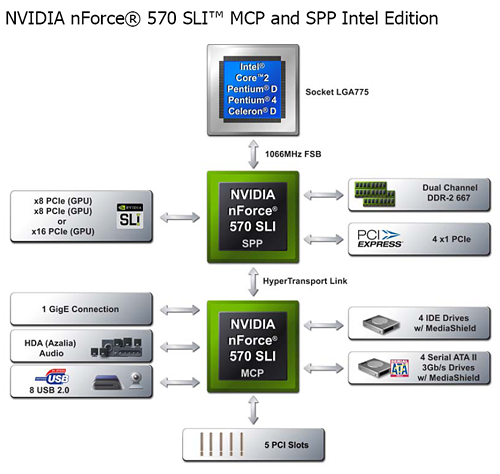
The chart above lists the standard feature set available when utilizing the NVIDIA 570SLI for Intel SPP and MCP chipsets. The 570SLI SPP enables full support for X16 PCI-E or dual X8 PCI-E graphics card configurations, up to four X1 PCI-E devices, 16GB memory addressability, and native DDR-2 667MHz memory support. The 570SLI MCP enables support for 8 USB 2.0 ports, HD Audio with S/PDIF connectors, Gigabit Ethernet support, 5 PCI slots, 4 SATA 3.0Gb/s ports, and 4 IDE devices.
| NVIDIA nForce 500 Series MCPs for Intel | ||
| Chipset: | NVIDIA nForce 590 SLI | NVIDIA nForce 570 SLI |
| Segment: | Enthusiast | Performance SLI |
| CPU: | Intel Socket 775 Core 2 Extreme Core 2 Duo Pentium D 9XX Pentium D 8XX Pentium 4 |
Intel Socket 775 Core 2 Extreme Core 2 Duo Pentium D 9XX Pentium D 8XX Pentium 4 Celeron D |
| NVIDIA SLI Technology: | Yes - Two X16 | Yes - One X16, two X8 |
| FSB (MHz): | 1066, 800, 533 MHz | 1066, 800, 533 MHz |
| DDR2 Memory (MHz): | 533/667/800 MHz + | 533/667 MHz+ |
| PCI-E - # Lanes | 48 lanes | 20 lanes |
| PCI-E - # Links | 9 links | 5 links |
| Configuration | 16, 16, 8, 1, 1, 1, 1, 1, 1 | 16, 8, 1, 1, 1 |
| SATA/PATA drives | 6, 2 | 4, 4 |
| SATA speed | 3Gb/s | 3Gb/s |
| RAID | 0,1,0+1,5 | 0,1,0+1,5 |
| NVIDIA MediaShield Storage Technology | Yes | Yes |
| Native Gigabit Ethernet Connections | 2 | 1 |
| NVIDIA FirstPacket Technology | Yes | Yes |
| NVIDIA DualNet Technology | Yes | No |
| Teaming | Yes | No |
| TCP/IP Acceleration | Yes | No |
| NVIDIA nTune Utility | Yes | Limited Support |
| USB ports | 10 | 8 |
| PCI Slots | 5 | 5 |
| Audio | HDA (Azalia) | HDA (Azalia) |
The NVIDIA nForce 590SLI caters to the high end gamer and enthusiast while the nForce 570SLI is targeting the value performance sector for users interested in SLI capability. The 590SLI utilizes the C51XE SPP with the 570SLI utilizing the C19A SPP. The 590SLI uses the new MCP55 from the AM2 nForce 500 product lines and the 570SLI is utilizing the current MCP51. The major difference in the two products is the availability of dual X16 PCI Express lanes on the 590SLI compared to dual X8 PCI Express lanes on the 570SLI for SLI operation. The other differences reside primarily in the MCP with the 590SLI offering DualNet networking technology, two additional USB ports, and two additional SATA 3Gb/s ports at the expense of an IDE port. Now let's take a closer look at the features this board offers.


 Facebook
 Twitter
 RSS
RSS


27 Comments
View All Comments
techkn0w - Tuesday, September 4, 2007 - link
I just got back my mobo from Asus RMA (I sent it in due to memory errors) and it's still giving memory errors. This just sucks and I read some websites that many users are getting errors too. Just thought I should put it out here so you guys know. Ok, back to checking the Asus forums.redpriest_ - Tuesday, August 22, 2006 - link
You mention the 590 SLI chipset, can we get a comparison versus that too?Gary Key - Tuesday, August 22, 2006 - link
The 590SLI Intel is under NDA currently. The 590SLI production boards will be different than the reference board we previewed earlier.
Napyan - Tuesday, August 22, 2006 - link
Sorry, kind of an idiot question but I've read the article 3 times now trying to figure it out. If the board doesn't support DDR2-800 how was it tested on it? Overclocking?Gary Key - Wednesday, August 23, 2006 - link
The chipset officially supports DDR2-533/667 although it will "unofficially" support DDR2-800 if bios support is provided by the supplier. Anything about DDR2-800 is overclocking and to a certain extent so is DDR2-800 although it is a very gray area. I apologize as this statement was in my original text and I removed it during the edit process. I will update the article.
Gary Key - Wednesday, August 23, 2006 - link
Where is the edit button? Anything above DDR2-800......Napyan - Wednesday, August 23, 2006 - link
Thank you for clearing that up for me.JarredWalton - Tuesday, August 22, 2006 - link
It does support DDR2-800. The problem is that it becomes wonderfully unstable if you push things too hard, i.e. 3-3-3 timings.JarredWalton - Tuesday, August 22, 2006 - link
Soon - as soon as we get it.yacoub - Tuesday, August 22, 2006 - link
Funny how your original look at NForce5 (as linked on page 2 of this article) showed 570 was supposed to also include DualNet, yet this board does not. :[