



The Mac mini as a Media Computer
by Anand Lal Shimpi on February 16, 2005 12:05 AM EST- Posted in
- Mac
The Mac mini as a DVR
In April of last year, the FCC mandated that all cable boxes must come with a FireWire port if requested by the consumer. The ruling came based on an interpretation of Section 304 of the Telecommunications Act of 1996. The ruling is also affected by another FCC mandate, in which all electronic devices capable of recording content must recognize and respect a broadcast bit that determines how the content can be shared across multiple devices.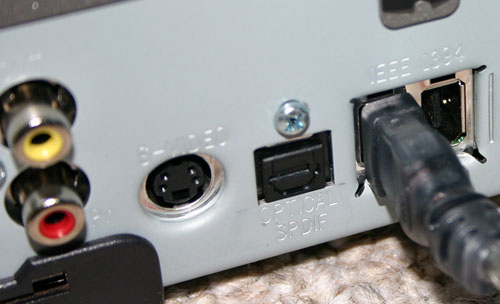
FireWire ports are now on most cable boxes.
The application included in Apple's FireWire SDK is called Virtual D-VHS, which as the name implies, allows your Mac to act as a Virtual D-VHS recorder fully capable of recording both standard and High Definition content over your cable box's FireWire port.
Before we get to the details of implementation, the first thing that must be noted and understood is that the Virtual D-VHS application is not a full-blown DVR nor was it designed to be. As a part of the FireWire SDK, the Virtual D-VHS application is more of a proof of concept or an enabling tool for developers to go out and make something interesting out of it - not to use as a turnkey DVR solution.
In many ways, this article isn't about using the Mac mini as a HTPC, but rather, its viability of being used as one if certain elements fall into place. At this point, your best bet for a polished HTPC with DVR functionality is something running Windows XP Media Center Edition. But for those who are interested in using the Mac mini as a HTPC, here's what can be done today.
The installation and setup of your cable box is extremely simple. We had a Motorola 6200 unit at our disposal, which made things even easier as you'll soon see. All you need is a 6-pin to 6-pin FireWire cable, plug one end into the cable box and the other end into your Mac mini and you're done.
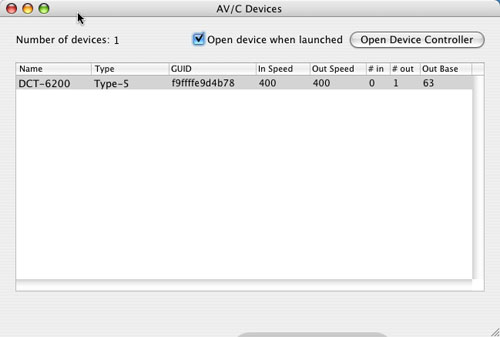 |
| The Motorola 6200 cable box is recognized automatically. The same applies to most cable boxes with FireWire ports. |
The next step is to fire up the Virtual D-VHS application and here you have a couple of options. You can use the Virtual D-VHS application provided in Apple's FireWire SDK, but there are some alternatives. The first alternative is Patrick Edson's AV/C Browser Enhanced, a modified version of the AV/C browser that also comes with Apple's FireWire SDK. The AV/C browser is necessary to connect to some cable boxes, but Patrick's modified version eliminates the need to have two applications - it integrates the functionality of Virtual D-VHS (recording and channel tuning) into the AV/C application.
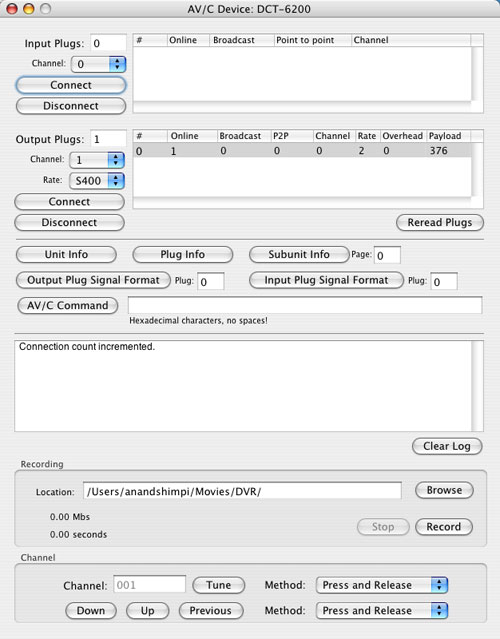
Then you can use the AV/C Browser to tune to whatever channel you want, hit record and it will start recording. Now, what you're recording is effectively a MPEG-2 transport stream. As such, the file size is quite large - most HD content recorded off of cable is between 15 and 19Mbps, translating into 6-9GB of storage required for each hour of recorded content. Standard definition content is a little more manageable, at 3 - 13Mbps (1 - 6GB/hr).
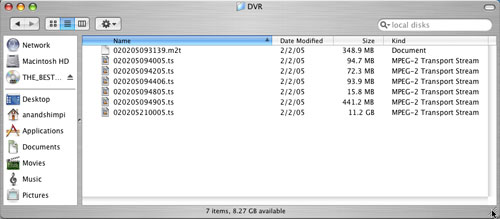
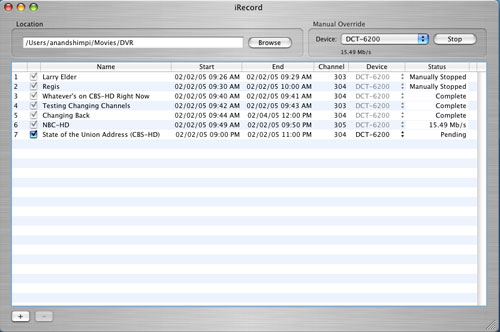
The iRecord program is interesting as it takes the functionality of the AV/C Browser, but puts it in a much simpler interface with one clear purpose - scheduled recording of shows.
To add a show, simply click the + button and fill out the necessary information, including the channel from which you want to record. An unfortunate limitation here is that you can't set the name of the file to which it records, regardless of what you input as the title of the recording in iRecord.

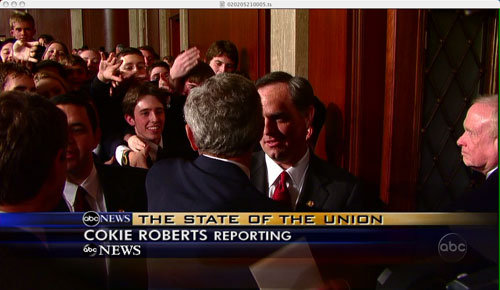

Recording the State of the Union address in 720p proved to be a success using iRecord.


 Facebook
 Twitter
 RSS
RSS


39 Comments
View All Comments
Stokestack - Monday, July 21, 2008 - link
You picked one of the worst possible DVD sets to use for comparison. These discs are NOT from film. They are clearly crap-quality encodes from lame, interlaced VIDEOTAPE sources.You don't even have to freeze the images to see that.
p0wermac - Wednesday, June 18, 2008 - link
http://www.ammesset.com/downloads/firerecord/FireR...">http://www.ammesset.com/downloads/firerecord/FireR...download that and the newest FireWire SDK's from developer.apple.com
~p0wermac
Squidlet - Sunday, January 15, 2006 - link
After building my Media Center and showing it installed with all of it's Demoapplications. Most people I have show it to where blown away by this version 1.01 application.
GenieCommands is a unique programmable software application
that allows you to control all your applications and media via simple
menus, in a theatre or lounge room environment. The Media Center
is a computer like the Mac Mini combined with the Geniecommands software that
provides an all-in-one entertainment system for your entire family.
While attached to your television screen it allows you to enjoy your
favorite entertainment such as; watch DVDs, record TV or pause TV,
listen to music, share your digital photos, access the internet and more
We have provided a complete set of demo menus to get you started,
with links on where to download additional software. These menus
can then be edited to suit your lifestyle or create a new one.
GenieCommands provides a kiosk push button environment
where users can get easier access to the best of what the industry has
to offer in software. This is achieved through simple user defined
graphic menus, to access all the scripts and to control almost any
application.
www.Geniecommands.com
Squidlet - Sunday, January 15, 2006 - link
After buiding my Media Center and showing it installed with all of it's Demoappliactions. Most people I have shopw it to where blown away by this version 1.01 appliaction.
GenieCommands is a unique programmable software application
that allows you to control all your applications and media via simple
menus, in a theatre or lounge room environment. The Media Center
is a computer like the Mac Mini combined with the Geniecommands software that
provides an all-in-one entertainment system for your entire family.
While attached to your television screen it allows you to enjoy your
favorite entertainment such as; watch DVDs, record TV or pause TV,
listen to music, share your digital photos, access the internet and more
We have provided a complete set of demo menus to get you started,
with links on where to download additional software. These menus
can then be edited to suit your lifestyle or create a new one.
GenieCommands provides a kiosk push button environment
where users can get easier access to the best of what the industry has
to offer in software. This is achieved through simple user defined
graphic menus, to access all the scripts and to control almost any
application.
www.Geniecommands.com
MrCoyote - Friday, March 25, 2005 - link
INTERLACING...That's what you see in those DVD pictures. It's no specific problem to that box. It is occuring, because the software is not de-interlacing the video. It happens on PC's too. Hook the box up to a standard interlaced TV, and the "problem" will go away.fitten - Friday, February 18, 2005 - link
#11, the Mac was not the original all-in-one. There were *many* machines from the late 70s and early 80s that beat it. Commodore64, Apple ][c, Atari XE, heck, even the TRS80s.michael2k - Thursday, February 17, 2005 - link
"it's similar to how apple disable's the dual display screen spanning on a perfectly capable radeon 9200 to segment the iBooks from the Powerbooks. there's no good functional reason to not have this sort of stuff enabled."Well, I can think of two functional reasons not to have this stuff enabled:
1) No need to test this feature before distribution
2) No need to support this feature in the field
Those two aspects of manufacturing and tech support probably saves Apple some money :)
By extension, that also saves consumers some money too.
Childs - Thursday, February 17, 2005 - link
H.264 will probably be the next preferred codec for htpc on the Mac. I've been meaning to test it out on my Mini, but haven't had the time.triadone - Wednesday, February 16, 2005 - link
a liked the review. i'm unclear as to whether a TV or monitor was used for the DVD playback. if a TV would resolve the interlacing issues it would be nice to know. most ppl interested in using it as a HTMac probably wouldn't want it hooked up to their monitor, but their TV for playback.it is good that Anand is pointing out the limitations of OS X's hardware handling of video. it's similar to how apple disable's the dual display screen spanning on a perfectly capable radeon 9200 to segment the iBooks from the Powerbooks. there's no good functional reason to not have this sort of stuff enabled. i hope that apple is ready to take on their effort to expand their marketshare with the mini. i.e.-a traditionally PC-oriented site like Anandtech starts covering Mac products and giving them some recognition as well as constructive feedback...let's hope they listen instead of just doing their own thing. they'll have to learn how to "think different" and integrate the feedback from reviewers to better their product. it will be interesting if apple will be as responsive to their product reviews in similar fashion to how video and motherboard vendors are. i.e.-poor review = swift delivery of new firmware or drivers. i hope that apple can do this as i feel it will have everything to do with bettering the already solid product that the mini is.
btw, USB 2.0 isn't a good option for Mac as of yet, unless u r a powermac user. specifically i'm referring to el gato's eyetv USB 2.0 product. it requires a baseline dual G4 system to handle the USB processor overhead along with on the fly video compression. not cool for my 1.2Ghz iBook. =(
like others i would have liked to see divx/mpeg-4 evaluations. i use mpeg-4 and divx streamed wirelessly from my 250GB PC drive to my ibook without issue. simply due to the HD limitation, one would think that the primary function of the HTMac would be to act as a front end for media stored on the network, or at least that's how i use my iBook around the house. :)
jsbhburg - Wednesday, February 16, 2005 - link
The combination of the new 10.3.8 OS update, the QuickTime MPEG2 Playback Component and the EyeTV 1.7 software has tested out great on an eMac G4 1.25 GHz with the same 9200 Radeon video card. No dropped frames on 720p and very little, if any, on 1080i.Try out EyeTV 1.7 from elgato. It is dramatically better than VLC.
Joe