



Acer AL2216W: a worthwhile compromise?
by Jarred Walton on March 10, 2007 3:00 PM EST- Posted in
- Displays
Introduction
Acer is a name that should be familiar to anyone that has been around the computer industry for a long time. Originally founded in 1976, they have been providing PCs, laptops, servers, displays, and other computer electronics equipment for a long time - a few of us here at AnandTech can recall running Acer PCs back in the glory days of the 286 and 386! Acer currently ranks as one of the world's more recognizable PC brands, with expertise in manufacturing, IT services, as well as consumer products.
We have looked at several high-end LCDs recently, and perhaps not surprisingly we found that the 24" and larger LCDs have all been good offerings overall. However, not everyone is interested in spending a lot of money on a high-quality LCD. Acer manufacturers a lot of LCDs, and they tend to be more value oriented offerings. Today, we take a look at their 22" AL2216W (AL2216Wbd is the full model name) and we will see where it does well along with some of its shortcomings.
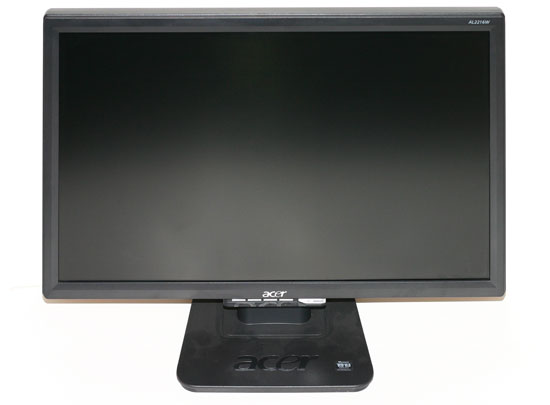
22" LCDs are a more recent introduction to the display market, and the AL2216W is one of the first (if not the very first) such models. These displays strike an interesting balance between size, resolution, and cost that should appeal to a large number of users. Like the 20" widescreen LCDs, they have a native resolution of 1680x1050. As they are 10% larger in viewable area that means the pixels aren't quite as small. Depending on your perspective, that can be either a good thing or a bad thing. Those with exceptional eyesight would probably prefer a higher resolution, while others are going to be happy with a larger display and a lower native resolution.
The resolution also has a few other benefits, however; specifically, gamers might like the slightly lower resolution as it will allow some of the slower GPUs to be able to drive the LCD at its native resolution. Not surprisingly, quite a few graphics cards struggle to provide acceptable frame rates at 1920x1200, so the net result is you get a larger display that may prove more acceptable for gaming, especially in the midrange sector. Perhaps price is the most attractive aspect of these displays, as they typically don't cost much more - and sometimes less - than 20" models and they are about half as expensive as the cheapest 24" LCDs. Be forewarned that to reach this lower price point some other amenities have been trimmed, and whether or not you desire these extras may determine whether or not you would be happy with something like the Acer AL2216W.
We have also been working on refining our LCD reviews over the past several weeks. With the help of user feedback, we have made a few more changes to the way we review LCDs. Specifically, we're going to be doing some additional testing and provide results that will hopefully answer any remaining questions. If you have read the previous reviews of the Gateway FPD2485W and Dell 2407WFP and 3007WFP, we will be looking at those displays yet again on the new tests.
Acer is a name that should be familiar to anyone that has been around the computer industry for a long time. Originally founded in 1976, they have been providing PCs, laptops, servers, displays, and other computer electronics equipment for a long time - a few of us here at AnandTech can recall running Acer PCs back in the glory days of the 286 and 386! Acer currently ranks as one of the world's more recognizable PC brands, with expertise in manufacturing, IT services, as well as consumer products.
We have looked at several high-end LCDs recently, and perhaps not surprisingly we found that the 24" and larger LCDs have all been good offerings overall. However, not everyone is interested in spending a lot of money on a high-quality LCD. Acer manufacturers a lot of LCDs, and they tend to be more value oriented offerings. Today, we take a look at their 22" AL2216W (AL2216Wbd is the full model name) and we will see where it does well along with some of its shortcomings.
22" LCDs are a more recent introduction to the display market, and the AL2216W is one of the first (if not the very first) such models. These displays strike an interesting balance between size, resolution, and cost that should appeal to a large number of users. Like the 20" widescreen LCDs, they have a native resolution of 1680x1050. As they are 10% larger in viewable area that means the pixels aren't quite as small. Depending on your perspective, that can be either a good thing or a bad thing. Those with exceptional eyesight would probably prefer a higher resolution, while others are going to be happy with a larger display and a lower native resolution.
The resolution also has a few other benefits, however; specifically, gamers might like the slightly lower resolution as it will allow some of the slower GPUs to be able to drive the LCD at its native resolution. Not surprisingly, quite a few graphics cards struggle to provide acceptable frame rates at 1920x1200, so the net result is you get a larger display that may prove more acceptable for gaming, especially in the midrange sector. Perhaps price is the most attractive aspect of these displays, as they typically don't cost much more - and sometimes less - than 20" models and they are about half as expensive as the cheapest 24" LCDs. Be forewarned that to reach this lower price point some other amenities have been trimmed, and whether or not you desire these extras may determine whether or not you would be happy with something like the Acer AL2216W.
We have also been working on refining our LCD reviews over the past several weeks. With the help of user feedback, we have made a few more changes to the way we review LCDs. Specifically, we're going to be doing some additional testing and provide results that will hopefully answer any remaining questions. If you have read the previous reviews of the Gateway FPD2485W and Dell 2407WFP and 3007WFP, we will be looking at those displays yet again on the new tests.


 Facebook
 Twitter
 RSS
RSS


32 Comments
View All Comments
DannyR - Sunday, July 8, 2007 - link
I went to Office Depot just to see which size LCD I might like and happened to see the 22 inch Acer on display. I did not write down the model which was a mistake. It had the best image of the monitors on display. I was not happy with the fact that all the displays were set to a single resolution regardless of wide screen or 4:3. But my wife also noticed the Acer had the best picture. So I did more research and found the 22 inch wide screen is the best bang for the buck. The monitors smaller than 22 inches are shorter and have less pixels than the same size 4:3. In other words, the hight of a 19 16:9 is shorter than a 19 4:3 and has less square inches of screen. The 22 inch wide screen is taller than my old 19 inch CRT. So the choice for me was 22 inch wide screen.I spent a lot of time trying to figure out the differences between Acers 22" monitors. Acer makes 4 models, AL2216W, AL2251W, AL2223W and X221W. Sometimes they are W and sometimes the are Wsd.
I went online and checked several reports and found the Acer was not worse than the others and in some ways better. I don't need speakers, I can use a book to raise the height and the monitor rotates left and right on the desk and that is OK with me.
I shopped the Sunday ads for the local big box stores and checked on line again. Tiger sells the AL2216W for $199 but was out of stock. I called Tiger to see if they could tell me the difference between the $199 AL 2216W and the AL 2251W "gamers" monitor which sells for $319 and I was told they did not know what was different. I check the specs on both and I found very little difference.
I went to a different Office Depot location to look at he AL 2216W in person and found they did not have one on the shelf. When I asked if they had any Acer monitors I was told they did not know, but they did not think so. I found an empty spot on one of the shelfs which had a tag for Acer 22" widescreen and a price of $299 minus instant savings of $30 and a mail in rebate for $70. It was the Acer AL2216W. I asked if they knew when it would be back in stock and the sales person called to the back room and told me it was in stock and do I want to buy one. I told him I wanted to see the box and check out the specs. They brought the box out and it told me little. I asked about the return and they said I had 14 days. I noticed the 1680x1050 resolution and I thought my Matrox Millienium G400 dual head has up to 1900x1200 so I figured no problem it must support 1680x1050. I bought the monitor for $300 less $30.00 instant savings and $70 mail in rebate and $30 tax. I thought that was a good price and I could take it home, check it out and bring it back if there were problems.
I got home and set up the monitor. I am very pleased with the whole package. The physical cabinet, the look, the screen are all acceptable. I set up the monitor as my main monitor and I set my 19" CRT Princeton Graphics as my second monitor. I set the the AL2215W to 1600x1024 since my video card does not support 1680x150. I figured I could upgrade the driver from the CD or online.
I set the brightness and contrast and the monitor looks great unless you want to read fonts, which are funny looking due to the resolution issues. Images and everything else look great.
I spent two days trying to find new drivers for the monitor. I loaded the zip file for the drivers and got a message the windows did not recognize the file extension. I sent e-mails to Matrox and Acer. Finally I got a telephone call through to Acer tech support and they told me they did not have any other drivers. They said go to my vendor for new drivers. I asked what the differences were between the four Acer 22 inch monitors and the tech guy did not know. He was very polite and nice, however.
I checked everywhere I could and I can not find a way to open the new driver file. I guess I am going to have to buy a new graphics card which supports 1680x1050.
The Matrox dual head works great and I can really see an improvement in the quality of the image on the new LCD since my 19 inch CRT was getting dim and loosing brightness.
I am going to build a new computer soon and I may have to live with the wrong resolution until then or I may have to buy a new graphics card now.
I hate to buy a new AGP when the new computer is getting a PCIe card which my old computer does not support.
Does anyone know of any issues where Windows XP Pro SP2 won't recognize a driver file with a ICM extension?
Does anyone know a way to open a file with a .ICM extension which windows does not recognize?
Thanks
DannyR
panagrass - Tuesday, July 3, 2007 - link
I got mine on sale at BestBuy for $189Hell of a good deal IMO @ sub $200 if u can wait for Holiday Sales
VooDooAddict - Monday, March 12, 2007 - link
What's the effective difference between the calibration tool you use there and the inexpensive "Spider2" line?I think you've effectively gotten many of us geeks quite interested in proper monitor calibration ... but can we archive that with a sub $75 tool? For $75 and if it was easy enough to use, I could justify that by using it to calibrate the display of friends, family, and possibly customers as well. But if the $75 Spider2 is more of a Toy then a tool ... and I have to spend close $250-$300 for the right equipment then I've already lost interest.
strikeback03 - Tuesday, March 13, 2007 - link
http://www.northlight-images.co.uk/reviews.html">http://www.northlight-images.co.uk/reviews.htmlthere is a site with some decent reviews of some common calibration tools. Unfortunately they don't include the DTR-94 that Anandtech uses. http://www.behardware.com/articles/626-1/monitor-c...">http://www.behardware.com/articles/626-1/monitor-c... has some more, and http://www.drycreekphoto.com/Learn/monitor_calibra...">http://www.drycreekphoto.com/Learn/monitor_calibra... includes the Coloreyes software with a X-Rite DTP-94 (dunno how close it is to the DTR-94), but was last updated in 2005 or so.
I got my Eye-One Display 2 for $180 or so from Newegg around Christmas time. The Eye-One Display LT uses the same colorimeter, but is crippled in software - for some it is probably all they need though, and within the settings you can choose I would expect the results to be as good as the Display 2.
JarredWalton - Tuesday, March 13, 2007 - link
Sorry - my mistake on the names. The "DTR-94" should have been "DTP-94". For what it's worth, the third link (drycreek) was what led to me purchasing the Optix XR Pro bundle for doing monitor reviews. I also have a "Lite" version of the software that creates profiles that are just as good as the Pro software I think, but it doesn't provide any information about the final results - i.e. Delta E or luminance levels.JarredWalton - Monday, March 12, 2007 - link
My understanding is the Spyder2 doesn't do nearly as well, but for casual use it's probably sufficient. The Monaco Optix XR with Pro software goes for more like $300. ColorEyes is another option, but just as expensive I think. It might be interesting to do a review of color calibration tools at some point, but honestly I think even a basic hardware calibration tool like Spyder2 is going to an adequate job for non-image professionals.The software side of things might be the more expensive aspect... not sure what Syper2 comes with in software. ColorEyes Display with the Optix XR is $300 or so. GretagMacbeth Eye-One Display 2 is $250 for the bundle. Spyder2Pro with software is also $250, so if you can get the same colorimeter with "basic" software for $75 that's probably a good deal; somehow I doubt it's the same colorimeter, though.
Resh - Monday, March 12, 2007 - link
Great! Loved all the detail re: calibration for print, etc. Fantastic!BernardP - Monday, March 12, 2007 - link
The article is very interesting, but I feel it tends to minimize problems associated with viewing angle limitations of TN panels: Sitting 18 to 24 inches in front of the monitor, it is fairly obvious that slight vertical head movement will make a darker band mode up and down the screen. The vertical viewing angle is so restricted that a 22-inch wide TN screen can't produce uniform color/brightess from a normal viewing ditsnce. This effect is not revealed when taking screeshots from 6 feet away, even with zoom, as the subtended angle is then much narrower.There is a new 22-inch LG L226 22-inch widescreen which has been top rated in its class in the LCD sticky in Anandtech Video Forum. It uses a new LG TN panel. I gave seen this monitor in store, and it seems to have better viewing angles than other 22-inch widescreens. I would be very interested to see a review comparing this monitor to the Acer 2216 (and newer Acer2223)
JarredWalton - Monday, March 12, 2007 - link
I suppose I just don't sit that close to my displays. 18-24"? I'm more like three feet away in most cases. Still, your point about angles isn't entirely correct. At 24", you would need to move your head about 14" to either side to achieve a 30 degree viewing angle. I have used this LCD on a regular basis for several weeks, and while I did notice that the viewing angle was clearly less than other LCDs I've used, for the most part I noticed that when approaching or leaving the PC and not while actually using it.SleepNoMore - Monday, March 12, 2007 - link
Over at NewEgg a very popular 22" is the Chenmei. It's sort of the most bang for the buck right now. A buddy of mine - his friend bought it and he is going to get one too. It doesn't have a height adjustment though, does have tilt. I'm assuming from this article that it's one and the same panel. It would be interesting to have that reviewed also as it comes in a 80 bucks less ( I think - doing this from memory) than the Asus.