



The Lynnfield Followup: Turbo Mode and Overclocking Investigated
by Anand Lal Shimpi on September 18, 2009 12:00 AM EST- Posted in
- CPUs
When Lynnfield launched I was on the other side of the country talking GPUs. AMD rented out the USS Hornet to tempt press in and kept them captive for several hours while divulging details of its new DX11 GPUs, the RV770 successors.

Needless to say, while I could read your comments about Lynnfield and what you desired, there was little I could do about it while sitting on (er, in) an aircraft carrier. Gary did a wonderful job with his follow ups but they managed to delay his P55 motherboard reviews. As soon as I landed, it was straight to work on the Lynnfield followup and that's what I'm publishing today.
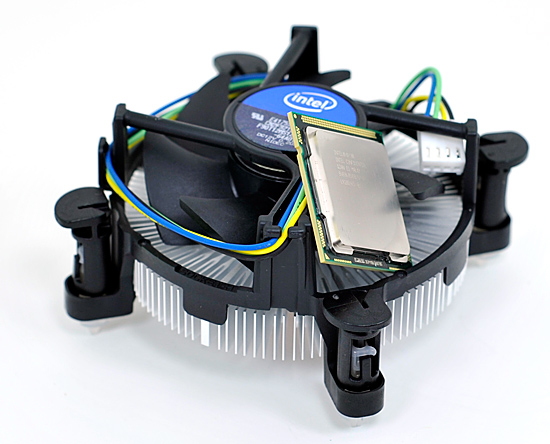
The first thing many of you asked for were turbo off results between Lynnfield and Bloomfield. On top of that, some wanted results with the exact same memory frequencies. Bloomfield officially only supports up to DDR3-1066, while Lynnfield's memory controller is validated for operation at up to DDR3-1333. Clearly both will work at speeds up to and beyond DDR3-2000, but for stock comparisons I've always tried to stay within validated limits of the platforms.
Below are our application benchmark results comparing Lynnfield to Bloomfield, with turbo disabled, and both platforms running DDR3-1333 at 7-7-7-20 timings. Unlike our standard test beds I've forced the CPUs into their highest performance mode so they are always running at 2.93GHz. The only difference between the two chips is that the Bloomfield is an underclocked Core i7 975 so its un-core runs at 2.66GHz compared to 2.40GHz for the Lynnfield. The real world impact of that difference is negligible:
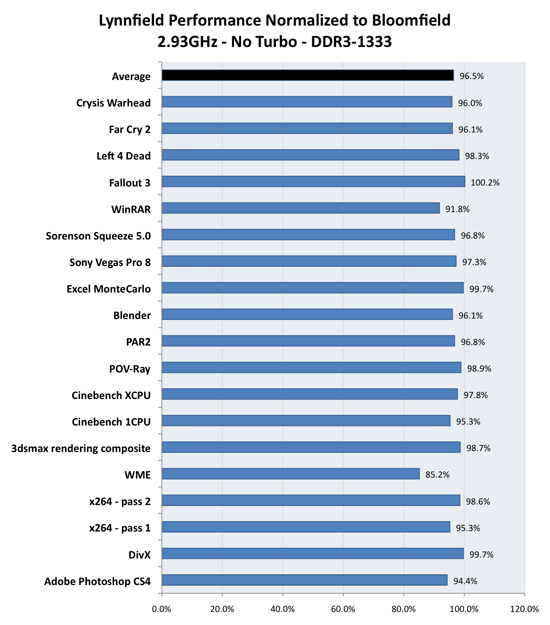
On average, Lynnfield without turbo mode delivers 96.5% of the performance of Bloomfield. The extra memory controller of Bloomfield is responsible for a 3.5% performance advantage on average; it's just not going to do much at these clock speeds/core configurations.
There are exceptions to the rule. Some applications do benefit from Bloomfield's triple channel memory controller. We see a 15% difference in Windows Media Encoder and nearly a 10% difference in a few other applications. Ultimately it's up to you whether or not the performance difference is worth it, but enable turbo and the advantage clearly goes to Lynnfield as we showed in our initial review.


 Facebook
 Twitter
 RSS
RSS


46 Comments
View All Comments
SixOfSeven - Monday, September 21, 2009 - link
Another good piece on the new CPUs, but without some new coolers or LGA1156 mounting kits it's a little hard to put into practice. Any news on the LGA1156 HSF front?strikeback03 - Monday, September 21, 2009 - link
In the power consumption area, you list a core i7 875 and giver power consumption when overclocked. is this supposed to be an i7 975 or a i7 870 (and curse you intel for using such similar names). Would it be possible to get a table showing both a 920 and an 8x0 at some overclock at idle and load?7Enigma - Monday, September 21, 2009 - link
Anand,While many are odd, the graph that really makes my head spin is the second one that shows the 4890 on the ranch small level. For some reason the older Q9450 is significantly faster than the rest of the competition, even outpacing the 870 which has a clockspeed advantage! When looking at several other graphs with the 4890 it's again apparent that the Q9450 has some weird magic going on where performance doesn't match the expected results (FarCry2 Playback action bench, HAWX 4X AA Max Quality Low AO). I'm assuming the mobo's are different, but could that honestly make the 5-6% difference between the 920 and the Q9450? (I'm assuming you are using the same graphics drivers correct?)
This could be a piece of the puzzle that would allow you guys to figure out a possible reason.
And thank you for the followup article. While I (and many others) thought a lot of the recent comments were from trolls looking to damage this site's comments section, I was interested in seeing the OC'd power numbers and direct comparison Turbo-disabled at higher OC's (where you would likely have Turbo disabled anyways if used for a gaming boot).
7Enigma - Monday, September 21, 2009 - link
Posted this message after reading the article but before reading the comments. I think GeorgeH might be spot on as he described a reason behind what my original comment was referring too.GeorgeH, I second the beer!
GeorgeH - Saturday, September 19, 2009 - link
The GPU oddities look almost completely like a hyperthreading issue to me. There are two types of anomalies in your graphs: performance inversions (a definitively "slower" CPU performing better than a "faster" one) and line crossing (a slower CPU becoming faster at a different resolution.) Only 2 games really demonstrate these behaviors to any significant degree: Far Cry 2 and HAWX. Those two titles benefit the most (to my knowledge) from going from 2 cores to 4, implying they have the most threads running at any one time and therefore would be most susceptible to HT issues.Looking at just those two titles, the i5 performs consistently better than its i7 brethren. As the only real difference between the two is hyprthreading, I conclude HT is the culprit (as it sometimes was in the "days of yore" on the P4.) Turbo mode as well as differences in base clock speed and memory architectures mask the problem, but I'd bet money that if you turn off HT your graphs will be much more normal.
coconutboy - Sunday, September 20, 2009 - link
If true and HT is the culprit, GeorgeH deserves a beer for figuring out the anomaly. Nice spot there, dude.gwolfman - Monday, September 21, 2009 - link
What about Battleforge then with the inverse affect?GeorgeH - Monday, September 21, 2009 - link
Dunno.My guess would be that it's using some Havok technologies that are more completely or efficiently GPU accelerated on AMD/ATI GPUs than on NVIDIA ones. Far Cry 2, Dawn of War II, and HAWX all demonstrate much more significant CPU dependence on NVIDIA hardware than on ATI hardware, and AFAIK all three use Havok technologies to some extent. I don't know if Battleforge uses any Havok technologies, but its behavior does roughly match the other titles that do.
silverblue - Sunday, September 20, 2009 - link
I'm not sure if they've looked at this back when i7 itself was launched, however it's definitely worthy of a second look. Simply disabling HT then retesting may yield all the answers we are looking for, even if there's only a couple of games where this issue exists for the i7s.swaaye - Sunday, September 20, 2009 - link
Hmmm, I think that this guy's comments should be considered.