



Intel's 34nm SSD Preview: Cheaper and Faster?
by Anand Lal Shimpi on July 21, 2009 11:00 AM EST- Posted in
- Storage
The rumors are true, Intel’s 2nd generation SSDs are available starting today.
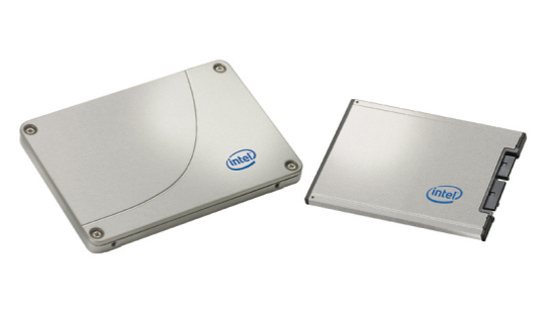
The high level details are pretty interesting:
- The new drives will be available in 80GB and 160GB sizes and are still called the X25-M and X18-M. The X18-M will start shipping later this quarter.
- 34nm flash (down from 50nm in the original X25-M), allows Intel to include roughly twice the flash in the same size die.
- The enterprise SLC version doesn’t get the 34nm treatment at this point.
- The smaller flash die results in lower prices, the 80GB model will sell for $225 while the 160GB version should sell for $440.
- Best case read/write latency has been improved (more details below).
- The 34nm drives have a new controller and new firmware, also contributing to better performance (2 - 2.5x more 4KB random write IOPS than the old drive!). Enterprise level workstation/database apps should see an immediate performance benefit, client desktop performance is unknown. Don't expect a significant increase in PCMark or SYSMark scores, but in real world usage the new drives could feel faster.
- The new controller is Halogen-free (the old one wasn’t) so Apple could theoretically use the new drives in their systems without being un-green.
- TRIM isn’t yet supported, but the 34nm drives will get a firmware update when Windows 7 launches enabling TRIM. XP and Vista users will get a performance enhancing utility (read: manual TRIM utility). It seems that 50nm users are SOL with regards to TRIM support. Bad form Intel, very bad form.
- I get my drive this week, so expect a review to follow.
Overall it’s an evolution of the X25-M, and not a revolutionary new design. The focus of the evolution is definitely price. Intel wants the X25-M to be used, not only at the high end, but even in mainstream PCs. At $225 for an 80GB drive, the new X25-M is currently cheaper than most Indilinx based drives on the market:
| Drive | NAND Capacity | Cost per GB | Price |
| Intel X25-M (34nm) | 80GB | $2.81 | $225 |
| Intel X25-M (34nm) | 160GB | $2.75 | $440 |
| OCZ Vertex (Indilinx) | 64GB | $3.41 | $218 |
| OCZ Vertex (Indilinx) | 128GB | $3.00 | $385 |
| Patriot Torqx (Indilinx) | 64GB | $3.48 | $223 |
| Patriot Torqx (Indilinx) | 128GB | $2.85 | $365 |
| OCZ Agility (Indilinx, non-Samsung Flash) | 64GB | $2.77 | $177 |
| OCZ Agility (Indilinx, non-Samsung Flash) | 128GB | $2.57 | $329 |
| OCZ Summit (Samsung) | 128GB | $3.04 | $389 |
There’s going to have to be a price correction from the competition. We may also see more manufacturers branching out to different flash memory vendors to remain price competitive (similar to what OCZ did with the Agility line).
The Specs Breakdown
The major differences between the 1st and 2nd gen X25-M are highlighted in the table below:
| X25-M Gen 1 | X25-M Gen 2 | |
| Flash Manufacturing Process | 50nm | 34nm |
| Flash Read Latency | 85 µs | 65 µs |
| Flash Write Latency | 115 µs | 85 µs |
| Random 4KB Reads | Up to 35K IOPS | Up to 35K IOPS |
| Random 4KB Writes | Up to 3.3K IOPS | Up to 6.6K IOPS (80GB) Up to 8.6K IOPS (160GB) |
| Sequential Read | Up to 250MB/s | Up to 250MB/s |
| Sequential Write | Up to 70MB/s | Up to 70MB/s |
| Halogen-free | No | Yes |
| Price | $345 (80GB) $600 - $700 (160GB) | $225 (80GB) $440 (160GB) |
The move to 34nm gives Intel the ability to both decrease costs and increase capacity. It now costs Intel the same to make a 160GB drive as it used to cost to make an 80GB drive, and about half to make an 80GB drive. Given the current cost structure, I’d say there’s still more room for Intel to drop prices but there’s just no need to given the competitive landscape.
Better Performance
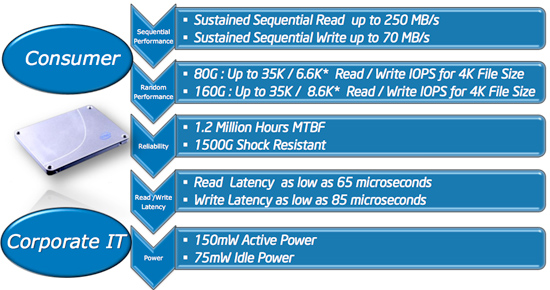
The performance of the new drives is improved. Read and write latency are both improved by around 30%. These figures are for a single sequential operation, so you're looking at best case performance improving on the drive. Intel also tweaked the controller and its firmware to further improve performance; the result is much faster 4KB random writes on the new drives.
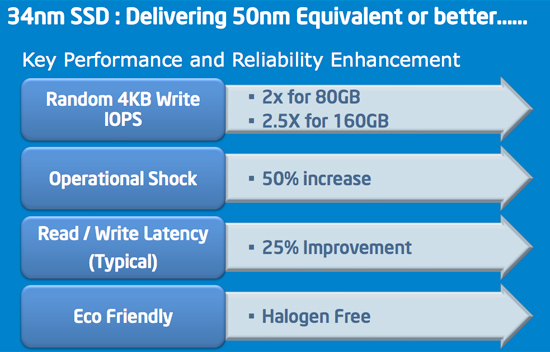
The real world benefits are difficult to predict. If you're running an I/O intensive app on the desktop then you'll see a definite improvement from the new drive. More typical desktop/notebook workloads probably won't see a tremendous difference between the 1st and 2nd gen drives. Large file sequential read/write speed remains unchanged and although there have been tweaks to the controller’s algorithms, the overall architecture hasn’t changed either.
I’ll be able to confirm for sure when I get a drive this week.
Other Spec Changes
There are two other specifications that have changed, one for the better and one for the worse with the new drive:
| X25-M Gen 1 | X25-M Gen 2 | |
| Idle Power (MobileMark 2007) | 65mW | 75mW |
| Operational Shock | 1,000G for 0.5 msec | 1,500G for 0.5 msec |
Load power hasn't changed between the drives, they are both at 150mW. Idle power went up by 10mW thanks to the new controller. These are "typical" values while running MobileMark 2007, so I'm not sure if things change at all if you're looking at real world workloads. Intel claims that the new drive doesn't deliver worse battery life than the old one, but I'll have to verify.
The maximum amount of operational shock that the 34nm drive can take went up by 50%; 1500Gs for 0.5 msec sure seems like a lot. I'm not sure if anything changed internally to allow for this higher rating or if it's simply the result of better manufacturing/improving production.
Halogen Free, Apple Friendly
A little known fact about the original X25-M was that its controller wasn’t Halogen-free. Because Intel used Halogens in the first controller, companies that had strict environmental restrictions (e.g. Apple) wouldn’t touch the drives.
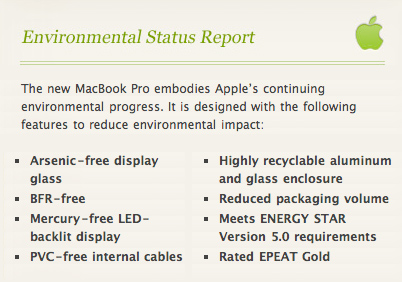
Apple couldn't claim BFR-free on its new MacBook Pro if it used Intel's 1st gen X25-M. Bromine is a Halogen.
The new drive has a new controller and it is Halogen free. For Apple to glance over the X25-M in its mobile lineup now would be a serious mistake.
How to Tell the Drives Apart
Despite the price drop and internal changes, Intel is still calling these things the X25-M and X18-M. So how do you tell the new drives apart from the old ones? It all comes down to the part number; if the last two digits are a G1 then it’s the old drive, if they are a G2 it’s the new one. If you have them in hand, the new drives are silver, the old ones are black.
| X25-M Gen 1 | X25-M Gen 2 | |
| 80GB 2.5" | SSDSA2MH080G1 | SSDSA2MH080G2 |
| 160GB 2.5" | SSDSA2MH160G1 | SSDSA2MH160G2 |
| 80GB 1.8" | SSDSA1MH080G1 | SSDSA1MH080G2 |
| 160GB 1.8" | SSDSA1MH160G1 | SSDSA1MH160G2 |
TRIM Support: Not For 50nm Drives
Part of today’s announcement is the fact that Intel will enable TRIM on these 34nm drives when Windows 7 ships. Intel is planning on releasing a user downloadable firmware update that will enable TRIM support. Windows Vista and XP users will get a performance enhancement tool that presumably will just manually invoke the TRIM command. I suspect that Intel is waiting until Windows 7 to enable TRIM support is to make sure that everything is thoroughly tested. As we’ve seen with other attempts to enable TRIM, it’s a tricky thing to do.
The disappointing part of the announcement is that there’s no TRIM support for the first gen 50nm drives. As far as I can tell, this isn’t a technical limitation of the drives, but rather something Intel is choosing to enable only on the 34nm products.
Final Words...for now
I'm still waiting on my 34nm review sample, as soon as I get it I'll start working on a full review. I've already started work on the newest SSDs from the competition, so expect something soon.


 Facebook
 Twitter
 RSS
RSS


73 Comments
View All Comments
Bolas - Monday, November 23, 2009 - link
MSRP turns out to be way too optimisitc.Drive NAND Capacity Cost per GB Price
Intel X25-M (34nm) 80GB $2.81 $225
Intel X25-M (34nm) 160GB $2.75 $440
Those prices still aren't available four months after launch. Would have been nice, though.
Pandamonium - Wednesday, January 20, 2010 - link
X18-M still nowhere to be found. This is really frustrating.sotoa - Thursday, July 23, 2009 - link
SSD's get me excited for some reason. They're getting faster, evolving, getting cheaper, are mysterious, yet Anandtech peels away the mystery.I can't get enough.
I can't wait to get my Win7 pro, and SSD in October. I'll decide in October which SSD, but Intel just made it sweeter.
futrtrubl - Wednesday, July 22, 2009 - link
One interesting but ultimately irrelevant derived statistic from the G rating of this drive...It can be accelerated to 7.35km/s over that 0.5 seconds.... discounting drag that's the delta-v required for low earth orbit....
Unfortunately that would require a canon/rail over 3km long ;']
GTVic - Wednesday, July 22, 2009 - link
I would like to kill (read: eliminate from existence) the tech writer, probably from HardOCP (read: guy who likes to review power supplies and use the non-word "immersive" way too much), who started using this "read" (read: read) terminology to explain what he meant.Please, why not just write what you mean.
Pastuch - Wednesday, July 22, 2009 - link
I have an ADFD generation Raptor and I'm thinking about getting the 80gb 34nm Intel SSD.
How would I install the 2.5 inch drive into my Antec P160 or Antec Gamer 300 cases? Do the drives come with 3.5 inch adapters?
rcpratt - Wednesday, July 22, 2009 - link
I haven't ever really tried to purchase brand-spanking new hardware before, so one question - how long does it usually take for newegg to start selling new hardware?rhys216 - Wednesday, July 22, 2009 - link
It is impossible for car makers to do this!Stop comparing APPLES to ORANGES.
People have paid through the nose for Intel drives and now Intel have left them bloody.
It's a simple fix that Intel are CHOOSING to do, and yes that is why people are feeling screwed.
I bet Intel would have to steal your wife and kill your dog before you said a bad word about them!!!
F**K Intel
dangerz - Wednesday, July 22, 2009 - link
Why can't we forget SATA and use PCI-E?xyxer - Tuesday, July 21, 2009 - link
Crap I bought 3 50nms last month?! Intel wouldn't be so stupid to screws its customers would it ?