



NVIDIA 680i: The Best Core 2 Chipset?
by Gary Key & Wesley Fink on November 8, 2006 4:45 AM EST- Posted in
- CPUs
nForce 680i Platform
At the top of the product line, and targeted at the "hard-core overclocker", is the nForce 680 SLI. It consists of two discrete chips, the 680i MCP and the 680i SPP. As we saw in the 590 chipset, one x16 PCIe slot is controlled by each chip. This provides dual x16 SLI slots for the 680i, similar to what was provided by the 590 chipset.
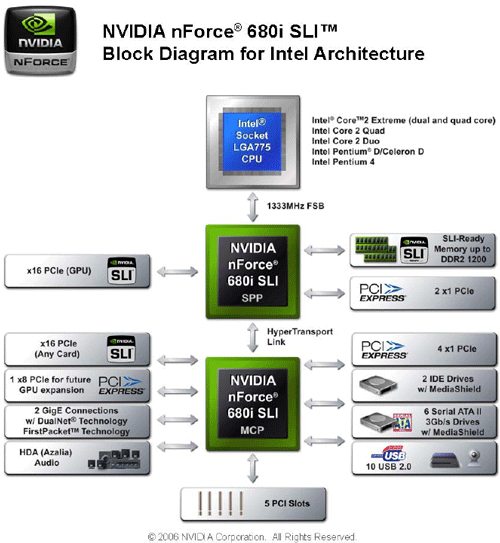
There is a significant new addition with 680i, however, in a third PCIe x16 slot between the x16 PCIe slots for SLI. This third slot is x8 PCIe instead of x16, but it can be used for a GPU on the 680i, with a new twist. This x8 slot is suitable for a physics processor combined with SLI.

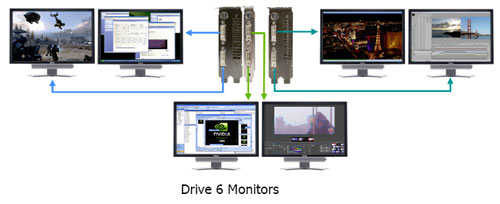
If you prefer multiple monitors instead, you can even drive up to six monitors - two per card - with video cards in all 3 PCIe slots.
The nForce 680i provides a total of 46 PCIe lanes, with 18 lanes available on the 680i SPP and 28 lanes provided on the 680i MCP.
New features of the 680i are the addition of Extreme Overclocking capabilities and basic refinements of the features first introduced with the 590 SLI chipset. Features include:
Extreme Overclocking
True 2 x16 PCI Express SLI Support provided by two full-bandwidth, 16-lane PCI Express links.
Third PCIe Slot for Graphics Expansion
NVIDIA MediaShieldTM Storage includes RAID and SATA drive support.
High Definition Audio (HDA) can deliver 192 kHz/32-bit quality for eight channels.
USB 2.0 plug-and-play interface that provides easy-to-use connectivity for up to 10 USB devices.
At the top of the product line, and targeted at the "hard-core overclocker", is the nForce 680 SLI. It consists of two discrete chips, the 680i MCP and the 680i SPP. As we saw in the 590 chipset, one x16 PCIe slot is controlled by each chip. This provides dual x16 SLI slots for the 680i, similar to what was provided by the 590 chipset.
There is a significant new addition with 680i, however, in a third PCIe x16 slot between the x16 PCIe slots for SLI. This third slot is x8 PCIe instead of x16, but it can be used for a GPU on the 680i, with a new twist. This x8 slot is suitable for a physics processor combined with SLI.
If you prefer multiple monitors instead, you can even drive up to six monitors - two per card - with video cards in all 3 PCIe slots.
The nForce 680i provides a total of 46 PCIe lanes, with 18 lanes available on the 680i SPP and 28 lanes provided on the 680i MCP.
New features of the 680i are the addition of Extreme Overclocking capabilities and basic refinements of the features first introduced with the 590 SLI chipset. Features include:
Extreme Overclocking
- FSB speeds of 1333 MHz can be achieved with a CPU that supports this specification.
- DDR2 speeds of DDR2-1200 and beyond can be used to keep pace with overclocked system components. NVIDIA nForce 680i SLI MCPs support high-speed SLI-Ready memory
True 2 x16 PCI Express SLI Support provided by two full-bandwidth, 16-lane PCI Express links.
Third PCIe Slot for Graphics Expansion
NVIDIA MediaShieldTM Storage includes RAID and SATA drive support.
- Multiple Disk Setup Through a wizard-based interface, you can set up your drives for better data protection, faster disk access or maximum storage capacity. MediaShield automatically selects a RAID 0, 1, 0+1 or 5 configuration according to your needs. Advanced users can access RAID options directly.
- DiskAlert System In the event of a disk failure, MediaShield users see an image that highlights which disk has failed to make it easier to identify, replace, and recover.
- RAID Morphing MediaShield allows users to change their current RAID setup to another configuration in a one-step process called morphing. This eliminates the need to back up data and follow multiple steps in the process.
- Bootable Multidisk Array MediaShield storage fully supports the use of a multi-disk array for loading the operating system at power-up.
- Six SATA 3Gb/s Drives Combine up to six SATA drives into one volume for bigger, faster RAID. Drives can be configured as six RAID 0 (striped) drives for maximum throughput, or Single or Dual RAID 5 arrays. Hot plug and Native Command Queuing are supported.
High Definition Audio (HDA) can deliver 192 kHz/32-bit quality for eight channels.
USB 2.0 plug-and-play interface that provides easy-to-use connectivity for up to 10 USB devices.


 Facebook
 Twitter
 RSS
RSS


60 Comments
View All Comments
fenacv - Tuesday, January 8, 2008 - link
http://www.pricebat.ca/EVGA-122-CK-NF67-T1-LGA-775...">http://www.pricebat.ca/EVGA-122-CK-NF67...-SLI-ATX...If you don't really care the prefermace, I found it's onsale just buy one only 138 bucks. It's cheap.
TheBeagle - Friday, December 8, 2006 - link
I'm wondering if these touted new 680i boards are vaporware, especially the Gigabyte GA-N680SLI-DQ6 board. Ever since you first alerted us to the fact that the 680i chipset was replacing the 590 version, I've been waiting to see this whole new array of motherboards. However, aside from a few boards (ASUS and a few others) the major board manufacturers haven't been forthcoming with these products. Maybe this is just going to be some sort of a big Christmas present that Santa delivers on the holiday. If you guys at AnandTech have some info on this, I'd sure like to hear about. Thanksmbf - Wednesday, November 29, 2006 - link
I, for one, am going to seriously miss the native hardware firewall of the nForce3 and nForce4 chipsets, so I'm anything but "thankful" for seeing it "jettisoned into deep space." Actually, this was one of the coolest features of the nForce chipsets and truly innovative.nVidia's stance as to removing it because the functionality is built into Windows Vista doesn't ring true. A software solution can never work as efficiently and transparently as a hardware solution. And what of the people having no intention to switch to Windows Vista, and there are many reasons for not wanting to. They're practically left out in the cold.
I second the opinion that nVidia probably botched the hardware in some form or other, although the hardware firewall works quite well on my nForce3 250gb based system, once you get familiar with its quirks. This actually doesn't bode well for nVidia's "inventiveness" and "forward-thinking" (think DualNet), since chances are nVidia will drop support completely rather than work out the bugs that inevitably will be there. Removing the hardware firewall is the best example of this.
Also, and this is a bit off-topic in regard to the rest of this topic, wasn't there supposed to be ECC memory support in the new northbridge for the 680i chipset? I remember reading about the northbridge also being used in the new nForce Pro series chipsets. Another feature that has been removed in the mean time?
skrewler2 - Monday, November 13, 2006 - link
How was the Tuniq Tower 120 on the board? I've heard lots of people complaining about backplates not fitting right on this board because the back of the mobo has lots of capacitors... Did you need to do any modding or did it just work?Gary Key - Monday, November 13, 2006 - link
I used the Scythe Infinity in my testing, Wes used the Tuniq. I did try the Tuniq and it was okay with an extra pad on the backplate that negated any damage to the capacitors.mlau - Monday, November 13, 2006 - link
Did you test a recent Linux kernel on this board?Which components are supported (I don't care about "raid"),
and how buggy are the HPET, (IO-)APIC and ACPI implementations?
Governator - Saturday, November 11, 2006 - link
First off, very well done article guys, but I've a question on the layouts with regards to PCI slots so far with the Asus and Evga; are we to expect similar layouts with upcoming boards from other manufacturers? I ask because I'm planning on a water cooled SLI setup upon a 680i and am planning on an X-Fi card but not sure if I'll be able to use the middle PCI slot, TIA...Gov
Gary Key - Sunday, November 12, 2006 - link
Most of the 680i boards have the same basic layout. On the Asus Striker board you should be able to use the X-FI with most watercooled SLI setups as an example. It will all depend on your setup but you can kiss the middle PCIe slot good-bye. ;)Governator - Saturday, November 18, 2006 - link
Hi Gary, sorry I meant to reply sooner but thanks for this. I'm hoping I'll be in good shape with the fact that I'll be using the new 8800GTX water block codeveloped by BFG Tech from Danger Den which appears that it'll only take up one slot allowing for that bottom PCI slot to go to the X-Fi card, thoughts? TIA ;)deathwalker - Friday, November 10, 2006 - link
I wonder if there are Matx mobo's in the future for the 600 series chipsets.