



Overclocking Intel's New 45nm QX9650: The Rules Have Changed
by Kris Boughton on December 19, 2007 2:00 AM EST- Posted in
- CPUs
Intel Processor Power Delivery Guidelines (Cont'd)
In this next case we eliminate Vdroop altogether and examine the chaos that ensues. As illustrated by our model, removing Vdroop does nothing to reduce the magnitude of the idle to full-load transient but does increase the settling time as the VRM must recover to a higher final regulation voltage. As in the case of no Voffset, it is possible to exceed the maximum allowable CPU voltage (VID). Clearly, removing Vdroop gains us nothing and only serves to create problems that are more serious.
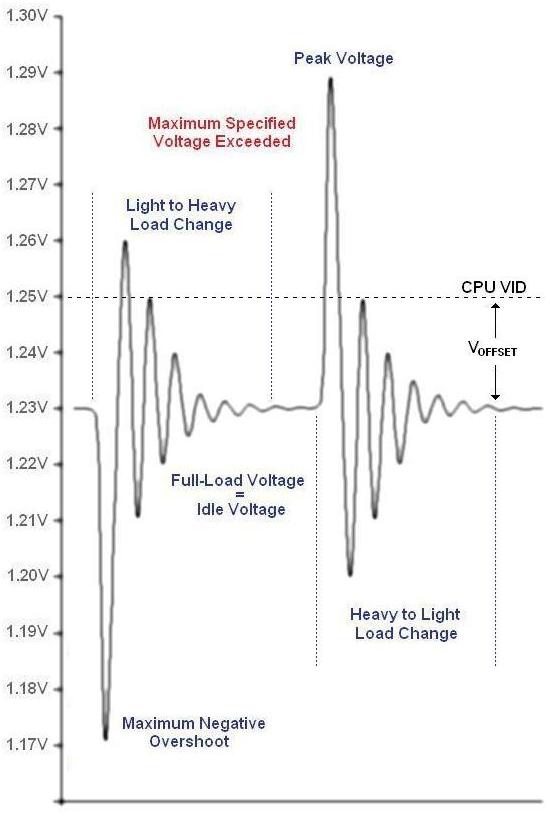
No Vdroop means the VRM circuit must work harder at maintaining a constant voltage
So what happens when we remove both Voffset and Vdroop? The answer is simple - bad things. Although the difference between the maximum positive and negative peak overshoot are the same, severe violations to the CPU VID limit occur. If you're asking yourself what's the problem with this, consider the case of a CPU VID of 1.60000V - because the user feels this is the absolute maximum CPU voltage that they will allow. Just how high do you think CPU voltage will go after leaving a heavy load condition? We can't be sure without knowing more of the details, but we can certainly conclude that it will be well in excess of 1.6V. If you've ever run a benchmark only to have your system crash right as it finishes then you have experienced the consequences of this poor setup.
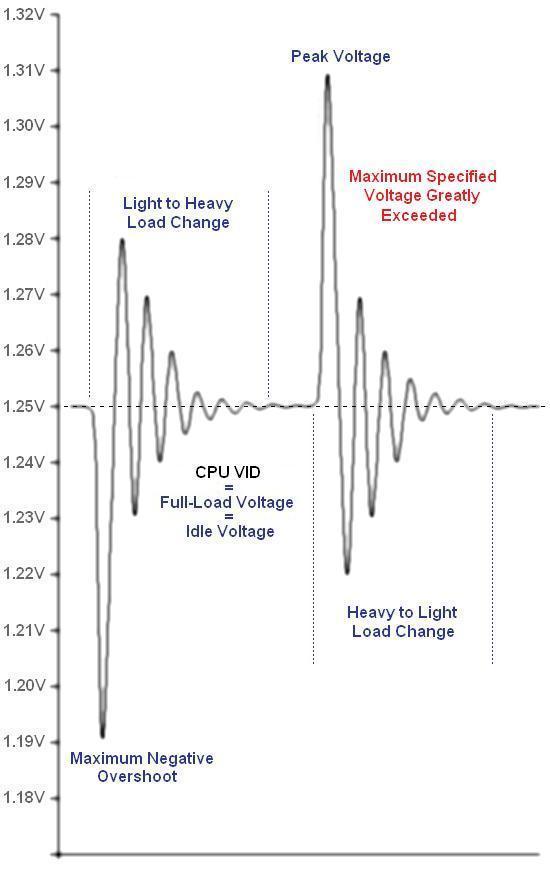
The user gives up all control over the CPU supply voltage with no Voffset or Vdroop
Finally, let's take one last real-world look at the consequences of removing Vdroop. ASUS' implementation of this feature, labeled as Load Line Calibration and included with their latest line of motherboards, is particularly worthy of our attention for a number of reasons. The first is that setting lower voltages with this option enabled actually results in a condition in which the CPU voltage under load is higher than the idle voltage. Imagine our confusion as we desperately struggle to understand why our system is Prime95 stable for days yet continues to crash under absolutely no load. What's more, in spite of the absence of droop and for reasons unknown, enabling this feature artificially raises our CPU's minimum stable core voltage at 4.0GHz from 1.28V to about 1.33V. As a result, our system uses more power under load than is otherwise necessary. Our efforts to reduce our processor's supply voltage backfired - instead of lowering the system's total power consumption we managed to affect a 20W increase.

Suffice it to say, we found it better to leave Load Line Calibration disabled
With Load Line Calibration disabled in BIOS, setting a CPU Voltage VID of 1.38750 resulted in a no-load voltage of about 1.34V and a full-load value of 1.28V. Enabling this feature and lowering the VID to 1.35000V produced a constant CPU supply voltage, regardless of load (or so it seemed), of 1.33V. Setting a lower VID resulted in a blue screen during Windows boot. Idle voltage was relatively unchanged at about 1.33-1.34V but the full-load voltage required increased by 50mV with no benefit. As you might guess, we recommend you leave this option disabled.
Hopefully we've shown you enough to understand exactly why Voffset and Vdroop are important. Please give second thought to your actions if you're in the habit of defeating these essential system safeguards.


 Facebook
 Twitter
 RSS
RSS


56 Comments
View All Comments
mariedeguzman - Friday, June 19, 2009 - link
Thanks for this post, this is a great article and a good help to those who need advices about this post.Markfw900 - Thursday, January 10, 2008 - link
My Gigabyte P35-DQ6 does have what you say is voffset, but is has NO vdroop from idle to load. I believe this is because it has a far superior power delivery system. I don't have an instrument to tell me any differences that may happen in nano-seconds on the voltage, but overall, it never seems to change. This would be consistant with a high quality board. So why do you say its a feature ? I can see how a mfg may undervolt to not go over recommended vcore for non-overclocked cpu's, but if I didn't overclock, my board wouldn't have vdroop either.Its just cheap motherboards, not a "feature". If I am wrong, please test a DQ6 and show the results.
LaGUNaMAN - Saturday, January 5, 2008 - link
One of the best tech articles I've read in awhile. (^^,)isvaljek - Tuesday, January 1, 2008 - link
"typically, even the worst "performance" memory can handle CAS3 when running at about DDR2-800, CAS4 to about DDR2-1075, and CAS5 for anything higher."Are they for real?
mindless1 - Monday, December 31, 2007 - link
Considering the heat produced I can't see a justification for the idea of drastic shifts in the cooling industry. Realistically there aren't THAT many overclockers using water cooling at all and current (including older) processors having lower power consumption were what brought the cooling industry to what it is today.You may say past some point the heat isn't the factor, but you still need a decent heatsink up until that point. 100W of heat for example is a non-trivial level even though some past parts have exceeded that.
mindless1 - Monday, December 31, 2007 - link
What I really meant to say is that it's not just a matter of getting rid of the heat but doing so without the system sounding like it has a leaf blower hidden inside, and for that many lesser heatsinks just don't cut it.mindless1 - Monday, December 31, 2007 - link
What I really meant to say is that it's not just a matter of getting rid of the heat but doing so without the system sounding like it has a leaf blower hidden inside and for that many lesser heatsinks just don't cut it.mindless1 - Monday, December 31, 2007 - link
What I really meant to say is that it's not just a matter of getting rid of the heat but doing so without the system sounding like it has a leaf-blower hidden inside and for that many lesser heatsinks just don't cut it.SilthDraeth - Friday, December 21, 2007 - link
And their TDP measurement is the same as it has always been, maximum draw.Yes ACP is a marketing tool. So what. MHZ is a marketing tool as well, and still has real world benefits. Same as ACP.
wordsworm - Thursday, December 20, 2007 - link
Best damned article I've seen out of AT in a long time. Bravo.