



Overclocking Intel's New 45nm QX9650: The Rules Have Changed
by Kris Boughton on December 19, 2007 2:00 AM EST- Posted in
- CPUs
Overclock That CPU
With the memory and memory subsystems out of the way, we are finally ready to see what the processor can do. Because we have already decided on our target FSB we must accept for the time being that our final CPU frequencies will be limited to discrete steeps equal to our FSB. This is by design and affords us the knowledge that any Prime95 errors met during our last testing phase come from the CPU and nothing else. As always, varying the processor's multiplier changes only the CPU frequency - if memory is stable at 8 x 400 then by definition it's also stable at 9 x 400. Assuming we have decided to run 1:1, in both cases, the memory continues to operate at DDR-800 regardless of CPU speed. Later you can tune your final clocks by adjusting the FSB if you so choose.
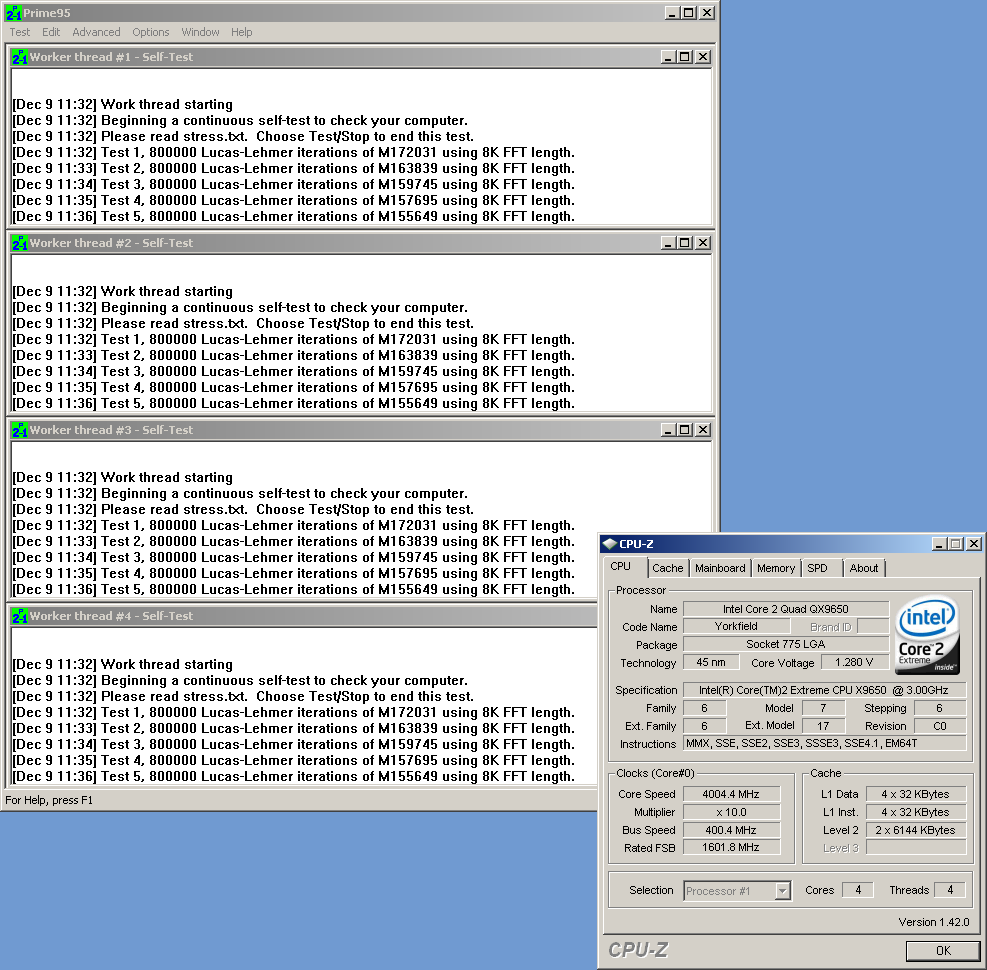 All green means everything is good. Remember to give the program time to run |
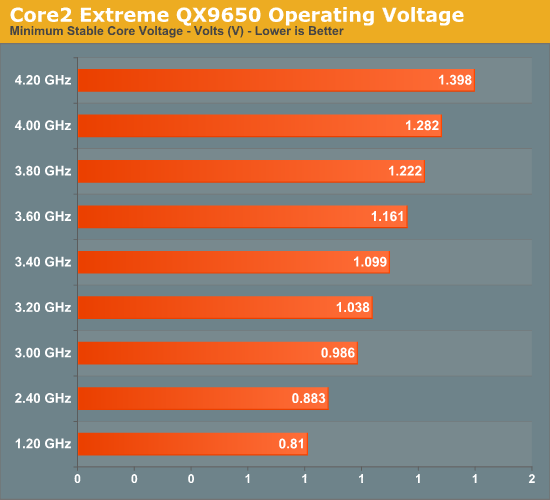
Once again, enter your motherboard's BIOS, this time adjusting only the CPU multiplier and the CPU voltage to set a potential overclocking frequency. Using custom water-cooling we were able to scale our QX9650 as shown below. Please note that all processors are different and voltage response curves generated using one CPU are not directly applicable to another. Your processor may perform slightly better or worse and these illustrations are only a general guideline. (The values shown are full-load CPU supply voltages and not the VID settings that we had to set.)
After booting to the Windows desktop, fire up Prime95 once again, this time choosing the option to run small FFTs as this setting places maximum stress on your CPU and leads to the highest load temperatures. As before, run at least 30 minutes while watching for errors. There are a few different potential failure modes, the least severe being a rounding error which causes one or more of the calculation threads to quit, changing the child window icon from green to red. Normally, with 45nm processors this is a good indication of a memory error, but since we know the memory is stable we can safely blame the CPU. In this case, the corrective action is to increase the CPU VID by a single step and try again. If the system freezes or freezes and then quickly resets, you will need to increase the CPU voltage by more than a single-step increment. Save yourself the hassle of multiple failures, increase CPU voltage by 0.05V or more, and try again. Later, back this down if possible until the CPU is just above the minimum required Vcore.
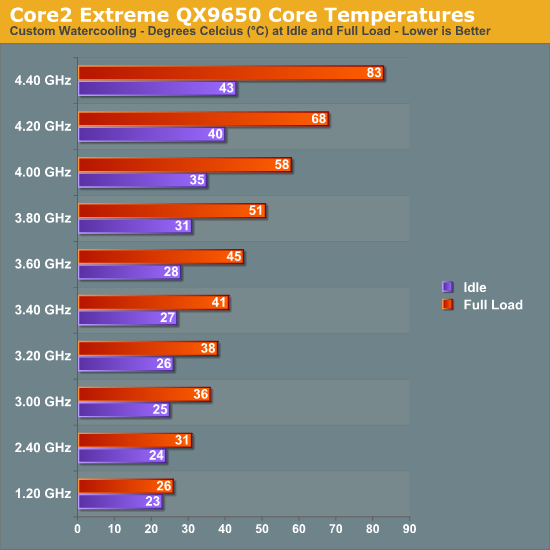
Depending on the cooling in use, you may find your overclock temperature limited. The QX9650 has a maximum thermal specification of 64.5°C but can generally handle temperatures as high as about 70°C before heat becomes a significant factor in scaling. Besides the core temperatures, the voltage regulator module (VRM) supply current can also function as a limiting factor. We saw before just how much current, in amps, the VRM circuit must provide under CPU full-load conditions in order to maintain stability. Current in excess of about 160A can be quite straining for even high-performance motherboards - make sure you adequately cool this area with at least a single, low-speed 120mm or larger fan if you plan to push a board this hard.
One of the great new features of the 45nm Core 2 family of processors is the ability to make use of non-integer multipliers. Sometimes referred to as half-multipliers, these values allow you to step your CPU frequency in increments one-half that of your FSB. Overclockers intent on running 400MHz FSB can now use a 10.5x multiplier to set a final CPU frequency of 4.2GHz, up from 4.0GHz (when 4.4GHz may be unachievable) without even touching the FSB. Consider this potential advantage if your motherboard allows use of these settings.
After some time experimenting with what works and what does not, you should start to get a feel for how your system responds to changes. During this time you should also learn how your CPU scales with voltage and exactly what speeds and timings to use with your memory subsystem. This three-phase approach helps lay the groundwork for the development of key overclocking skills and provides those new to overclocking with some ideas on how to approach the subject. Only once you understand the theory behind this basic methodology can you begin to safely stray into uncharted territory.


 Facebook
 Twitter
 RSS
RSS


56 Comments
View All Comments
mariedeguzman - Friday, June 19, 2009 - link
Thanks for this post, this is a great article and a good help to those who need advices about this post.Markfw900 - Thursday, January 10, 2008 - link
My Gigabyte P35-DQ6 does have what you say is voffset, but is has NO vdroop from idle to load. I believe this is because it has a far superior power delivery system. I don't have an instrument to tell me any differences that may happen in nano-seconds on the voltage, but overall, it never seems to change. This would be consistant with a high quality board. So why do you say its a feature ? I can see how a mfg may undervolt to not go over recommended vcore for non-overclocked cpu's, but if I didn't overclock, my board wouldn't have vdroop either.Its just cheap motherboards, not a "feature". If I am wrong, please test a DQ6 and show the results.
LaGUNaMAN - Saturday, January 5, 2008 - link
One of the best tech articles I've read in awhile. (^^,)isvaljek - Tuesday, January 1, 2008 - link
"typically, even the worst "performance" memory can handle CAS3 when running at about DDR2-800, CAS4 to about DDR2-1075, and CAS5 for anything higher."Are they for real?
mindless1 - Monday, December 31, 2007 - link
Considering the heat produced I can't see a justification for the idea of drastic shifts in the cooling industry. Realistically there aren't THAT many overclockers using water cooling at all and current (including older) processors having lower power consumption were what brought the cooling industry to what it is today.You may say past some point the heat isn't the factor, but you still need a decent heatsink up until that point. 100W of heat for example is a non-trivial level even though some past parts have exceeded that.
mindless1 - Monday, December 31, 2007 - link
What I really meant to say is that it's not just a matter of getting rid of the heat but doing so without the system sounding like it has a leaf blower hidden inside, and for that many lesser heatsinks just don't cut it.mindless1 - Monday, December 31, 2007 - link
What I really meant to say is that it's not just a matter of getting rid of the heat but doing so without the system sounding like it has a leaf blower hidden inside and for that many lesser heatsinks just don't cut it.mindless1 - Monday, December 31, 2007 - link
What I really meant to say is that it's not just a matter of getting rid of the heat but doing so without the system sounding like it has a leaf-blower hidden inside and for that many lesser heatsinks just don't cut it.SilthDraeth - Friday, December 21, 2007 - link
And their TDP measurement is the same as it has always been, maximum draw.Yes ACP is a marketing tool. So what. MHZ is a marketing tool as well, and still has real world benefits. Same as ACP.
wordsworm - Thursday, December 20, 2007 - link
Best damned article I've seen out of AT in a long time. Bravo.