



Thermalright Ultra 120: Elegant, Fanless and Efficient Cooling
by Wesley Fink on March 5, 2007 12:05 AM EST- Posted in
- Cases/Cooling/PSUs
Fanless Cooling
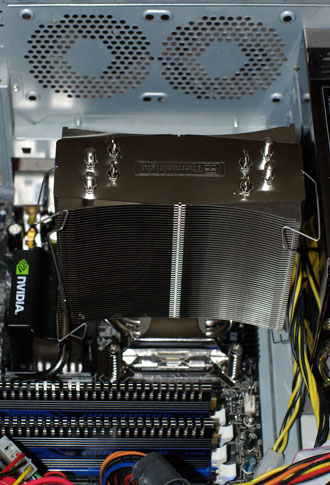
The Ultra 120 is based on the design of the fanless HR-01, so we were interested in seeing how the Ultra 120 performed without a cooling fan.
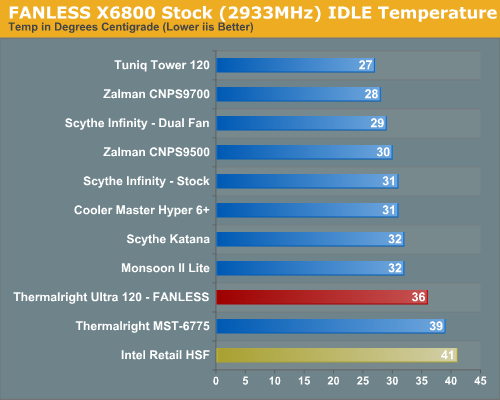
Even without a cooling fan the Ultra 120 managed to keep the CPU cool at idle. This performance is actually a bit better than the stock Intel retail HSF which does have a fan. Where the very good Intel stock cooler keeps the X6800 at 41C at idle, the fanless Ultra 120 can manage an even better 36C, with no fan at all.
Cooling efficiency of the fanless Thermalright Ultra 120 was also compared under load conditions at stock speed by continuously looping a benchmark test of Far Cry. The Far Cry River demo is looped for 30 minutes and the CPU temperature is captured at four second intervals with the NVIDIA monitor "logging" option. The highest temperature during the stress test is then reported. Momentary spikes are ignored, as we report a sustained high-level temp that you would expect to find in this recording configuration.
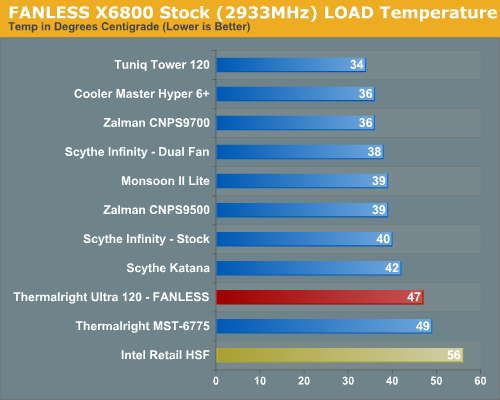
The temperature after 8 minutes of heavy load testing reached 47C. During the 30 minutes of testing the Ultra 120 never exceeded 62C. It also quickly returned to 48C after the stress testing, but it took quite a while to return to the idle 36C. This demonstrates that our case setup is very poor for a fanless CPU cooler.
Our stock OCZ PowerStream 520 is a poor design for a fanless cooling system. Thermalright recommends a power supply with a down-facing fan (one that removes air from the CPU area) be used for cooling for the fanless HR-01. Many other power supplies use this design and they would definitely improve fanless performance of the Ultra 120. Therefore our fanless test results should be considered absolute worst case.
Fanless Overclocks
Fanless benchmarks were also run at two moderate overclocks. At 3.2GHz (12x267 at default voltage), temperatures started at 40C. We measured temperatures after each 8 minutes of load test and found maximum temperatures at 58C-67C-71C-82C. The system never failed even though temperatures as high as 82C were reached during testing. It is again clear our case design is not exhausting enough air for this cooler in fanless operation while it is overclocked.
Tests were also run fanless at 3.5GHz (13x277 at stock voltage). Idle at 3.5GHz fanless was 50C. 8-minute interval stress temperatures were 69-75-81-fail. We are confident that a better ventilated case and a power supply with a down facing fan above the CPU would improve air flow enough for day-in and day-out operation at moderate overclocks with a fanless Ultra 120. With no case fans, no CPU fan, and a power supply that exhausts air only to the rear there was nothing to adequately remove heat from the case/CPU. With a reasonable case/PSU setup for fanless use you will likely get performance levels close to our first set of load measurements.
It is clear from the Ultra 120 testing without a fan that this heatsink can easily cool a Core 2 Duo at stock speed without a fan. It also will likely handle moderate overclocks at stock voltages. It is important to use a power supply with a CPU down-facing fan for best fanless performance. Case exhaust fans would also help, as well as rear fan ducts such as those supplied on the Thermalright HR-01 fanless cooler.
For those whose main concern with cooling is low noise the ability to cool with no fan at all is hard to beat. Fanless CPU cooling requires careful attention to airflow in the case and the design of the power supply, but the reward is the lowest noise possible with air cooling.
The Ultra 120 is based on the design of the fanless HR-01, so we were interested in seeing how the Ultra 120 performed without a cooling fan.
Even without a cooling fan the Ultra 120 managed to keep the CPU cool at idle. This performance is actually a bit better than the stock Intel retail HSF which does have a fan. Where the very good Intel stock cooler keeps the X6800 at 41C at idle, the fanless Ultra 120 can manage an even better 36C, with no fan at all.
Cooling efficiency of the fanless Thermalright Ultra 120 was also compared under load conditions at stock speed by continuously looping a benchmark test of Far Cry. The Far Cry River demo is looped for 30 minutes and the CPU temperature is captured at four second intervals with the NVIDIA monitor "logging" option. The highest temperature during the stress test is then reported. Momentary spikes are ignored, as we report a sustained high-level temp that you would expect to find in this recording configuration.
The temperature after 8 minutes of heavy load testing reached 47C. During the 30 minutes of testing the Ultra 120 never exceeded 62C. It also quickly returned to 48C after the stress testing, but it took quite a while to return to the idle 36C. This demonstrates that our case setup is very poor for a fanless CPU cooler.
Our stock OCZ PowerStream 520 is a poor design for a fanless cooling system. Thermalright recommends a power supply with a down-facing fan (one that removes air from the CPU area) be used for cooling for the fanless HR-01. Many other power supplies use this design and they would definitely improve fanless performance of the Ultra 120. Therefore our fanless test results should be considered absolute worst case.
Fanless Overclocks
Fanless benchmarks were also run at two moderate overclocks. At 3.2GHz (12x267 at default voltage), temperatures started at 40C. We measured temperatures after each 8 minutes of load test and found maximum temperatures at 58C-67C-71C-82C. The system never failed even though temperatures as high as 82C were reached during testing. It is again clear our case design is not exhausting enough air for this cooler in fanless operation while it is overclocked.
Tests were also run fanless at 3.5GHz (13x277 at stock voltage). Idle at 3.5GHz fanless was 50C. 8-minute interval stress temperatures were 69-75-81-fail. We are confident that a better ventilated case and a power supply with a down facing fan above the CPU would improve air flow enough for day-in and day-out operation at moderate overclocks with a fanless Ultra 120. With no case fans, no CPU fan, and a power supply that exhausts air only to the rear there was nothing to adequately remove heat from the case/CPU. With a reasonable case/PSU setup for fanless use you will likely get performance levels close to our first set of load measurements.
It is clear from the Ultra 120 testing without a fan that this heatsink can easily cool a Core 2 Duo at stock speed without a fan. It also will likely handle moderate overclocks at stock voltages. It is important to use a power supply with a CPU down-facing fan for best fanless performance. Case exhaust fans would also help, as well as rear fan ducts such as those supplied on the Thermalright HR-01 fanless cooler.
For those whose main concern with cooling is low noise the ability to cool with no fan at all is hard to beat. Fanless CPU cooling requires careful attention to airflow in the case and the design of the power supply, but the reward is the lowest noise possible with air cooling.


 Facebook
 Twitter
 RSS
RSS


30 Comments
View All Comments
hox - Thursday, March 8, 2007 - link
I would like to know what you have enabled or disabled in the bios that controls CPU automatic throttling. Typically that would include Enhanced C1 control (C1E), SpeedStep, and for my Asus MB, something called CPU internal thermal control.These settings affect how the cpu "handles" load and will affect the temps reported to the Ntune program. Programs like CpuZ and Coretemp and Ntune do not detect some of these rapid throttling instances, but the temps of the processor are reduced because of this throttling. The Righmtark CPU temp utility is one of the few programs I know that allows you to visualize this throttling even when you have several of the throttling paramters disabled.
This issue is important because the temps you are seeing, even at idle, are very different for several of your reviewed heatsinks then what end users will experience when they have altered these parameters in the bios.
I believe this will be helpful for end users to feel like the products your reviews are deeming as superior are performing in their hands in a manner similar to your review. Please provide the bios settings to help the end users decide if the equipment they have purchased is functioning properly.
I suspect by doing this, many RMAs and emails to the manufacturer would be reduced.
There is a clear 10C difference between the reported CPU temps at both idle and full load for my QX6700 cpu caused by changing these three settings. Enabling these parameters in the bios I routinely see temps of 33 to 35 C for the cores of my QX6700 at stock speeds, MB temp is 35C. Disabling these parameters, temps on all 4 cores rise to 44C. Thus discrepancy in temps could lead someone to think that the Monsoon II lite cooler I am using is malfunctioning, when in reality it is working properly.
Also it would be helpful if you also tested these devices with the quad core processors which have a higher heat output. By testing the quad core cpus the high end capacity of these heat sinks to move heat would be tested. Providing the thermal resistance Degrees C/Watt would also be a helpful guideling for these devices.
It would also be helpful to comment whether the side door will fit with the thermalright heat sinks. As far as I know this heat sink is taller than the Tuniq which caused end users to move side panel fans and vents.
Thank you
arswihart - Tuesday, March 6, 2007 - link
I think you should consider retesting the Monsoon II Lite. As the only heatsink to make it to 3.96ghz on your OC tests, and with a full 6C increase in temp at 3.90ghz compared to the Ultra 120, I question whether you can replicate your results with the Monsoon at this point. We all know transistors age with OC'ing, and it is possible that your CPU has actually degraded in performance since you tested it with the Monsoon.There's no reason to think that the Monsoon enabled your CPU to reach 3.96ghz by some magical effect apart from it's cooling ability, which is 6C worse that the Ultra 120 at 3.90ghz.
arswihart - Tuesday, March 6, 2007 - link
Sorry my fault I mis-stated the temp difference at 3.90ghz between the two heatsinks, it is actually a paltry 2C!I think it still might be worthwhile to retest the Monsoon, just because the Tuniq Tower and today's Ultra 120 were unable to reach 3.96ghz even with comparable or better cooling at 3.90ghz.
muddocktor - Monday, March 5, 2007 - link
This is a decent review of the Ultra 120 Wesley, good job. But like another person posted, I also had gotten an Ultra 120 with a bad base finish. In my case, there was a machining ridge left on one side of the base that interfered with getting a flush mount plus the base was fairly concave too. And my initial testing of it (with those defects) found the performance to be no better than the stock Intel heatsink. After I filed the ridge down on the edge, then lapped the base of the Ultra 120 to be flat, the performance was much like the performance that you had with yours. I also tested it with both the S-Flex fan you chose plus I tried the Tuniq Tower's fan too(I also have one of those heatsinks) and saw very little difference in cooling ability with either fan mounted on either heatsink. So for the folks that want to swap out the Tuniq Tower's stock fan with the 63 cfm S-Flex you will only lose a minimal amount of performance and the S-Flex is noticeably quieter.Also in testing my Ultra 120, I tested on a socket 939 AMD system too and ran into a mounting orientation problem with my motherboard. Since AMD doesn't use a square mounting pattern on socket 939 (or 754 or 940 or AM2 for that matter), you can't just change the mounting direction by simply rotating the heatsink 90 degrees. Thermalright does make an "S" clip for this though, which I also tried out. The "S" clip is a real PITA to mount with but does do the job effectively and gives you a decent mount.
Finally, with the Ultra 120 you have the ability to mount different thickness fans too, unlike the Tuniq Tower. You can easily use any of the Panaflo 120 X 38 mm fans and if you are brave enough you can even mount the Delta GFB1212VHW 120 X 76 mm fan if you think it would help in cooling (I don't think so as there seems to be a point of diminishing returns on added cooling efficiency with this heatsink past 60-70 cfm with a moderate max static pressure fan).
The biggest problem I see with Thermalright's products lately is the somewhat variable nature of their quality control on base finish. I've also gotten some XP90's in the last year or so with concave base finishes that required lapping too. But other than that, Thermalright has some of the best designs on the market in my opinion.
takumsawsherman - Monday, March 5, 2007 - link
I have been having good success with the HR-01 from Thermalright, so I am glad to see this review which more accurately measures the performance of *this* heatsink versus competitors, which looks even better than the HR-01 in terms of construction quality (the HR-01, despite its good performance, looks unfinished).As far as the stock Intel coolers go, I have been pleasantly surprised by the latest generation of both Intel and AMD stock coolers. Though I recently replaced a customer's late model P4 stock heatsink (LG775 3.04 Prescott) with an HR-01 with Scythe SFF21F because of crazy temps that were causing the system to power down. Tried adjusting the heatsink, and when cleaning and reapplying thermal paste to the stock cooler I noticed that as opposed to the copper core of the C2D coolers, this had a chrome-like metal. After reinstallation, the temperature at idle was still crazy hot, with no apparent reason (Intel board, voltages looked OK, no overclocking, etc.. After installing the HR-01, idle dropped to 32C, full load after 20 minutes was 47C-49C.
As an aside, I am really not digging the new Intel fasteners. There always seems to be one that doesn't want to go in easily, and/or you can't hear the click. Then I go nuts trying to verify whether or not it is really in. Hopefully, AMD will not follow that system.
gramboh - Monday, March 5, 2007 - link
Awesome review, I love the amount of detail and variables involved in the test, very comprehensive and well described.I was set on a Tuniq but after being frustrated by how hard they are to get in Canada, I am going to go with an Ultra 120 instead. My current PC (4 year old P4 2.6 Northwood @ 3.25) has been cooled with a Thermalright SLK-900U (copper) and has been stablewith a 625MHz OC for 4 years. I like the company.
Anyone know if there are any fit issues using the Ultra 120 with a Asus P5B-E in an Antec P180B/P182 case?
Thanks
AbRASiON - Monday, March 5, 2007 - link
Nice article but all it has convinced me is that the intel stock cooler is surprisingly pretty good for "free"It's not too noisy (for a change) it's not holding back overclocking (that much) and it costs 0$
If you're a budget guy, right now an E4300 with the stock cooler is pretty ok for cheap.
Baked - Monday, March 5, 2007 - link
Thank you Anandtech for finally reviewing this HSF. Thermalright is king baby.mforce - Monday, March 5, 2007 - link
I know you specified in your article that an adaptor for AM2 needs to be purchased separately but I don't find this quite normal. I think Thermalright should make an effort and support AM2 out of the box. After all AM2 isn't a new thing , it's been out for quite some time now and it's also here to stay. An extra adaptor costs more and might also be hard to find.Maybe you should ask Thermalright and have an official position as to why it's so hard to support AM2 out of the box. Socket 754 and 939 are cool but they're quite dead.
johnsonx - Monday, March 5, 2007 - link
Are you sure you're describing that correctly? I don't ever recall seeing such a power supply, unless someone screwed up and installed the fan backwards. I agree though that a power supply with a bottom fan would be better suited to cool a fanless heatsink, but because it draws in air FROM the CPU area not blows ONTO the cpu area.