



December 2004 HTPC Case Roundup
by Purav Sanghani on December 27, 2004 2:00 AM EST- Posted in
- Cases/Cooling/PSUs
NMediaPC HTPC 100
NMediaPC is a new company (opened 2004) that provides complete HTPC solutions in one fell swoop. Their products include Home Theater PC Suites, Plasma TV's, and HTPC barebones kits. NMediaPC sent us their HTPC 100 barebones kit, which includes a Foxconn uATX Intel motherboard, a Zalman CNPS 7000 Aluminum Copper heatsink fan, a 270W power supply, and of course, the HTPC 100 chassis.This roundup is, however, based solely on the performance of the HTPC/desktop chassis, so we swapped out their hardware with our test bed to compare it to the rest of the pack.
External Design
The bezel of the HTPC 100 looks very similar to a set top DVD player. The middle section of the bezel is composed of an optical drive door at the top, which features the "DVD" logo printed at the center. This will work in conjunction with the optical drive's own bezel, so there is no need to replace it. Underneath the tray door at the right is the optical drive's eject button, which is labeled "Open/Close".
Click to enlarge.
The bottom half of the middle section of the bezel is composed of a backlit LCD temperature display instead of the VFD's featured on the LC10/M and D.Vine 4/5. To the left of the display is the IrDA receiver and to the left, the power and HDD activity LEDs. The silver power button is placed at the right of that section and features the power logo molded onto it.
Under the LCD temperature display is a fan control knob as well as controls for the display; Reset, Set, and CF.
The sides of the bezel feature sliding doors. The left door covers the auxiliary ports, which include two USB, audio in/out, and a FireWire port. The right side door hides a 7-in-1 flash card reader (which was included) that accepts CompactFlash I/II, SmartMedia, SD/MMC, and memory stick/memory stick pro flash media. We are beginning to see many components, including television sets, that feature memory card readers and this is a nice touch to an HTPC.
 Click to enlarge. |
 Click to enlarge. |
There are a number of vents on the HTPC 100's body. On the left side, there is a ventilated area that will aid in providing air to or pushing warm air from the expansion cards such as graphics adapters.
There are also a couple of vents at the top of the case, again, above the expansion card area, as well as above the CPU area like we saw on the Cavalier 2.
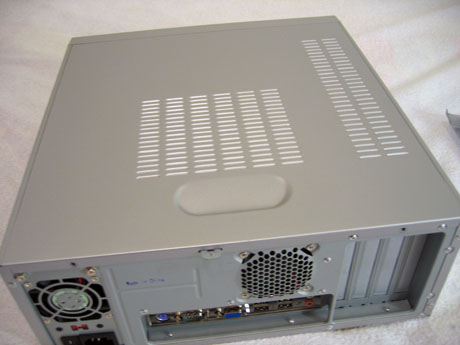
Looking at the backside of the HTPC 100 case, we notice that it will only accept uATX boards, since there are only 4 expansion slots. We also notice that there is only one area to mount a fan, so we may see some poor thermal performance in our benchmarks.


 Facebook
 Twitter
 RSS
RSS


34 Comments
View All Comments
monsoon - Wednesday, September 7, 2005 - link
hola,i want my HTPC to be a full fledged double-core AMD PC capable of running everything, with double 5'25" front bays and silent.
so, what'S out there today to realize such a project ?
it's been almost a year since this shoot-out, and i would really love to see some commercial products ( already assembled or cases only ) to match these needs.
120mm fans anyone ?
passive cooling ( or should we wait for the coming laptop double-core CPU releases ) ?
thanks for reading this,
cheers
rdunnill - Friday, January 28, 2005 - link
Quote: "There isn't anything requiring these large cases except a gaming video card"To the contrary, I use a Holo3Dgraph-I deinterlacing card, which is full-height and thus requires a modestly-footprinted case like the NMediaPC.
rdunnill - Friday, January 28, 2005 - link
I am considering the NMediaPC case due to its small footprint.Footprint barely received mention in the review, but it's important to me, because the space in my HT cabinet is small.
mindless1 - Thursday, December 30, 2004 - link
JKing76, the distinction is not "just playing movies". There isn't anything requiring these large cases except a gaming video card, or to look at it another way, stuffing so many cards in that you can't get a riser to work and need a larger power supply too. Perhaps if you need more than 2 HDDs, that's an issue too... but most won't.Games <> Home Theater
Some can't grasp that, and that's OK, there SHOULD be cases suitable for building living room gaming boxes, but that does not begin to mean HTPC cases per se, should be this large.
goku21 - Thursday, December 30, 2004 - link
What about doing a project/review on a HTPC you build yourself? Go all out and instead of using a HTPC case use a SFF case or something. Be a little different about it.That's something I'd like to see. Perhaps something interactive where all the readers can vote on what types of components go into it and what not.
Of course that's just my stupid opinion =)
PuravSanghani - Wednesday, December 29, 2004 - link
We gave our Editor's Choice Award to the SilverStone LC10/M because it has a combination of great features (VFD Text display, room for expansion with more HDD mounting space, the ability to install a full ATX board and power supply, as well as an optional multimedia kit since MS Windows Media Center is not sold on store shelves just yet). Bias is not one of the reasons we chose the LC10.The HTPC100 is a great out-of-the-box solution if you want a simple barebones system. It performed well in our thermal and sound benchmarks. The case, however, does not have much room for expansion, only supports microATX boards, and does not have a text display. Although, for its performance in thermal and sound we believe it is a worthy competitor to the LC10.
We hope this clears up some confusion in our regarding our conclusion of this roundup.
-----
Nintari, Mindless, mcveigh: We chose these components because many boxed Home Theater PCs come with hardware similar to our configuration. A media center PC, in our definition, is not just a PC with a TV Tuner slapped in it, but rather a fully functional PC with the ability to process home theater content.
Definitions of the HTPC will vary by user and the purpose of the HTPC in their home theater setup.
During our testing we do not install a TV Tuner card but we do process content like playing a DVD and video games to simulate operations during normal PC use with this "standard" hardware.
-----
#27: Feel free to let us know of any errors in the article and we will be more than happy to fix them. Thanks.
Purav Sanghani
Clint - Wednesday, December 29, 2004 - link
All three vendor links for the Silverstone case show a completely different case (though they all match one another).ElFenix - Tuesday, December 28, 2004 - link
I've asked for years: please hire an english major to edit your articles. The sentence structure of this article is even worse than most of the articles around here.JKing76 - Tuesday, December 28, 2004 - link
Sorry mindless, I don't buy your definition of HTPC. I consider an HTPC to be a computer you'd keep hooked up to a home theater system full time. You want a tiny, low-power PC just for playing movies, well, that's your choice. But there's no reason big screen, high-quality surround sound gaming support can't be part of a HTPC.geogecko - Tuesday, December 28, 2004 - link
Personally...the best HTPC case money can buy...http://www.atechfabrication.com/products/heatsync_...