



Microsoft Surface Review
by Anand Lal Shimpi on October 23, 2012 9:01 PM EST- Posted in
- Tablets
- Microsoft
- Mobile
- Surface
- Windows RT
Battery Life
Surface features an integrated 31 Wh battery, which is larger than what’s in the iPad 2 but smaller than what Apple used for the iPad 3. Charging duties are handled via a 24W power adapter with a custom magnetic connector.
Of all of the aspects of Surface, the charging connector feels like the least well executed. For starters, the connector is quite long – about twice the length of a MagSafe connector. Secondly, the magnets in the connector aren’t all that strong so the attraction to Surface isn’t very confidence inspiring. The third issue is alignment. Because of the 22-degree beveled edge on Surface, you have to approach mating the power connector to the tablet very carefully. More often than not I’d have the connector match up but not fully connect. It usually required a few minor adjustments to get the connector to actually start charging. My final complaint is about the power indicator LED on the connector itself. The LED only glows white and gives no indication of whether or not the device is done charging. Furthermore, it doesn’t even glow all that bright, making it hard to tell in daylight whether the device is even getting power. I’m pleased with virtually all aspects of Surface’s physical design, but the charging port and connector need to be redone for the next generation.
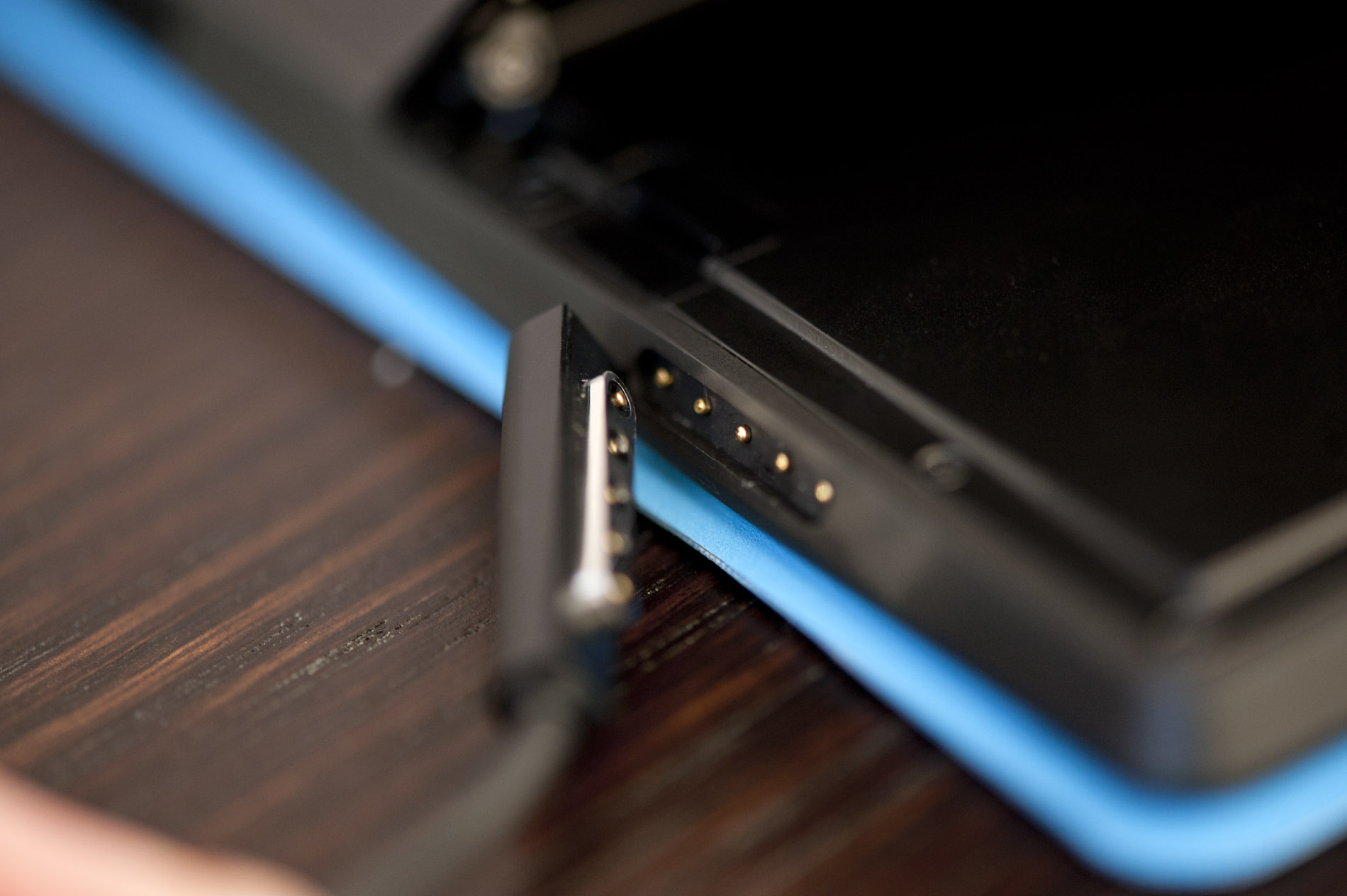
The power adapter itself is larger than the 10 – 15W units you get with most tablets in this price range, but it is also a considerably larger power supply. You can take Surface from completely empty to fully charged in a little over 3 hours hours. You can also get Surface up to 50% power, while using the device, after just over an hour of being plugged in. Microsoft wanted to prioritize real world productivity scenarios where you had a limited amount of time to charge but also needed to use the device. The larger power adapter and not gigantic battery were the right balance to meet those needs.

The power brick features a Windows RT logo, but is otherwise clean. The surface of the adapter is a nice soft touch plastic. The two prongs for US models stow away neatly in the adapter. The power cable is nice and long at around 1.5m. There’s no built in cable management other than a little U to keep the connector attached to the end of the cable.
To measure battery life I put Surface through our 2012 tablet battery life suite. All tests were run with the display calibrated to 200 nits and with Surface, its Touch Cover was attached.
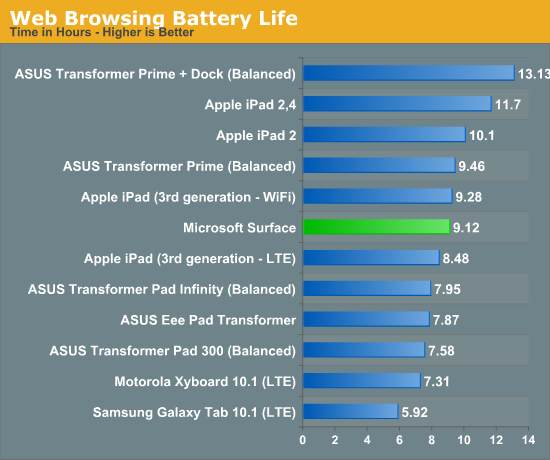
Overall battery life is pretty competitive with the iPad. In lighter use cases Apple pulls ahead slightly, but if you look at our updated web browsing test the heavier CPU load pushes Surface ahead of the third gen iPad. It’s not clear how the 4th gen iPad would stack up in this comparison.
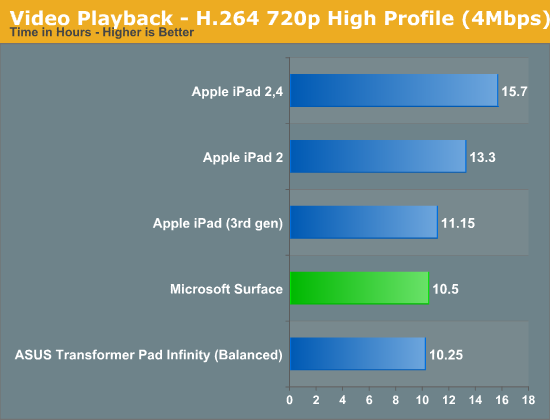
Video playback is also decent for Surface, although Apple manages to pull ahead with the win there as well. The bigger accomplishment is that we’re seeing a Windows device with battery life that’s comparable to other tablets running mobile OSes designed from the ground up.
Microsoft has the right OS platform to be competitive in this space. With some more power efficient hardware I could see a future iteration of Surface moving its way up these charts.


 Facebook
 Twitter
 RSS
RSS


235 Comments
View All Comments
bogieworf - Thursday, November 29, 2012 - link
While I cannot disagree that it would be better to wait and see how these windows tablet/PCs shake out, this is still an exceptionally well sorted out product for a first try. If you need a tablet with the qualities this tablet has, there is no reason to wait. The next gen will be better (aren't they all, pretty much???), but I doubt that it will be dramatically better. The only competition on the horizon right now is the Lenovo Yoga 11 which will be more expensive, probably heavier, and definitely thicker. I don't think this will be much competition (But I do like the Yoga 13 which is a different device aimed at a different market).The next gen will be better, but this is a solid device and it is good enough today to buy IF this tablet meets your needs
bogieworf - Wednesday, December 12, 2012 - link
After using the Surface for several weeks and talking with co-workers who are in the market for a tablet/laptop, I have to reluctantly give the Surface a failing grade. MS has positioned the Surface as the productivity tablet. The catch is that you have to offer enough productivity for people to care about your device and buy it over an comparably priced iPad.The problem is NOT RT or anything taken out out Office to make it work on the Surface. For the vast majority of people, this is a secondary device and those compromises are fine. Heavy word processing or other productivity will be done on a bigger, more capable device.
Rather the problem is that many, if not most offices, have some SW which has to be downloaded onto your computer in order to access their network and Surface won't let you do that. That is a MAJOR omission. The Office suite covers close to 100% of what most people would do with a tablet like this, but I HAVE to be able to connect to my office!!!
A second and basically related issue is that there is no cellular option. This is a highly portable device and I need the option to connect to my Office on the go. That is not possible with the Surface.
With these two options, the Surface would work for most people as a media tablet with secondary, but meaningful productivity capabilities. Without them, the Surface RT just does not offer enough productivity for most people to prefer this device over an iPad.
bogieworf - Thursday, December 13, 2012 - link
Sent my comments to MS regarding the need for the Surface RT to connect to offices. Their response: the Pro will be available in January. While I do not think the Surface is a direct competitor with the iPad, the iPad does set the top price that people expect to pay for a tablet. If you are gong to price your product at the top of the market, you need to make sure the value proposition is there. Just not convinced that the productivity offered by the RT is sufficient to justify the price if you cannot connect the device to your office (or college).Kit Karamak - Wednesday, February 26, 2014 - link
when paying for iPad, you're also paying for a device that has lots of apps, a vast bevvy of choices, etc.The MS Store stinks, let's face it. Some people would rather get a 16GB ipad2 referb with all the apps they know and like, than to get a surface 32GB that has expandable microSD space, because the apps stink. :(
I have both. I use both for what I intend them for. But not everyone has that option. Then again, having all these gadgets also means I don't own a TV or pay for cable as my trade off. It is what it is. But both devices are great for what they do best. :)
Of course, I waited until the surface came down to $199 on eBay, and yet I bought the iPad Mini 2 /Retina at full price. Ironically, I'm an Android fanboy lol
Kit Karamak - Wednesday, February 26, 2014 - link
Now that you can find the Surface RT on eBay, refurbished by Microsoft with 8.1, for a low price of $199 in mint condition, I've decided to take the plunge.I'm glad I did. I'm an aspiring novelist. I type a lot, and 8.1 seems to be quite smooth. It runs great. Typing doesn't slow things down one little bit.
The first gen RT runs Grand Theft Auto: San Andreas very well, and I can use my xbox 360 controller to play it. In desktop mode, I can have twitter open in the desktop browser, I can have outlook polling for email, I can type a document and have Facebook up all at the same time. Or more if I want. People often say to get rid of Metro UI for desktop w8, and get rid of desktop for Surface RT/2, but I disagree. Having the desktop mode is fantastic for having ten different windows open (or more if you can squish everything down lol), and the RT, for me, keeps up fairly well.
W8.1 seems to have fixed things people have complained about. I cannot say much more on the subject because I've only owned the tablet for two days, now.
Touch cover is good, two finger scrolling works fine. Type cover is NOT very good. It doesn't let you use the mouse and keys at the same time, meaning you cannot game; these covers do not handle several key strokes at the same time either. Just two or three. In other words, don't expect to use it as a piano replacement for a piano app, or something like that. (I can't really think of a better example at the moment).
Battery is good. Brightness and darkness is good. I hate having things bright when I'm reading at night. And while it's kind of weird to read on this monster-length screen, it can get darker than my iPad 4, which is great when you're in a ridiculously dark room (or re-reading /revising in the dark with a Migraine - yeah I've done it).
moving on, I have to say the microSD card moves fairly quick. As fast as you'd expect from a desktop version of the same thing plugged into a USB2 header on the mobo. It's not searing fast, and it's no slouch either.
The Microsoft store, for gaming, sucks horribly. If San Andreas wasn't on there, I wouldn't even have anything nice to say at all. But I'll take what I can get. Netflix app is good. Always appreciated, y'know? I wish YouTube had one as well, so that you could watch high def videos for long periods of time in an optimized state but... that's okay. Google only has one app for the MS Store - "Search". And that's it.
Speakers are horrible. They're loud enough for watching Netflix, sure. but if you play music or crank them for something other than TV show compressed dialogue sound... then they will distort when you've got the volume up. Not badly. But if you listen to dynamically compressed music (any modern rock or rap or pop group), which is dynamically boosted in the mastering process... then you can be SURE it will distort a little. As an example, the first Foo Fighters album (at full volume) does not distort. But the new Falling in Reverse album distorts horribly. The Chronic (Dr Dre) no distortion. New Eminem? ...Crazy distortion.
RT is supposed to get only 5 points of touch at one time. I have no idea if this is hardware or software based. PRO gets 10, so I've read.
Also, plugging in a 24" Dell 1920x1080 to the first gen RT works fine. At least for me on 8.1 ... but don't expect to game on it. Use it for writing, or having a website open off to the side, or keeping Facebook open while you watch Netflix on your smaller monitor... or just use it for Netflix on your TV and do nothing on the touch screen.
I have NOT tried to see if sound is sent out through the HDMI port. I suspect it should, but I haven't yet tried it, as there are no speakers in my 24" Dell. Sorry, gang.
Finally, battery has been great. It's onpar with my iPad1 and son's iPad mini (1st gen) which have been the best for iPad battery life that I've seen so far (I own the 1, used to own the 2, owned the 4, and an ipad mini2 with retina. The 1 and my kid's Mini1 have the best iPad battery life of the group).
The surface holds its own easily with the 4 I used to own and the mini/retina I currently use.
Finally, as a closing comment, I can plug in my Apple keyboard, which has a USB hub, and it will still power a mouse, connected through the keyboard. It powers two devices. I'm quite happy with that. It makes things a lot easier, to be able to bypass the need for a powered hub is huge for me.
When I'm on the go, I use a Microsoft Bluetooth Entertainment 7000 keyboard. Most of the extra keys work - Volume rocker, dedicated back key, etc. But a lot either doesn't, or isn't marked properly. Fn-F4 has a "home" picture (and when paired to an iPad DOES take you 'home'), but on the surface, it opens the mobile metro version of Internet Explorer.
Also, the other buttons do nothing (magnifying, favorites, music app, camera button, calling button, gadgets obviously, etc). However, the built in mouse it has on the side works great. So that's awesome. I use that most of all. It pairs instantly. As soon as I turn on the keyboard, it starts working right away with Surface. There's no lag time in re-pairing.
If you've read this far... well, thanks for reading! I hope it helped!
I don't know why these websites don't re-review products that have been out for a while. Obviously iPad1 with iOS5.1 and iPad2 with iOS7, and Surface1 with W8.1 are going to work very differently than when they were reviewed. Some things will be better, some will be worse (like battery life on the iPad 4, LOL. Got it became awful later on).
I'd like to suggest to these tech sites to do a "Where are they now" kind of segment to show people interested in buying older tech (IE from ebay) how these devices stack up.