



Western Digital’s Advanced Format: The 4K Sector Transition Begins
by Ryan Smith on December 18, 2009 12:00 AM EST- Posted in
- Storage
What Operating Systems Are Affected
Now that we’ve dealt with what 4K sectors are, why Western Digital and other drive manufacturers are switching to them, and what the potential pitfalls of 512B emulation are, we can look at the specific cases where there are potential problems.
The big problem is that while the first work on 4KB sectors started in 1998, it wasn’t until after the launch of Windows XP that the matter came to a head. As a result the 5.x versions of Windows (2K, XP, 2K3, WHS) have no concept of 4KB sectors. Even though all operating systems will be seeing 512B sectors through the use of emulation technology on the drive controller, out of Windows only Win 6.x (Vista, 2008, Win7) and later have been programmed to take in to account the alignment issues we mentioned earlier. Win 5.xx in particular has a nasty habit of starting the first partition at LBA 63, which is 1 512B sector misaligned from a 4K sector boundary. In essence, the issue is that Win 5.x will always create a misaligned first partition and will have poor default performance as a result.
Although Win 5.x is the primary victim here, other versions of Windows can also be affected in edge cases. Along with the need for 4K-aware operating systems, drive imaging software needs to be 4K-aware. Otherwise such imaging software may inadvertently create misaligned partitions too. As such, Win 6.x is also affected by alignment issues when imaging software is used, as some (and perhaps all?) imaging products currently available will write misaligned partitions and/or clusters.
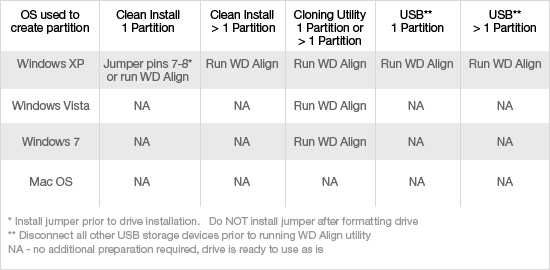
Notably, Linux and Mac OS X are not affected by this issue. Western Digital has tested both of these operating systems, and officially classifies them as not-affected. Ultimately we suspect that if you went back far enough you could find older versions of these OSes that are affected, but unlike Win 5.xx, there’s not a significant legacy user base to worry about. Along these lines, Linux and Mac OS X drive imaging products are similarly unaffected. In their testing, imaging tools such as SuperDuper didn’t run in to any alignment issues, so Linux and Mac OS X users are not affected in any way by 4K sectors. It’s only Windows and Windows imaging products that are affected.
In order to solve the misalignment issue, Western Digital is offering two solutions. The first solution for correcting misaligned partitions is specifically geared towards Win 5.x, and that is an option on the drive itself to use an offset. Through the jumpering of pins 7 and 8 on an Advanced Format drive, the drive controller will use a +1 offset, resolving Win 5.xx’s insistence on starting the first partition at LBA 63 by actually starting it at LBA 64, an aligned position. This is exactly the kind of crude hack it sounds like since it means the operating system is no longer writing to the sector it thinks its writing to, but it’s simple to activate and effective in solving the issue so long as only a single partition is being used. If multiple partitions are being used, then this offset cannot be used as it can negatively impact the later partitions. The offset can also not be removed without repartitioning the drive, as the removal of the offset would break the partition table.
The second method of resolving misaligned partitions is through the use of Western Digital’s WD Align utility, which moves a partition and its data from a misaligned position to an aligned position. This is the recommended solution for using multiple partitions under Win 5.xx, along with correcting any misaligned partitions generated by imaging software. For that matter we’d consider it the recommended solution for single-partition drives being used under Win 5.x too, as there’s no need to worry about offsets and breaking the partition table.
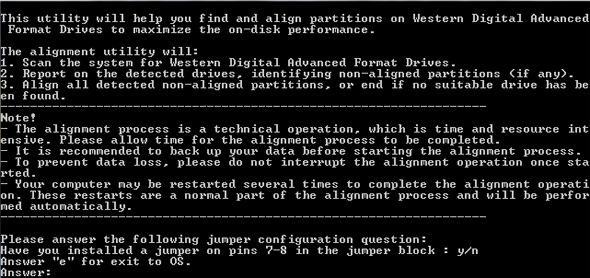
The utility is available for download from Western Digital’s site, and while it isn’t pretty (it’s a scripted CLI application) it gets the job done. The amount of time needed to run the utility is based on the amount of data that needs to be moved rather than the partition size (it simply ignores empty space), so it’s best to run the utility immediately after creating a partition or installing Windows, as there’s less data to move around.
Unfortunately, at this point the utility also serves as the only way to identify an Advance Format drive without physically looking at it. Looking at the ATA spec, it looks like there’s a provision for asking a drive its native sector size (regardless of 512B emulation) but at this point there’s no such tool beyond the WD Align utility itself. This in and of itself isn’t a big issue, but if you’re a techie that ever finds themselves working on an XP machine with a 1TB+ Western Digital drive, you’ll want to keep an eye open.
The First Drives & The Future
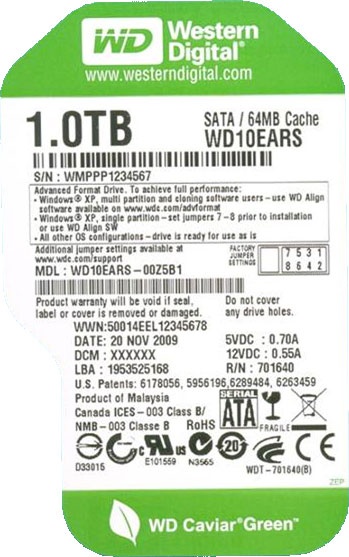
So what are the first Advanced Format drives and when are they due? The first drives will be Caviar Green drives using multiple 500GB platters – so the 1TB, 1.5TB, and 2TB Caviar Green. These drives will be shipping any day now, and can be identified through two different methods: 1) They all have 64MB of cache - the first WD Caviar Green drives to come with that much cache - and 2) They all have EARS in the drive model number, e.g. WD10EARS.
As we stated before, in spite of the benefits of 4K sectors, Western Digital is not pushing these drives as part of any major product launch. Rather they’re going to be quietly trickling in to the marketplace. Expect a price premium at first (as with any other new product) before settling down. We don’t have a drive on-hand to review, but from the fact that this is a low-key launch, WD isn’t painting any expectations of a performance difference, although this will be something to test in the future.
And on that note, expect to see similar launches from everyone else within the next year. The last IDEMA plan called for everyone to have 4K-sector drives by 2011, so everyone should be launching within the next year here. Everyone using 512B emulation is going to run in to the same teething issues with Win 5.x – so while other vendors may handle things slightly differently, ultimately everyone is going to be compensating for Win 5.x in some manner (in case it hasn’t been made clear here, these guys would be ecstatic for Win 5.x to go away quickly).
Farther down the road will be the exposure of 4K-sectors to the operating system itself. Linux and Win 6.x are set (and we believe that Mac OS X is too), the only limit right now is the desire to do a phased transition to make thing easier for legacy users. Since 4K-sector drives won’t work on Win 5.x at all, drive manufacturers can’t put them on the market so long as there’s a significant legacy base. 2014 – the year that extended support ends for WinXP – looks like a good year to finally complete the move to 4K sectors.


 Facebook
 Twitter
 RSS
RSS


86 Comments
View All Comments
Donuts123 - Sunday, December 20, 2009 - link
The "problem" with Windows XP and earlier (and many other OSes) is that they create partitions which are not aligned on a 4KB boundary.If you're installing XP on a new drive, the workaround is to partition the drive correctly before installing XP, and have XP install into the existing partition. You can use a Linux boot CD, but you might need to use command-line tools to ensure the partition is aligned, so that's not for novices.
So, what's the effect on performance when using a drive with 4KB physical sectors? If your partition is correctly aligned, there should be no performance decrease. The OS filesystem cluster size defaults to 4KB, so all reads and writes will normally be done in multiples of 4KB anyway. Since there is an effective areal density increase due to the larger physical sectors, you can expect 4KB-sector drives to have a higher data transfer rate than an equivalent 512-byte-sector drive.
So "it's all good", providing your partitions are aligned on a 4KB boundary.
If the partition is not correctly aligned, each filesystem read of n 4KB clusters requires the drive to read n+1 4KB physical sectors. The performance impact of that will be pretty small I think. Most filesystems have a read-ahead feature that reads in larger chunks anyway. The worst-case would be a 4KB random-read benchmark, and even there, no extra disk revolutions are needed.
Writes are the big problem. The impact will be decreased to some extent due to the drive's cache and the computer typically writing data in larger chunks. But read-modify write requires more revolutions of the disk. Each revolution takes 8.3ms for a 7200rpm drive. The worst-case scenario will be much slower than a 512-byte-sector drive.
Consider a 4KB random-write benchmark, i.e. one that writes 4KB of data to random places on the disk. (If your partition is not aligned, then none of the 4KB clusters are aligned.) For each 4KB write, the drive has to do this:
- Read two 4KB sectors.
- Wait while the disk makes one revolution (1/120th sec for a 7200rpm drive)
- Write back the two modified sectors
For every write in that case, an extra revolution of the disk is necessary. The actual worst-case scenario is even worse, but unlikely to be a problem in practice. Consider the case where the two sectors that the drive needs to read are on adjacent physical tracks. (The computer typically won't know where physical track boundaries are.) Then to write a 4KB sector, the drive needs to do this:
- Read the first sector (last sector of a track)
- Wait for a disk revolution
- Write the modified first sector
- Seek to the next track
- Read the second sector (first sector of the track)
- Wait for a disk revolution
- Write the modified second sector
So that requires two extra disk revolutions and a seek.
Solid-state drives have many of the same issues, along with a limited number of flash write cycles. Typically, the SSD flash page size is 4KB. If you use an SSD, you can improve drive performance and lifetime by ensuring your partitions are 4KB-aligned.
For what it's worth, drives with larger-than-512-byte sector sizes have been around for years. Magneto-optical (MO) drives first appeared in the late 1980s, and could use disks with 1024-byte sectors. (In that case though, the drive doesn't emulate a smaller sector size, so there is no problem.)
9.1GB MO drives, which first came out in late 2000, can use disks which have 4KB physical sectors, but the drive emulates 512- or 1024-byte sectors. Just like these new 4KB-sector hard drives.
DVD-RAM discs have 32KB physical sectors, but emulate 2048-byte logical sectors.
nowayout99 - Saturday, December 19, 2009 - link
I can't imagine wanting one of these drives until after the transition. Who would want the performance hit?leexgx - Saturday, December 19, 2009 - link
windows 7 own disk backup i am quite sure is alignment aware as welljohnsonx - Saturday, December 19, 2009 - link
I think Steve Gibson better get off his arse one of these days and update Spinrite. I suppose it will probably still work on 4KB drives, but I suspect it will be VERY non-optimal. It needs better support for modern SATA interfaces anyway, so it's time.TechDicky - Friday, December 18, 2009 - link
"Along with the need for 4K-aware operating systems, drive imaging software needs to be 4K-aware. Otherwise such imaging software may inadvertently create misaligned partitions too. As such, Win 6.x is also affected by alignment issues when imaging software is used, as some (and perhaps all?) imaging products currently available will write misaligned partitions and/or clusters."That is not true of file based imaging such as WIM.
ppelleg - Sunday, February 21, 2010 - link
I think it's correst, instead!!!When You clone to an empty drive, the disk cloning/imaging software must create the destination partition that MUST be 4K boundaries aligned so they MUST be 4K aware.
I can state it for sure, as I run into the problem!!! After cloning my 500GB to a 1TB WD drive I got a very slow system...
Problem solved using WD utility
puffpio - Friday, December 18, 2009 - link
they talk about using jumpers on the drive to provide various workarounds to the 512b address mapping.what about a jumper to say "address w/ 512b" which is enabled by default and if you pull the jumper, the hdd will bypass that translation layer and allow direct 4kb addressing?
yuhong - Friday, December 18, 2009 - link
Don't forget the 2TB MBR barrier too, which will require either an increase in the sector size that is presented to software, or an move to GPT.hechacker1 - Friday, December 18, 2009 - link
Yeah, when I initialized my 3x7200.11 raid5 array I had to use GPT.Does anybody happen to know if Windows 7 (intel matrix raid) automatically align's the disk correctly? I have tried searching google but Windows 7 and Intel Matrix has me confused.
I am not sure if Windows 7 knows about the underlying disk structure of the matrix raid?
Thanks to anybody who knows.
leexgx - Saturday, December 19, 2009 - link
windows vista/2008 or higher are aware of alignment and norm correctly set the partitions correctlyif you run diskpart there is an option you can pick to show if it has been incorrectly aligned or not (not sure where thought or there is an tool that lists it)