



Mobile Core i7 920XM, Clarksfield: Nehalem on-the-go
by Jarred Walton on September 23, 2009 10:00 AM EST- Posted in
- Laptops
Good morning and welcome to Fall 2009 IDF week! As usual, Intel has a ton of stuff to discuss at the Intel Developers' Forum (IDF). Most of the truly exciting stuff shows up first on the desktop - things like Larrabee and Sandy Bridge. Those of us who dwell more in the mobile market tend to get leftovers, but sometimes things taste better after they've had some time to age properly.
Not quite one year since the official launch of Nehalem for desktops and servers, Core i7 is officially making its way to notebooks. The processor is called Clarksfield, but it's essentially a mobile variant of Lynnfield. If you haven't read anything about Lynnfield, you might want to start with our thorough look at the desktop CPUs. Of course, there are some differences between Clarksfield and Lynnfield. Lynnfield processors use LGA-1156 for example, while the mobile Clarksfield uses a smaller 989-pin socket. Clarksfield also comes with new model numbers, naturally.
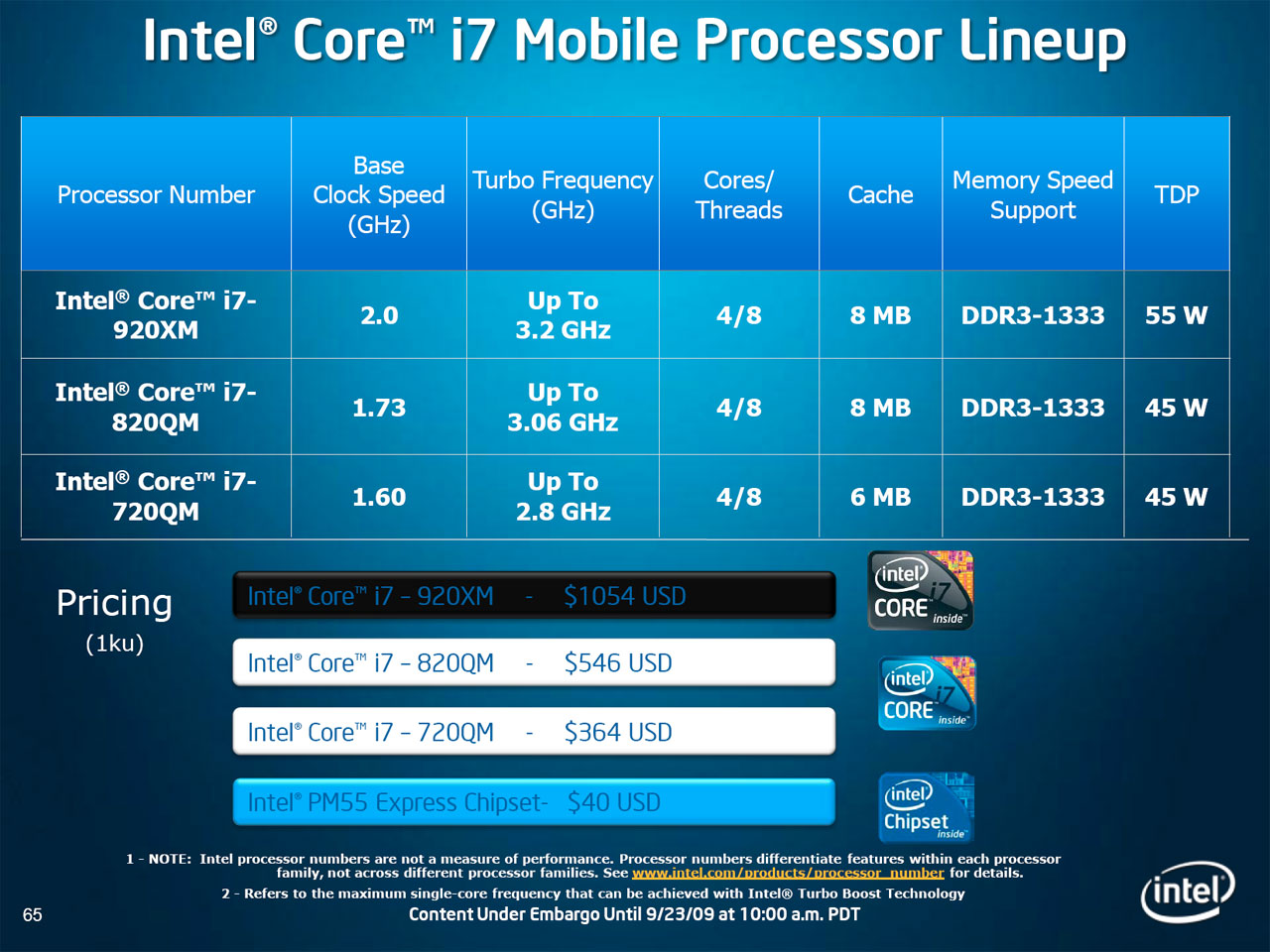 |
Initially, Clarksfield is launching in three variants: i7-920XM, i7-820QM, and i7-720QM. The i7-920XM is an Extreme Edition processor, designed to replace the Core 2 Extreme QX9300. Like all Extreme processors, the i7-920XM carries a price tag of around $1000. If you want the latest and greatest, it's going to cost you. The i7-820QM drops performance slightly and cuts the price in half, with the i7-720QM as the "affordable" alternative. Unlike Lynnfield, all of the current Clarksfield parts have Hyper-Threading enabled. The Turbo modes are also aggressive on all of the models, but multi-core performance will definitely favor the i7-920XM.
| Codename | Market | Cores | Manufacturing Process |
| Bloomfield | Desktop | 4 | 45nm |
| Lynnfield | Desktop | 4 | 45nm |
| Clarkdale | Desktop | 2 | 32nm |
| Clarksfield | Mobile | 4 | 45nm |
| Arrandale | Mobile | 2 | 32nm |
One of the interesting presentation points from Intel concerns the question of why Clarksfield is important - after all, don't most people just use a desktop anyway? Intel provided the following slide:
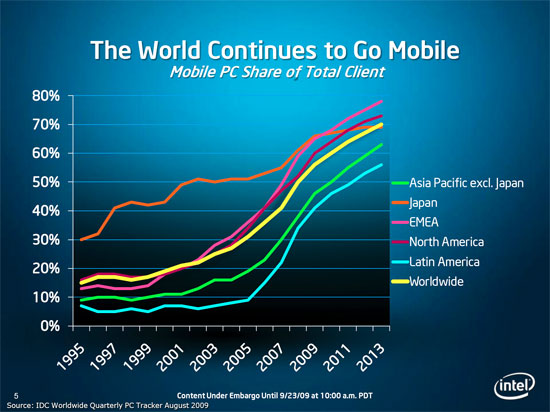
There will always be a case for using desktops (and servers, workstations, etc.), but there's a growing trend in the world to move towards laptops. The gap between desktops and laptops has always been rather large, and honestly it still is. The fastest laptops currently available are about equal to what you could get on the desktop at least two years ago, give or take. Getting mobile i7 CPUs at least narrows the gap somewhat. Comparing Clarksfield and Lynnfield, maximum base clock speeds favor desktops by just under 50% while Turbo speeds for a single core bring Clarksfield within 13% of Lynnfield. While that's nice, it doesn't change the fact that desktop GPUs are still a couple generations ahead of the mobile parts.
Anyway, we are here to talk about Clarksfield today. This is a first look as we are still performing additional tests - yes, we have a Clarksfield notebook - but we will follow up with a complete review of the highest performing notebook solutions. For now, let's quickly go over the Clarksfield basics, look at some of the material from Intel, and compare performance in a few benchmarks.


 Facebook
 Twitter
 RSS
RSS


63 Comments
View All Comments
JarredWalton - Wednesday, September 23, 2009 - link
Regarding the "max brightness", that was actually incorrect. I used new values for the laptops with the LCDs always at 100 nits. It's still not a perfect comparison, since one LCD at 100 nits might use 3W and another could use 8W depending on size and backlight technology, but it's closer than using the max brightness (as your comments indicate).FWIW, Core 2 Quad QX9300 and the i7-920XM appear similar in max power draw but with the i7 part having far better idle power. A C2Q with two 10W CPUs would end up running at 1.6GHz tops and use ~20W TDP, but idle power still won't be as good as the 920XM because of Power Gate. What would be really interesting would be Power Gate tech moved into Core 2 CPUs, but that ain't gonna happen anytime soon I suspect. :)
gstrickler - Thursday, September 24, 2009 - link
Can the QX9300 on the Eurocom system be clocked down to 2.0GHz? Can you disable Turbo and HT on the Core i7-920XM on the Clevo W87CU system? If so, you could compare a C2Q @ 2.0GHz vs a 920XM @ 2.0GHz (with and without HT). Run CPU (not GPU) intensive tasks and see how they perform and how much load power they each use. That should give a good indication of the relative instructions per clock of the two architectures as well as the performance/watt.There is no need to repeat any of the gaming tests, just a couple single threaded and multithreaded CPU intensive tests and idle and full CPU load power usage. It might let us put to rest the lingering questions of whether C2D or Core i7 is a better core architecture for mobile systems.
Granted, there are still other system differences that we can't eliminate, but as long as SLI is not enabled on the Eurocom system, we can get them to be fairly close.
gstrickler - Wednesday, September 23, 2009 - link
Agreed. Aside from better power management (power gating and turbo mode), I'm not yet convinced that the Core i7 is more power efficient than C2. I don't expect to ever see it, but a C2Q with the power management of the i7 might make an excellent laptop CPU.As for the "Max brightness" comment, I was addressing the other poster's reply about tests of the Dell Studio 16, don't know the 100nit level was used there, but as noted, power can still vary significantly.
JarredWalton - Wednesday, September 23, 2009 - link
Arrandale is what we want, really: dual-core with HyperThreading. That should cut maximum CPU power use down substantially, and there will be 25W and 35W parts (and likely 17W as well). Restricting Turbo modes to lower clocks will also help. Right now, Clarksfield is max performance within a much greater thermal envelope than most laptops allow.Wolfpup - Thursday, October 15, 2009 - link
*I* want a quad core laptop! No question dual core is kind of anemic anymore. I mean it's been silly to go dual core on the desktop for YEARS, yet we're still stuck mostly with dual core on notebooks :-/I'm really more interested in how those 1.6 and 1.73Ghz parts do versus faster clocked Core 2 duos and quads. The clock speed obviously is kind of frighteningly low, so I sort of need to see benchmarks that 1.6 or 1.73 actually gives you a competent system (I'm sure it does, but...)
And yeah, I game on my 2.4Ghz Penryn dual core with mobile Geforce 9650GT. I'd like better, but a desktop isn't an option for me anymore, so I'll just upgrade my notebook as needed :)
gstrickler - Wednesday, September 23, 2009 - link
While Arrandale is promising, I would be similarly interested in a 25W C2Q. Since they can make 10W and 17W C2D, they should certainly be able to make 25W and 35W C2Q. Arrandale should be faster when running 1 or 2 threads, but a 1.6GHz C2Q @ 20W TDP (2 x SU9600) should perform as well or better when running all 4 cores. As a bonus, the C2Q could work with the Nvidia 9400M chipset, for very good IGP performance, add an optional discreet GPU for those who want something faster. Until Intel demonstrates that they can actually deliver a good IGP, Arrandale doesn't sound all that wonderful. Just a thought.gstrickler - Wednesday, September 23, 2009 - link
Let me clarify a bit. I would be far more interested in the Core i# CPUs if it didn't have an Intel GPU built in and if I had an option of a good non Intel chipset. Since Intel and Nvidia seem to be in a pissing contest over the licensing that would allow Nvidia to build an i# compatible chipset, the future of a low power CPU, chipset, and GPU (that doesn't suck) looks questionable on Arrandale.For those of us who don't need a discreet GPU, but want decent graphics performance AND excellent battery life, an all Intel solution does not look promising. At best, it looks like a 25W Arrandale with an Intel chipset and a discreet low power ATI or Nvidia GPU.
While HT on the Core i# CPUs is better than HT on P4, it's still nowhere near the benefit of doubling the real cores. I would rather have a non HT (e.g. Core i5) based quad core than Arrandale.
yacoub - Wednesday, September 23, 2009 - link
55% market share is laptops but they don't mention if those people also own a desktop - or more importantly, build their own desktop.When you consider that more and more of the people who want a desktop are enthusiasts who build their own, and those numbers aren't going to be counted in desktop sales which only considers the pre-built big-box manufacturers like Dell, etc, you realize that chart means little.
So in reality the chart is a great marketing tool: It's "true" in one sense, but it doesn't tell the whole story.
jordanclock - Thursday, September 24, 2009 - link
Pre-built machines from Dell, HP, Apple, etc. account for the vast majority of systems sold. Custom built computers are a niche. I suspect custom build computers would be lost in the margin of error.pervisanathema - Wednesday, September 23, 2009 - link
What means little is your phantom statistic "when you consider that more and more of the people who want a blah blah blah."That' your opinion. You have no evidence to back that up. My opinion is that you are very wrong and that most people just buy the cheapest prebuilt rig they can find.