



Okay, but what IS application virtualization?
The reason we found it rather hard to describe application virtualization is that it has such a broad meaning. In order to understand it, we first need to go over the different kinds of virtualization.
When first confronted with this term, many people will instantly link it to hardware virtualization. Although hardware virtualization can also be divided into many subcategories, that is not the focus of this article. Hardware virtualization is essentially an entire set of simulated hardware that an operating system can run on, and the complete package is what we call a virtual machine (VM). The VM is completely independent from the host OS and can easily be moved around and run from a different machine, even with a different host OS, as long as the required management software is present.
There are two main types of hardware virtualization, one that based on the use of a hypervisor (ESX, Hyper-V), and one that functions as a software package running on top of host OS (VMware Server, Parallels Desktop). The hypervisor runs directly on the hardware, functioning as a low overhead virtual machine manager. Software packages offer similar functionality but with increased overhead.
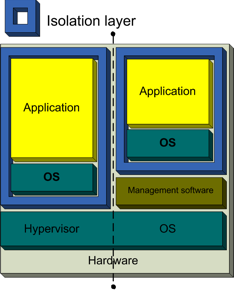
Hardware virtualization consists of two areas. The guest OS and applications are unaware of their virtualized state, and function as though they have sole access to the computer hardware. In reality, they talk to the hypervisor or management software, which takes care of routing the calls to the actual hardware. This is a technique regularly used by companies to consolidate older servers and for running less demanding servers. A major benefit is that there is no need to purchase a new system for every new service they wish to offer. It's also used quite often for development testing purposes, due to its sandbox nature (you can test on multiple OSes simultaneously on a single physical computer), and even in the consumer market people use hardware virtualization as a means to run different OSes at the same time (i.e. a full Linux installation running under Windows XP).
Another, less well-known form of virtualization is OS virtualization. Though more commonly used on Linux-based systems (for example by OpenVZ), Parallels Virtuozzo provides a Windows alternative. Instead of simulating an entire set of hardware, the existing OS is "partitioned" to cater to several isolated applications that are all operating under the impression that they have sole control of the OS. Though this remains restricted to the use of one kernel, the partitions can use different distributions and/or drivers and run completely independently. The interesting thing about this approach is that, though different services can run in a completely isolated environment, the amount of overhead created on the host system is greatly reduced compared to hardware virtualization, as there is no need to maintain a complete set of hardware for each partition.
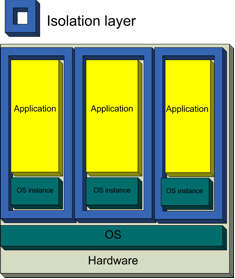
With OS virtualization, every container makes use of the same base OS, while advanced isolation and resource management allow every container to feel like a separate server to its users. The recurring trend in both these technologies is the isolation of certain resources while still allowing applications and software to function normally, unaware of the sandbox state. Virtualization just adds a layer between the physical resources and the software that requires these resources, creating an environment where the resource will no longer influence anything beyond that layer.
When moving to application virtualization, we take another step and follow the same logic, turning applications into isolated, self-contained packages that are able to operate under an OS and use all of its resources, but they are unable to wreak havoc when things go wrong. Because the packages are basically a complete environment they no longer require installation, thus providing extremely easy software distribution along with the safety of a completely isolated application. We'll cover more of the interesting uses of application virtualization later, though.
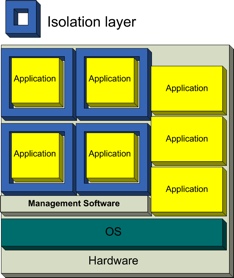
Virtualized applications can run perfectly next to regularly installed applications, and next to each other. This allows a user to run several different versions of the same software at the same time, and can reduce software conflicts to a minimum. While researching this subject, we regularly bumped into a conflict discussing the "two kinds of application virtualization". While the above image in fact applies to either approach, there's a rather significant difference in their usage, so let's cover that first.


 Facebook
 Twitter
 RSS
RSS


11 Comments
View All Comments
Genx87 - Monday, February 25, 2008 - link
About 18 months ago I was introduced to VMWares virtual server. Right now I am in the beginning phases of planning for a Hyper-V envrionment which should consolidate nearly all of our servers onto a few boxes. Easier to manage, easier to backup, easier to migrate, and easier to recover from a disaster.Software virtualization looks like an awesome technology for the IT admins around the world. Being able to spit out a package to a client and roll it back if there is an issue with the latest patch while preserving the OS is a godsend.
I appluad Anandtech for taking a look at these technologies. Virtualization is the way of the future imo.
Olaf van der Spek - Monday, February 25, 2008 - link
Doesn't this basically show that installing applications and keeping them up-to-date is too hard on Windows?Sounds like proper package management instead of virtualization would go a long way to fixing this.
lopri - Monday, February 25, 2008 - link
but intro only.. :PJokes aside, I thought there would be a lot more pages in this article, until I turned to the last page. Great job, wetting others' appetite! Also a joke. Grr..
Anyway, great article and lots of information. Thanks.
ninjit - Monday, February 25, 2008 - link
Reading the article, I kept thinking of Valve's Steam game/content delivery system.If you've ever looked at at the files with the Steam folder, they look nothing like the files that would normally be installed if you had bought the game traditionally on CD/DVD (or direct download from the publisher), yet I don't believe developer's have to change much (if anything at all) in order to have their game delivered through steam.
It appears a game's installed files are placed within virtual disk-files that Steam then manages.
I'm not sure, but I think steam also virtualizes many user settings/ registry entries a game may require - I've been able to move my steam folder about willy-nilly (e.g. from my main drive to a new faster secondary one) and steam (+ my games) still work fine, the only thing that gets broken are shortcuts.
GTVic - Monday, February 25, 2008 - link
Nice article. I believe AMD and Intel are touting virtualization support in their newest CPUs/chipsets particularly on the server side.Is this "hardware" virtualization another type of virtualization. Some info on that would be a nice addition.
Lizz - Monday, February 25, 2008 - link
That is in fact a different kind of virtualization, as explained on page 2 of the article.A more in-depth article on hardware virtualization will be posted very soon, so if you're interested in this subject, I'd suggest waiting on that. Johan will be putting it up later today, I believe. :)
smitty3268 - Monday, February 25, 2008 - link
There's an interesting Linux project called Klik2 in development that aims to provide application virtualization.Less as an enterprise solution and more as an easy way of demoing apps across multiple linux distros, I think.
Doormat - Monday, February 25, 2008 - link
"Using MAV in a streaming environment prevents any of the applications from actually being installed on the client computer (apart from the user's local settings). This means that all applications need to stream to the system over the network every time they are requested, and nothing is actually saved on the client. However, MAV does provide the option to run virtualized apps locally without the use of streaming, should the need arise."Most situations would run the streamed apps over the network the first time, and run them locally from then on. I know thats how our Softgrid is implemented at work. The plus is that Softgrid checks for upgrades whenever the app is started.
Lizz - Monday, February 25, 2008 - link
I was under the impression that only the user's local settings and profiles were saved, to minimize the amount of data saved locally on the client computer. I'll have another look at this in a bit, thanks for pointing it out!anandtech02148 - Monday, February 25, 2008 - link
Overpaid and always whinning, sure its only a few hundred machines to installed, but hey.. overtime is even better pays right?Interesting, will google's cloud computing replace this virtualization someday?