



Server Guide part 2: Affordable and Manageable Storage
by Johan De Gelas on October 18, 2006 6:15 PM EST- Posted in
- IT Computing
Enterprise SATA
So the question becomes: will SATA conquer the enterprise market with the SAS Trojan horse, killing off the SCSI disks? Is there any reason to pay 4 times more for a SCSI based disk which has hardly one third of the capacity of a comparable SATA disk just because the former is about twice as fast? It seems ridiculous to pay 10 times more for the same capacity.
Just like with servers, the Reliability, Availability and Serviceability (RAS) of enterprise disks must be better than desktop disks to be able to keep the TCO under control. Enterprise disks are simply much more reliable. They use stiffer covers, heads with very high rigidity, expensive and more reliable rotation engines combined with smart servo algorithms. But that is not all; the drive electronics of SCSI disks can and do perform a lot more data integrity checks.
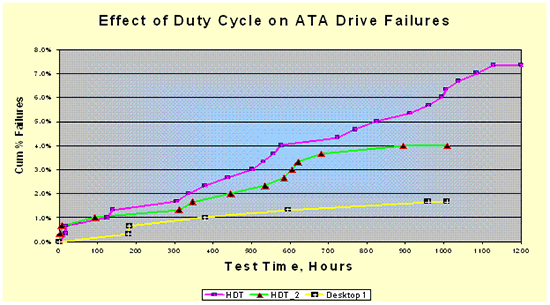
The rate of failures increase quickly as SATA drives are subjected to server workloads. Source: Seagate
The difference in reliability between typical SATA and real enterprise disks has been proven in a recent test by Seagate. Seagate exposed three groups of 300 desktop drives to high-duty-cycle sequential and random workloads. Enterprise disks list a slightly higher or similar failure rate than desktop drives, but that does not mean they are the same. Enterprise disks are tested for heavy duty highly random workloads and desktop drives are tested with desktop workloads. Seagate's tests revealed that desktop drives failed twice as often in the sequential server tests than with normal desktop use. When running random server or transactional workloads, SATA drives failed four times as often![²] In other words, it is not wise to use SATA drives for transactional database environments; you need real SCSI/SAS enterprise disks which are made to be used for the demanding server loads.
Even the so called "Nearline" (Seagate) or "Raid Edition" (RE, Western Digital) SATA drives which are made to operate in enterprise storage racks, and which are more reliable than desktop disks, are not made for the mission critical, random transactional applications. Their MTBF (Mean Time Between Failure) is still at least 20% lower than typical enterprise disks, and they will show the similar failure rates when used with highly random server workloads as desktop drives.
Also, the current SATA drives on average experience an Unrecoverable Error every 12.5 terabytes written or read (EUR of 1 in 1014 bits). Thanks to the sophisticated drive electronics, SAS/SCSI disks experience these kinds of errors 100 (!) times less. It would seem that EUR numbers are so small that they are completely negligible, but consider the situation where one of your hard drives fails in a RAID-5 or 6 configuration. Rebuilding a RAID-5 array with five 200 GB SATA drives results in reading 0.8 terabytes and writing 0.2 terabytes, in total 1 terabytes. So you have 1/12.5 or 8% chance of getting an EUR on this SATA array. If we look at a similar SCSI enterprise array, we would get a 0.08% chance on one unrecoverable error. It is clear an 8% chance of getting data loss is a pretty bad gamble for a mission critical application.
Another good point that Seagate made in the same study concerns vibration. When a lot of disk spindles and actuators are performing a lot of very random I/O operations in a big storage rack, quite a bit of rotational vibration is the result. In the best case the actuator will have to take a bit more time to get to the right sector (higher seek time) but in the worst case the read operation has to be retried. This can only be detected by the software driver, which means that the performance of the disk will be very low. Enterprise disks can take about 50% more vibration than SATA desktop drives before 50% higher seek times kill the random disk performance.
So the question becomes: will SATA conquer the enterprise market with the SAS Trojan horse, killing off the SCSI disks? Is there any reason to pay 4 times more for a SCSI based disk which has hardly one third of the capacity of a comparable SATA disk just because the former is about twice as fast? It seems ridiculous to pay 10 times more for the same capacity.
Just like with servers, the Reliability, Availability and Serviceability (RAS) of enterprise disks must be better than desktop disks to be able to keep the TCO under control. Enterprise disks are simply much more reliable. They use stiffer covers, heads with very high rigidity, expensive and more reliable rotation engines combined with smart servo algorithms. But that is not all; the drive electronics of SCSI disks can and do perform a lot more data integrity checks.
The rate of failures increase quickly as SATA drives are subjected to server workloads. Source: Seagate
The difference in reliability between typical SATA and real enterprise disks has been proven in a recent test by Seagate. Seagate exposed three groups of 300 desktop drives to high-duty-cycle sequential and random workloads. Enterprise disks list a slightly higher or similar failure rate than desktop drives, but that does not mean they are the same. Enterprise disks are tested for heavy duty highly random workloads and desktop drives are tested with desktop workloads. Seagate's tests revealed that desktop drives failed twice as often in the sequential server tests than with normal desktop use. When running random server or transactional workloads, SATA drives failed four times as often![²] In other words, it is not wise to use SATA drives for transactional database environments; you need real SCSI/SAS enterprise disks which are made to be used for the demanding server loads.
Even the so called "Nearline" (Seagate) or "Raid Edition" (RE, Western Digital) SATA drives which are made to operate in enterprise storage racks, and which are more reliable than desktop disks, are not made for the mission critical, random transactional applications. Their MTBF (Mean Time Between Failure) is still at least 20% lower than typical enterprise disks, and they will show the similar failure rates when used with highly random server workloads as desktop drives.
Also, the current SATA drives on average experience an Unrecoverable Error every 12.5 terabytes written or read (EUR of 1 in 1014 bits). Thanks to the sophisticated drive electronics, SAS/SCSI disks experience these kinds of errors 100 (!) times less. It would seem that EUR numbers are so small that they are completely negligible, but consider the situation where one of your hard drives fails in a RAID-5 or 6 configuration. Rebuilding a RAID-5 array with five 200 GB SATA drives results in reading 0.8 terabytes and writing 0.2 terabytes, in total 1 terabytes. So you have 1/12.5 or 8% chance of getting an EUR on this SATA array. If we look at a similar SCSI enterprise array, we would get a 0.08% chance on one unrecoverable error. It is clear an 8% chance of getting data loss is a pretty bad gamble for a mission critical application.
Another good point that Seagate made in the same study concerns vibration. When a lot of disk spindles and actuators are performing a lot of very random I/O operations in a big storage rack, quite a bit of rotational vibration is the result. In the best case the actuator will have to take a bit more time to get to the right sector (higher seek time) but in the worst case the read operation has to be retried. This can only be detected by the software driver, which means that the performance of the disk will be very low. Enterprise disks can take about 50% more vibration than SATA desktop drives before 50% higher seek times kill the random disk performance.


 Facebook
 Twitter
 RSS
RSS


21 Comments
View All Comments
dickrpm - Saturday, October 21, 2006 - link
I have a big pile of "Storage Servers" in my basement that function as a audio, video and data server. I have used PATA, SATA and SCSI 320 (in that order) to achieve necessary reliability. Put another way, when I started using enterprise class hardware, I quit having to worry (as much) about data loss.ATWindsor - Friday, October 20, 2006 - link
What happens if you encounter a unrecovrable read error when you rebuid a raid5-array? (after a disk has failed) Is the whole array unusable, or do you only loose the file using the sector which can't be read?AtW
nah - Friday, October 20, 2006 - link
actually the cost of the original RAMAC was USD 35,000 per year to lease---IBM did not sell them outright in those days, and the size was roughly 4.9 MB.nah - Friday, October 20, 2006 - link
actually the cost of the original RAMAC was USD 35,000 per year to lease---IBM did not sell them outright in those days, and the size was roughly 4.9 MB.yyrkoon - Friday, October 20, 2006 - link
It's nice to see that someone finally did an article that had information about SATA port multipliers (these devices have been around for around 2 years, and no one seems to know about them), but since I have no direct hands on experience, I feel the article concerning these was a bit skimpy.Also, while I see you're talking about iSCSI (I think some call it SCSI over IP ?) in the comments section here, I'm a bit interrested as to why I didnt see it mentioned in the article.
I plan on getting my own SATA port multiplier eventually, and I have a pretty good idea how well they would work under the right circumstances, with the right hardware, but since I do not work in a data center (or some such profession), the likelyhood of me getting my hands on a SAS, iSCSI, FC, etc rack/system is un-likely. What I'm trying to say here, is that I think you guys could go a good bit deeper into detail with each technology, and let each reader decide if the cost of product x is worth it for whatever they want to do. In the last several months (close to two years) I've been doing alot of research in this area, and still find some of these technologies a bit confusing. iSCSI for example, the only documention I could find on the subject (around 6 months ago) was some sort of technical document, written by Microsoft that I found very hard time digesting. Since then, I've only seen (going from memory) white papers from companies like HP pushing thier own specific products, and I dont care about thier product in particular, I care about the technology, and COULD be interrested in building my own 'system' some day.
What I am about to say next, I do not mean as an insult in ANY shape or form, however I think when you guys write articles on such subjects, that you NEED to go into more detail. Motherboards are one thing, hard drives, whatever, but when you get into technology that isnt very common(outside of enterprise solutions) such as SAS, iSCSI, etc, I think you're actualy doing your readers a dis-service by showing a flow chart or two, and briefly describing the technology. NAS, SAN, etc have all been done to death, but I think if you look around, you will find that a good article on ATLEAST iSCSI, how it works, and how to implement it, would be very hard to find(without buying a prebuilt solution from a company). Anyhow (again) I think I've beat this horse to death, you get my drift by now im sure ;)
photoguy99 - Thursday, October 19, 2006 - link
Great article, well worth it for AT to have this content.Can't wait for part 2 -
ceefka - Thursday, October 19, 2006 - link
Can we also expect a breakdown and benchmarking on network storage solutions for the home and small office?LoneWolf15 - Thursday, October 19, 2006 - link
Great article. It addressed points that I not only didn't think of, but that were far more useful to me than just baseline performance.It seems to me that for the moderately-sized business (or "enterprise-on-a-budget" role, such as K-12 education) that enterprise-level SATA such as Caviar RE drives in RAID-5, plus solid server backups (which should be done anyways) make more sense cost-wise than SAS. Sure, the risk for error is a bit higher, but that is why no systems/network administrator in their right minds would rely on RAID-5 alone to keep data secure.
I hope that Anandtech will do a similarly comprehensive article about backup for large storage someday, including multiple methods and software options. All this storage is great, but once you have it, data integrity (especially now that server backups can be hundreds of gigabytes or more) cannot be stressed enough.
P.S. It's one of the reasons I can't wait until we have enough storage that I can enable Shadow Copy on our Win2k3 boxes. Just one more method on top of the existing structure.
Olaf van der Spek - Thursday, October 19, 2006 - link
Why does this simple (non-mechanical) operation take so long?
Fantec - Thursday, October 19, 2006 - link
Working for an ISP, we started to use PATA/SATA a few years ago. We still use SCSI, FC & PATA/SATA depending on our needs. SATA is the first choice when we may have redundant data (and, in this case, disks are setup in JBOD (standalone) for performances issues). At the opposite, FC is only used for NFS filers (mostly used for mail storage, where average file size is a few KB).Between both, we are looking at needed storage size & IO load to make up our mind. Even for huge IO loads but only when requested block size is big enough, SATA behaves quite well.
Nonetheless, something bugs me in your article on Seagate test. I manage a cluster of servers whose total throughoutput is around 110 TB a day (using around 2400 SATA disks). With Seagate figure (an Unrecoverable Error every 12.5 terabytes written or read), I would get 10 Unrecoverable Errors every day. Which, as far as I know, is far away from what I may see (a very few per week/month).