
Motherboards Memory Storage Cases/Cooling/PSUs IT Computing Displays Mobile Mac CPUs & Chipsets Video Digital Cameras Linux Gadgets Systems Trade Shows Guides Home Increase Font Size Decrease Font Size Change Page Size
The Cable Chronicles: Win7 Digital Cable Advisor Released
Date: November 9th, 2009
Author: Ryan Smith


As we mentioned in our previous edition of The Cable Chronicles, Microsoft and CableLabs have come to an agreement to allow the installation and use of CableCARDs on unapproved and non-OEM systems, allowing for the wider proliferation of CableCARD equipped HTPCs beyond the handful of OEM systems that CableLabs had previously approved. With Windows 7 implementing a complete DRM scheme for TV tuners – the Protected Broadcast Driver Architecture – computers running Win7 would be the first to be able to take advantage of these relaxed restrictions.

The limitation at the time was that computers did not come CableCARD-capable out of the box. A Digital Cable Advisor tool was to be released by Microsoft, which would check a computer to make sure it meets all of MS’s and CableLab’s requirements, before going ahead and enabling CableCARD access. That tool was supposed to be released in time for Win7’s launch, but it ended up being AWOL at the time. As Microsoft was not going to publish the complete system requirements for using a CableCARD, this tool was the only way to find out the system requirements.

The tool was finally released this weekend, allowing us to get an idea of what the system requirements are.

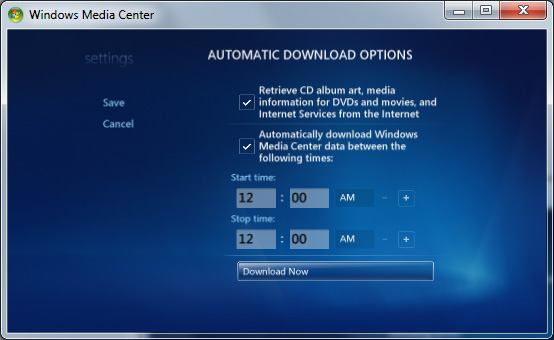
The tool comes as a Windows Media Center Extra, and needs to be downloaded, installed, and used from within Windows Media Center. If you don’t regularly run MCE, then it probably won’t show up in the Extras Gallery, as MCE picks up on it when it regularly checks in for updates. To force MCE to check in, go to Settings -> General -> Automatic Download Options -> Download Now.
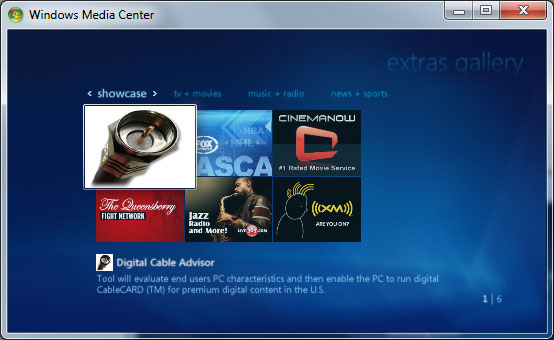
Once installed. It shows up in your Extras Gallery.
When activated, the tool will analyze the system to determine if it meets MS/CableLab’s requirements, reporting back whether the computer passes or fails the requirements, and if it fails, offers a short explanation why.

Digging through the tool’s support files, for most of the system requirements the tool appears to just be looking at the Windows Experience Index of the computer. The chart below lists the scores we’ve found, and the text attached to them if the computer fails

  WEI Score Attached Text
Memory 4.3 While 2GB of RAM is sufficient for most broadcast content 4GB of RAM is recommended for the best viewing experience
CPU 2.2 A Dual Core CPU or better is recommended for the best viewing experience
Graphics 3.3 Your graphics card or driver doesn't meet the minimum requirements
COPP/HDCP x Your graphics card or driver doesn't support content protection
DXVA x We recommend that you update your video card to one that supports hardware acceleration

In spite of the attached text, the tool doesn’t appear to actually be looking for specific pieces of hardware. We ran this test on a single-core computer with 1.5GB of RAM, and it passed anyhow, as it met the WEI scores required. So our best guess is that only WEI scores matter here.
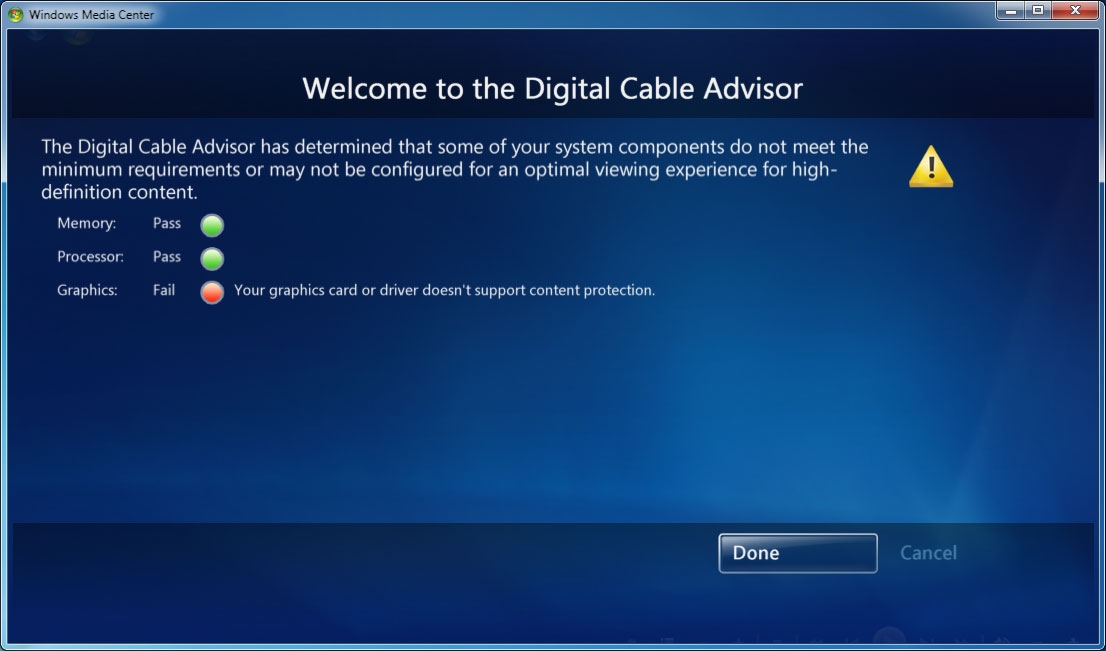
The second test tests the Content Protection (Read: DRM) capabilities of the hardware. It appears to be looking for the various MCE DRM components (PBDA and PlayReady), HDCP support, and DXVA acceleration of MPEG-2. We suspect the DXVA check is just a warning rather than a hard error, but we don’t have any appropriate hardware to test this.

From our testing, we believe the tool will fail if HDCP support is not present in the video card, regardless of if a digital connection is being used. The big question we have, and one we haven’t been able to find an answer to, is whether HDCP is required for digital connections (e.g. an older TV using HDMI), as we don’t have a monitor on-hand that doesn’t support HDCP.

The analog situation looks better. On a PC hooked up to a TV via Component, it passed the check and was allowed to enable CableCARD support.

However once a PC passes the test, the final screen leaves us scratching our heads as to whether the tool actually knows what it’s doing.
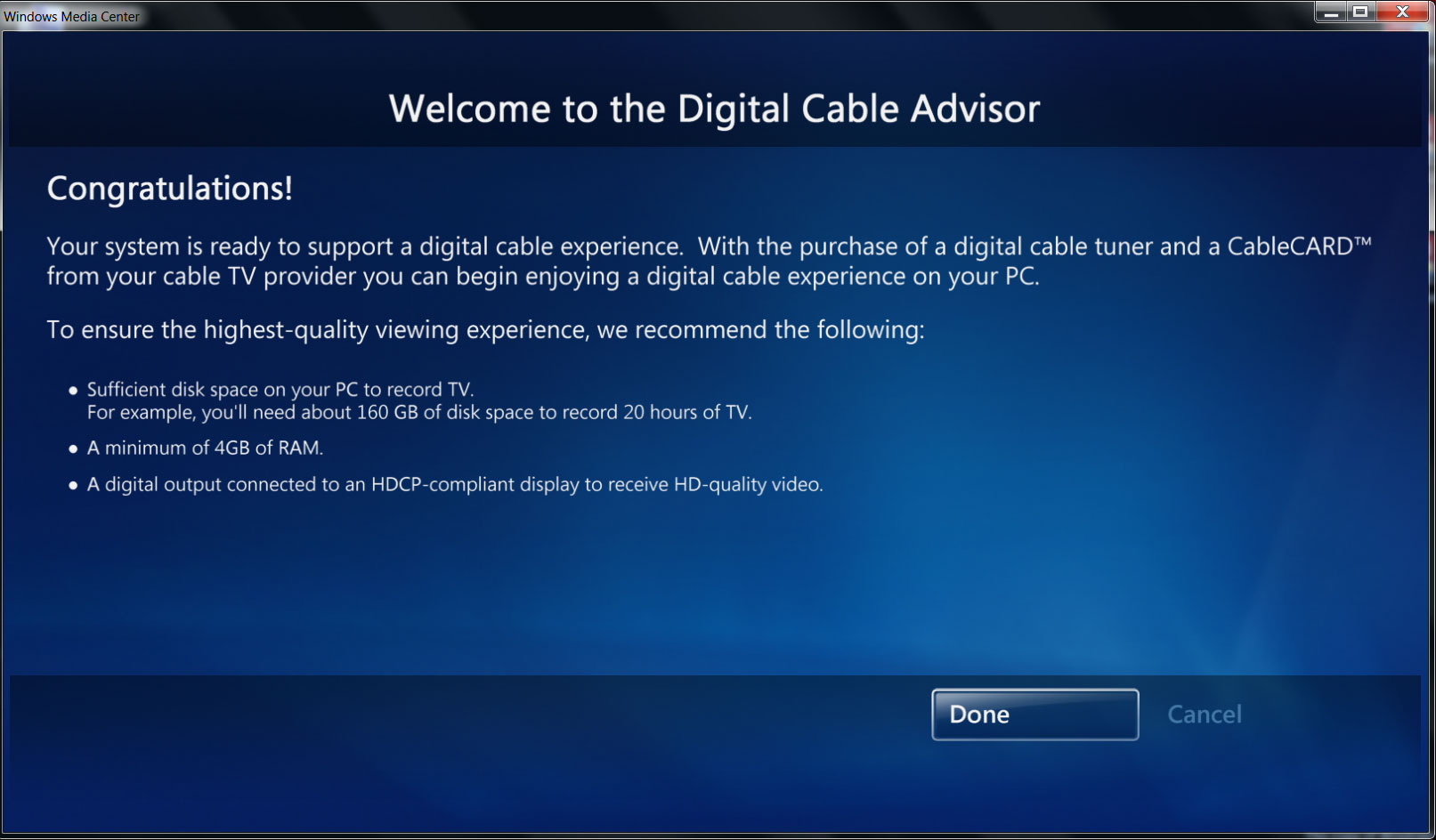
The screen is a list of recommended hardware:

  • Sufficient disk space on your PC to record TV. For example, you’ll need about 160GB to record 20 hours of TV
  • A minimum of 4GB of RAM
  • A digital output connected to an HDCP-compliant display to receive HD-quality video.

We’re not sure where the disagreement lies. It could very well be that the tool isn’t checking for an HDCP-attached monitor and is just blindly approving everything so long as there’s HDCP support, or that it’s downscaling content going out an analog output (ala the Image Constraint Token on Blu-Ray), or it could be that this is an empty recommendation. This tool was supposed to clear up confusion about what’s required for CableCARD use, and it hasn’t really achieved that.

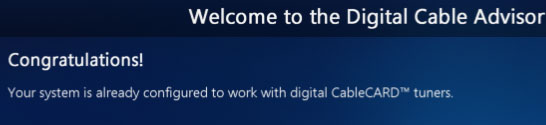
Finally, in the strangest occurrence, one of our systems was already authorized according to the tool. The Core i7 rig we use for benchmarking shows up as authorized, even on a fresh install of Windows 7. This is expected behavior for OEM systems (or rather, motherboards) that were previously approved by CableLabs, but we have no idea why this would be showing up on an Asus Rampage II Extreme.
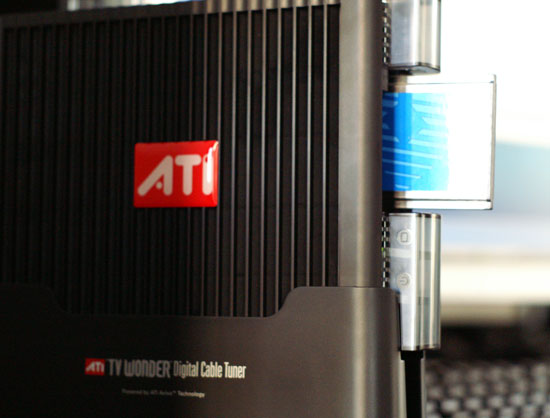
Finally, along with the release of the advisor tool, the updated firmware for the ATI TV Wonder Digital Cable Tuner needed to go with these looser restrictions has finally been released. As this was originally intended as an OEM-only product, the only place we’ve seen it thus far is at Dell’s website, where they want $210 for a tuner. Since it’s a single-stream tuner, you’ll want 2 (or more) to watch & record multiple channels. Other vendors will have CableCARD tuners out, including multi-stream tuners, but not until next year. For the time being, CableCARD on Win7 comes with a high early adopter tax.

31 Comments
Username:
Password:
I'm glad by Spivonious, 11 days ago
I'm glad to see the restrictions lifted. Now we just need something worth watching on those encrypted channels.

Reply
jordan shoes$32,Ugg boots$50,handbag(lv,gucci,coach)$35,jean$30,free shipping by elivebuypp, 3 days ago
http://www.elivebuy.com

Air jordan(1-24)shoes $33

UGG BOOT $50

Nike shox(R4,NZ,OZ,TL1,TL2,TL3) $35
Handbags(Coach lv fendi d&g) $35
Tshirts (Polo ,ed hardy,lacoste) $16

Jean(True Religion,ed hardy,coogi) $30
Sunglasses(Oakey,coach,gucci,Armaini) $16
New era cap $15

Bikini (Ed hardy,polo) $25

FREE sHIPPING
http://www.elivebuy.com

Reply
ATI Digital Tuners Available Online by gcannon, 11 days ago
Cannon PC (www.cannonpc.com) have the internal and external versions of the ATI Digital CableCARD tuners available ($249)

Reply
This may be of interest to a lot of you. by numberoneoppa, 11 days ago
http://www.cetoncorp.com/ProductsWMC.php

TV Tuner card on steroids.

Reply
RE: This may be of interest to a lot of you. by mckirkus, 11 days ago
Interesting tidbit from the FAQ:
"A: The Ceton Multi-Channel Cable TV Card takes advantage of standard Media Center Extenders including the Xbox 360 to distribute live and recorded programs to multiple TV sets in the home. No special installation or configuration of the extenders is required by the Ceton card.

Depending on which versions of Windows 7 and the Ceton card you have, you will be able to distribute either 2, 4 or 6 live TV channels around the home with a single CableCARD installed and using a single RF connection.

So in a typical 4-tuner home installation, you could have 4 different TV sets in 4 different rooms, each watching or recording (or some combination of watching and recording) a different show in HD at the same time."

I plan to buy one and use My XBox 360 as a cable box / DVR in my bedroom. That'll save two cable boxes which works out to $22 a month or ~$250 a year.

My only concern is bandwidth to my bedroom, I can't currently stream hi-def MKV files via wifi to my XBox 360 extender without buffering. Also, Xbox 360 chokes if you have a lot of content.

Reply
RE: This may be of interest to a lot of you. by mckirkus, 11 days ago
Forgot to mention... Anybody want to bet that the next generation games consoles are going to have cable card slots built in?

Reply
RE: This may be of interest to a lot of you. by numberoneoppa, 10 days ago
I would highly recommend just wiring your house for ethernet using a roll of cat6 or 5e. It comes out to be around 125 bucks for everything needed during the project (1000 ft cable, connectors, crimper, wall gangs, covers) and it's totally worth it in the long run!

Reply
RE: This may be of interest to a lot of you. by glugglug, 10 days ago
Don't know how you are getting that it is $125. I wired my place myself a few weeks ago. 500 ft cable was bundled with a bag full of connectors, a crimping tool, and a cable tester for $35. If you search online there are some good deals on this stuff.

But yeah, wireless is way too flaky for media streaming. At a minimum if you are going to go wireless you need to go wireless N instead of wireless g to have enough bandwidth, with dual band routers & access points set on 5GHz instead of the default 2.4GHz band so they don't get interference from microwaves, bluetooth devices, legacy wireless g networks & devices, etc. HD streaming requires 10MBps. Yes, I am aware wireless G stuff is marketed as 56MBps, but that is only theoretical when you have no interference, your signal doesn't need to go through any walls, etc, and is very far from reality.

Reply
RE: This may be of interest to a lot of you. by dagamer34, 8 days ago
It's not just the speed you have to think about when going wireless, but the potential of data packet loss. When streaming HD video, lost data packets are going to cause stuttering like you'd never believe.

Though I don't how you got the price down to $35. You're at least going to need to get a gigabit switch to route all your cables, and that'll swallow your $35 whole.

Reply
200+ per stream? ouch! by erple2, 11 days ago
That seems to be a bit excessive for the ability to watch CableCARD protected content. A fully paid for TiVo HD costs 700 dollars. That also buys you the TiVo service, however. I suppose a valid argument can be made that the TiVo can't do as much as a full-blown PC (built in Blu-Ray player, streaming "other" streams from the intertubes, surf the intertubes, etc), but the cost of entry is now quite a bit less of a difference for the PC HT.

I think that I might be willing to pay 250 for a multichannel capable tuner card, not 500 for "equivalent" ability (plus the potential headaches of installing 2 such tuners in my PC). As a minor cost, my cable provider (Verizon FIOS) charges per card, not per stream, so the multistream card costs me "half" per month as 2 single stream cards.

Reply
RE: 200+ per stream? ouch! by Colin1497, 11 days ago
Exactly. I stream you-name-it from my PC to my TiVo already. I guess this product is basically for those who just have to have something to tinker with.

Reply
Hmmm by jav6454, 11 days ago
Yay! Finally I can a card that can do what my DVR already does /sarcasm. Now, in all seriousness, although it's a good thing I find it hampering having to deal with ecryption on many channels.


Reply
RE: Hmmm by jav6454, 11 days ago
Forgot to mention any of those cards can carry quite the tag.

Reply
Video on Demand by Zero110, 11 days ago
Been waiting for this for what seems like an eternity, but any word on two-way communication and VOD with this? It's been a long time since I researched DVR's, but my understanding is that Tivo still can't do VOD. It's the last niggling reason not to replace my hideous Comcast box.

Reply
RE: Video on Demand by SloppyG, 10 days ago
Yeah, I would be interested if this would support VOD.

I currently use a HD PVR and DVBLogic to get HD into my HTPC. Works great but having to grab a second remote to work the VOD menu (with a 3-4 second delay between presses) is a little tiring.

Added a 360 recently as an extender and am amazed by how well it works. Streamed HD fine over wifi but I went ethernet to reduce some menu latency I was experiencing. The fan (jasper chipset) is still a little on the loud side, however.

Great setup...

Reply
RE: Video on Demand by Ryan Smith, 10 days ago
Sorry guys, no VOD. For that you need True2Way, which is a whole new can of worms.

Reply
Rampage II Extreme by xp3nd4bl3, 10 days ago
Mine also says I'm "already" configured for CableCARD. Sweet.

Reply
Works with non HDCP displays by DigitalFreak, 10 days ago
FYI - I just ran the advisor on my PC that has a Geforce 8800GTX and Dell 2405 monitor connected via DVI. The 2405 is NOT HDCP compliant, but the advisor said that I met all recommendations and enabled CableCard support. I don't actually have a CC tuner, but it looks like it will work.

Reply
Useful! by NKnight, 10 days ago
Very useful news. My HTPC just passed using an Nvidia GeForce 9400 integrated video chipset outputting over HDMI to my Kuro. I think I may just pull the trigger on a tuner now.

Reply
What is CableCard? by Visual, 10 days ago
I am very confused.

Things seem like a mess to me even without involving a PC, for watching cable channels on a TV - without an external box, that is.
A lot of new TVs come taunting "digital tuner" stuff, which often turns out to be useless.

I don't understand a lot of the terminology when it comes to digital television, so not everything I ask may make sense. Please accept my apologies in advance.

I get the impression that the whole CableCard deal should not concern me at all, and I should be looking for a DVB-C (probably also DVB-T, DVB-S) tuner with CI slot instead. But I am still posting this as I want to be sure.

I am not in the USA, and have no clue what CableCard is. Here in Bulgaria we of course do have some digital cable television, and it is protected by some encryption requiring an external receiver box with a smart-card thing to decrypt it... but I wonder, is it the same thing? Or are there many different standards for this and CableCard is just one of them? Is it used outside of the USA? Why are you focusing your articles exclusively on this standard and not write something more general?

Is DVB-C and Common Interface (CI) a different standard for the same thing and are they compatible to some degree? Or is it the same thing entirely? Or can one be using the other, for example can there be a CI-slot CAM module for CableCard? Or what's what?

What other standards are there?

For which of these standards will the mentioned ATI tuner work?
For which of these standards are there already other PC tuners available?

On and one last thing, what happens when you insert a CableCard module (or a CI-slot module, for that matter, as they are both physically the same slot) into a normal PCMCI slot that most any laptop has? Can you at least theoretically use it to decrypt a signal that you get from a standard digital tuner card that was meant to be used with unencrypted channels only?


Reply
RE: What is CableCard? by DeesTroy, 10 days ago
Cable Card is strictly a USA thing. Our government saw fit to require our cable companies to come up with some method to allow other devices to be used to watch cable TV besides the crappy boxes that they shove down the throats of most people.

To others, some general statements:
Centralized recording of TV with whole house distribution is where it is at and where the future of DVR should go. Having one interface, guide, and list of recorded shows is exceedingly nice. You should be able to record your shows and watch them on any TV in the house without having to fuss with anything. Media center provides this functionality, but it only works well with extenders. If you have 2 computers, you can watch unprotected TV on the second computer, but the second computer can't watch live TV shows or tell the first computer what shows to record. Total PITA and there's no reason Microsoft can't implement it, but they won't and won't tell us why. You won't be able to watch any protected shows on another computer, but you can with a Xbox or other extender. Other DVR software allows this functionality such as Sage, Media Portal, GBPVR, Myth, or Beyond TV. Unfortunately, those programs do not work with cable card, so if you want cable card, you must use Media Center and extenders.

Wireless networking rarely works with HDTV. If you plan to use wireless, you best go with N and with a router that can put the N network on its own 5GHz band separate from the B/G traffic.

Reply
RE: What is CableCard? by darkslyde, 7 days ago
i really like the idea but that would mean implementation of a server of some sort. if MS would implement a media center server version for their win home server, that would really be a good way to realize that idea.

anandtech, is there anyway y'all can do some sort of htpc revisited slash how-to in regards to a cetralized A/V home experience?

thats been my project since day one.
a "main" htpc in the living room that is capable of backing up/grabbing all media files from "satelite" computers (which WHS can already do). this main htpc must be able to run win media center (music, videos, tv, blu-ray/dvd, online content and 3rd-party wmc add-ons). as stated, the "satelite" computers or extenders has the ability to access a centralized guide; schedule shows that can be recorded (all satelite pc's will know which shows are already slotted, and let everyone know about show overlaps). the satelite pc's will be allowed to watch protected contents, but not be able to copy it (similar to itunes+appleTV). ofcourse, all shared media can be accessed according to DRM.

why go through all the trouble? i call it house clouding. centralizing = savings. all media in one location (granted WHS allows sync/share/etc options on backing up), one 1 cable-connection (vs 5 cable cards for 5 pc's that are all recording the same shows). only 1 pc needs to stay on 24/7 (recording/backups/etc). also, the benefits of WHS utilities.


anyone know of something like this that isnt linux? and before you give me the linux speech, try teaching my computer inept gf then maybe... thank you dual booting.

Reply
More money, more money, more money by mcnabney, 10 days ago
I have a better solution.

HD HomeRun
Antenna
Hulu

Reply
RE: More money, more money, more money by Roland00, 10 days ago
Sadly this is the truth

Reply
when? by 457R4LDR34DKN07, 9 days ago
I hope that what you say is true about more manufacturers rolling out cablecards but what about the tuners compatibility with tru2way? Any news about ati making a updated cable card tuner using the theater 750 or a single slot 2 cablecard version?

Reply
UK Compatible? by initialised, 7 days ago
Will this work on VirginMedia in the UK?

Reply
RE: UK Compatible? by ViRGE, 7 days ago
No, CableCard is a purely Yankee thing.

Reply
Where's the support for IPTV??? by Casper42, 6 days ago
Hey Ryan, if you have any contacts at MS in the MediaRoom division, ask them when they are going to release (I know it would be to providers and not directly to me) a Win7 IPTV Client for MediaRoom (aka AT&T U-Verse).

My U-Verse DVR can record 4 concurrent shows, 2 of them being in HD, using the following crappy specs:
300Mhz CPU as part of a SoC
128MB of RAM
PATA Hard Drive
100Mbps Ethernet
All managed by Windows CE 5.0

I have also read some PR from MS that said they have released a MediaRoom client package for the Xbox360, which means you can turn it into a STB.

I find it laughable that MS has not released a Windows client package for MC when most decent PCs these days have at least a 2Ghz Core2, 2GB of RAM, SATA3Gbps and a large number would have a Gigabit NIC.

Packets are Packets, how hard is it to let my PC grab them rather than my DVR/STB?

Reply
Honestly, I wish that they would just make a software solution by Lerianis, 4 days ago
Instead of this Cablecard bull. You know that I have a tuners for my laptops but.... no Cablecard slot in them! Both my laptops tested as Cablecard-Ready today, but don't have any Cablecard slots in them..... and neither do most external tuners I have seen!

What we really need is for Cablecard to be BUILT INTO THE TUNERS when they are sent out. Then, the number is just taken off the tuner and activated and BOOM! You are ready to go!

Reply
Netflix by Alphafox78, 3 days ago
Netflix FTW!!!
I used to care about digital cable but when you can watch movies and older tv shows for $9 a month with no commercials, who needs cable??

Reply
Is the Digital Cable Advisor supported on x64? by fMF, 2 days ago
Running WMC on my Windows 7 Ultimate x64 system I do not get the Extras Gallery feature. Under Extras I see only the Extras Library and the Internet TV beta. Forcing a download of updates per the article makes no difference. Anyone else seeing this issue?

Reply
Comments Page 1 of 1


AnandTech.com Blog Categories
All categories
Anand's Macdates
Anand's Theater Construction
Anand's Updates
Cases and Power Supplies
CeBIT 2008
CES 2008
Computex 2009
Derek Decanted
Eddie's Got Game
Gary's First Looks
IT Computing general
Jarred's Musings
Kris's Corner
Raja's Ramblings
Rob's Experiences...
Ryan's Ramblings
Virtualization
What's New with Wes
Blank
Blank

Blank

Latest news by
DailyTech

 November 20, 2009

Blank
Blank
Blank
Blank
Blank
Blank
Blank
Blank
Blank

 November 19, 2009

Blank
Blank
Blank
Blank
Blank
Blank
Blank
Blank


more Blogs Discussions


pipeboost
Copyright © 1997-2009 AnandTech, Inc. All rights reserved. Terms, Conditions and Privacy Information.
Click Here for Advertising Information