



How Much Video Memory Do You Need in OS X?
by Anand Lal Shimpi on July 16, 2009 7:00 PM EST- Posted in
- GPUs
As I mentioned in an earlier post, I’m working on a review of EVGA’s GeForce GTX 285 Mac Edition. I just finished writing a section about GPU memory usage under OS X (since the 285 has a hefty 1GB frame buffer) and thought I’d publish it as a standalone before the review is done. I've been considering doing more things like this in the future, where you get pieces of a review as I finish them before the full thing is done. Let me know what you think.
{poll 136:240}
How Much Video Memory Do You Need in Mac OS X?
Honestly, one of the biggest uses for a new graphics card under OS X is having additional video memory.
The contents of each window and the windows themselves are drawn by the GPU and stored in video memory. Previous versions of OS X either drew windows in system memory and then composited all of them in video memory, or did everything in system memory and just outputted the final scene to the video card. Ever since OS X 10.4, the entire drawing and display process happens on the GPU and in video memory. Ars Technica’s John Siracusa has an excellent explanation of the whole process.
Each window gets treated as a 2D OpenGL surface and all of the character and image rendering, blending and display happens on the GPU. The GPU is much faster at all of this than the CPU so it made sense. The result is much lower CPU and system memory usage. What it also means is that the amount of video memory you have matters.
If you run out of video memory, the GPU has to swap data in and out of system RAM. The trip to system memory is much higher latency than just grabbing windows from video memory, and thus we see performance suffer. Faster memory busses and PCIe 2.0 both help minimize the impact, but it’s there nonetheless.
The issue is never about how many windows you can have open, but how smoothly effects like Dashboard and Exposé run. Those depend on having enough video memory to store/manipulate all open windows.
I ran some tests to figure out exactly how much video memory was enough for a single display. I started with a blank desktop and measured available video memory. On a 512MB card, at 2560 x 1600, you end up with 488MB of free video memory in OS X 10.5.7.
Depending on the contents of the windows you open, their memory requirements will differ. I found that a full height Safari 4 window showing the AnandTech home page was pretty stressful from a memory footprint standpoint. A single Safari 4 window required 7MB of video memory at 2560 x 1600. Finder windows are much cheaper, some application windows are much more expensive (more on this later).
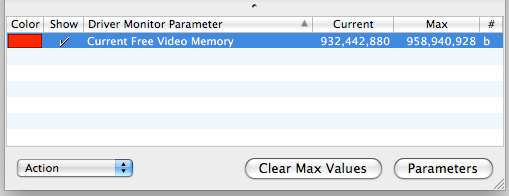
With a single window requiring 7MB, 10 requires about 70MB. Now things don’t always scale linearly and there’s additional overhead for dealing with more windows. At 10 windows that overhead appears to be around 1MB. While a single Safari 4 window needs 7MB at 2560 x 1600, ten will need around 71MB; twenty windows will need 144MB.
Lower resolutions require less video memory. At 1680 x 1050 the cost per 10 windows drops from 71MB to 44MB.
I extrapolated the data out to 130 Safari 4 windows and presented the video memory requirements, dependent on resolution in the graph below:
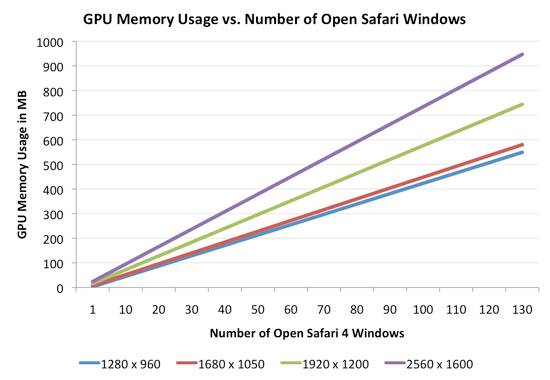
If you have a 30” monitor running at its native resolution (2560 x 1600), a 512MB video card will get you just under 70 windows.
Note that not all applications play nicely. Take Photoshop CS4 for example. One of its major features is the ability to enable OpenGL acceleration within the application. With each image being OpenGL accelerated you get benefits like being able to zoom and rotate smoothly, the downside is that each image you open in Photoshop now eats up even more video memory.
Under OS X each 12MP image from my digital camera that I open in Photoshop eats up around 56MB of video memory (at 2560 x 1600)! To make matters worse, OS X won’t reclaim all of the memory even if you close all of the images in Photoshop. You need to exit Photoshop to get all of your video memory back.
While it would take 70 normal windows to max out the 512MB of video memory on a GeForce GT 120 at 2560 x 1600, it would take less than nine 12MP images open in Photoshop to do the same. And once again, you don’t get that memory back when you close your images - only after you exit Photoshop. Most other windows in OS X will give you your GPU memory back as soon as you close the window.
If you find yourself doing a lot of work in Photoshop, you’ll want to either limit the number of images you have open at once or disable OpenGL acceleration. And by all means, quit the app once you’re done editing. Of course you could always move to a graphics card with more memory...


 Facebook
 Twitter
 RSS
RSS


30 Comments
View All Comments
sxr7171 - Saturday, July 18, 2009 - link
I mean if 1GB video RAM can handle around 140 windows open at 2560x1600 which I'd guesstimate maybe 5-10% at best of users use, then this is a non issue. Who has 140 windows up? For that matter who has even 70 windows up?I don't know how much Apple gimps out its shipping video cards these day but 512MB is mid-end at best these days. Who would buy a machine with less than that to power a 2560x1600 display?
On the Macbook "Pro" supposedly all video memory is shared memory anyway. So what difference does it make there. With iMacs you have a display built-in. So you are looking at a $3000 Mac Pro to have effective use of video memory.
I think OSX is great but Apple hardware is just completely inadequate in choice. You have to spend big bucks just to have th concept of video memory that is not shared since the cheapest desktop is $3000. The rest are shared video memory queens. There are many gaps in the lineup due to there being a monopoly on machines with supported Mac OS X. There is no ultraportable worth its salt.
The Macbook Air is gimped and weighs THREE pounds. That is a weak proposition to anyone with a Lenovo X-series or Dell E4200 or Toshiba R500/600 or many better Magnesium Alloy (not Coke can aluminum) chassis based ultraportables. It's about time I can just pay a premium to run Mac OSX on the superior hardware that is available to Windows users. Just license me the OS for $300-350 and let me use it in supported format. I hate to be locked in using hardware designed for the lowest common denominator. It would be like Windows 7 could only run on the Toshiba/HP/Dell low-end stuff found at Best Buy. If you bought a business level Latitude or Thinkpad then you must use Linux. That's what sort of insanity this amounts to.
DeathRayLoveMachine - Saturday, July 18, 2009 - link
[quote]I mean if 1GB video RAM can handle around 140 windows open at 2560x1600 which I'd guesstimate maybe 5-10% at best of users use, then this is a non issue. Who has 140 windows up? For that matter who has even 70 windows up? [/quote]Not all apps tested used so little VRAM, remember. Photoshop took 56MB per image, and it failed to release RAM when images were closed. If that's the case, you could easily chomp through 512 or 1024 MB of VRAM just by opening and closing files.
[quote]On the Macbook "Pro" supposedly all video memory is shared memory anyway.[/quote]
The Macbook Pros have always had discrete video cards with dedicated VRAM. The only exceptions are the new 13" Macbook Pro, which has a 9400M, and all the other current-generation Macbook Pros, which have both integrated AND discrete video cards (on the logic that you can use the discrete unit while plugged in).
[quote]The Macbook Air is gimped and weighs THREE pounds. That is a weak proposition to anyone with a Lenovo X-series or Dell E4200 or Toshiba R500/600 or many better Magnesium Alloy (not Coke can aluminum) chassis based ultraportables.[/quote]
I only checked out one of the laptops you listed, the Dell E4200, but it seems like a joke compared to the Macbook Air. Dell doesn't list the weight or battery life of the E4200, but I understand the battery at least is worse than the Macbook Air's; and on top of that, the Macbook Air has a faster processor (1.8 or 2.16GHz with 6MB cache versus 1.4-1.6 with 3MB on the E4200), and a videocard which is actually worth a damn (a 9400M, versus some Intel garbage on all the E4200s).
Now here's the part that really shocked me: the Macbook Air was CHEAPER than the Dell, in addition to utterly trashing it in terms of performance. The entry Macbook Air is $1500, versus $1720 for the Dell, and the upgraded Macbook Air with SSD is $1800, versus $1900 for the upgraded Dell. (One thing Dell has the Apple doesn't: SSDs on the entry model. But the entry Macbook Air has 120GB versus the Dell's paltry 64, not to mention that it's $220 cheaper.)
I don't know what you mean about "Coke can aluminum," since I quite like the new Macbook chassis and I haven't used the E4200.
Anyway, please do a better job of checking your facts
DEredita - Tuesday, July 28, 2009 - link
Even the base 15" Macbook Pro at $1699 comes with a 9400M that used shared ram. That pathetic. It's a Pro series laptop at ~ $1700, it should have a dedicated GPU with dedicated Vram at that price. Face it, Apple hardware is inadequate. They're hyped up to be this graphics machines, when in reality, they use bargain basement integrated video solutions, which they pawn off at monstrously high costs.snookie - Thursday, August 27, 2009 - link
I can't disagree with that. I just bought a new 2.8ghz and spent quite a bot extra to get the 512MB vid card. At least I ought it online and between rebate and not taxes saved $449.DeathRayLoveMachine - Saturday, July 18, 2009 - link
Pardon the formatting and type-checking, apparently I am stupid.MrPIppy - Friday, July 17, 2009 - link
Actually, by default, Leopard still draws windows in system memory and then has the GPU composite them.Siracusa's article describes Tiger's new Quartz path that had the GPU both draw windows and composite them. Tiger called it Quartz 2D Extreme, Leopard calls it QuartzGL. Neither system has it enabled by default, I assume because of application compatibility problems. Applications in Leopard can turn it on for themselves though.
fmaste - Friday, July 17, 2009 - link
I OSX or Photoshop problem not freeing up the space of each closed image?I think is Photoshop
psonice - Friday, July 17, 2009 - link
I'm pretty sure it's photoshop.Normally you create an openGL texture, which will allocate the memory, do what you want with it, then release it at the end. At that point (or very soon after) if nothing else is using it, the memory gets deallocated. If you told something else to keep hold of the texture and forgot to tell it to let go when you're finished, the OS won't deallocate the memory because it's still being used - at that point, you have a memory leak. When you quit the OS, the OS is then sure nothing is using it and you get your memory back.
There are things in the OS that leak memory, so it is conceivable that it's an OS problem, but that has all the signs of being an application issue.
erple2 - Saturday, July 18, 2009 - link
That's not necessarily a memory leak - it's possible that Photoshop keeps that RAM "paged" for future use to speed up repeated access to that image. That's a similar way to how databases utilize their space - they don't actually free up the disk space used until you dump and reload a database, even if you "delete" data out of them.psonice - Saturday, July 18, 2009 - link
I'm sure they do that to speed things up while you work on an image, but surely when you actually close the file you've finished using it and the memory should be freed :)