



Unreal Tournament 3 CPU & High End GPU Analysis: Next-Gen Gaming Explored
by Anand Lal Shimpi & Derek Wilson on October 17, 2007 3:35 AM EST- Posted in
- GPUs
UT3 Teaches us about CPU Architecture
For our first real look at Epic's Unreal Engine 3 on the PC, we've got a number of questions to answer. First and foremost we want to know what sort of CPU requirements Epic's most impressive engine to date commands.
Obviously the GPU side will be more important, but it's rare that we get a brand new engine to really evaluate CPU architecture with so we took this opportunity to do just that. While we've had other UE3 based games in the past (e.g. Rainbow Six: Vegas, Bioshock), this is the first Epic created title at our disposal.
The limited benchmarking support of the UT3 Demo beta unfortunately doesn't lend itself to being the best CPU test. The built-in flybys don't have much in the way of real-world physics as the CPU spends its extra time calculating spinning weapons and the position of the camera flying around, but there are no explosions or damage to take into account. The final game may have a different impact on CPU usage, but we'd expect things to get more CPU-intensive, not less, in real world scenarios. We'll do the best we can with what we have, so let's get to it.
Cache Scaling: 1MB, 2MB, 4MB
One thing we noticed about the latest version of Valve's Source engine is that it is very sensitive to cache sizes and memory speed in general, which is important to realize given that there are large differences in cache size between Intel's three processor tiers (E6000, E4000 and E2000).
The Pentium Dual-Core chips are quite attractive these days, especially thanks to how overclockable they are. If you look back at our Midrange CPU Roundup you'll see that we fondly recommend them, especially when mild overclocking gives you the performance of a $160 chip out of a $70 one. The problem is that if newer titles are more dependent on larger caches then these smaller L2 CPUs become less attractive; you can always overclock them, but you can't add more cache.
To see how dependent Unreal Engine 3 and the UT3 demo are on low latency memory accesses we ran 4MB, 2MB and 1MB L2 Core 2 processors at 1.8GHz to compare performance scaling.
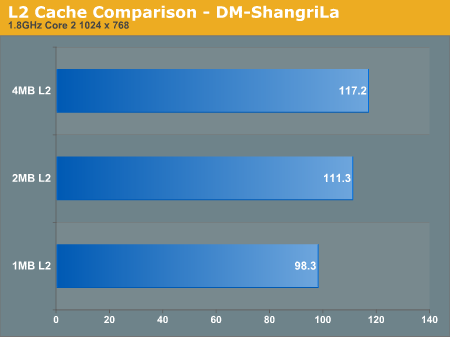
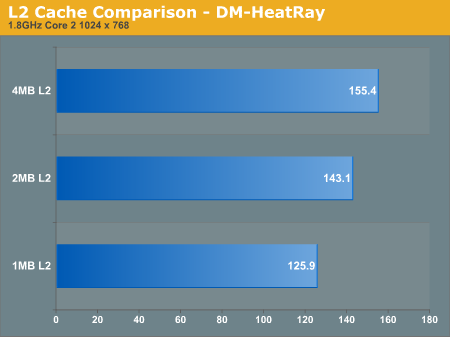
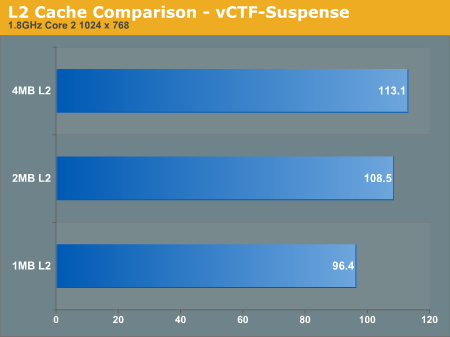
From 1MB to 2MB there's a pretty hefty 12 - 13% increase in performance at 1.8GHz, but the difference from 2MB to 4MB is slightly more muted at 4 - 8.5%. An overall 20% increase in performance simply due to L2 cache size on Intel CPUs at 1.8GHz is impressive. We note the clock speed simply because the gap will only widen at higher clock speeds; faster CPUs are more data hungry and thus need larger caches to keep their execution units adequately fed.
In order to close the performance deficit, you'd have to run a Pentium Dual-Core at almost a 20% higher frequency than a Core 2 Duo E4000, and around a 35% higher frequency than a Core 2 Duo E6000 series processor.


 Facebook
 Twitter
 RSS
RSS


72 Comments
View All Comments
Matthew12222 - Thursday, July 17, 2008 - link
2MB L2 cache VS 4MB L2 cache! And FSB 1000mhz VS 1333mhz. THis is after proving L2 makes a big difference and Fsb a smaller one.SiliconDoc - Thursday, February 7, 2008 - link
I have been enjoying Anandtech now for many years, and have appreciated the articles I've learned so much from for so long. One of the first uses of that knowledge was passing along the review on the HOT 591P to a very good programmer friend, upon which he purchased the board for his at home portion of work.That said, I had to finally make a username so I could comment on - the bias that is so often shown against AMD here. It is often subtle, in certain wordings and in less than blatantly obvious ways, but it has bothered me for some time. I guess that's the way the cookie crumbles, everyone has a favorite, for whatever reason.
Concerning this article, I plodded along, and then found out that something was amiss once again with the tests chosen, or the equipment chosen, that resulted in a strange result, to AMD's disadvantage. I've seen it here it seems 100 times. Like good representatives, the articles writers pass along that they notified the manufacturers/companies, relieving some of the disdain for it I tasted. I wonder if AMD feels the same way. I doubt it. I suspect they are and have been angry about it.
If it was the UT3 game, or the sli board, or whatever, why was the test posted as "valid" when it scientifically proved something other than card framerate limits were amiss ?
I just can't help wondering how ragingly angry AMD reps are that view this type of thing, over and over again.
I'm not sure why the bias is so consistent here, but it is here, and I just wish it wasn't.
I've really never seen this site "unable" to diagnose the most obscure of matters when it comes to performance issues, but then again, if it's an AMD chip, often the two shoulders go up and the blank pout is given, then the applause for Intel is heartily enjoyed.
If I'm not the first person who has said something like this, good.
I don't generally read any comments, so maybe everyone has accepted the slant already and moved on.
Nonetheless I think this site is wonderful, and will no doubt be visiting it for years to come, learning and learning and learning more and more, as much as I can to help me in my endeavors.
For that, I have real way to repay the good that has been done for me, I hope that in some way exlpains why I feel fine expressing my opinion concerning the processor wars and the handling of the same by this site.
Thanks to all at anandtech and all the rest of the fans out there.
BlackOmega - Thursday, November 8, 2007 - link
Very useful article.Anyway, I would sugest you guys posted the diference in the minimum framerate attained by both processors...
I'm running a Athlon 4200+ overclocked to 2.8ghz, and after some benchmarking I found out that there are certain areas in game where the frame rate would drop severely. In fly by runs I get 100 fps + running in 1024x768, but in actual game play, places like the ShockRifle/Helmet in Shangrila make the frame rate drop to ~40 fps.
It would be nice if you guys could test those areas and see how the diferent processors affect minimum frame rate / specially heavy areas of the map.
I'm also very interested in how cache affects AMD's processors performance.
Nil Einne - Saturday, October 27, 2007 - link
Historically, AMD's A64 architecture has been a lot less cache sensitive then the Intel's C2. It would have been interesting to see how the A64 performance depended on cache akin to the C2 but sadly you didn't test this.Tuvokkk - Sunday, October 21, 2007 - link
please anand let us know the command to run the flyby benchs and the settings u used so that we can compare our resultsZoomer - Friday, October 19, 2007 - link
How much disk space does the beta demo take up? I tried to install the 700mb installer and it complains that there's insufficient disk space, even though I have 20gb free in my partition containing my programs and user data, and >200GB spread out over a few other partitions.Or does it do a dumb check of c:\ ? That could be a problem; my c partition is only 4 gigs big and contains only windows files.
TSIMonster - Thursday, October 18, 2007 - link
I'd like to see how the 2900 does with the addition of AA & AF. Typically, that is where it falls behind slightly. The architecture seems fine, its just the power usage and lack of AA & AF support that gets me thus far.poohbear - Thursday, October 18, 2007 - link
thanks anandtech for a great article!!!! very detailed and informative stuff. cheers again for the article and i hope u revisit it when the full game comes out. Mind u, were u using DX10 or 9 and can u do a comparison on this end too?mongoosesRawesome - Thursday, October 18, 2007 - link
I'm wondering if the large discrepancy in performance between 1M and 4M cache CPU's remains when you turn up the frequency? It seems that a lot of people are buying the lower clocked pentium dual cores and overclocking them to 3GHz speeds. Could you compare the chips in that situation in order to see if the cache matters as much at high frequencies as it does at low frequencies?shuffle2 - Wednesday, October 17, 2007 - link
I would love to see the game run with hardware physics enabled - with both the card installed and also with only the software installed. I currently run the beta demo on highest settings available, including hardware acceleration, and no errors are thrown up at any time. also, the game performs very, very smoothly.