



Exclusive: ASUS Debuts AGEIA PhysX Hardware
by Derek Wilson on May 5, 2006 3:00 AM EST- Posted in
- GPUs
PhysX Performance
The first program we tested is AGEIA's test application. It's a small scene with a pyramid of boxes stacked up. The only thing it does is shoot a ball at the boxes. We used FRAPS to get the framerate of the test app with and without hardware support.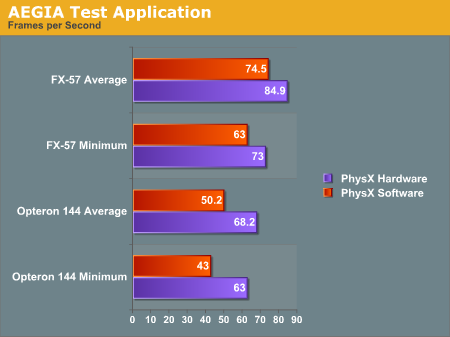
With the hardware, we were able to get a better minimum and average framerate after shooting the boxes. Obviously this case is a little contrived. The scene is only CPU limited with no fancy graphics going on to clutter up the GPU: just a bunch of solid colored boxes bouncing around after being shaken up a bit. Clearly the PhysX hardware is able to take the burden off the CPU when physics calculations are the only bottleneck in performance. This is to be expected, and doing the same amount of work will give higher performance under PhysX hardware, but we still don't have any idea of how much more the hardware will really allow.
Maybe in the future AGEIA will give us the ability to increase the number of boxes. For now, we get 16% higher minimum frame rates and 14% higher average frame rates by using be AGEIA PhysX card over just the FX-57 CPU. Honestly, that's a little underwhelming, considering that the AGEIA test application ought to be providing more of a best case scenario.
Moving to the slower Opteron 144 processor, the PhysX card does seem to be a bit more helpful. Average frame rates are up 36% and minimum frame rates are up 47%. The problem is, the target audience of the PhysX card is far more likely to have a high-end processor than a low-end "chump" processor -- or at the very least, they would have an overclocked Opteron/Athlon 64.
Let's take a look at Ghost Recon and see if the story changes any.
Ghost Recon Advanced Warfighter
This next test will be a bit different. Rather than testing the same level of physics with hardware and software, we are only able to test the software at a low physics level and the hardware at a high physics level. We haven't been able to find any way to enable hardware quality physics without the board, nor have we discovered how to enable lower quality physics effects with the board installed. These numbers are still useful as they reflect what people will actually see.
For this test, we looked at a low quality setting (800x600 with low quality textures and no AF) and a high quality setting (1600x1200 with high quality textures and 8x AF). We recorded both the minimum and the average framerate. Here are a couple screenshots with (top) and without (bottom) PhysX, along with the results:
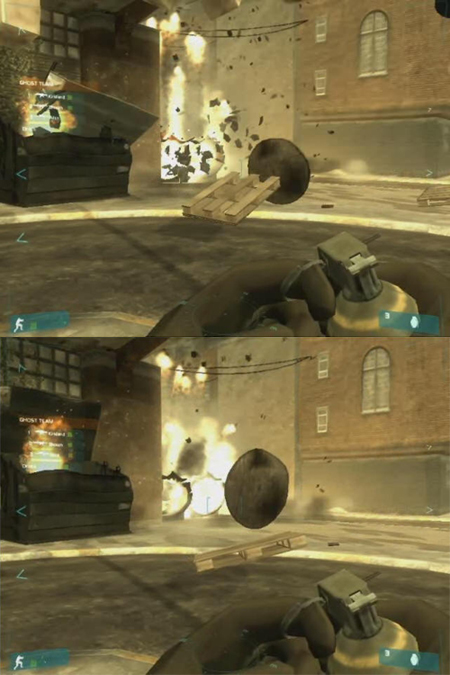
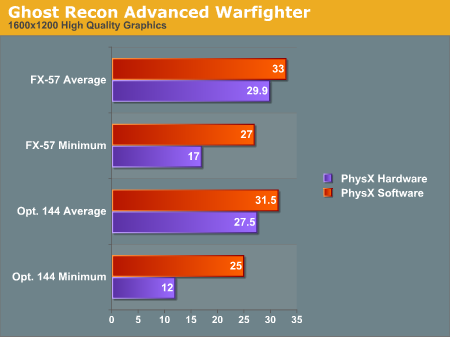
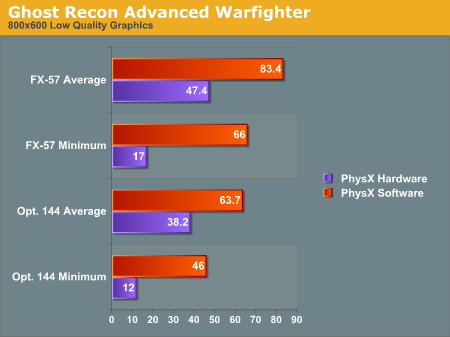
The graphs show some interesting results. We see a lower framerate in all cases when using the PhysX hardware. As we said before, installing the hardware automatically enables higher quality physics. We can't get a good idea of how much better the PhysX hardware would perform than the CPU, but we can see a couple facts very clearly.
Looking at the average framerate comparisons shows us that when the game is GPU limited there is relatively little impact for enabling the higher quality physics. This is the most likely case we'll see in the near term, as the only people buying PhysX hardware initially will probably also be buying high end graphics solutions and pushing them to their limit. The lower end CPU does still have a relatively large impact on minimum frame rates, however, so the PPU doesn't appear to be offloading a lot of work from the CPU core.
The average framerates under low quality graphics settings (i.e. shifting the bottleneck from the GPU to another part of the system) shows that high quality physics has a large impact on performance behind the scenes. The game has either become limited by the PhysX card itself or by the CPU, depending on how much extra physics is going on and where different aspects of the game are being processed. It's very likely this is a more of a bottleneck on the PhysX hardware, as the difference between the 1.8 and 2.6 GHz CPU with PhysX is less than the difference between the two CPUs using software PhysX calculations.
If we shift our focus to the minimum framerates, we notice that when physics is accelerated by hardware our minimum framerate is very low at 17 frames per second regardless of the graphical quality - 12 FPS with the slower CPU. Our test is mostly that of an explosion. We record slightly before and slightly after a grenade blowing up some scenery, and the minimum framerate happens right after the explosion goes off.
Our working theory is that when the explosion starts, the debris that goes flying everywhere needs to be created on the fly. This can either be done on the CPU, on the PhysX card, or in both places depending on exactly how the situation is handled by the software. It seems most likely that the slowdown is the cost of instancing all these objects on the PhysX card and then moving them back and forth over the PCI bus and eventually to the GPU. It would certainly be interesting to see if a faster connection for the PhysX card - like PCIe X1 - could smooth things out, but that will have to wait for a future generation of the hardware most likely.
We don't feel the drop in frame rates really affects playability as it's only a couple frames with lower framerates (and the framerate isn't low enough to really "feel" the stutter). However, we'll leave it to the reader to judge whether the quality gain is worth the performance loss. In order to help in that endeavor, we are providing two short videos (3.3MB Zip) of the benchmark sequence with and without hardware acceleration. Enjoy!
One final note is that judging by the average and minimum frame rates, the quality of the physics calculations running on the CPU is substantially lower than it needs to be, at least with a fast processor. Another way of putting it is that the high quality physics may be a little too high quality right now. The reason we say this is that our frame rates are lower -- both minimum and average rates -- when using the PPU. Ideally, we want better physics quality at equal or higher frame rates. Having more objects on screen at once isn't bad, but we would definitely like to have some control over the amount of additional objects.


 Facebook
 Twitter
 RSS
RSS


101 Comments
View All Comments
Clauzii - Thursday, May 11, 2006 - link
ASUS PhysX P1:Processor Type: AGEIA PhysX
Bus Techonology: 32-bit PCI 3.0 Interface
Memory Interface: 128-bit GDDR3 memory architecture
Memory Capacity: 128 MByte
Memory Bandwidth: 12 GBytes/sec.
Effective Memory Data Rate: 733 MHz
Peak Instruction Bandwidth: 20 Billion Instructions/sec
Sphere-Sphere collision/sec: 530 Million max
Convex-Convex(Complex) collisions/sec.: 533,000 max
jkay6969 - Monday, May 8, 2006 - link
I have read all your posts with great interest, I feel that some very good points are being made, so here's my 2 cents worth ;-)I believe the 'IDEA' of having a dedicated PPU in your increasingly expensive monster rig is highly appealing, even intoxicating and I believe this 'IDEA' coupled with some clever marketing will ensure a good number of highly overpriced, or at least expensive, sales of this mystical technology in it's current (ineficient) form.
For some, the fact that it's expensive and also holds such high promises will ensure it's place as a 'Must have' component for the legions of early adopters. The brilliant idea of launching them through Alienware, Falcon Northwest and the top of the line Dell XPS600 systems was a stroke of marketing genius as this adds to the allure of owning one when they finally launch to the retail market...If it's good enough for a system most of us can never afford but covet none the less it's damn well good enough for my 'monster RIG'. This arrangement will allow the almost guaranteed sales of the first wave of cards on the market. I have noticed that some UK online retailers have already started taking pre-launch orders for the £218 OEM 128MB version I just have to woner how many of these pre-orders have actually been sold?
The concept of a dedicated PPU is quite simply phenominal, We spend plenty of money upgrading our GPU's, CPU's and quite recently Creative have brought us the first true APU (X-Fi series) that it makes sense for there to be a dedicated PPU and berhaps even an AiPU to follow.
The question is, will these products actually benefit us to the value of their cost?
I would say that a GPU, or in fact up to 4 GPU's running over PCIe x32 (2xPCIe x16 channels) become increasingly less value for money the more GPU's added to the equation. i.e. a 7900GTX 512MB at £440 is great bang for the buck compared to Quad SLI 7900GTX 512MB at over £1000. The framerates in the Quad machine are not 4x the single GPU. Perhaps this is where GPU's could trully be considered worthy of nVidia or ATI's Physics SLI load balancing concept. SLI GPU's are not working flat out 100% of the time...Due to the extremely high bandwidth of Dual PCIe x16 ports there should be a reasonable amount of bandwidth to spare on Physics calculations, perhaps more if Dual PCIe x32 (or even quad x16) Motherboards inevitably turn up. I am not saying that GPU's are more efficient than a DEDICATED and designed for PPU, just that if ATI and nVidia decided the market showed enough potential, they could simply 'design in' or add PPU functionality to their GPU cores or GFX cards. This would allow them to tap into the extra bandwidth PCIe x16 affords.
The Ageis PhysX PPU in it's current form runs over the PCI bus, a comparitively Narrow bandwicth bus, and MUST communicate with the GPU in order for it to render the extra particles and objects in any scene. This in my mind would create a Bottleneck as it would only be able to communicate at the bandwidth and speed afforded by the Narrow bandwidth and slower PCI bus. The slowest path governs the speed of even the fastest...This would mean that adding a dedicated PPU, even a very fast and efficient one, would be severely limited by the bus it was running over. This phenomenon is displayed in all the real world benchmarks I have seen of the Ageis PhysX PPU to date, The framerates actually DROP when the PPU is enabled.
To counter this, I believe, Ageis through ASUS, BFG and any other manufacturing partner they sign up with will have to release products designed for the PCIe bus. I believe this is what Ageis knows as the early manufacturing samples were able to be installed in the PCI bus as well as the PCIe bus (although not at the same time ;-) ). I believe the PCI bus was chosen for launch due to the very high installed user base of PCI motherboards, every standard PC I know of that would want a PPU in their system. I belive this is a mistake, as the users most likely to purchase this part in the 'Premium price' period would likely have PCIe in their system, or at least would be willing to shell out an extra £50-£140 for the privelage. Although I could be completely wrong in this as it may allow for some 'Double Selling' as when they release the new and improved PCIe version, the early adopters will be forced to buy into it again at a premium price.
This leads me neatly onto the price. I understand that Ageis, quite rightly, are handing out the PhysX SDK freely, this is to allow maximum compatibilty and support in the shortest period of time. This does however mean that the end user, who purchases the card in the beginning will have to pay the full price for the card...£218 for the 128MB OEM version. As time goes by and more units are sold, the installed userbase of the PPU will grow and the balance will shift, Ageis will be able to start charging the developers to use their 'must have' Hardware Physics support in their games/software and this will subsidise the cost of the card to the end user, therefore making them even more affordable to the masses and therefore making it a much more 'Must Have' for the developers. This will take several generations of the PPU before we feel the full impact of this I believe.
If ATI and nVidia are smart, they can capitalise on their high installed initial userbase and properly market the idea of Hardware physics for free with their SLI physics, they may be able to throw a spanner in the works for Agies while they attempt to attain market share. This may benefit the consumer, although it may also knock Agies out of the running depending on how effective ATI and nVidias driver based solution first appears. It could also prompt a swift buy out from either ATI or nVidia like nvidia did with 3DFX.
Using the CPU for Physics, even on a multicore CPU, in my opinion is not the way forward. The CPU is not designed for physics calculations, and from what I hear they are not (comparitively) very efficient at performing these calculations. A dedicated solution will always be better in the long run. This will free up the CPU to run the OS and also for Ai calculations and well as antivirus, firewall, background applications and generally keeping the entire system secure and stable. Multicore will be a blessing for PC's and consoles, but not for such a specific and difficult (for a CPU) task.
"Deep breath" ;-)
So there you have it, My thoughts on the PPU situation as it stands now and into the future. Right now I will not be buying into the dream, but simply keeping the dream alive by closely watching how it develops until such a time as I believe the 'Right Time' comes. £218 for an unproven, generally unsupported, and possibly seriously flawed incarnation of the PPU dream is not in my opinion The Right Time, Yet ;-)
JKay6969
DeathBooger - Monday, May 8, 2006 - link
The Cellfactor demo is available on Ageia's website now. If you try to play it with out a PhysX card you get an error message. However, the demo includes a game editor. If you open the editor, you can open up the demo level and it allows you to play the game with out the PhysX card. You can't play with bots in the editor, nor can you see cloth or fluid dynamics. Everything else is present, it's like playing the game normally otherwise. I was able to play the game inside the editor with no performance problems. I have a dual core AMD with a single X1900XT and 2GB of RAM. CPU usage does go up to 80% when playing the game and blowing up things and whatnot, but it's a smooth experience with no noticable slow down. Graphics-wise, everything is present inside the editor, including dynamic lighting and normal mapping.If Ageia wanted to show people how well the PPU works and is needed in a game like Cellfactor, they should have allowed you to play the game normally with out a PhysX card. Since they didn't do that, it makes me think it's not actually needed.
AnnihilatorX - Sunday, May 7, 2006 - link
People don't want another separate card mainly becuase of slot problem. But if the card uses PCIX1, which I bet most people with new motherboard doesn't have anything at that slot, it doesn't make it unfavourable.Since as mentioned, heat and noise of the card is low
hellcats - Saturday, May 6, 2006 - link
If Aegia really want to spur additional support for their PPU card then they should develop a lower-level API than Novodex. Something similar to OpenGL or DirectX for graphics cards. This would encourage other middleware developers to support the PPU for the "heavy lifting". Then Havok and other physics middleware developers would be working with Ageia and not against them. The current situation is as if Nvidia were to provide a proprietary game engine as the only way to access the power of the GPU. Then only the game companies that would agree to support this engine would get graphics accleration.Walter Williams - Sunday, May 7, 2006 - link
Microsoft is currently working on a physics API that will be like their DirectX but for physics.DerekWilson - Sunday, May 7, 2006 - link
additionally, AGEIA is working with Havok to try to get them to include support for the PhysX hardware in their product.when we spoke with AGEIA about it, we learned that its more important to them to get software support than to create an SDK business. they want PhysX acceleration in Havok very much. but Havok is doing pretty well on its own at the moment and are being a little more cautious about getting involved.
as is generally the case, small companies don't like to have their success tied up in the success of other small companies. Havok needs to decided if the ROI is worth it for them at this point, while there wouldn't really be a downside for AGEIA to let them include support.
Celestion - Saturday, May 6, 2006 - link
If the 360 doesn't have the the PhysX chip in it, what can PhsyX SDK be used for?JarredWalton - Saturday, May 6, 2006 - link
A software SDK (Software Development Kit) is a set of libraries that people can use. So rather than write their own physics routines, they can use PhysX. Just like they can use Havok. The way we understand it, if done properly the PhysX libraries can run on either the CPU or the PPU, though the CPU should be slower. Right now, we don't have any 100% identical comparison other than AGEIA's test app, which doesn't really appear complex enough to be truly indicative of maximum performance potential.Celestion - Sunday, May 7, 2006 - link
Thanks