



Digital Visual Interface (DVI) Explained & Improving GeForce2/3 Image Quality
by Anand Lal Shimpi on January 17, 2002 1:54 AM EST- Posted in
- GPUs
DVI-I vs. DVI-D
Another benefit, albeit very infrequently utilized, of the DVI specification is the ability to support both analog and digital connections on a single interface. The DVI connector can be seen below:
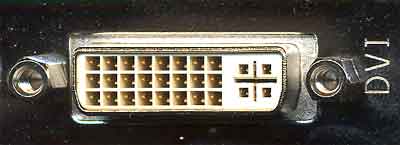
On the left you'll notice 3 rows of 8 pins each; these 24 pins are the only pins required to transmit the three digital channels and one clock signal. The crosshair arrangement on the right is actually a total of 5 pins that can transmit an analog video signal.
This is where the specification divides itself in two; the DVI-D connector features only the 24-pins necessary for purely digital operation while a DVI-I connector features both the 24 digital pins and the 5 analog pins. Officially there is no such thing as a DVI-A analog connector with only the 5 analog pins although some literature may indicate otherwise. By far, the vast majority of graphics cards with DVI support feature DVI-I connectors.
The idea behind the universal nature of this connector is that it could eventually replace the 15-pin VGA connector we're all used to as it can support both analog and digital monitors.
What to do about scaling?
A major problem when dealing with digital flat panels (the primary market for the DVI spec) is that they have a fixed "native" resolution that they can properly display at. Since there are a fixed number of pixels on the screen itself, attempting to display a higher than native resolution on the screen is impossible.
It is quite often however that a lower resolution will be displayed on the screen; case in point would be the Apple 22" Cinema Display monitor with a native resolution of 1600 x 1024. Playing a game at that resolution would be silly not to mention that most games don't even support such odd ratio resolutions, and thus you'd have to play at 1024 x 768 or 1280 x 1024. The problem with this is that the image must now be scaled to properly be displayed on the screen.
It used to be that scaling was not even considered an important matter and was left ignored but as digital flat panels increased in popularity it became something that manufacturers worried about. The DVI specification places the duty of properly scaling and filtering non-native resolutions where it should lie, on the monitor manufacturer's shoulders. So any monitor that is fully DVI compliant should handle all scaling/filtering itself and obtaining a relatively nice scaling algorithm is not too difficult meaning there shouldn't be much difference between monitors in this respect (although we're sure there will inevitably be some).


 Facebook
 Twitter
 RSS
RSS


0 Comments
View All Comments