



WinHEC 2005: Coverage Wrap
by Derek Wilson & Jarred Walton on April 29, 2005 2:00 PM EST- Posted in
- Trade Shows
Longhorn Manufacturing and Installation Features
One of the sessions we attended covered the OEM/business side of Longhorn preparations. Home users don't often think about these issues, but for a company like Dell, installing and configuring the OS on millions of PCs is a critical matter. Some of the basic problems with deployment of Windows are summarized in the following slide.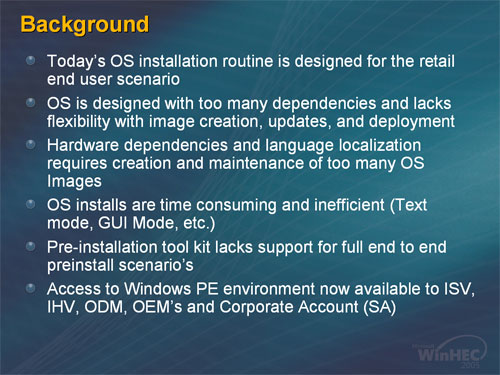
If none of those items sound particularly important, then you probably haven't dealt with the deployment of a large number of PCs. Hardware dependencies, languages, etc. are all matters that have to be dealt with on a typical assembly line. Longhorn comes with quite a few changes to help their OEM and business partners.
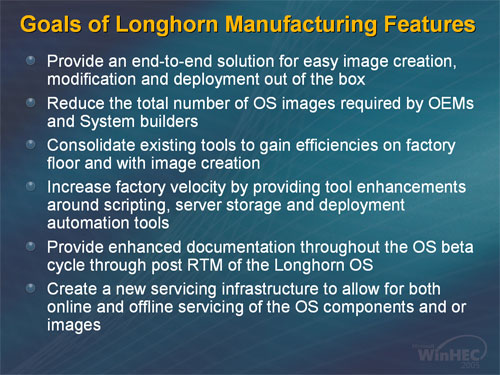
Several of the bullets deal with the management of system images. While ghost utilities have been used in the past, Longhorn will include its own imaging system. The underlying OS has also been componentized in order to facilitate deployment. For example, languages are now an entirely separate component; a single "world wide binary" is used for executables and it simply plugs into whatever language pack(s) the user has installed. The imaging system appeared to be very robust, as only the OS' developer could make it.
The Windows Images (WIM) can contain multiple configurations, and a single file called "unattend.xml" will contain all of the settings for a specific installation. So, rather than having a separate image for Home, Pro, and Media Center, with further images for each system platform, not to mention the various languages... you can get by with a single image! There will still be separate images for x86-32 and x86-64, however, and it wasn't entirely clear (to us) at what point a separate image might be required for different systems. Still, instead of dozens or even hundreds of disk images, the process can be reduced to perhaps two images per machine platform.
Most of this is accomplished using a new tool called Setup Manager. Images can be created, and modifying them can be done by opening the image and adding or deleting files, or simply by dragging and dropping packages onto an existing image. (All of this can alternatively be done at the client level if desired, but that's basically the current way of doing things, so it's nothing new.) If everything goes as planned, an online ordering process could also be integrated with the new imaging tools to create an on-the-fly unattend.xml file for a specific machine. Then on the assembly floor once the hardware is built, the image and configuration file are used to setup the OS and software for a custom PC. The OEM partners at the session looked very interested in the new features, although it's certainly not going to have as big of an impact for home users.
An interesting point that was made during this presentation (and covered elsewhere) is that DOS is going away. We'll still have a command prompt within Windows, but the DOS environment is basically dead. Consider the many businesses and OEMs that currently use DOS to load up a tool like Ghost, along with network drivers for specific platforms. A lot of new hardware - particularly SATA and USB devices - will not be properly supported by DOS. DOS will hit the end of the road on 12/31/05 as far as Microsoft is concerned, and there will be no way to use a DOS executable to start the Windows setup process. What's needed is a new tool to accomplish this task.
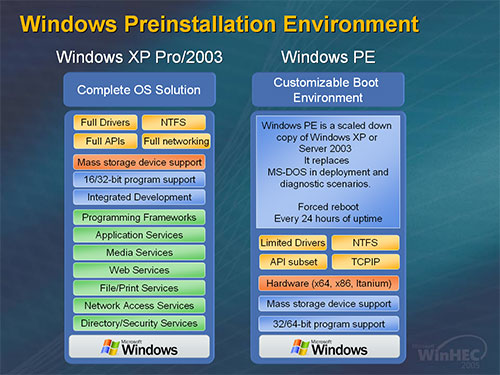
Enter Windows PE (Pre-installation Environment), basically a stripped down version of Windows with reduced API support. Like regular Windows, it can be customized to fit the need; it can even be turned back into the full Windows environment if desired, although that's counter productive. (It also has a forced reboot that occurs every 24 hours.) WinPE can easily fit on USB flash devices, coming in at under 64MB for the minimum configuration, although 128MB flash devices may be more appropriate for customized toolsets. Network support among other features will be available, and the same drivers as regular Windows can be used. This should make things easier for driver teams as well as the system builders - at least, that's the plan. We certainly won't miss DOS much - R.I.P. MS-DOS, 2005. Incidentally, WinPE is available for use now (or very soon), and it will work with XP and Server 2003 while we wait on the release of Longhorn.
A few last comments on Longhorn information we picked up at the show. First, Longhorn should install much faster than XP, which is welcome news. The goal is for Longhorn to be installed and ready to use within 15 to 20 minutes of inserting the CD/DVD. DVD? That's right! It's not official yet, but we heard the comment several times that based on the current size of the Longhorn build, DVDs will probably be used. We hope so, as installing from a single DVD sounds a lot better than 3 to 5 CDs. (The current Longhorn image is over 900MB and still missing many drivers, so DVDs really make sense.) The installation process will be faster in part due to less file copying; the image will be extracted to the hard drive, and then enumeration of PnP devices will occur and you're done. With even high-end systems still taking 45 minutes to an hour to complete the XP installation, the thought of getting everything done in less than half that amount of time is definitely appealing.


 Facebook
 Twitter
 RSS
RSS


17 Comments
View All Comments
JarredWalton - Wednesday, May 18, 2005 - link
JimmyTalbot, the Avalon cylinder demo was done on a laptop for us but one of the developers. It was basically meant as a "proof of concept". She said it took about one or two days to create - i.e. it was much easier than current Windows APIs. As far as I know, it's not available to the public or anyone outside of MS. Sorry.JimmyTalbot - Monday, May 16, 2005 - link
I should have specified: I got the WinFX (Avalon) Beta SDK hoping to find the sample in there, but it's not included.JimmyTalbot - Monday, May 16, 2005 - link
Does anybody know if/where I can get the "3D Picture Viewer" demo shown on page 1 of the article?Doormat - Monday, May 2, 2005 - link
I think the idea of browsing in the BIOS is fascinating. Even with WinXP its still 1-3 minutes or so to get to a usable browser or mail program. If all you needed to do is check your mail real quick, why not just go into the BIOS and forget about booting all the way into windows, and then shutting down.Fricardo - Monday, May 2, 2005 - link
"The other interesting comment from Barry was that he stated AMD will be using DDR2 in a future processor. We had asked if they might simply skip DDR2 altogether and head straight to DDR3, and he said they would not be doing so."Now that is interesting. I've been wanting to know that for months. Strange how the most useful part of the article was a talk with an AMD employee. Thanks guys.
Tujan - Sunday, May 1, 2005 - link
The funny thing about Windows is that the development areas seem oblivious to fact that testing of succesful programs are done on high-end systems wich then we see with the OEMs giving underperforming system to the masses.The graphics ideas are great,sure,but on 'when''the default graphics will be able to take and PASS the test the big boys are working with.
Windows interface for Longhorn,sure looks like the same barnyard.So we will have to rely on other vendors, and programs such as WindowsBlinds to add deriviative to such things as different colored buttons in a dialog box.
Again why so,a system font size cascades 'all windows.Nothwithstanding,getting pass security to customize your own computer now. Why does the interface remain nothing more than a very expensive colored lightbulb,and a glorified printer.
Hello,'integrate the icons into the 'program ? Sure we see the 'how-it-works. But why does it have to work at all.Is this going to keep us from creating our own icons for our own 'visual aids.Wich most all of retails off-the-shelf instructions for 'Long Horn,will invariably be in print.Now just imagine the trees for example.
So why dont you integrate the add/remove programs to the 'File Associations.? Isn't this explicit enough to keep from having those undocked windows fish flying from one pond to another.
Get rid of DOS.Think the learning expression traveling this train is simply to head for the caboos,and jump off.You would certainly be at the conductors point of reference then right ?
Im ready for a Virtual windows machine running technology all the way to the 60s.But we in the real computer world only imagine.Imagine that syntax doesn't come with noun,verb,subject and predicate. Much less have a reference that tells you so. Rather than giving somebody the rug by saying lets do the media,then I told you so.
Good luck.And wheres the beef ?
DerekWilson - Sunday, May 1, 2005 - link
In hind sight, Anand is probably right about Longhorn being more advanced than Tiger ... But the direction and (lacking) demos we saw didn't give us the warm fuzzy feeling we would expect.Of course, the ammount of cash Microsoft has laying around to make something happen if they need to would make anything possible ... My real question is: do they think they need to?
Give both Apple and MS a year and a half, and we could have an interesting feature battle on our hands depending on how much Apple can push themselves and how much MS cares :-)
Icehawk - Saturday, April 30, 2005 - link
I'm very curious as to how the UEFI Bios works, very intriguing to me.***
I think it is interesting that in Anand's Tiger article he says that Longhorn should be more advanced but this articles suggests it will be at on par, at best. I wonder which it will be?
***
3D on servers? Now that is a waste of resources and money. If a particular app uses it, OK then I'll budget the resources. But why should I need 3D to run IIS/FTP/etc?!
Well software wouldn't be anywhere without hardware, would it?
The market is pretty stagnant right now so I guess pushing 3D onto all desktops and making a gpu/cpu intensive OS should ensure some huge rounds of upgrades. Server-side almost none of them have 3d cards, or if they do very weak built-ins for the most part. On the desktop a P3 1ghz with 512mb of RAM is still *passable* on XP, that is a 5 year old machine. Something even slightly more robust like a 1.4ghz K7 with 1gb of RAM still runs everything but games without too many issues.
Guess they need to do something to make me want to upgrade again - I just went from that 1.4 K7/GF4 to a 3.2 P4/6600GT and don't see any offerings on the 1-2yr horizon causing me to upgrade otherwise. DC would be nice with my usage but raw processing power...? Only in games. That was the only reason I upgraded at all now, I would have waited if I could have otherwise as my old machine ran everything up until D3/HL2 fairly well.
stephenbrooks - Saturday, April 30, 2005 - link
...or post comments while you're in your BIOS.xtknight - Saturday, April 30, 2005 - link
awesome...I can't wait to get ahold of a WGF2.0 card and Longhorn. sounds like that will provide for some awesome effects I could put in my programs. UEFI looks kinda interesting as well. web browser in a BIOS is going too far IMO, though. they need to keep in mind this is just for diagnosing your pc. on the other hand you could download drivers or search for troubleshooting information from anandtech forums, while you're in your BIOS :)