



Networking Benchmarks
Just to get a quick idea of what these new features can do, we ran our usual networking benchmark suite on a pair of ASUS P5B-Deluxe motherboards using both the on-board PCI and PCIe connected gigabit network controllers (Marvell 88E8056 and 88E8001 respectively). We used two tests for this, a multiple small file transfer test consisting of about 450 files totaling 600MB, and a large file transfer test consisting of a pair of ISO images totaling 3GB. In order to keep the load on our D-Link Gamer Lounge router consistent, we also had the WMV-HD version of Terminator 3 streaming in the background. We tested Windows XP SP2 for a base score, followed by Vista with Compound TCP switched on and off.
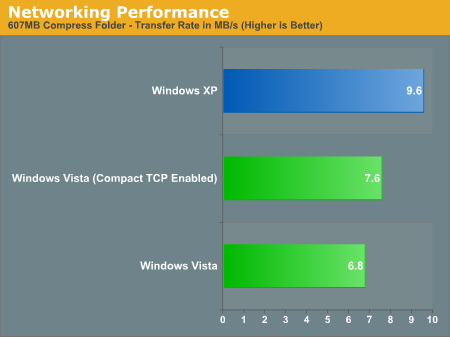
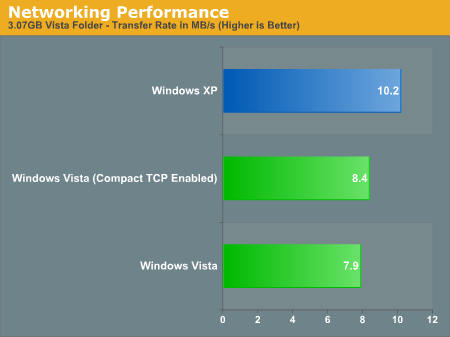
Unfortunately for Vista, neither test is particularly favorable. Compared to XP when Compound TCP is disabled, Vista is anywhere between 25% and 50% slower than XP in terms of the total time required for these tests. Without the ability to separate Vista's networking stack from the drivers for our NICs, it's impossible to tell if this slowdown is the fault of the networking stack being worse for this situation, or if the Vista drivers for this line of Marvell NICs are not quite as tuned, so as a comparison to XP this test is inconclusive. Either way, for this particular setup Vista ends up being slower at file transfers than XP.
The one bright spot however is that when enabled, Compound TCP is clearly having some effect even on our low-latency network. The 5% or so boost in Vista's low scores won't bring it back above XP, but it clearly proves that Compound TCP does have a real-world effect on performance. This will be something we will be able to talk more about as Microsoft perfects this algorithm set for the release of Longhorn Server later this year. Hopefully, the relatively slow performance we're seeing right now is being caused by drivers rather than by Vista's "new and improved" networking stack. We will definitely keep an eye on networking performance over the coming months, as most of the people we've talked with expected Vista's networking performance to be faster than XP's.
Just to get a quick idea of what these new features can do, we ran our usual networking benchmark suite on a pair of ASUS P5B-Deluxe motherboards using both the on-board PCI and PCIe connected gigabit network controllers (Marvell 88E8056 and 88E8001 respectively). We used two tests for this, a multiple small file transfer test consisting of about 450 files totaling 600MB, and a large file transfer test consisting of a pair of ISO images totaling 3GB. In order to keep the load on our D-Link Gamer Lounge router consistent, we also had the WMV-HD version of Terminator 3 streaming in the background. We tested Windows XP SP2 for a base score, followed by Vista with Compound TCP switched on and off.
Unfortunately for Vista, neither test is particularly favorable. Compared to XP when Compound TCP is disabled, Vista is anywhere between 25% and 50% slower than XP in terms of the total time required for these tests. Without the ability to separate Vista's networking stack from the drivers for our NICs, it's impossible to tell if this slowdown is the fault of the networking stack being worse for this situation, or if the Vista drivers for this line of Marvell NICs are not quite as tuned, so as a comparison to XP this test is inconclusive. Either way, for this particular setup Vista ends up being slower at file transfers than XP.
The one bright spot however is that when enabled, Compound TCP is clearly having some effect even on our low-latency network. The 5% or so boost in Vista's low scores won't bring it back above XP, but it clearly proves that Compound TCP does have a real-world effect on performance. This will be something we will be able to talk more about as Microsoft perfects this algorithm set for the release of Longhorn Server later this year. Hopefully, the relatively slow performance we're seeing right now is being caused by drivers rather than by Vista's "new and improved" networking stack. We will definitely keep an eye on networking performance over the coming months, as most of the people we've talked with expected Vista's networking performance to be faster than XP's.


 Facebook
 Twitter
 RSS
RSS


105 Comments
View All Comments
nishzone - Saturday, May 24, 2008 - link
Hi,I'm glad tnat your memory usage is similar to mine and therefore I might finally understand this. You have 2 gig of Ram...I understand that superfetch is the reason free ram is 0 (cache increases as free memory decreases). But why is the memory usage 45%? so around 1 gig?
I also have 50% usage on startup. Is vista using 1 gig memory? There is something I don't understand here because you recommended 1 gig for general users.
Regards,
Nishzone
Dataland - Wednesday, November 28, 2007 - link
I think Microsoft needs a performance reset. As I've said in some previous posts, I think software in general, and Microsoft software in particular, is getting slower at faster rate than hardware is getting faster. And this problem acutely affects Vista. I think Microsoft needs... (Pingback)Performance Reset
http://dataland.wordpress.com/2007/11/28/performan...">http://dataland.wordpress.com/2007/11/28/performan...
Kondado - Saturday, February 10, 2007 - link
I've done my own tests. I sent the same amount of data (51 files, 2,5 GB) once from XP to Samba, then from Vista to Samba (OpenBSD). Then I did the same from XP to XP, and from Vista to XP. XP was always a LOT faster.I would really know if it's the drivers or the stack...
jonp - Monday, February 5, 2007 - link
It seems like the budget system area was a little overlooked in this review of Vista. So I have some questions:"Memory in Vista..." - It appears that acceptable multitasking performance is found somewhere in the 3GB to 4GB memory size area. Many budget systems have only two memory slots and many new ones support dual memory access. This will force budget systems to 4GB which is fairly pricey now and probably will be for some time.
"CPU Performance..." - Your love for anything Core2 Duo shines here. But what about the dual core Pentium Ds? Like the D915 2.8GHz processor. Yes it is Netburst, but also easier on the budget than a Core 2 Duo processor. We need something more specific here in terms of benchmarks/guidelines.
Video adapters - I didn't see anything that talked about integrated video adapters vs. VGA/PCIe video adapters. Are any of the integrated graphic engines, like Intel 950GMA provide acceptable performance for VISTA? How about older video cards? Minimum graphics memory? Graphics engine speed? Again we need more specific guidance here.
Hard drive - You addressed hard drive performance, in a way, in the "Vista Search for Fast Drives Only" section. But again no specific device selection guidelines like: RPM, cache size, average access, size, data transfer rate, ...
Virtualization - It appears that MS forbids the use of virtualization products with Vista Home Basic and Home Premium editions forcing budget users to more costly editions of Vista.
Upgrade or "clean" install? - Not strictly a budget system issue; the web if full of warnings about NOT trying to upgrade to Vista --- that it should only be a "clean" install situation. That upgrading is fraught with too many pitfalls that it isn't even worth trying. And not all editions of Vista are allowed to do in-place upgrades of the XP editions; oh, and you can't do an in-place upgrade of anything prior to XP. See http://tinyurl.com/36ljxv">http://tinyurl.com/36ljxv for some upgrade details.
JarredWalton - Monday, February 5, 2007 - link
Basically, a lot of that falls into areas we are going to look at in future articles. Given that we don't really recommend most people upgrade to Vista yet, the lower-end your system is the less we would consider Vista. Pretty much all of the DX9 NVIDIA and AMD cards do fine with the Vista Aero Glass UI, but IGP solutions are slower. Individual tolerance for the UI will vary; I'm sure plenty will be okay with GMA950 and Glass, while others won't want anything less than a $100 discrete GPU. Oh, and GPU drivers for Vista are still flaky, IMO. :)
HDD, anything 7200 RPM should be fine. CPU, really with a decent GPU the requirements aren't all that much higher than XP. RAM is more important - don't even think about Vista with less than 1GB - but HDD and CPU most people with anything made in the past two years will be fine. Just my opinion there - individual usage and preferences will again play a role.
I wouldn't say 3-4GB of RAM is even remotely necessary for most people. A few will like it, but 2GB is still sufficient for about 99% of people.
Virtualization and Upgrades... I'll have to defer to others there. Again, I recommend discretion, so I would tend towards doing a full backup (Ghost or similar) of any system before doing a Vista upgrade. I believe Gary is about to revert his system for the time being, as Vista has just had a few too many glitches. The number of people that worry about virtualization - really intending to use it, not just for test purposes - is again very small. I think mostly we're seeing the vocal minority complaining. Still, I find it odd that MS even worries about whether or not people run the OS via virtualization - unless the glitches are aggravated by such an environment, which is entirely possible.
jonp - Tuesday, February 6, 2007 - link
Thanks Jarred...you insights are always very helpful and I am glad that these topics will get more focus in the future. Jonjonp - Monday, February 5, 2007 - link
Both of the charts in the Compound TCP section for Windows Vista say "Compact" and not "Compound".duploxxx - Sunday, February 4, 2007 - link
Its probably me that's missing a page or so but could you guys explain what system you used for these tests?funk3y - Saturday, February 3, 2007 - link
HelloI also spent some time testing the network part of windows vista, and I discovered some quite interesting things:
Windows Vista is reducing the network I/O when an application using the audio interface is launched, I discovered this when copying large files over my network.
When I copy large file through the network the average speed is 40 mb/sec and the taskmanager whow 30-50% of network use, as soon as I start an application playing sound (WMP, Skype, Warcraft III, ....) the rate drop to 8 mb/sec and the network use in the taskmanager never go beyond 12.5%
I achieved those test on different hardware, with differents drivers and the results are always the same; it is just impossible to get further then 12.5% of network use while playing a sound.
My guesses are that microsoft voluntary did this, in order to avoid sound crackling. Because of the new driver scheme, bad written drivers having to do many I/O could lead to sound degradation (I had this issue while using my raptors RAID on a NF4 board; making a lot of I/O on the disk just killed the sound quality).
As you where streaming a film while benchmarking, you may have been in this situation. It could be nice if you could rerun some benchmark taking into account all what I have written.
As I am already posting, here are some other consideration about DOS and vista:
-It is just impossible to launch a DOS application in fullscreen mode! This functionnality lack can be really painfull in environnement where DOS application are still well used; I just don't understand microsoft's choice
-I don't think that vista x64 is still able to launch 16 bit apps anymore (keep this in mind before upgrading to x64!)
ministerchief - Saturday, February 3, 2007 - link
I have a "Corsair Flash Voyager 4Gb" usb stick and I can't use it to "BOOST" my system.So, how anandtech could use it ?
Can someone tell me how to use this flash drive with the "READY BOOST" feature.
THX