



Shuttle SK83G: Chassis
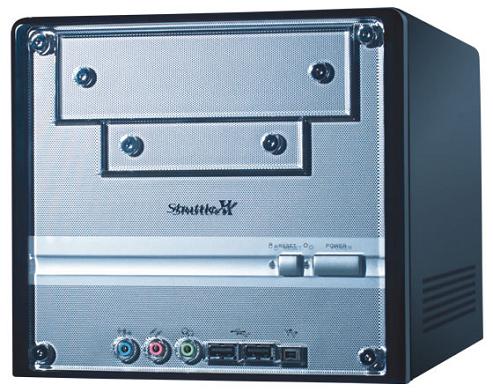
A brand new Shuttle SK83G
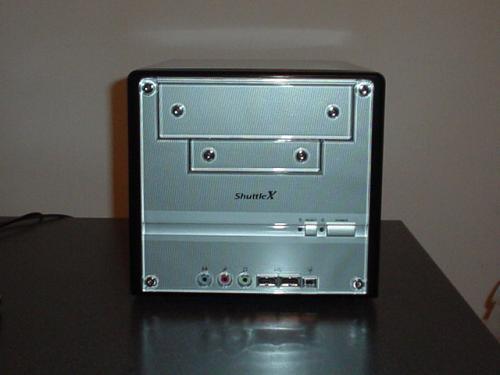
The front panel of the Shuttle SK83G consists of your standard array of I/O ports; it includes two USB 2.0 ports, audio ports (Mic In, Line In, Line out) and a microphone jack. For some reason, Shuttle continues to ignore their optical drive bay(s) by not building a matching plate into the face of the SK83G, which would stop beige optical drives from clashing with the black and grey colors of this SFF. I suppose you could always buy a black optical drive, and that's a fine choice, but many manufacturers have already constructed their SFFs with built-in face plates, so we're not sure what's holding up Shuttle.
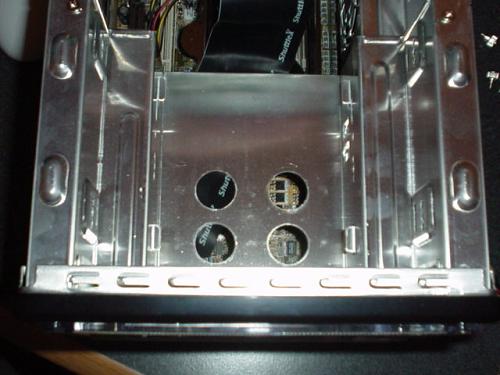
The SK83G is only able to store one optical (ATAPI) drive, one floppy drive, and one hard drive at a time. Or, you could opt to install two hard drives and one optical drive if you have no use for a floppy drive, and vice versa. Regardless of the combination, you're not going to be able to install more than three drives total due to the SK83G's small dimensions. This isn't terribly inconvenient, but other manufacturers have found a way to avoid this restriction by building slightly larger SFFs without getting too big. We hope that Shuttle can move toward slightly larger SFFs so as to create another drive bay with their future models. Anyway, routing cables to their destinations from the optical, floppy and hard drives that we installed was a cinch using the bundled rounded cables, even though we would have liked the Floppy cable to have been rounded too. All in all, the way the SK83G's internals were organized allowed us to move through areas seamlessly, and space in general wasn't too cramped or tight by SFF standards.
|
|
|


Shuttle, like most SFF manufacturers, uses special heatpipe cooling to dissipate the heat coming from the Athlon 64 3200+ processor that we used for testing. With the SK83G, Shuttle has improved upon their previous "ICE" heatsink by adding a heavier and generally thicker copper base, and slightly thicker aluminum fins as well. The ICE now also has a new Everflow cooling fan, which can be manipulated in the BIOS through the PC Health section's CPU Fan Speed Control option.
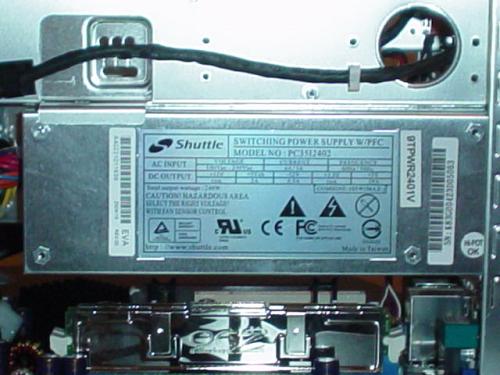
The SK83G's PSU is a 240W version of Shuttle's recently introduced series of "SilentX" products. Basically, what you're getting here is the more silent and cooler version of Shuttle's first iteration of their Athlon 64 SFF, the SN85G4 (version 1). The original SN85G4's PSU ran very hot and was quite loud, which of course didn't sit well with the enthusiast community. Luckily, that was completely fixed with the SN85G4V2 and is not an issue in the SK83G. Anyway, 240W won't be enough to support high end, next generation video cards, but it will be able to support power hungry hard drives (yes, even SCSI) and processors. Just make sure you understand that with a system like this, you probably aren't going to be doing much overclocking at outrageous levels.
Like most good SFFs these days, the Shuttle SK83G left enough room for high end video cards such as the Radeon 9800 Pro or GeForce FX 5900 Ultra. We were, therefore, able to fit a standard 128MB 9800 Pro inside the SK83G quite easily. Even though both ATI and NVIDIA's high end cards are still primarily 9800 Pro cards or 5900 Ultra cards, their next generation cards are just starting to reach retail in quantity. ATI's X800 and their various iterations have been on the market for several weeks in low quantity, and we were able to test one out successfully inside the SK83G. Just as with the 9800 Pro, the X800 was easy to install and didn't really take up any space that would interfere with other components in the SK83G. Unfortunately, since GeForce 6800 cards aren't available in retail (or are only barely trickling in), and because we couldn't get the few samples that are available at the moment, we were unable to confirm whether or not a GeForce 6800 of any kind would fit in the Shuttle SK83G's AGP slot. Obviously, we realize that a GeForce 6800 Ultra won't fit due to its two-slot design, assuming manufacturers follow reference design. But a slimmed down version of the GeForce 6800 Ultra, like a GeForce 6800GT, should fit. UPDATE: After weeks of waiting, we were finally able to test out a GeForce 6800 series card to see if it could fit and operate in an SFF system. We tested a PNY GeForce 6800GT (taken from a local Best Buy) inside the Shuttle SK83G, and experienced no issues with installation or operation. It was a tight fit, but it worked, and the PSU was able to handle a Windows XP install and multiple gaming apps.
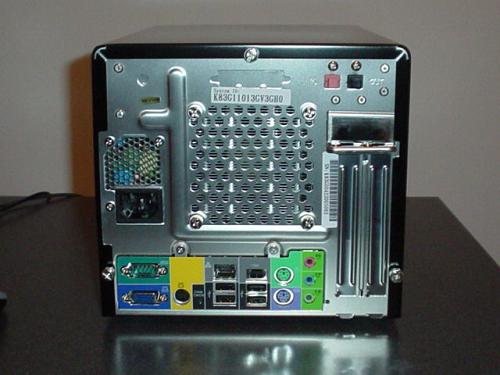
The SK83G also includes a good collection of I/O ports in its back panel. Specifically, there are four USB 2.0 ports, one IEEE1394 FireWire port, one S-video and VGA port, three audio ports (Mic in, Line in, Line out), two PS/2 ports, and a serial port. The IEEE 1394 port is a nice touch and is necessary for users who demand high throughput for large files, such as digital camera users. Four rear USB 2.0 ports are fairly standard nowadays, so that's nothing new. Everything else is standard but the VGA output, which is, of course, an excellent addition to an SFF for enthusiasts looking for reliable backup video in case their AGP card dies. While UniChrome II video is nowhere near acceptable for 3D gaming, it is an adequate 2D accelerator.
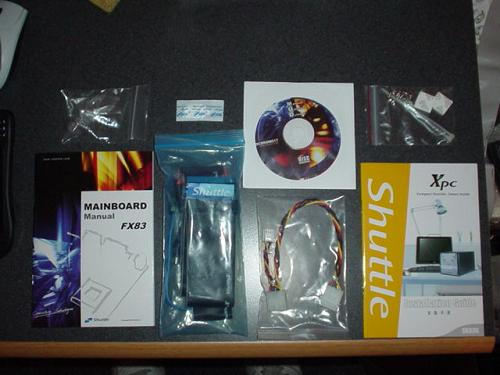
Shuttle's bundle is primarily made up of your standard set of cables, screws, floppy, etc. There is one SATA cable, one IDE cable, one Floppy cable, a 4-pin male/female power connector, an S-video connector, a motherboard driver CD, and heatsink compound bundled with the SK83G. The IDE cable that is bundled with this SFF isn't a rounded cable unfortunately. Rounded cables in an SFF can be exceedingly useful because they make it much easier to route and organize cables within a system as cramped as an SFF. Unfortunately, we didn't get a rounded IDE or Floppy cable with this bundle. But in the end, it's a minor drawback.


 Facebook
 Twitter
 RSS
RSS


18 Comments
View All Comments
aw - Thursday, July 29, 2004 - link
I have a question. In the final thoughts:"Overall, we were most impressed with the quiet and cool operation of the SK83G, its well thought-out exterior and neatly organized interior, and the little additional features (rubber washers, tied down PSU wires, well positioned card reader, etc.)"
When you say "card reader" did you mean a compact flash card reader? This is a nice feature of SFF PC's but I didn't see it mentioned in the article or in the pics anywhere. Maybe I am confused ;-)
nserra - Friday, July 16, 2004 - link
#overclockingoodnessI would like to see you on the days of the 286, 386, 486 it would be funny.
The difference between you and the others like the ones who make posts at http://www.megagames.com is not much. You must be a 12yr old child who think know everything about computers, have you ever come out from your house and see the true world, the true reality? Have talked with other people non computer fanatics like your self? Regular PC users? Do you know about their needs? What they really want?
From all the video cards in the world how many you do think are overclocked? 1/10000 1/1000 1/100? 1/10?
How many people do you think came to my store and ask me about overclocking? Or what's better nvidia card's or ati cards? Even if I tell them don’t buy the 5600 go for the 9600 pro it's faster and cheaper, they go for nvidia, they have nvidia graved on their minds I can't do nothing, the same problem was on the 3dfx(voodoo)/powervr(pcx1/2) days.
I agree with you when you say "...hence the reason to implement high-end technologies that business users will never use."
How many people do you think buys a P4 3Ghz just for surf the net, print stuff and word/excel processing? 1/10000 1/1000 1/100? 1/10? When even a C3 1Ghz is more then enough to do that?
Do you know why there is 6/8 USB 2.0 ports on current PC’s, instead of 2/4 USB 1.1 and 2/4 USB 2.0? Do you know why USB 2.5” external hard drives powered by the USB cable work fine in USB1.1 mode, but not on USB2.0 mode? And the issues that come from this?
Just because I don’t agree with you I am wrong, and vice versa? It’s my opinion. It’s your opinion.
“you can't come up with any decent arguments you are just posting crap”, and your argument’s where are they? I didn’t see you or any one saying what is right, you only say I am wrong, you don’t say why are you right!
I think who is scared is every one in here that can’t even see what is SM3.0 for example, have any one read Microsoft documents about SM3.0, maybe then some people didn’t say the stupid things they say. I cant be some one that don’t sell Ati because don’t have SM3.0 or that don’t sell Nvidia just because SM3.0 is not a big deal. I must sell what people want (some know, other go for others opinion, for others anything that is working is good, only some ask the opinion), the only think I can do is keep rightly informed.
overclockingoodness - Thursday, July 15, 2004 - link
Yes, many of them might be space savers or people are looking into some looks and stuff, but belive it or not they are still inclined towards enthusiasts, hence the reason to implement high-end technologies that business users will never use.Just because a machine is designed for enthusiasts doesn't mean only enthusiasts can buy them. Companies have to open their options feature wise in order to sell more units. That's how business works...you should know that since you are a "business owner" yourself. Almost all motherboards (enthusiast and non-enthusiast) come with on-board sound so just because this SFF has on-board doesn't mean that it is not for enthusiasts. Maybe you need to check your facts sometimes. What a misinformed jerk?
You can upgrade almost everything in a SFF system including the power supply, video card, sound card, hard drive, CPU, case, CPU cooler, case fans etc. etc. The only thing you can't upgrade is the motherboard. Do you even know what an upgradable system is? I guess not and yet you claim to own the "largest PC store" in your area. I bet the area only has about 10 people living in it. You are such a moron.
Almost all enthusiasts overclock their system. Overclocking system does not mean that the system is unstable. Even increasing the system bus by 2MHz means overclocking. How many systems will get unstable with the 2MHz FSB increase. You can overclock a lot with good cooling. You need to re-learn the definition of of overclocking? How do you claim to own the "most selling PC store" when you don't even know what overclocking is? Hey Dumbass, go and check your facts.
Processor is not more important than the motherboard. They are both equally important. 2.4GHz "C" is the legendary overclocker for Intel systems and if you use this CPU with a PC Chips motherboard, you will hardly get any overclocking done on the CPU. In this case, the high capabilities of the CPU is useless. Once again, better check your facts before posting stupid arguments like these. It seems to me you are scamming in your "most selling PC store" by misinforming them.
Okay...I agree with you on the high-end CPU. But you are still a misinformed fool about the other facts and you are still scamming your consumers.
The thing is...I seemed to have hit your misinformed neves with my comments and since you can't come up with any decent arguments you are just posting crap. I also noticed that atleast one more user agreed with me and you couldn't tolerate that with your hot-headed temper. The testing methods you suggested to AnandTech staff were also declined by them, which made you even angry because they could care less about you.
People like me wouldn't want to work for such a dumbass boss anyways. Take my advise...stop scamming people, quadruple check your facts before posting, go to your mamma's house because now I know you are crying and STFU.
HAHA...what a scammer. I wish people like you go out of business. Maybe jerk is the right word for me, but STUPID seems to better describe you.
nserra - Thursday, July 15, 2004 - link
#4 You are wrong!People who buy these systems are:
- Out of space users
- And people who want a PC, but don’t want it to look like one
- A system that can make them spare money on an audio system
If they are LAN machines for enthusiasts, I don’t see the need of the integrated graphics card? Where is the SB sound card? Or you only give credits to the graphics performance. Maybe the on board speaker is enough for you.
What enthusiast user buys a practicality non upgradeable system? Have any one heard of PS2, XBOX? I guess not.
Overclock a system that looks like a cube? Are you crazy? Unless, you like unstable systems and lookups while playing games.
The post of overclocking results is good, but if you are smart, you should already know that the processor is more important when you consider overclocking then the motherboard.
I didn’t say the AMD 64 was ok, but why I would like a high end CPU if I am not going to do gaming? You must be joking.... have you heard of VB studio, DB, CAD soft, even DVD ripping? Maybe you skipped the Workstation and General performance and Encoding benchmarks, maybe a 4X SLI Geforce Ultra Extreme would help there don’t you think, maybe you can’t think, because you are not very cleaver. Jerk is the right word.
I am the owner of the most selling PC store in my region in a ratio of 100KM, people like you, I don’t want them working for me, because they sell 1 PC to 100 clients, and not 90 PC to each 100 clients.
MIDIman - Thursday, July 15, 2004 - link
Confused...every single SFF article at anandtech has a noise db benchmark. This was the first with only a subjective noise comment in the Summary:"Overall, we were most impressed with the quiet and cool operation of the SK83G..."
That's it?
lupis42 - Wednesday, July 14, 2004 - link
I would tend to cuncur with number 4, and I'm surprised you guys let this machine off so easily. Compare relative performance and feature set to Shuttle's Athlon XP offerings, and it plainly sucks. The SN421G for example, was a gaming system, but unlike this one it had an excellent feature set, including excellent integrated graphics. Honestly, this sounds like a worse deal except for the A64 support. Where's the nForce 3 250GB? And not ditch the whole socket 754 thing, since AMD is phasing that socket into low end anyway? And why bother with the integrated video if it isn't usable? Also, why not integrate good sound? And can the front audio ports be hooked up to a PCI soundboard? This system sounds fairly shoddy, and not what I would want to consider a good AMD small form factor. As a side note, I disagree entirely with the idea that the system should be a little larger to allow for another drive. Part of the selling point of Shuttles is that they are SMALLER than the competition, especially than competing micro-ATX systems. If the Shuttle case was larger, it would start to lose out on the size selling point, and they would need to give you a better power supply if you were planning to put drives and a modern AGP card in it. All in all, nice benchmarking, but I'm surprised at the positivity of the review. This falls short on far too many counts.Evan Lieb - Wednesday, July 14, 2004 - link
Sonic587, I think that's just a flaw with the engine, but I'll see what I can do.Jeff, I'm not sure who changed the title, but that wasn't the original title. I'll change it if it's not already too late.
nserra, Wes and others have answered your points adequately, so I don't see a need to comment further.
ggnl, good point, it's embarrassing. We're trying to do something about it. Bare with us. :)
cosmotic, we tested nForce3 150/250Gb motherboards and SFFs for this review.
coutch, we did give our subjective analysis. But in the future, we'll have actual instruments to test noise levels. You won't have to worry about it for too much longer. Our Linux section is a work in progress, that type of testing will take time (mostly because there isn't nearly enough demand for Linux testing).
quorm, we weren't particularly impressed with this SFF either. As far as S939 goes, we're getting some S939 SFFs in this week.
quorm - Wednesday, July 14, 2004 - link
I'm always happy to see more SFF reviews. But, based on your review, I'm pretty disappointed that Shuttle bothered to put out a new AMD SFF with such minor improvements over their previous AMD64 machine. Also, that thing is extremely ugly. What I really want to see is a Socket939 Shuttle with all of the features of their new Intel SFF (hi-quality audio, multiple drive support, cooling zones, etc.). Any word on something like that? Here's a review of the new Intel SFF.http://www.sfftech.com/showdocs.cfm?aid=563
thomas35 - Wednesday, July 14, 2004 - link
Hi, another nice review as always. But how about doing a review on Iwill's SFF dual Opteron system? According to their website, they started "sampling" the product this month, so maybe you can get your hands on one and tell us if they are worth buying.coutch - Wednesday, July 14, 2004 - link
Firstly ... NOISE !Even if just a subjective analysis, please include noise level tests of these SFF in the future. Some of them have been plagued with horrible levels of fan noise ...
Secondly, it would be great to have more Linux tests done on motherboards review. Even if it's just trying to install a distro and see what works/doesn't work out of the box ... mostly for onboard controllers compatibility ...