



Thermaltake Muse R-Duo: External RAID
by Dave Robinet on December 14, 2007 2:00 AM EST- Posted in
- Storage
Introduction
RAID, while initially overused in desktop configurations, has found a more stable home among knowledgeable users over the past year. Where "RAID 0" became a buzzword equaling "high performance" some years ago, the trend has recently shifted towards people researching their decisions and acting accordingly. These informed consumers have begun to notice that indeed, not all RAID implementations are equal - some controllers perform better than others do, and most importantly, some handle failures and other unexpected events much more smoothly. It is with this mindset that we turn our attention once again to some of the newer RAID offerings, beginning with a RAID enclosure from Thermaltake.
Thermaltake
Founded in 1999, enthusiasts recognize Thermaltake for their heat management portfolio (coolers, fans, etc). Indeed, the company has only recently moved into the storage arena - so recently, in fact, that their "Company History" page omits any mention of the product line. When browsing said line, however, it's clear that Thermaltake has had a lot of recent activity in this regard, and now offers products ranging from data cables through RAID enclosures. The question, obviously, is this: Is Thermaltake intentionally downplaying the presence of their storage offering due to lackluster performance, or do they have powerful weapons hidden in their storage arsenal? We'll look at their Muse R-Duo product, and see how it fares under a variety of conditions.
The Thermaltake Muse R-Duo RAID Enclosure
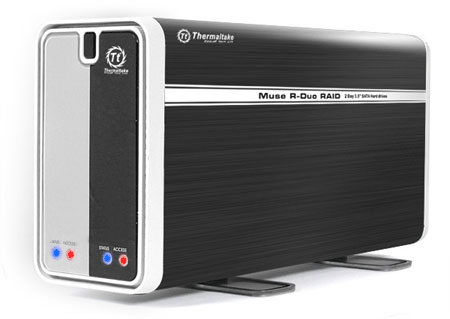
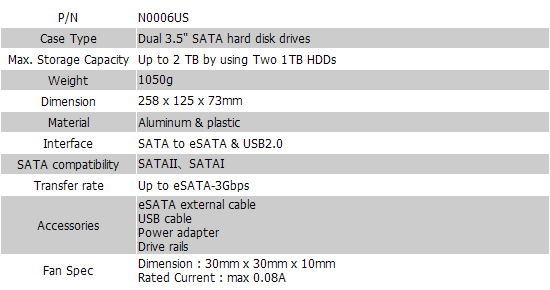
The Thermaltake Muse R-Duo is an external aluminum enclosure, housing up to two SATA hard drives. The unit is made primarily of aluminum, both for the frame as well as the brushed aluminum housing. Rather than relying solely on the aluminum housing to dissipate the (often substantial) heat generated by two active hard drives, Thermaltake has opted to put a 30mm fan on the back of the enclosure, providing both active and passive cooling. The unit can rest on either its side, or using the rotating stand found at the bottom of the device.


 Facebook
 Twitter
 RSS
RSS


11 Comments
View All Comments
Zak - Friday, December 14, 2007 - link
I've gone through 4 dual drive enclosures and concluded that anything with fan smaller than 80mm is too loud. They were usually louder than my computer so I don't expect this one to be any better. I've settled for SansDigital 4-drive USB eclosure in JBOD mode. Their 4-drive SATA is also a great value but I couldn't get the included SATA card to work properly neither under OSX nor Windows XP so it went back. But I'd like to see some reviews of SansDigital hardware, they have some nice offerings.Zak
MrPickins - Friday, December 14, 2007 - link
I'm sure I missed it when reading the article, but what type of connection were you using for the benchmarks?I'd assume eSATA, but I'd also like to see how the enclosure performs using the USB interface.
Dave Robinet - Friday, December 14, 2007 - link
Yep - eSATA was used. It's tough to imagine a lot of USB use for this sort of device, to be honest, so that wasn't tested.Thanks a lot for reading!
Magendanz - Friday, December 14, 2007 - link
I believe this unit uses the Silicon Image SiI5744 Storage Processor, which has frequent firmware updates and a decent utility called SteelVine Manager for configuring and monitoring the chipset. I purchased a similar unit called the ONNTO DataWhale from CoolDrives and have been very happy with it. (The DataWhale has removeable drive trays, which I like.)It's interesting to note that the SteelVine products have support for SAFE33 and SAFE50 modes (which split the drives into RAID 1 and BIG partitions) as well as an advanced GUI configuration mode that allows you to configure combined modes manually. On the DataWhale, this was enabled with an internal jumper and I'd expect the Muse also has this. Just pull the jumper and set the DIP switches to SAFE mode, then you can configure to your heart's content using SteelVine Manager.
Note: The latest version of SteelVine Manager requires the latest firmware update, but since SteelVine Manager is required to update the firmware this results in a bit of a Catch 22. Just install an older version of SteelVine Manager, install the firmware update, and then update to the latest version.
Yawgm0th - Friday, December 14, 2007 - link
The definition of RAID 1 listed in the article is not correct. In a standard RAID 1, the drives are mirrored and presented as a single volume to the operating system. However, they will both be accessed simultaneously during all read and write actions. This is why RAID 1 generally results in a substantial increase in read speeds but a slight decrease in write speeds.This is true if you are doing a software RAID, in which case the operating system or RAID software knows to do this, and with a hardware RAID, in which case the controller automatically reads and writes to both drives simultaneously. Anything else is not RAID 1.
The definition listed for RAID 1 in this article describes a behind-the-scenes backup, which is not RAID 1. If this is the case, it ought to be given more mention in the article. One of the biggest benefits to using RAID 1 is not just the high reliability, but the greatly increased read speeds. If the described method is what's in use, then it's a serious flaw in the device.
Dave Robinet - Friday, December 14, 2007 - link
The device does provide true RAID 1 in its normal sense. My choice of words was meant to illustrate the way the end-user sees the device, and it's substantially easier to say "show one device, then use the other".The reality of RAID 1 is that the OS reads from only one drive, so the basic definition is essentially true, though. I'll see about cleaning up the wording to satisfy both clarity and to make it more accurate. Good catch!
yyrkoon - Friday, December 14, 2007 - link
$143 usd is not a terribly large sum of money, but if you look into alternatives, you can get the addonics 2port port Multiplier, and do the same thing for cheaper. Then again, you'd have to either build your own enclosure, or buy one. I wouldnt be surprised if this device in fact uses the addonics port multiplier . . .All the above said, I would have to agree in wondering if RAID really has a place on the desktop(or most workstations and servers for that matter), as there are so many 'better' ways to store data safely without even using RAID in the first place. Database servers storing mission critical data MAY need RAID for an added form of reliability, but probably do not need RAID for performance, as any self respecting database admin is probably using a static ram HDD device, or possibly a large RAM disk(assuming balls out performance is even needed).
I cannot really help but wonder if a software RAID array, on a multiple core system would outperform this device or not. That and the fact with tools such as rsync, and just storing important files on multiple drives wouldn't be as safe, without the hassles/complications that RAID can bring into the big picture. The cost definately would be less . . .
cserwin - Friday, December 14, 2007 - link
I've had to explain to too many family members that their digital photos are gone-baby-gone because they haven't backed them up.I think RAID 1 is critical for digital photos.
ESATA give the advantage of allowing direct management of the photos on the redundant array without any appreciable loss of performance, and it is very portable for upgrades. It is way more functional than USB 'backup' solutions - especially for me, who gets the phone call when my uncle/mom/sister/aunt is having a problem.
yyrkoon - Saturday, December 15, 2007 - link
Sorry, but RAID 1 is not going to magically fix all of everyones problems. What happens if bobby-sue's kid deletes (a la shift delete) all their families image files, or disk corruption creeps onto a single somehow, while mirroring to the second ? Try explaining to a family that their Photos and other data files are bye-bye-gone after you recommended that they spend twice as much in HDDs plus controller(if needed).DeltaCopy:
http://www.aboutmyip.com/AboutMyXApp/DeltaCopy.jsp">http://www.aboutmyip.com/AboutMyXApp/DeltaCopy.jsp
Smart partitioning + DeltaCopy + offsite optical media storage may not be perfect, but is a good bit smarter than just adding another point of failure to a storage syst
Magendanz - Sunday, December 16, 2007 - link
Fortunately, Vista and Windows Server shadow copies prevents data loss in these scenarios.