



EVGA Killer Xeno Pro: The Impact of Network Offloading
by Derek Wilson on July 3, 2009 4:20 AM EST- Posted in
- Networking
Bigfoot Networks has, for the past few years, been trying very hard to bring high powered, intelligent network interface cards to the desktop. We previously looked at their Killer NIC with some interesting results, and today we've got the Killer Xeno Pro in our labs.
The major difference between the older Killer NIC and the newer Killer Xeno Pro is the inclusion of an audio path and audio processing for voice chat acceleration. They Killer Xeno Pro also has twice the RAM of the original. Despite the improvements, one of the major benefits is that the Killer Xeno Pro will be available at a lower retail price than the Killer NIC was. Oh, and it is sort of cool to see the new hardware dialog talking about a PowerPC Processor:
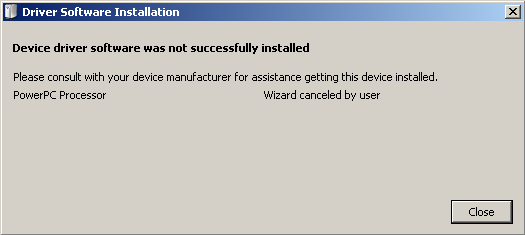
I sooo want to hack this thing now.
In our original investigation, we did see some situations where the Killer NIC could make some difference, but, for what you get, the cost was much too high. One of the ways that Bigfoot is trying to combat this is by selling chipsets and letting vendors like EVGA build and market boards. They've managed to get their costs down and the price of the Killer Xeno Pro, while very high for a network card, is much more reasonable than the original offering. The EVGA Killer Xeno Pro can be had for about $120 USD.
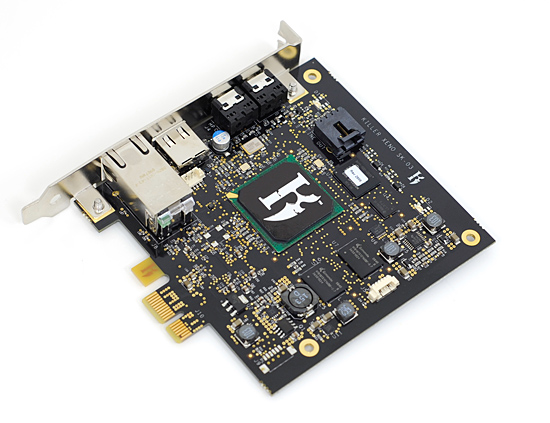
The EVGA Killer Xeno Pro in all its glory.
Let's start by saying that this isn't going to be a network card for someone hanging on to a 7 Series NVIDIA card or a Radeon 1k part from ATI in a single core CPU system. When upgrading, spending the $120 cost of the Killer Xeno Pro on a better graphics card will net you a great deal more performance. Even putting that money into the CPU is likely to get you more for your money in general. This is a card that should be targeted at the online gamer with a good system who wants to make sure every possible advantage is covered.
This hardware at this price is just not for everyone. It still needs to come down to more of a commodity price in order to see wider adoption. In our opinion, those who should even consider this card should already have a modern dual core system with single GPU graphics hardware capable of delivering a good, steady, high framerate at the preferred resolution in the majority of games. We don't expect that everyone who has such a system will want to invest in the Killer Xeno Pro either, but let's not get too far ahead of ourselves.
Up first we will look at the Killer Xeno Pro, its features, and why we should expect some level of increased performance at all from a typical network card.


 Facebook
 Twitter
 RSS
RSS


121 Comments
View All Comments
tamalero - Saturday, July 18, 2009 - link
just wondering guys, why you didnt test on a NORMAL machine and not on a high end machine?to test the offloading, you should have used games that are heavily cpu bound or that limits cpu or similars.
a dual core machine with some heavy source based engines and see if it offloads the cpu....
if you're not gonna squish what the card promises, why even test then?
kmmatney - Friday, July 10, 2009 - link
A more useful article would be whether a sound card improves performance - I'd like to see a good article on that.hoak - Friday, July 10, 2009 - link
I hope this isn't a trend, but this review and others like it on AnandTech are not of the caliber of other of reviews past, or what's offered on other sites like X-Bit Labs where rigorous objective testing standards, science, and hard facts are the arbiter of a review, not this subjective and half-assed swill that panders to the the difficulty of testing and baseless opinion.Five Frowny Faces For AnandTech...
:( :( :( :( :(
LoneWolf15 - Thursday, July 9, 2009 - link
"Adding to this, the Killer Xeno Pro hardware is capable of offloading other network centric tasks like VoIP, firewalls, and networked storage (though these features are not all fully supported with appropriate software at this point in time)."This is the ONE use I would find for this card, rather than gaming. I know people who rely on VOiP, or teleconferencing for distance-learning and therapy who could truly benefit from what this card has to offer. And of course, most of those features aren't fully supported.
Hmm. Think I'll just make sure those people have a fast enough CPU to crunch things (which really isn't all that fast, a Core 2 Duo P8400 on a laptop can handle it no problem) and a low-latency network, since I probably can't guarantee even, consistent support with something like this product. Maybe someone like Cisco can buy the company or Killer NIC can look at the business aspect of this, since I think they'd make more money there, and then be able to use it to support the gaming side of things.
jiulemoigt - Wednesday, July 8, 2009 - link
I started reading through the comments to see if anyone posted this but the whole test was invalid. Two computers with the exact same hardware going to a location on internet could have totally different latencies because they took different routes to get to the host server.Though the results reflewct reality some times it is going to be fast some times it is going to be slow, but mostly it is dependant on how congested the net in general and how busy your server is. The network stack is not significant to transfering data unless something is broken.
Last most built in NIC have traces directly to the north or south bridge depending on the chip and don't share bandwidth with anything else.
swaaye - Friday, July 10, 2009 - link
Onboard NICs are either on PCI or PCIe and definitely do share with other such devices.Teloy - Wednesday, July 8, 2009 - link
«the Killer Xeno Pro can disable it's "game mode" and enable "application mode»; «(...)the major feature of the Killer Xeno Pro is it's ability to offload TCP/IP work(...)... "It's" is a typo only allowed to first grade children... You should pay more attention to grammar when writting an article on a website as prestigious as Anandtech...jaggerwild - Tuesday, July 7, 2009 - link
I have to question why this article was done, unless EVGA is buying space here.........Rasterman - Monday, July 6, 2009 - link
One question that would put things into perspective is how much CPU is used to do TCP/IP functions? My guess is a tiny fraction of 1%, especially with a monster CPU like in the test. Therefore even if you offload 100% of network computation, you are never going to notice a difference.It seems this card might be more useful for a web or file server. Testing it in a system with as high of a network load as possible would seem to be a much better test if the card is actually doing anything. Granted people are going to buy this for games, but the problem testing with games is they are designed to use as little network as possible.
hooflung - Monday, July 6, 2009 - link
Q: Who else would benefit from using this product?A: Among other things, Killer is a UDP (User Datagram Protocol) accelerator, so other applications that are UDP intensive could also see benefits. In addition, programmers, Linux developers, and other enthusiasts will love FNA because they will be able to write or download Flexible Network Applications that run on Killer's NPU. Flexible Network Applications could be VOIP apps, peer to peer file sharing utilities...the list is endless.
Q: Some of the articles about your card say you offload TCP/IP. Is this true?
A: While our card does perform some TCP/IP acceleration functions, it does not fully offload this network protocol (nor does any other network card in the consumer market today). Most MMO and First Person Shooter online games don't use TCP/IP as the primary protocol, but rather use UDP. Among other things, Killer IS a UDP (User Datagram Protocol) accelerator, which makes it EXTREMELY FOCUSED on gaming, and very different from what any other company is offering today.