



What are Double Buffering, vsync and Triple Buffering?
When a computer needs to display something on a monitor, it draws a picture of what the screen is supposed to look like and sends this picture (which we will call a buffer) out to the monitor. In the old days there was only one buffer and it was continually being both drawn to and sent to the monitor. There are some advantages to this approach, but there are also very large drawbacks. Most notably, when objects on the display were updated, they would often flicker.
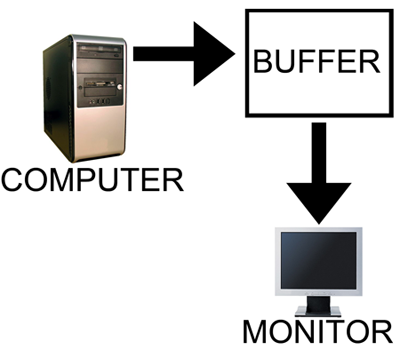
The computer draws in as the contents are sent out.
All illustrations courtesy Laura Wilson.
In order to combat the issues with reading from while drawing to the same buffer, double buffering, at a minimum, is employed. The idea behind double buffering is that the computer only draws to one buffer (called the "back" buffer) and sends the other buffer (called the "front" buffer) to the screen. After the computer finishes drawing the back buffer, the program doing the drawing does something called a buffer "swap." This swap doesn't move anything: swap only changes the names of the two buffers: the front buffer becomes the back buffer and the back buffer becomes the front buffer.
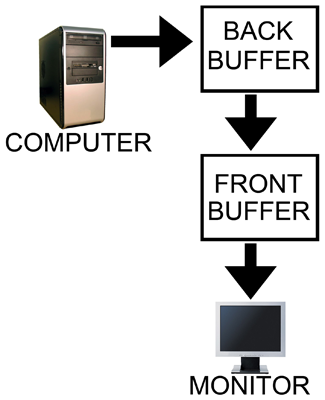
Computer draws to the back, monitor is sent the front.
After a buffer swap, the software can start drawing to the new back buffer and the computer sends the new front buffer to the monitor until the next buffer swap happens. And all is well. Well, almost all anyway.
In this form of double buffering, a swap can happen anytime. That means that while the computer is sending data to the monitor, the swap can occur. When this happens, the rest of the screen is drawn according to what the new front buffer contains. If the new front buffer is different enough from the old front buffer, a visual artifact known as "tearing" can be seen. This type of problem can be seen often in high framerate FPS games when whipping around a corner as fast as possible. Because of the quick motion, every frame is very different, when a swap happens during drawing the discrepancy is large and can be distracting.
The most common approach to combat tearing is to wait to swap buffers until the monitor is ready for another image. The monitor is ready after it has fully drawn what was sent to it and the next vertical refresh cycle is about to start. Synchronizing buffer swaps with the Vertical refresh is called vsync.
While enabling vsync does fix tearing, it also sets the internal framerate of the game to, at most, the refresh rate of the monitor (typically 60Hz for most LCD panels). This can hurt performance even if the game doesn't run at 60 frames per second as there will still be artificial delays added to effect synchronization. Performance can be cut nearly in half cases where every frame takes just a little longer than 16.67 ms (1/60th of a second). In such a case, frame rate would drop to 30 FPS despite the fact that the game should run at just under 60 FPS. The elimination of tearing and consistency of framerate, however, do contribute to an added smoothness that double buffering without vsync just can't deliver.
Input lag also becomes more of an issue with vsync enabled. This is because the artificial delay introduced increases the difference between when something actually happened (when the frame was drawn) and when it gets displayed on screen. Input lag always exists (it is impossible to instantaneously draw what is currently happening to the screen), but the trick is to minimize it.
Our options with double buffering are a choice between possible visual problems like tearing without vsync and an artificial delay that can negatively effect both performance and can increase input lag with vsync enabled. But not to worry, there is an option that combines the best of both worlds with no sacrifice in quality or actual performance. That option is triple buffering.
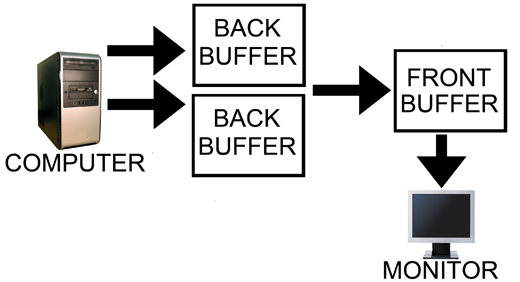
Computer has two back buffers to bounce between while the monitor is sent the front buffer.
The name gives a lot away: triple buffering uses three buffers instead of two. This additional buffer gives the computer enough space to keep a buffer locked while it is being sent to the monitor (to avoid tearing) while also not preventing the software from drawing as fast as it possibly can (even with one locked buffer there are still two that the software can bounce back and forth between). The software draws back and forth between the two back buffers and (at best) once every refresh the front buffer is swapped for the back buffer containing the most recently completed fully rendered frame. This does take up some extra space in memory on the graphics card (about 15 to 25MB), but with modern graphics card dropping at least 512MB on board this extra space is no longer a real issue.
In other words, with triple buffering we get the same high actual performance and similar decreased input lag of a vsync disabled setup while achieving the visual quality and smoothness of leaving vsync enabled.
Now, it is important to note, that when you look at the "frame rate" of a triple buffered game, you will not see the actual "performance." This is because frame counters like FRAPS only count the number of times the front buffer (the one currently being sent to the monitor) is swapped out. In double buffering, this happens with every frame even if the next frames done after the monitor is finished receiving and drawing the current frame (meaning that it might not be displayed at all if another frame is completed before the next refresh). With triple buffering, front buffer swaps only happen at most once per vsync.
The software is still drawing the entire time behind the scenes on the two back buffers when triple buffering. This means that when the front buffer swap happens, unlike with double buffering and vsync, we don't have artificial delay. And unlike with double buffering without vsync, once we start sending a fully rendered frame to the monitor, we don't switch to another frame in the middle.
This last point does bring to bear the one issue with triple buffering. A frame that completes just a tiny bit after the refresh, when double buffering without vsync, will tear near the top and the rest of the frame would carry a bit less lag for most of that refresh than triple buffering which would have to finish drawing the frame it had already started. Even in this case, though, at least part of the frame will be the exact same between the double buffered and triple buffered output and the delay won't be significant, nor will it have any carryover impact on future frames like enabling vsync on double buffering does. And even if you count this as an advantage of double buffering without vsync, the advantage only appears below a potential tear.
Let's help bring the idea home with an example comparison of rendering using each of these three methods.


 Facebook
 Twitter
 RSS
RSS


184 Comments
View All Comments
CallsignVega - Thursday, November 12, 2009 - link
Are you people sure that triple buffering is being enabled even with tools like DXTweaker and ATI Tray tools? In theory, shouldn't the card be working just as hard with triple buffering on as it does with VSync disabled?I've tested EvE online with my ATi HD5870. With Vsync off, my FPS are of course very high and I can see the high load on the GPU in regards to amperage used and heat produced. If I turn VSync on, it uses very little amperage and creates very little heat only running at 60fps.
In triple buffer theory, shouldn't the graphics card be working just as hard but only displaying the 60 FPS with Vsync on? I've mad profiles for EvE under ATi Tray tools and forced triple buffering on, but I get the same results as with VSync on, very low amperage and heat increase. This leads me to believe that triple buffering is in fact, not being applied.
Could all of these so called forcing of Direct3D triple buffering apps really not be doing anything? It could just be placebo effect and people think it's working just because they marked the check-box. Theres no way I could see triple buffering actually working with my HD5870 in Direct3D with such a very very low stress on the card compared to VSync off. Besides polling the stress level of the card, is there any other way to see if triple buffering is ACTUALLY turned on and working?
Skakruk - Wednesday, July 22, 2009 - link
From the last page of the article:"...they have just as little input lag as double buffering with no vsync at the start of output to the monitor."
I believe that is misinformation, as in my experience input lag results can vary significantly from game to game.
For example, enabling V-Sync and Triple Buffer in UT2004 results in input lag so bad that the game is all but unplayable, but enabling V-Sync and Triple Buffer in CoD4 creates barely any input lag at all.
Although CoD4 was very much playable, neither game exhibited "just as little input lag as double buffering with no vsync".
NOTE: For both UT2004 and CoD4, I was forcing V-Sync and Triple Buffer via D3DOverrider, and all mouse filtering etc. was disabled in both games.
griffhamlin - Thursday, July 16, 2009 - link
hang yourself morron. you didn't understand a single piece of this article LMAO !enabling tripple buffering without Vsync ??!!!. tripple buffering IS MEANT FOR VSYNC. for avoid the slowdown due to double buffer.
And vsync is made for avoid TEARING. GOT IT ? u_o.
Stop posting crap.
you want vsync ? go for tripple buffer. dont think , do it...
you don't want vsync ? whatever you enable tripple or double buffer. it doesn't matter.
davidri - Sunday, July 26, 2009 - link
Wow, you're a rudeandy80517 - Wednesday, October 31, 2012 - link
LOL good comment XD !davidri - Tuesday, July 14, 2009 - link
"So there you have it. Triple buffering gives you all the benefits of double buffering with no vsync enabled in addition to all the benefits of enabling vsync. We get smooth full frames with no tearing."This statement is not true. I enabled triple buffering without vsync on a GTX 280/27" LCD @ 60hz and ran Elder Scrolls Oblivion. The vertical tearing was awful.
I have been running the 280 with vsync and double buffering enabled on because I'll take the performance overhead to alleviate vertical tearing.
jp777cmoe - Saturday, July 18, 2009 - link
I read the article but im not sure about vsync and triple buffering..would it work well? i use a samsung 2233rz 120hz lcd monitor
griffhamlin - Wednesday, July 15, 2009 - link
*Facepalm*davidri - Wednesday, July 15, 2009 - link
Thank you for the duly and astute feedback.MamiyaOtaru - Thursday, July 16, 2009 - link
RTFA. DX game has to support triple buffering for you to get the benefit. If you toggled it on in the control panel, you were toggling it on for opengl games only.But *if* the game supports it, you'd be better off with triple buffering for avoiding tearing, though I still prefer double buffering with no vsync for responsiveness