



Toshiba Portege R700: A Truly Ultraportable 13.3"
by Vivek Gowri on September 7, 2010 6:01 PM EST- Posted in
- Laptops
- SSDs
- Toshiba
- Portege R700
Toshiba Portege R700—Inside and Out
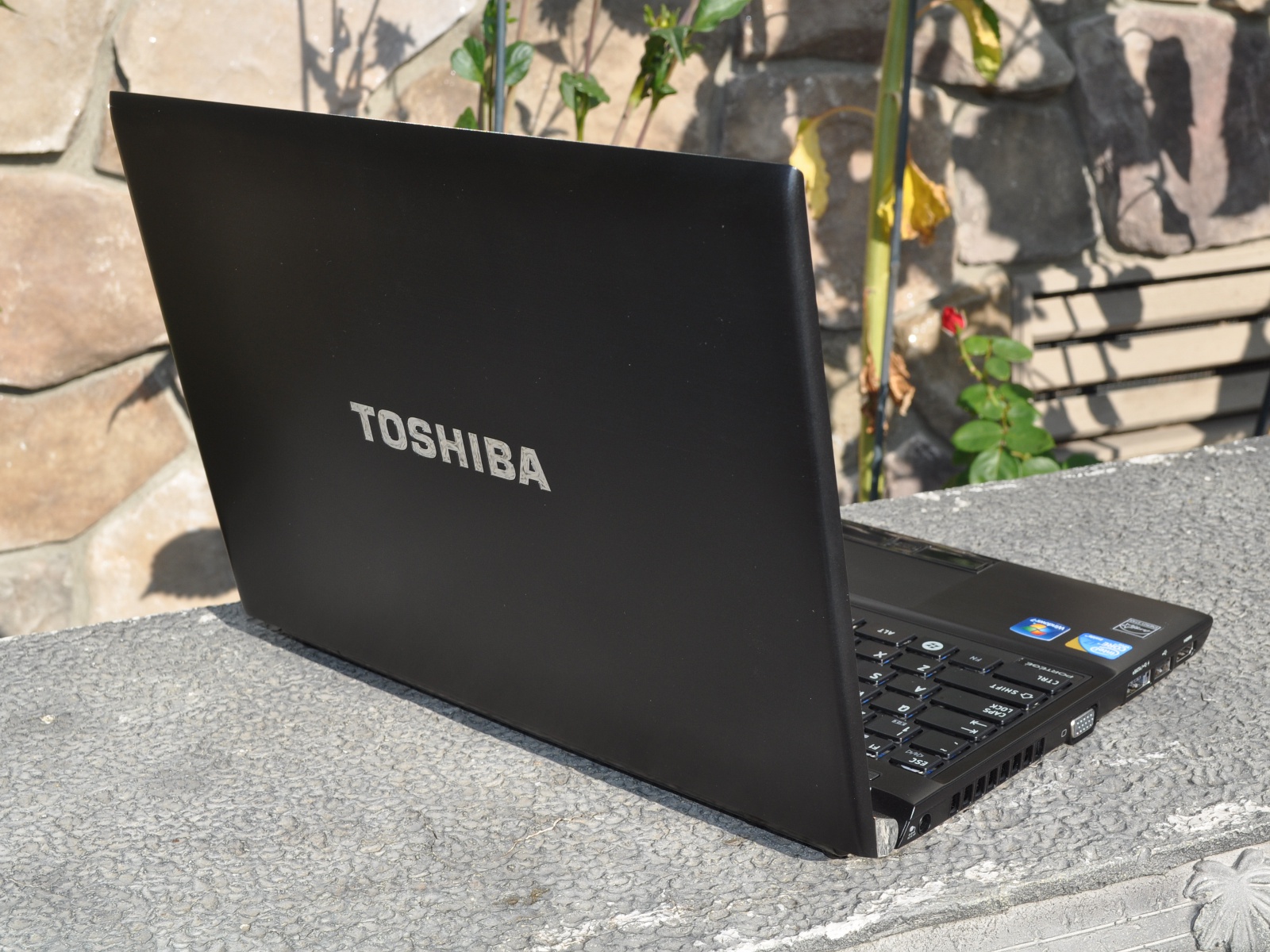
The R700 is definitely a good looking computer. Most of the external surfaces are rendered in black brushed magnesium, and it’s a subtle but high quality look. The large, chrome Toshiba lettering on the back is sadly not that subtle, but it does accentuate the overall aesthetic, unlike the somewhat chintzy chrome hinges. The side profile is wedge shaped and very thin throughout—the thickest point is just over an inch and slopes down from there. The surfaces are smooth and continuous, while the sides are almost entirely covered in ports. It’s not a very adventurous design, but attractive nonetheless. The overall simplicity of the aesthetic combined with the effect of the textured metal makes the entire notebook look and feel more upscale than the Toshiba name would lead you to believe.


Build quality is a more concerning item, in that it’s not very good. Even with the magnesium internal structure and the aluminum honeycomb, there’s a lot of flex present throughout the chassis. It’s especially egregious on the bottom panel, just under the optical drive, but even the palm rest on that side has a fair amount of flex. The left side of the system (which carries the HDD/SSD) feels much more solid and exhibits less flex, but that doesn’t make up for the ridiculous flex around the optical drive. The lid is fairly thin, and like most other superthin laptops, it’s not the most sturdy feeling lid and shows rippling under pressure along with being fairly flexible.
The chiclet keyboard is another issue—the feel is somewhat vague, and there is a little bit of flex at times. The flex isn’t particularly concerning and isn’t really noticeable unless you’re looking for it, but the mushy feel is pretty off-putting. To be fair, I’ve been dealing with some pretty stellar keyboards lately, with the business-class HP EliteBook 8440w and the ASUS U33Jc (in my opinion, the gold standard for consumer-level keyboards), but the Toshi keyboard is shockingly mediocre for a $1600 notebook. It looks and feels like a slightly larger version of the NB205 keyboard, which I’m not a huge fan of to start with.
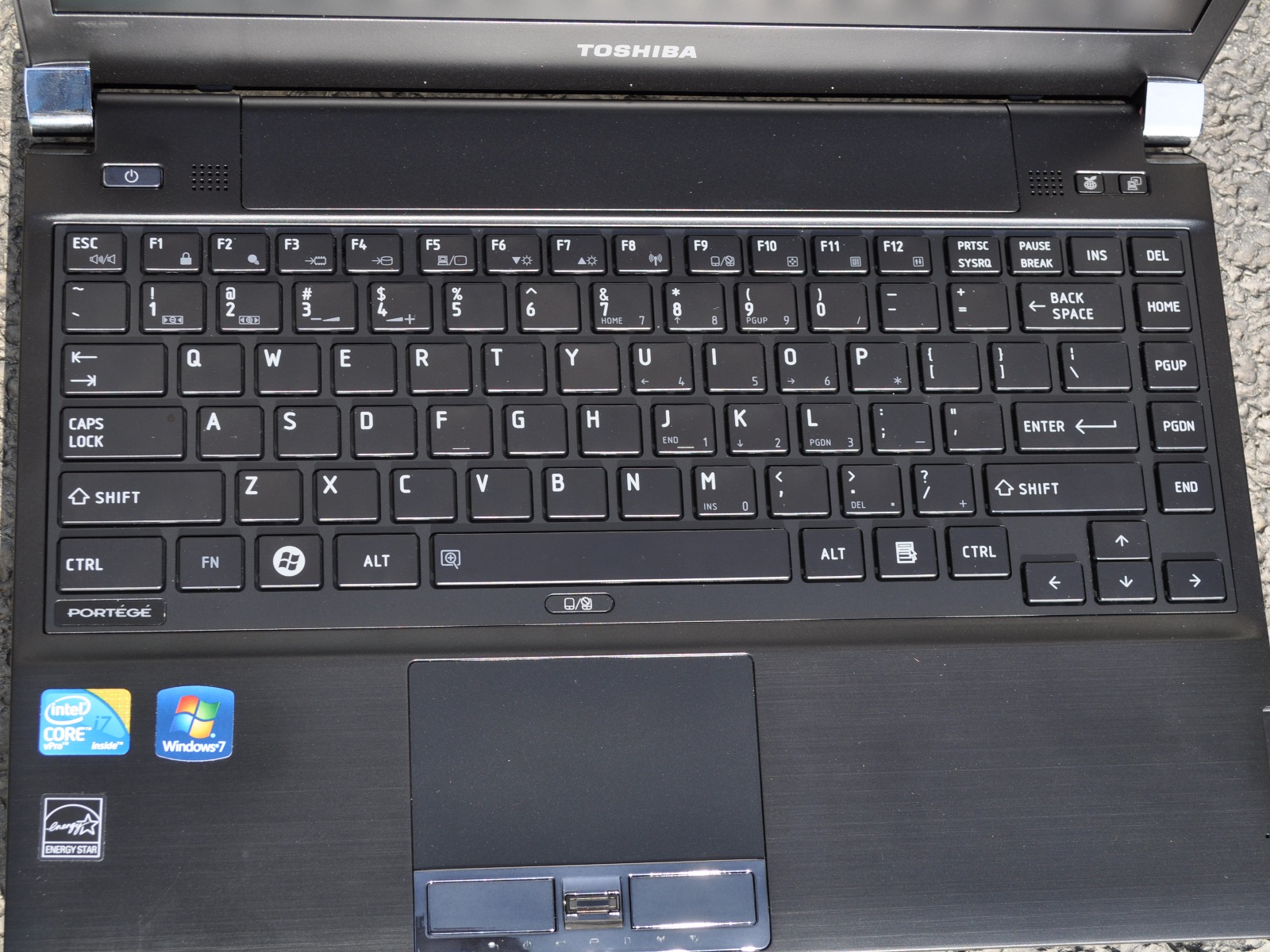
The touchpad is nothing special, though the dark chrome buttons are certainly an eyesore. I’m not sure why manufacturers continue to think that putting chrome in the most touched places on a notebook is a good idea—fingerprints, hello? It’s not just Toshiba; HP was terrible (chrome touchpads and buttons?) and ASUS does the chrome mouse buttons from time to time, mostly with their Eee PC netbooks. It’s simply a bad idea. Sorry guys. There’s a fingerprint reader located between the mouse buttons, which sometimes resulted in accidental swipes and such. I prefer having the fingerprint reader off to the side like Lenovo and HP do it, but I’m guessing Toshiba liked the aesthetic of having the scanner integrated into the touchpad assembly.
The R700 has a fairly good complement of ports, with two dedicated USBs and a USB/eSATA combo port, a VGA port, HDMI, Ethernet, an SD card reader, and an ExpressCard slot located under the optical drive. Nothing spectacular or groundbreaking, but a healthy assortment for sure. The speakers are pretty poor, but that’s about par for the course as far as ultraportables go. The webcam and mic work fairly well, enough for Skype conversations. The mic is located on the palmrest, so it can be covered by a hand if you’re not paying attention.


 Facebook
 Twitter
 RSS
RSS


43 Comments
View All Comments
bertomatic - Tuesday, September 7, 2010 - link
While i agree I hate bloat/crap ware, and always do a "clean install".I'd like to see before and after results of all tests of this system, one "out-of-the-box" and one with a "clean install"
Thank you...
DigitalFreak - Tuesday, September 7, 2010 - link
I agree. Even if you don't run the full test suite, I'd love to see benchmarks from both out of the box and after a clean install. If all the big review sites would do this, maybe the manufacturers would get the hint when they see public benchmarks showing their system runs like crap with all the bloat-ware.yyrkoon - Tuesday, September 7, 2010 - link
I too agree that Toshiba has a talent for loading their laptops with bloatware. Just in case you're looking Toshiba. This is not a compliment.With the above said. I myself own a Toshiba. An inexpensive $399 model from newegg. This laptop as usual came with loads of crapware. However, I knew this going in, and what I could do about it. Since Toshiba is very good about providing drivers for most, if not all of their laptops. It was nearly a joy to wipe the HDD clean ( I actually bought a bigger HDD ), and retrograde from Vista HP, to WinXP Pro. Not one driver was missing. Although, some of the utilities such as the auto sense application that detects when an external mouse is plugged would not work. Big deal . . . manual touchpad disable is easy enough.
Now I am currently running Windows 7 Ultimate x64, and guess what. Not a single missing driver. Three distinct versions of Windows, and Toshiba has them all covered. For someone who knows how to use a system, truly. This is a serious major factor when dealing with a name brand. Here, I think they deserve a lot of credit.
So, perhaps it is not the speediest laptop, with all the latest gadgets a computer geek may/may not ever use. But at least Toshiba gave those of us who know how to deal with a bloated install an option. As it stands. For the money, it is every bit worth the cost, and more.
Longevity . . . well that remains to be seen. So far though, I am working on 2 years, and the only real issue I have is: Once in a while the fan port gets a bit of dust in it, and the laptop will lockup from heat. That is, about once every 3-4 months. A simple shutdown, followed by flipping it over, and blowing the fan port out with compressed air fixes the problem. Of course, before blowing it out, you will want to use something to keep the fan from spinning, so it doesn't burn out.This is less than ideal, but you get what you pay for, and this is something I am personally willing to deal with.
Of course, I treat my laptop with respect, and do not toss it around. In return, I expect that it will last every bit of 4-5 years.
Aloonatic - Wednesday, September 8, 2010 - link
No one likes the "bloatware"but doesn't it play a part in making the hardware (and software that you actually want, the OS at least) more affordable?It's a hassle to get rid of, but if it means that the machine is cheaper, then can we really complain too much? It's not like Toshiba are the only people who do it. Every machine that I have bought has had a fair bit on.
mfenn - Tuesday, September 7, 2010 - link
Vivek, it seems like you've really found your voice with this article. Keep it up!seanleeforever - Tuesday, September 7, 2010 - link
any possibility to get a Lenovo X201 and do a review?seanleeforever - Tuesday, September 7, 2010 - link
by the way. there is no mention of the venting hole on the bottom? i know this is subjective, but i know a handful of people, including myself, would not consider any portable computer with vent on the bottom, you can easily cover the vent with your leg or some soft surface and overheat the system. this is, IMHO, a huge design flaw.Jarp Habib - Tuesday, September 7, 2010 - link
Sony's VAIO Z has manually switchable graphics only. Better than ALWAYS ON ALL THE TIME but it's not Optimus. There's been some work hacking together Optimus drivers for the VAIO laptops, but it's certainly not official.saqqy - Tuesday, September 7, 2010 - link
Those are comparable laptops with Core i3/i5 also starting around 3.2 lbs for an 11.6"Roland00 - Wednesday, September 8, 2010 - link
The 11.6 Timeline X models use ULV processors (18w TDP) while the 13 inch models use standard 35w processors. The fastest 11.6 inch Timeline X uses the i5 430um which runs at 1.2 ghz and 1.73 with turbo boost. The 13 inch Timeline X use the standard 35w parts, the 35w i5 430m runs at 2.26 ghz and 2.53 with turbo boost (a difference of 46% to 88% in clock speed).Now you don't always need the clock speed difference, I love my predecessor I have an 1810 (the predecessor of the current 11.6 inch timelines) which is based off an 1.2 ghz core 2 duo based processor. The form factor, battery life, price ($350 at time of purchase) were everything I wanted; and it is fast enough for school work, internet, travel, and amazingly WoW when you turn down the settings.