



OCZ's RevoDrive Preview: An Affordable PCIe SSD
by Anand Lal Shimpi on June 25, 2010 2:15 AM ESTInstallation and Early Issues
OCZ doesn’t do anything to hide what’s going on under the hood. The Silicon Image RAID BIOS loads at POST, it’ll even let you enter the BIOS and destroy the RAID array if you’d like. The first time I tried to install Windows on the RevoDrive I actually had to recreate the RAID array. I headed into the Silicon Image BIOS, asked to recreate the array, specified the entire 223GB capacity and hit ok. My sample is a bit early so I don’t expect that all users will have to deal with that, but just be aware that there are no abstraction layers here. You’re working with a pre-configured RAID array.
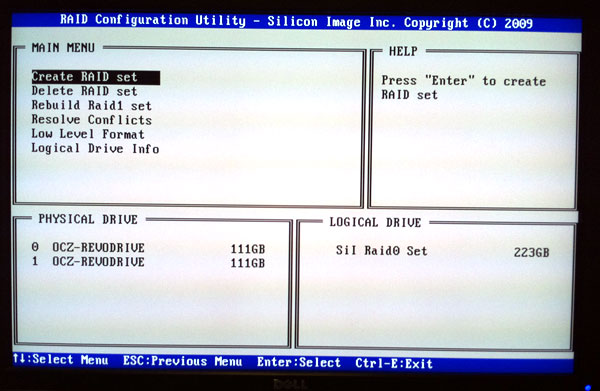
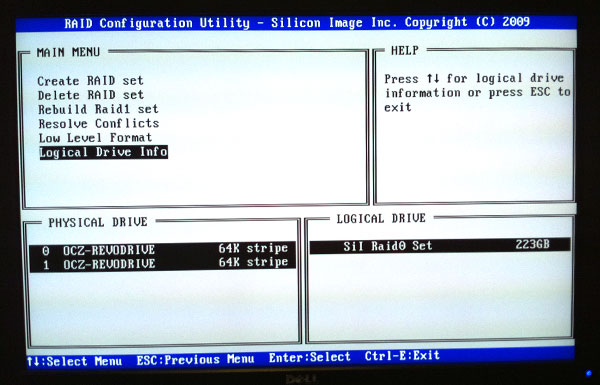
The RevoDrive is bootable, but you need to supply Windows with the appropriate drivers to recognize the controller. OCZ provided me with a set of 64-bit drivers for the Sil3124 controller and I was on my way. Windows 7 x64 installed without a hitch.
I did notice that I got consistency warnings between reboots however. The OS would run a chkdsk operation, find some issues with files, repair them and let me get on with things. Again, I’m not sure how much of this is due to the early nature of my sample.
The Test
| CPU | Intel Core i7 965 running at 3.2GHz (Turbo & EIST Disabled) |
| Motherboard: | Intel DX58SO (Intel X58) |
| Chipset: | Intel X58 + Marvell SATA 6Gbps PCIe |
| Chipset Drivers: | Intel 9.1.1.1015 + Intel IMSM 8.9 |
| Memory: | Qimonda DDR3-1333 4 x 1GB (7-7-7-20) |
| Video Card: | eVGA GeForce GTX 285 |
| Video Drivers: | NVIDIA ForceWare 190.38 64-bit |
| Desktop Resolution: | 1920 x 1200 |
| OS: | Windows 7 x64 |


 Facebook
 Twitter
 RSS
RSS


62 Comments
View All Comments
orangpelupa - Friday, June 25, 2010 - link
"It'll offer up to twice the performance of a Vertex 2 SSD for only $20 more when it ships in July."lol i read that wrong.
and though the SSD only priced @ $20 >_<
HollyDOL - Friday, June 25, 2010 - link
Nice reading, thanks for another SSD review.btw, on Installation and Early Issues you have a typo:
I headed into the Silicon Image BIOS, asked to recreate the array, specified the entire 233GB
should be 223GB ;-)
Rajinder Gill - Friday, June 25, 2010 - link
Thanks for point that out, it's fixed.-Raja
TonyB - Friday, June 25, 2010 - link
would have been nice to see this thing saturate the PCIe 4x bus on sequentials (1GB/s?). but alas we get a hardly faster if not equal device similar to the Crucial C300 on a sata3 channel.i'll pass thanks.
Phate-13 - Friday, June 25, 2010 - link
Recently encountered a very interesting ssd, seems like crucial launched a new ssd, 64GB version. And at $150, it's a bargain for it's performance. It's not only cheaper then an Intel Postville per Gigabyte, it's also seems to be faster.http://www.crucial.com/store/partspecs.aspx?IMODUL...
(Didn't know where else to put this tip.)
therealnickdanger - Friday, June 25, 2010 - link
Wow, that is fantastic! I guess I never even thought to look for a smaller C300 model, but 64GB is really all that I need. @ $150, that's clearly the BEST deal around! Two of those in RAID-0 is $300 and would destroy the Revo or Z!vol7ron - Friday, June 25, 2010 - link
You must not read any articles here.In order of occurrence (later to newer):
http://www.anandtech.com/show/2909
http://www.anandtech.com/show/2974/crucial-s-reals...
http://www.anandtech.com/show/3694/crucial-release...
http://www.anandtech.com/show/3704/crucial-realssd...
Phate-13 - Friday, June 25, 2010 - link
You must only read the titles of the articles here.1. The 64GB version is new, and a lot cheaper then the 128GB version. The 128GB costs more then double that of the 64GB.
2. If your not trying to point out that it is not new, but the fact that there are problems with it, read the last article:
"The update should go live while I'm out of the country, but it looks like by the end of this month things should finally (hopefully?) be safe for C300 owners. "
It's been two months, so things should be ok by now.
So if you got some information about CURRENT affairs, that would be appreciated, and for the rest, that is interesting reading material for people who are interested in the ssd indeed, but for the rest, I know that already. The only thing I'm interested in right now if there still are those problems.
Qapa - Saturday, June 26, 2010 - link
Hi Anand,Can you give us an update indicating if everything is working fine by now or if there are still problems?
Of course, more problems can appear later on but just to know if, for now, it seems to be ok...
Thanks,
Qapa
Trisagion - Friday, June 25, 2010 - link
Can anybody please tell me the <b><i>name</i></b> of that connector above the SI chip? I know it's an expansion slot for a daughter board, but what is it called? It's driving me crazy!