



System Buyer’s Guide: $1700 Performance Midrange
by Mike Jones and Jarred Walton on May 12, 2010 4:52 AM ESTIntel Performance Midrange System
Since the introduction of Intel’s i5-750 in Q3 09—delivering quad-core performance that tops the i7-920 for significantly less money—reviewers and builders alike have praised its performance, efficiency, flexibility and value. Even as Intel has rounded out their CPU lineup with various Clarkdale CPUs, the i5-750 remains a compelling processor that can serve as the base for a performance/value machine. Compared to our last Intel performance midrange system, enthusiasts can begin their builds with $100 or more of combined CPU and mobo savings in the piggy bank, or use it to beef up other components. Better performance for a substantially lower platform cost? That's music to the DIYer's ears. Here's the basic setup.
At $200, the i5-750 is a terrific bargain. As noted in our Lynnfield article from September 2009, the i5-750 brings quad-core performance that tops the i7-920 in most benchmarks to the significantly less expensive LGA-1156 platform. While the lack of Hyper-Threading costs the i5-750 some performance in well-threaded applications, its aggressive Turbo Modes—which enable the clock speed to rise to 3.2GHz whenever two or more cores are idle—makes it a processor that punches well above its weight in the majority of usage scenarios. The i5-750 is also a great overclocker, but requires overvolting to get anywhere near its full potential. If you’re buying the 750 with anything more than mild overclocking in mind, the retail cooler is not going to be sufficient.
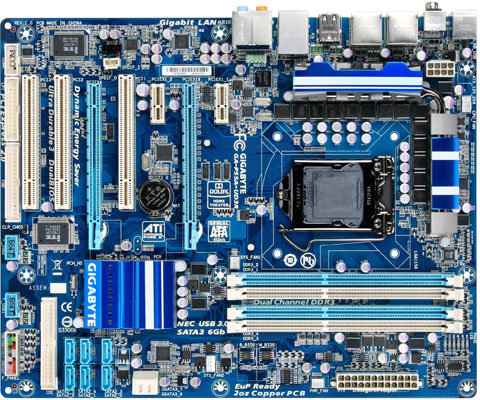
The Gigabyte GA-P55A-UD3 is a feature-rich option for the builder who might want CrossFireX down the road and it comes at a midrange price. It's an excellent choice for an i5-750 system designed to maximize performance, flexibility, and value. Its feature set includes eight USB 2.0 ports with two more headers on the board, and two more USB 3.0 ports on the rear I/O panel. For hard drives, the board has six SATA 3Gbps ports and two more SATA 6Gbps ports. If you want to enable both USB3 and SATA6, the primary GPU slot will drop down to x8 speed, while the secondary x16 slot always runs at x4 bandwidth. For the price, however, it's a very good board and it has good overclocking abilities if you're interested.
Options for Intel 1156 motherboards abound, and we want to mention a few alternatives. First, if you prefer higher performance CrossFire (or you want the potential for SLI), look at the MSI P55-GD65. It provides GPUs dual x8 lanes as opposed to the x16/x4 combination on the P55A-UD3; you also get Firewire support. Though not without a blemish or two, it offers performance and features on par with more expensive offerings and exceptional power consumption characteristics. One major drawback with the MSI board is that tweaking memory timings is an all-or-nothing affair, so if you prefer to set most to "Auto" while only changing a few important items, look elsewhere. For non-CrossFire/SLI setups, the ASUS P7P55D-E LX also boasts USB3 and SATA6 support, with your primary GPU slot always running at x16. Not surprisingly, the P7P55D-E LX is another great overclocking board for this price range, just like most ASUS boards.
All of the boards we mentioned are P55 chipset offerings, which is preferable for overclocking and dual GPU configurations. However, if you don't need a lot of CPU cores and want to save money on your power bills, the H55 chipset boards and Clarkdale CPUs are certainly a great option. You can also get an H55 board and use a Lynnfield CPU as the boards do tend to cost a bit less. The BIOSTAR TH55XE, ASUS P7H55D-M EVO, and Gigabyte GA-H55M-USB3 are all worth a look. Paired with an Intel Core i3-540, they can shave ~5W to 60W off your system power consumption relative to the recommended i5-750 + P55 setup, and the total cost of the system will drop around $100.
On the other end of the spectrum, overclockers and users looking to potentially move to hex-core Intel chips down the road might want to think about X58 and socket 1366. With the Core i7-920, 3x2GB DDR3, and the least expensive X58 motherboard you're looking at a price increase of around $150 and performance that may not be noticeably better in most applications. Still, some will prefer going with the higher-end Bloomfield route.
A nice change since the days of DDR2 vs. DDR3, triple-channel vs. dual-channel memory is that all of the remaining components for our AMD and Intel platforms are the same. You can find additional information about the other parts and accessories on pages four and five. First, let's look at the AMD motherboard and CPU recommendations.


 Facebook
 Twitter
 RSS
RSS


102 Comments
View All Comments
pjconoso - Wednesday, May 12, 2010 - link
$1700? Midrange? This is like PhP 85,000 in our currency and I'd like to think its high-end already.artifex - Wednesday, May 12, 2010 - link
If you think "performance" means primarily number crunching, not gaming, then go with the AMD choice, but just use the integrated Radeon 4290 graphics on the ASUS motherboard and save yourself over $300 by dumping the GPU card. Not to mention that if you can get by with a 19" monitor, there are several to be had for like $150 or less (Fry's actually has a 23" for $200 before rebate, too), etc. Oh, if you dump the graphics card, you probably can get by with a smaller PS, too, and that will save more... And honestly, doesn't that retail Phenom II come with a stock cooler? Knock another $27 off...isrial - Wednesday, May 12, 2010 - link
85.000 PhP !?That’s almost 290.000 Nigerian naira! The average nigerian would have to work two full years to be able to afford this system! Preposterous.
I demand this guide to be renamed into "System Buyer’s Guide: $1700 Super Computer".
jleach1 - Wednesday, May 12, 2010 - link
And....as you can tell by the title...it says "PERFORMANCE MIDRANGE"JarredWalton - Wednesday, May 12, 2010 - link
I'm just putting this here so it hopefully doesn't get lost in the discussion below. You'll note that I added a paragraph on the "Base Components" page discussing the SSD/Blu-ray debate and making specific note of the option to downgrade one and upgrade the other. I sort of take that thing as a given, but obviously a lot of you want us to explicitly mention stuff like that.whatthehey - Friday, May 14, 2010 - link
Just FYI Jarred:http://www.xtremesystems.org/forums/showthread.php...
You struck a nerve by pissing on their "requirement" to have SSDs in any modern system. Now we know why GullLars has been such a prick over here. Of course if you're into competitive benchmarking, SSDs will help out. PCMark Vantage is a fucking joke the way it boosts your scores just by putting in an SSD. "Oh wow... my gaming score got 100% higher by using an SSD!" NOT!
Maybe everyone from AnandTech should go over there and piss in their forums for a while? Except, I know from being around here quite a while that the people here are of much higher caliber material than the idiot ORB-Penis worshipers at XtremeSystems.
So GullLars and pals, if you come back again, let me wish you a fine PISS OFF. Someone posts an informed guide that doesn't cater to your every whim by recommending a $200+ upgrade to a reasonable SSD and you tell people to come over here and complain. Real nice. And you can forget that 32GB SSD garbage... just my Windows and Program Files directories use up 20GB, and I don't have a ton of stuff installed! I doubt most mainstream users want to deal with telling every Tom, Dick, and Harry application to put files somewhere other than C:. I still spend 10 minutes on every tech support call trying to get people to open Windows Explorer and browse to a specific location. Those that know how to deal with multiple HDDs, changing user documents default location, etc. are more than capable of determining on their own whether or not they need an SSD without you pushing them as the be-all, end-all of computer performance.
Bipedal Humanoid - Thursday, July 1, 2010 - link
To those who complain: Before you post in a renowned place such as anandtech, make sure you know what you are talking about. You obviously have NO idea.This is a HARDWARE website not a MONEY website... Need more clarity? Ok then, Performance midrange means that in terms of the currently available hardware this guide hits the sweetspot between PERFORMANCE and cost.
If you still don't understand, I'd recommend you go buy yourself a Dell.
And to isrial: You can't make such demands, this is still a free country the last time I checked, your demands are reflecting poorly on your country mugu.
Phate-13 - Wednesday, May 12, 2010 - link
1. I absolutely agree that this is NOT a midrange pc, but that it is high end. You can play (almost) any game at its maximum with that config, how can you call that midrange?2 . Please make up your mind internally, about ssd's:
"Though the time for suggesting the purchase of an SSD boot/OS disk in this segment appears to be drawing closer, prices just aren’t there yet." And that's it in this article, while over a year ago:
@ The SSD Anthology: Understanding SSDs and New Drives from OCZ
@ 3/18/2009
And even later explicitly:
Title: Why You Absolutely Need an SSD
The SSD Relapse: Understanding and Choosing the Best SSD @ 8/30/2009
Over half a year ago you absolutely needed an SSD and now all of sudden the time isn't just there yet?
And on the other hand, you do put an Blu-ray player in it.
In general I really do like the articles on Anandtech, but personally I think this one is a swing and miss.
JarredWalton - Wednesday, May 12, 2010 - link
The old "my midrange is not your midrange" argument rears its ugly head again. The classification is technically "Performance Midrange", which means it's closer to high-end than entry-level (as opposed to Entry Midrange, or Mainstream, or whatever you want to call it). You can, as someone above pointed out, make many changes--quite a few of which we mention in the text--to get the price lower.As for the SSDs, Anand loves them. He also loves Macs. And he happens to have far more available spending money than the vast majority of people... plus he gets them for free. Personally, I've used systems with and without SSDs and I don't feel the difference as much as Anand. For $100 I can get a 1TB hard drive. For the same $100 I can get a dumbed down 30GB or 40GB SSD. It will handle random file access a lot better, but you will fill up a big chunk of it with just your OS and Office.
Personally, I am fine having all of my documents, images, movies, etc. reside in C:\Users\Jarred. At present (and with much of my pre-2009 data moved to backup on a different drive), my user folder checks in at nearly 60GB of data. 12GB is just for the 2009/2010 AnandTech stuff, and another 12GB or so is for family pictures. I could store it in a different location, but I prefer not to as I like being able to open Explorer and get straight to my pictures with the link in the top-left.
Is Anand wrong? Nope. And neither am I. It's merely a case of different priorities. For the cost of a reasonable sized SSD (160GB is the smallest I'd be okay with), I can get a lot of other performance upgrades that will matter more to me.
Phate-13 - Wednesday, May 12, 2010 - link
Thanks for the quick reaction. But when you state that you don't feel the difference that much, then I can hardly imagine that you can actually feel the difference between the WD black and other 1TB HD's. Which makes it hard to justify going for the faster WD Black.And by shaving off those additional costs + switching out the Blu-ray for a normal dvd writer, I can fit in an Intel Postville 80GB for only a small extra.
Because you used newegg as reference, I'll use it as well:
HD: http://www.newegg.com/Product/Product.aspx?Item=N8... (-30)
Dvd: http://www.newegg.com/Product/Product.aspx?Item=N8... (-85)
GPU: (HD5770 in crossfire, which is actually faster a lot of times) http://www.newegg.com/Product/Product.aspx?Item=N8... (-20) (and 30 rebate)
Memory: http://www.newegg.com/Product/Product.aspx?Item=N8... (-12) (and 15 rebate)
Which adds up to 147 + 45 rebate.
With the intel ssd costing 215: http://www.newegg.com/Product/Product.aspx?Item=N8...
That's only $23 extra with extra GPU performance. The only thing your missing is the blu-ray.
Well, that's my point of view. I think most people don't need a blu-ray player in their computer, I even don't get the point of having one. If you want to watch a blu-ray movie, you'll do it on your tv.