



HP ProBook 5310m: A Slender Laptop for Business Users
by Jarred Walton on April 26, 2010 4:52 PM ESTHP ProBook 5310m Design and Build
One of the first things you notice with the 5310m is that it feels very solid—almost like a ThinkPad, though obviously it looks completely different. The magnesium alloy main body provides a firm foundation to build upon, and the LCD and cover are sturdy as well showing very little twist or flex. The keyboard is likewise free of flex and provides a comfortable typing surface. All told, build quality is definitely a highlight of the ProBook.


The appearance is attractive with a nice blend of aluminum surfaces and glossy plastic highlights around the LCD bezel and under the keyboard keys; the touchpad is also shiny. Initial impressions are fine, but the glossy surfaces as usual do a great job of showing fingerprints and smudges after even a short amount of use, and the black anodized aluminum surfaces show smudges as well. The problem with the appearance in my book is that it seems designed to take nice photographs but it doesn't stay clean during use. The touchpad in particular ends up smeared with fingerprints, and I would have preferred a different finish as slick/glossy doesn't have the tactile feedback I like (though opinions on touchpad surfaces vary).
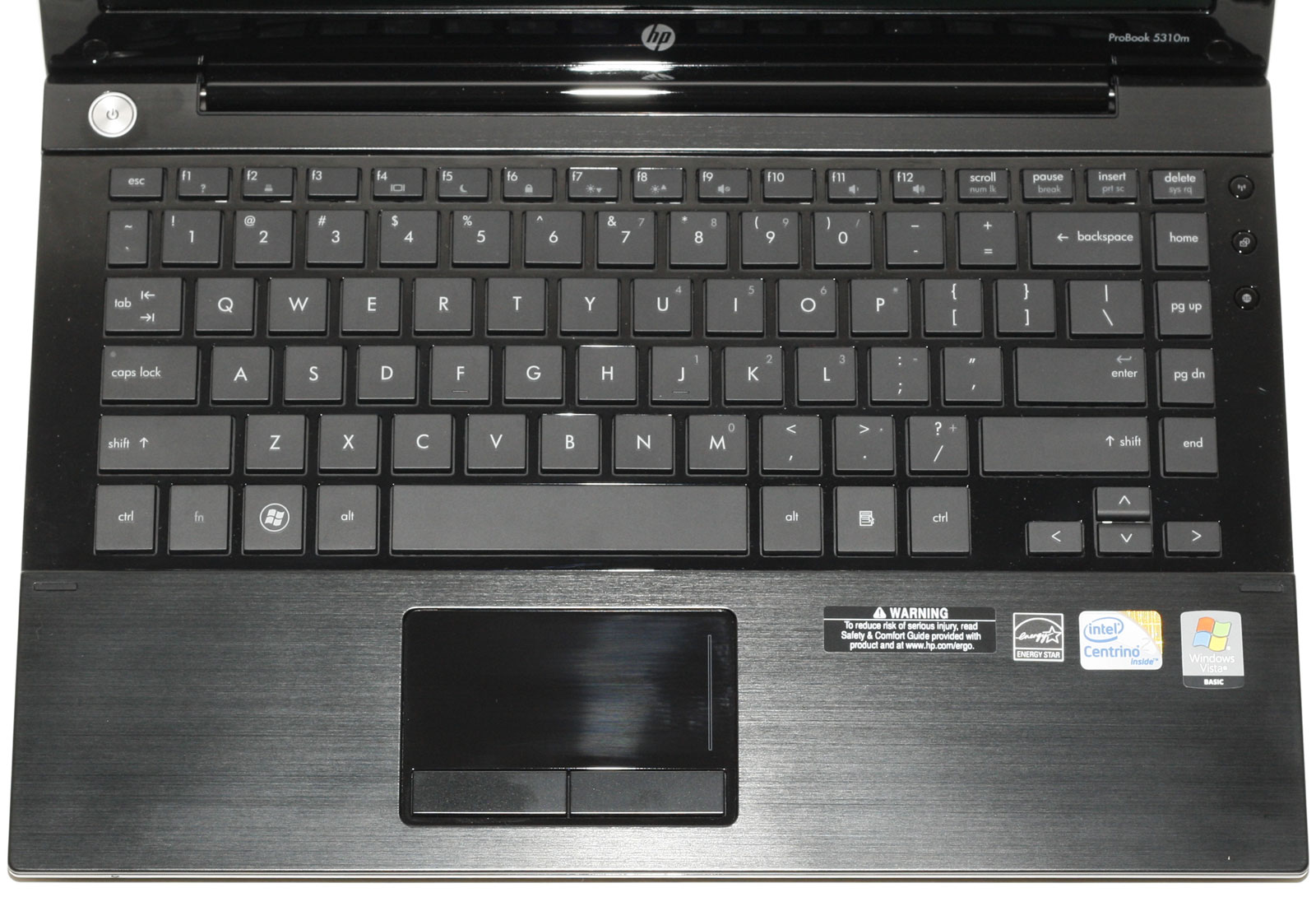
Keyboards are something highly personal, and what one person loves another may hate. My favorite laptop keyboard to date is the standard Lenovo ThinkPad T-series layout, with beveled and contoured keys. Chiclet keyboards are common these days, and they run the gamut from horrible designs where the keys are packed so tightly that it's difficult to feel (i.e. without looking) where your fingers are, to designs where the keys have more spacing and are quite comfortable. The 5310m keyboard falls in the latter category, and while the corners of the keys aren't rounded the overall feel is very much like a MacBook to my hands. Key travel is also good, and with a gap of just over 1/8" between keys it's easy to know where your hands are positioned. The LCD is also slightly recessed into the top cover, so you don't have to worry about your keyboard leaving marks on the screen.


The touchpad and palm rest are both a good size for a 13.3" chassis, and the touchpad provides support for gestures and multi-touch. It's worth noting that the 5310m ships with multi-touch and gesture support disabled (apparently so business users who aren't familiar with the features don't get confused), but you can easily enable the desired features in the touchpad drivers. The keyboard and laptop as a whole remain cool to the touch during use, even under heavy loads. In a 21C testing environment, the majority of the laptop topped out with surface temperatures of just 27C after looping 3DMark05 for over an hour. The hottest spot is in the bottom-center section right under the SO-DIMM, which hit 37C.
Noise levels are good as well; the 5310m is virtually silent at idle and under light loads, but under certain situations it can become quite a bit louder. The idle noise is at the limits of our equipment and environment (~31dB), typical load noise at two feet is 33-34dB, but on occasion (i.e. when resuming from hibernation) the fan will kick up to full speed for a bit. At such times, the 5310m can reach 39dB, but it usually doesn't last long and the only repeatable method we found of reaching that noise level was the initial boot phase or when you resume from hibernation.
The underside of the 5310m has a rubberized paint coating, with a single panel offering access to the RAM, hard disk, wireless card, and a (empty in our setup) mini-PCI slot. As with all BGA956 processors, the CPU is soldered onto the motherboard. The battery is a very thin, flat rectangle that takes up the majority of the rear section of the laptop. The default 4-cell battery we received for testing is specced at 41Wh and is flush with the bottom of the laptop, while an optional 6-cell upgrade rates 62Wh and juts out slightly.
The stereo speakers are located at the front of the chassis, with small grilles in front of them. Audio quality from the small speakers is actually quite good compared to similar sized laptops. It's not enough to fill a large room with sound, but we didn't have any issues with distortion or crackling at maximum volume. The hinge opens about 135 degrees for those of you who might be interested in such information.
Expansion options are quite limited, especially for a business laptop. You get three USB 2.0 ports… and that's about it. Internally, there's an empty mini-PCI slot… presumably populated in some configurations with the Gobi GPS. ExpressCard, FireWire, USB3, and eSATA support are all MIA, so you get exactly what you see with little way of changing it up down the road. We're also a little perplexed with the single combo headphone/microphone jack; was it really too hard to fit a second jack on the side? Anyway, a USB audio pod will solve that problem if you need a full headset, but whichever way you slice it there's not a lot of extras with the 5310m. The primary claim to fame is a very thin and attractive design, and compromises were made in order to get that.


 Facebook
 Twitter
 RSS
RSS


10 Comments
View All Comments
cbutters - Monday, April 26, 2010 - link
This is a sweet laptop, I have had mine for about 2 months. It is light and comparable to a macbook air.I have one of these up on ebay right now, complete with a vertex 60GB SSD if anyone is interested, item no 180499381266
whatthehey - Monday, April 26, 2010 - link
If it's so nice... why are you selling it on eBay? LOLafkrotch - Monday, April 26, 2010 - link
Hookers and blow. Isn't that always the reason?blyndy - Monday, April 26, 2010 - link
If only they put this design and build quality in with optimus graphics I would call it my next notebook.secretanchitman - Monday, April 26, 2010 - link
a better gpu, a few extra ports, and a much better display would make this a great notebook.feelingshorter - Monday, April 26, 2010 - link
Comparing it to the Asus U30J is not a good idea IMO since the U30J comes with a dvd drive and the HP ProBook doesn't. If your looking for thin and slender, its the UL30JT, which is the successor to the UL30VT. Either of which would of been a good comparison to this HP. The UL30JT hasn't come out yet but it is 3.75 pounds with 8 cell 5600mah batter, less than an inch think, but with asus Turbo Boost, intel's UM series CPU for the same ridiculously 10.5 + hour battery life seen on the other VT series, and 4500MHD/310M.Plus, this laptop is already outdated because you can only push the Intel GS45 + ICH9M so far, with all next gen laptops harnessing the HM55. The HM55 platform now has the 4500MHD on die, and with the UM series cpu, has an overall system TDP lower than that of the GS45 + 4500MHD. Not to mention the HM55's 4500MHD has a similar Turbo Boost as the CPU does, so its actually faster than the previous gen 4500MHD. The UL30JT is basically UL30VT but faster CPU and better battery life.
Given an Asus SU7300 + Turbo Boost, it really narrows the CPU lead that this HP ProBook has on the UL30VT, which is comparable since the UL30JT isn't available yet. Regardless, you hit hit the nail on the head when you said the HP ProBook is just aesthetics (although the silver Asus UL30VT-A1 thats available now looks better IMO.
YpoCaramel - Tuesday, April 27, 2010 - link
X201i would be another consideration - Core i3-330M, business oriented but only a 12" screen.KaarlisK - Tuesday, April 27, 2010 - link
As a result, 3dmark06 isn't the best way to compare the 4500MHD in this laptop with the 4500MHD in the other laptops that have dual-channel memory. A game might actually show the laptop with a slower cpu but double the memory bandwidth to have higher Intel IGP performance.And it can play Starcraft 2, you know ;)
davepermen - Tuesday, April 27, 2010 - link
Why should anyone care?And for those who would (artists, power users), for those the Elitebook line exists.
This is for the typical business user: office, windows, sap, web.
obiuquido144 - Wednesday, April 28, 2010 - link
When I was buying a laptop 2 months ago I loved this super-good-looking 5310m when I first saw it.But in the end I went with the heavier 14" Probook 6440b with a 1600x900 matte LCD, optical drive, both audio connectors, 8GB RAM possibility (4GB standard) and i5 for the same price. For $10 bucks I added an eSATA expresscard from dealextreme and for another $10 a Displayport->DVI cable.
I also called to HP support enquiring about how I can burn/get system installation disks when I want to format the whole HD, and they said they'd ship them to me for free through their service partner.
When I was providing the service company with photos of my license labels etc., I asked if it was possible to get 64bit disks while we're at it - and they said sure, no problem, you just won't be able switch back.
Of course I went with that! I live in Europe, not sure if this is possible in the US, or if I just had plain luck. But the license sticker doesn't specify the bit-version of the OS.
The 5310m looks awesome though, I have to admit. The sexiest laptop I've ever seen!