



Intel X25-V in RAID-0: Faster than X25-M G2 for $250?
by Anand Lal Shimpi on March 29, 2010 8:59 PM ESTSequential Read/Write Speed
Using the 6-22-2008 build of Iometer I ran a 3 minute long 2MB sequential test over the entire span of the drive. The results reported are in average MB/s over the entire test length:
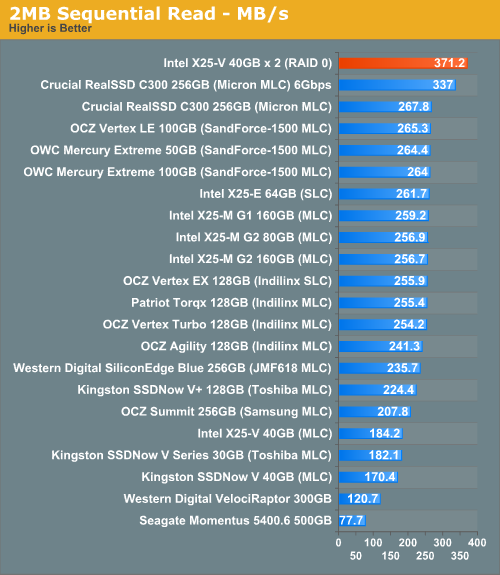
This starts out very interesting. Each SATA port on our X58 board is bound by a 3Gbps transfer limit, but run two in parallel and you can go much higher. Our pair of X25-Vs are actually faster than Crucial's RealSSD C300 on a 6Gbps controller! That's absolutely nuts.
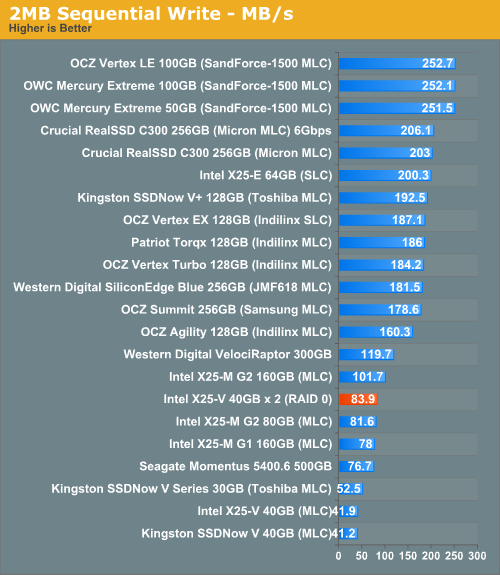
Sequential write speed also shows a near doubling of performance, unfortunately that only brings us up to ~84MB/s. It's not bad for most users but if you do a lot of heavy downloading or file copying, you'll still be behind an Indilinx, Crucial or SandForce drive.


 Facebook
 Twitter
 RSS
RSS


87 Comments
View All Comments
IvanAndreevich - Tuesday, March 30, 2010 - link
I am sure they would blow these away, and at $80 AR they are cheaper per GB. They also support GC and TRIM with 1.5 firmware.machzero - Tuesday, March 30, 2010 - link
Ya missed an important point on the first page."1) There is currently no way to pass the TRIM instruction to a drive that is a member of a RAID array."
The drives may support TRIM but no RAID controller on the market will pass the instruction to the drive.
Minion4Hire - Tuesday, March 30, 2010 - link
And OCZ's garbage collection is entirely independent from the drive controller, and doesn't need instructions passed to it like TRIM. It will work regardless of your configuration.And on that note, I have two 60GB OCZ Agility SSDs in RAID 0 and am very happy with them. My sequential read performance sits at over 400MB/s and sequential writes are over 200MB/s. Although my random read and write performance isn't quite as nice as the Intels RAIDed here, I didn't pay any more for my drives ($140 ea. Canadian on sale after rebate) and have an extra 40GBs of storage over this Intel RAID. The extra capacity is what sold me on the OCZ drives over Intel, but I'd be willing to bet that the Intel X25-V drives would offer a better overall RAID experience than a set of Agilities, even with their lack of garbage collection as Anand noted.
funkyd99 - Wednesday, March 31, 2010 - link
Is the lack of TRIM a limitation of RAID controllers or a limitation in the drivers? I.e. could an update to the Intel storage drivers remedy the problem on Intel chipsets?plamengv - Friday, April 2, 2010 - link
There is no lack of TRIM for RAIDs anymore thanks to Intel.http://guru3d.com/news/intel-brings-trim-to-ssds-i...
nwrigley - Friday, April 2, 2010 - link
Nope, it only supports single drives running next to a RAID. RAID still lacks TRIM support.http://techreport.com/discussions.x/18653
Makaveli - Tuesday, March 30, 2010 - link
Performance is great, since I already have one 160GB G2 drive I would love to see a second in Raid 0..hint hint :)should be able to hit 200 mb/sec writes!!
TheHolyLancer - Tuesday, March 30, 2010 - link
I'm wondering, is there a way (be it a special raid card or something else) to allow me to to put put a raid 0 +1 array in there with standard hdds?Something like 2 SSDs + 2 hdds or hell 2 SSDs + 1 large hdd with 2 partitions. This way, you can get data protection on the cheap.
Or for something like this to work, the drive performance has to be big, or else you need a huge data cache on the controller in order for the hdds to catch up to SSDs.
Or is this just completely outside the scope of what current controllers can do?
Calin - Tuesday, March 30, 2010 - link
You don't have that option (and anyway, it will slow your RAID to the speed of the slowest writing disk, even if reads will always take place from the SSD drives).therealnickdanger - Tuesday, March 30, 2010 - link
You're better off creating a SSD RAID-0 as your boot/app/game drive and then back up that partition every night (or twice per day?) to a HDD RAID-1/5/6. It's not as protected as a real-time RAID-1/5/6, but it's the best and cheapest of both worlds. Also, if you've ever tried to restore a RAID-1/5/6, it takes much, MUCH longer than restoring a partition from a backup. I use Windows Home Server to do this for my ~60GB SSD partition and it is bloody quick (the one time I had to do it).