



Zotac H55-ITX Review - The World's First mini-ITX H55 Motherboard
by Joshua Youngberg on February 28, 2010 12:00 AM EST- Posted in
- Motherboards
Performance summary
App and Gaming Performance
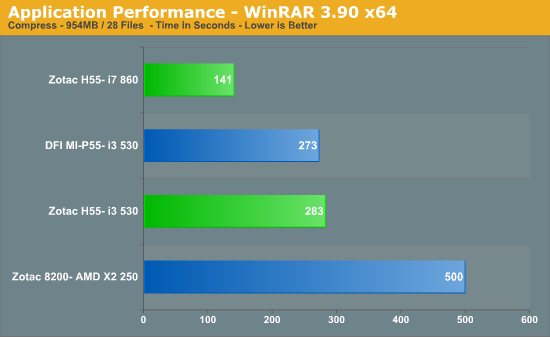
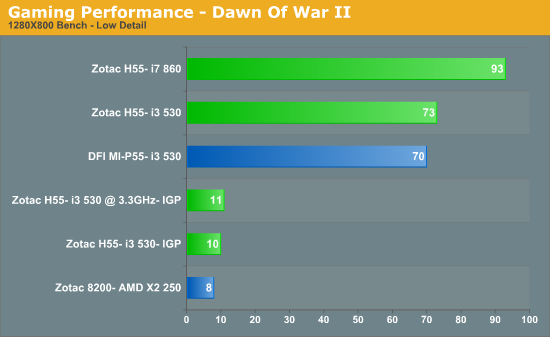
We found that the H55-ITX performs comparably to the other H55/P55 motherboards on the market during system benchmarking.
Power Consumption
For our system power consumption tests we measure the watts being pulled out from the wall socket by the entire system. Keep in mind that power consumption at the wall can vary for a specific system based on the efficiency of the power supply being used. For these tests every power saving option in the BIOSes were turned on.
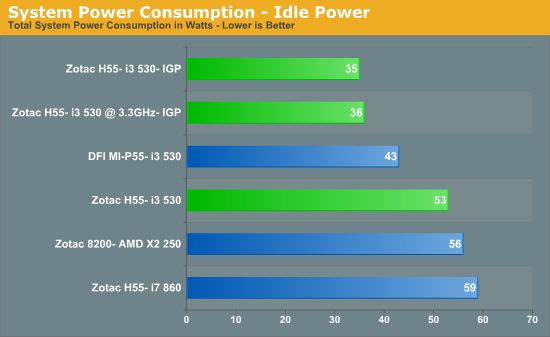
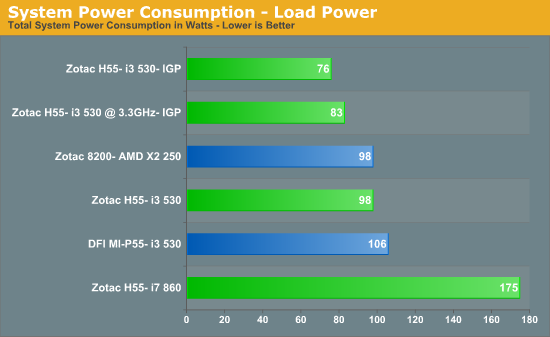
The Zotac H55-ITX put down some of the lowest idle power consumption numbers that I have ever recorded on a desktop. System consumption under 100% CPU load was very mild as well. Numbers this low would make the H55-ITX ideal for a system that is rarely shutdown, like a HTPC.
Audio Latency
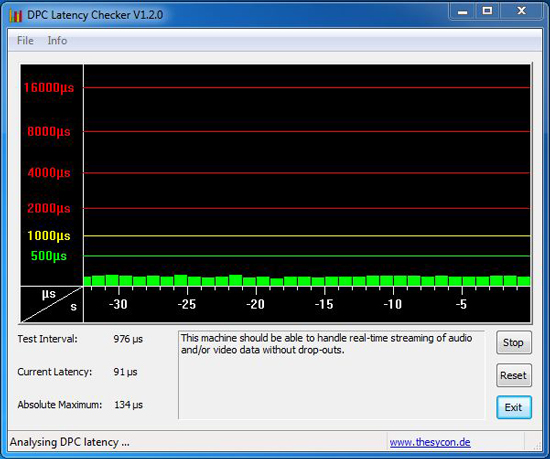
During our battery of tests we also measure DPC latency. This will be of particular interest to the audiophiles of the world.
Overclocking
While testing the H55-ITX we decided to take a different turn for the overclocking segment. Instead of pushing the board to its limits in order to find its maximum frequencies we chose to find the perfect balance between speed and voltage. The fact that the VRM for CPU Vcore is very restricted and that the BIOS offered no adjustment for CPU VTT voltage helped point us in this direction.
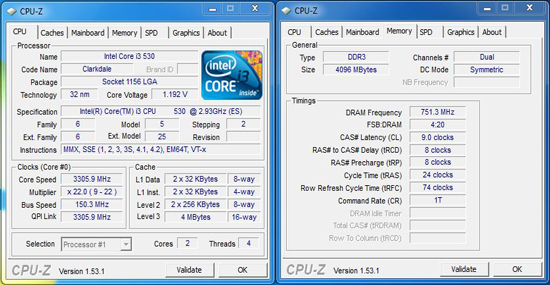
To reach our final overclock on our i3 530 I simply raised the Bclock to 150, lowered the Vcore to the default, 1.20V, minus .025V and adjusted the Vdimm to 1.65V. 1.175V was the lowest Vcore we could use to maintain a 150 Bclock. All other available voltages were untouched. For system memory the timings were manually set to 9-9-9-24-72 and the frequency was set at 1500MHz. On a side note, I ran this system in a Silverstone SG06 and using the factory Intel heatsink core temperatures rarely got above 50 degrees Celsius.
We chose not to overclock the i7 860 to avoid any risk to the ZOTAC motherboards power circuitry. The H55-ITX simply wasn't designed to power a heavily overclocked quad core.


 Facebook
 Twitter
 RSS
RSS


69 Comments
View All Comments
wysiwygbill - Saturday, March 6, 2010 - link
There is apparently a problem with this motherboard that won't allow turbo boost to function. This wouldn't affect the i3 processors where you compared performance with the i3 but you didn't test any i5 processors or compare i7 performance with the DFI.I'd be interested to see how much difference the turbo boost would make by comparing i5 performance with the i3 or by comparing the i7 performance with a different motherboard.
That's assuming you aren't concerned with the DFI bursting into flames should you put an i7 in it. :-)
Shadowmaster625 - Friday, March 5, 2010 - link
$150 for this board is pure insanity. MAYBE if they soldered an i3 to the board it might be worth that much. What is the reasoning behind paying over $300 for a mob/cpu/RAM combo for something like an HTPC? How does this possibly justify a 50% premium versus a similar AMD HTPC setup?ROID R4GE - Wednesday, March 3, 2010 - link
What I am most interested in (and haven't seen anyone mention) is finding out if this motherboard along with and i3 530 can handle playback of a 1080p .mkv file.have you done any testing of this type?
ROID R4GE - Friday, March 12, 2010 - link
ok, if anyone is interested. the core i3 and this motherboard can handle a .mkv 1080p moviejustniz - Monday, March 1, 2010 - link
The tests would have been A LOT more informative if you had included figures from the same tests on a full-sized motherboard with the same ram, cpu and graphics card, so we could see exactly how much of a penalty (if any) the just switching to the smaller size board brings.ScavengerLX - Monday, March 1, 2010 - link
From my experience power consumption between an mATX and its mini-ITX counterpart is generally around a ~5 watts higher. Not a huge difference. I think it would be interesting to see how an ATX system compares to a comparable mini-ITX system though.Josh
willtriv - Monday, March 1, 2010 - link
DFI had a x55 series ITX board on the market for a few months.Unless we are talking about h55 and it was a p55...
ggathagan - Monday, March 1, 2010 - link
Yes, this is an H55 chipset, allowing for the use of the i3/i5 on-die GPU, whereas DFI's board is P55, requiring an additional GPU card.karlkesselman - Monday, March 1, 2010 - link
it seems to me that actually for IDLE power consumption the DFI motherboard is better than Zotac, is it not?We have:
Zotac H55 i3 530 (not igp) = 53 W
DFI MI-P55 i3 530 (not igp) = 43 W
So the DFI is 10 W lower on IDLE than Zotac. Can you confirm this? (I assume they use same video card in this case)
Ben - Monday, March 1, 2010 - link
Something in a banner ad in this article just tried to install a fake Antivirus on my computer!