



Western Digital’s Advanced Format: The 4K Sector Transition Begins
by Ryan Smith on December 18, 2009 12:00 AM EST- Posted in
- Storage
What Operating Systems Are Affected
Now that we’ve dealt with what 4K sectors are, why Western Digital and other drive manufacturers are switching to them, and what the potential pitfalls of 512B emulation are, we can look at the specific cases where there are potential problems.
The big problem is that while the first work on 4KB sectors started in 1998, it wasn’t until after the launch of Windows XP that the matter came to a head. As a result the 5.x versions of Windows (2K, XP, 2K3, WHS) have no concept of 4KB sectors. Even though all operating systems will be seeing 512B sectors through the use of emulation technology on the drive controller, out of Windows only Win 6.x (Vista, 2008, Win7) and later have been programmed to take in to account the alignment issues we mentioned earlier. Win 5.xx in particular has a nasty habit of starting the first partition at LBA 63, which is 1 512B sector misaligned from a 4K sector boundary. In essence, the issue is that Win 5.x will always create a misaligned first partition and will have poor default performance as a result.
Although Win 5.x is the primary victim here, other versions of Windows can also be affected in edge cases. Along with the need for 4K-aware operating systems, drive imaging software needs to be 4K-aware. Otherwise such imaging software may inadvertently create misaligned partitions too. As such, Win 6.x is also affected by alignment issues when imaging software is used, as some (and perhaps all?) imaging products currently available will write misaligned partitions and/or clusters.
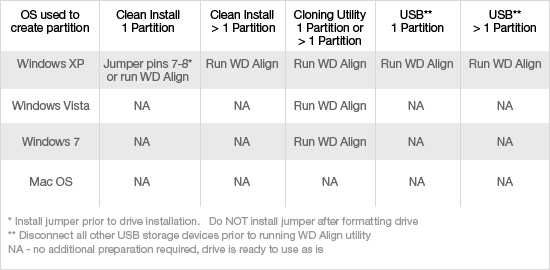
Notably, Linux and Mac OS X are not affected by this issue. Western Digital has tested both of these operating systems, and officially classifies them as not-affected. Ultimately we suspect that if you went back far enough you could find older versions of these OSes that are affected, but unlike Win 5.xx, there’s not a significant legacy user base to worry about. Along these lines, Linux and Mac OS X drive imaging products are similarly unaffected. In their testing, imaging tools such as SuperDuper didn’t run in to any alignment issues, so Linux and Mac OS X users are not affected in any way by 4K sectors. It’s only Windows and Windows imaging products that are affected.
In order to solve the misalignment issue, Western Digital is offering two solutions. The first solution for correcting misaligned partitions is specifically geared towards Win 5.x, and that is an option on the drive itself to use an offset. Through the jumpering of pins 7 and 8 on an Advanced Format drive, the drive controller will use a +1 offset, resolving Win 5.xx’s insistence on starting the first partition at LBA 63 by actually starting it at LBA 64, an aligned position. This is exactly the kind of crude hack it sounds like since it means the operating system is no longer writing to the sector it thinks its writing to, but it’s simple to activate and effective in solving the issue so long as only a single partition is being used. If multiple partitions are being used, then this offset cannot be used as it can negatively impact the later partitions. The offset can also not be removed without repartitioning the drive, as the removal of the offset would break the partition table.
The second method of resolving misaligned partitions is through the use of Western Digital’s WD Align utility, which moves a partition and its data from a misaligned position to an aligned position. This is the recommended solution for using multiple partitions under Win 5.xx, along with correcting any misaligned partitions generated by imaging software. For that matter we’d consider it the recommended solution for single-partition drives being used under Win 5.x too, as there’s no need to worry about offsets and breaking the partition table.
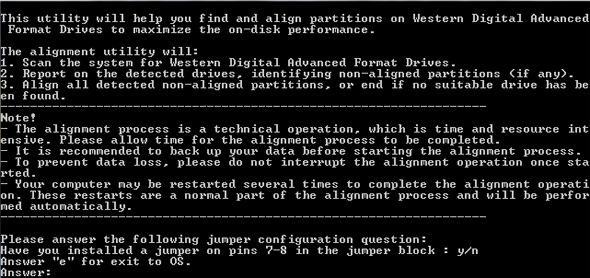
The utility is available for download from Western Digital’s site, and while it isn’t pretty (it’s a scripted CLI application) it gets the job done. The amount of time needed to run the utility is based on the amount of data that needs to be moved rather than the partition size (it simply ignores empty space), so it’s best to run the utility immediately after creating a partition or installing Windows, as there’s less data to move around.
Unfortunately, at this point the utility also serves as the only way to identify an Advance Format drive without physically looking at it. Looking at the ATA spec, it looks like there’s a provision for asking a drive its native sector size (regardless of 512B emulation) but at this point there’s no such tool beyond the WD Align utility itself. This in and of itself isn’t a big issue, but if you’re a techie that ever finds themselves working on an XP machine with a 1TB+ Western Digital drive, you’ll want to keep an eye open.
The First Drives & The Future
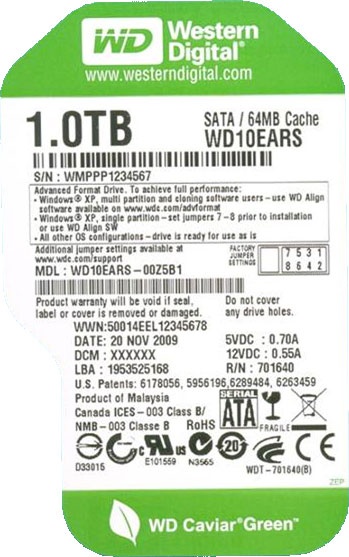
So what are the first Advanced Format drives and when are they due? The first drives will be Caviar Green drives using multiple 500GB platters – so the 1TB, 1.5TB, and 2TB Caviar Green. These drives will be shipping any day now, and can be identified through two different methods: 1) They all have 64MB of cache - the first WD Caviar Green drives to come with that much cache - and 2) They all have EARS in the drive model number, e.g. WD10EARS.
As we stated before, in spite of the benefits of 4K sectors, Western Digital is not pushing these drives as part of any major product launch. Rather they’re going to be quietly trickling in to the marketplace. Expect a price premium at first (as with any other new product) before settling down. We don’t have a drive on-hand to review, but from the fact that this is a low-key launch, WD isn’t painting any expectations of a performance difference, although this will be something to test in the future.
And on that note, expect to see similar launches from everyone else within the next year. The last IDEMA plan called for everyone to have 4K-sector drives by 2011, so everyone should be launching within the next year here. Everyone using 512B emulation is going to run in to the same teething issues with Win 5.x – so while other vendors may handle things slightly differently, ultimately everyone is going to be compensating for Win 5.x in some manner (in case it hasn’t been made clear here, these guys would be ecstatic for Win 5.x to go away quickly).
Farther down the road will be the exposure of 4K-sectors to the operating system itself. Linux and Win 6.x are set (and we believe that Mac OS X is too), the only limit right now is the desire to do a phased transition to make thing easier for legacy users. Since 4K-sector drives won’t work on Win 5.x at all, drive manufacturers can’t put them on the market so long as there’s a significant legacy base. 2014 – the year that extended support ends for WinXP – looks like a good year to finally complete the move to 4K sectors.


 Facebook
 Twitter
 RSS
RSS


86 Comments
View All Comments
davidschorfhaar - Friday, February 12, 2010 - link
for a service pack to fix this you would have to either get a new install disk with the service pack included or use a utility like Nlite to slipstream the service pack into your install disk. Does anyone know if a simple fix would be to just download a linux iso, burn it to a disk, then boot the live cd and us gparted or qt parted to preformat the disk before you install. I have several of said live cd's already lying around so it would be a simple fix for me... if it worksiforum - Saturday, January 30, 2010 - link
Though this article says that drives with EARS in the drive model (eg. WD10EARS) will have 4k sectors, just a quick calculation from the drive specs on the WD website seems to indicate that these drives still have only 512B sectors.Formatted Capacity: 1,000,204 MB = 1000204000000B
User Sectors Per Drive: 1,953,525,168
dividing, bytes per sector: 511.9995464527
Even the LBA printed on the label in the article says the same number of sectors: 1,953,525,168
What am I missing?
runeks - Thursday, July 8, 2010 - link
The drives "pretend" to be 512 bytes per sector-drives, but are really 4 KiB sector-drives.Apparently they do this both to the BIOS and the dude reading the label - to avoid confusion I guess.
foxyshadis - Saturday, January 23, 2010 - link
Honestly, are you that dense? Companies still make T-Bird parts for many times what they once sold for - try getting one from Ford for free, tell me how that turns out for you. Likewise, if you pay the $250 for MS support they'll often write little barely-tested patches to fix your particular bug. Microsoft, just like Ford, has every financial incentive to get you to upgrade, and will never do more than the bare minimum once you commit to not spending money with them ever again.Algis - Monday, January 11, 2010 - link
I am, as many here, a technology entusiast.From my point of view, the big mistake was to use the 7 and 8 pin's jumper for XP workaround and sector shifting. There is WD align utility that solves the issue for old good XP. Now 10% of users will decide that two medicines will work even better than one, so they will both install the jumper, and then align the partitions with some aligment tool. Or, the users will get their systems shipped with XP and jumper installed, and later will upgrade to Windows7. What will happen? In all these cases users will get a 50% decreased performance and drive weared out earlier than necessary due to many read-change-write cycles.
These PINs should been used to just enable native 4KB sectors when pin removed! So anyone with Vista or later OS and NEW PC (with 4KB aware BIOS) can simply take out the jumper and enjoy knowing that now it works in native 4KB.
I would even put the default at 4KB. And put a big warning - XP and older OS users please install the jumper and run the utility after OS installation!
The only limitation would be that if upgrading OS the additional operation is needed - to remove jumper, and then install clean Windows7. Majority of users will be upgrading this way anyway. And going forward it would just be less and less users who need the "XP jumper".
What a mistake...
I am suprised who is taking a product decisions on WD. They release external disks with built-in SmartWare (many users called it CrapWare) that always pop-up as CD letter, and there is no way to have just a clean drive without space wasted for software of no use (most recent firmware allows to disable pop-up CD but users need to flash new firmware to the USB drives).
And now... they release good new 4KB technology and there is NO WAY (no jumper) to just pass 4KB on interface?
No chance to get whats needed (wanted), and obligatory pushing of whats not needed (not wanted). I am fan of WD drives because of their low power consuption, but obligatory SmartWare and no way to allow native 4KB sectors were two wrong product decisions.
tophe - Friday, January 15, 2010 - link
I've bought this drive without knowledge of 4k technology and thus I've big problem because I'm using XP and W7 in my computer. I'd like to use this drive as single partition data drive, but will my data accesible from both OS? And then is it better to format it with W7 ( readable with xp w/out align software? ) or to format it with XP with the align software ( no trouble with W7 after? )? Or maybe I should change it for a normal 512bytes drive... If anyone can help I'd be very happy :)Algis - Tuesday, March 9, 2010 - link
Initialize the new drive and create both partitions with Windows 7, then you do not need to do anything extra. Windows7 will care about all alignments. Then you can install XP into some partition, if you cannot just use "Windows XP mode" inside Windows7.ArchStanton1 - Friday, January 8, 2010 - link
Will these Advanced Format drives work with third-party drive encryption software?xpclient - Saturday, January 2, 2010 - link
This article (http://support.microsoft.com/default.aspx/kb/92333...">http://support.microsoft.com/default.aspx/kb/92333... : Windows Vista support for large-sector hard disk drives) lists about Windows support.toyotabedzrock - Wednesday, December 23, 2009 - link
I'd be willing to bet the people at http://hddguru.com">http://hddguru.com know how or will very soon what commands to use to tell if a drive is of the 4k variety.