



Introduction
One of the fastest growing market segments in terms of computer sales is of course the mobile sector. As we have repeated many times in the past, for most of the work people do on a computer we have now reached the point where a decent laptop is more than sufficient. Yes, you will still pay more money than you would for an equivalent performance desktop. Yes, many desktop components are faster than any mobile options. And yes, we still find keyboards, mice, and desktop LCDs to be far more pleasurable to use overall. However, if you only have one computer in your household, there are plenty of good reasons to choose a laptop.
We'll start with the last area: input devices and displays. If you don't plan to move your laptop around, it's extremely simple to just connect a desktop keyboard, mouse, and LCD. More likely, you can set up a computer desk for normal use and use the laptop as a sort of docking station. Then if you ever want to go somewhere else to work - the couch, a coffee shop, the park, etc. - you can easily pick up your computer and cut the wires. As far as performance goes, outside of gaming and a few high-end applications, there's not much need for a state-of-the-art quad-core processor with a powerful GPU. In fact, if you don't plan on playing games at all you should be more than happy with the integrated graphics solutions.
Before you actually decide to take the mobile plunge, however, we need to step back for a moment. You may not need all of the performance that a modern $1500 desktop can offer, but sometimes needs change. Besides the additional cost of the notebook relative to a desktop, upgradability is without doubt one of the major deficiencies of laptops. Take just about any budget desktop system and you can add more memory, more hard drives, better audio, and significantly faster graphics cards - if you're willing to put in a bit of time spent tinkering. You can even replace the motherboard and processor should the need arise.
Laptops on the other hand are pretty much a static system. Sure, it's possible to increase the memory in some cases (though many laptops now ship with 4GB of RAM, which is certainly more than 32-bit Windows will ever need), and you can upgrade or replace the hard drive and often even the CPU. However, graphics chips, motherboards, and the built-in screen, keyboard, and touchpad are pretty much set in stone at the time of manufacture. If you need something faster, you will usually be better off just selling your old laptop and buying a new one rather than trying to figure out how to upgrade the various components (although we could probably say the same thing about some desktops). There's also the issue of component failures, which tend to occur far more often on notebooks and desktops in our experience. If your laptop is no longer covered by a warranty, repairs can be prohibitively expensive.
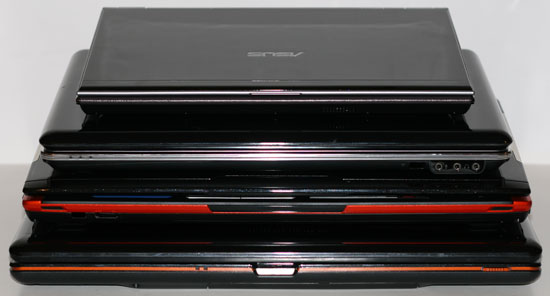
Okay, that should set the stage once again for a review of several new laptops. What makes these new laptops interesting is that they use Intel's Centrino 2 platform. Centrino 2 officially launched several months ago,, but outside of the gamer oriented Gateway P-7811 FX, we have not been able to get any review samples until now. Part of that seems to be related to some teething problems with Centrino 2; we know several of the manufacturers we contacted a few months back said that they were still working on finalizing their Centrino 2 offerings. Or maybe it's just that Centrino 2 doesn't really have many noticeable advantages over older Centrino laptops? That's certainly one of the things we want to investigate with these three new notebooks.
There are of course many different categories of Centrino 2 notebooks, starting at prices well under $1000 and going all the way up to the ultra expensive solutions. Once again, we have three notebooks that fall into the midrange category, although how they get there differs quite a bit. Two of the laptops are from ASUS and the third is from HP. Unfortunately, none of these are integrated graphics solutions - we just received a fourth notebook with Intel's latest GM45 chipset late last week, but testing is still underway. For now, we will be comparing these three notebooks with other recently tested midrange laptops. Since the other notebooks all use the Centrino platform, that will certainly be an interesting point of comparison.


 Facebook
 Twitter
 RSS
RSS


27 Comments
View All Comments
CEO Ballmer - Sunday, October 26, 2008 - link
This thing is Vista Home Certified! That's the bomb!http://fakesteveballmer.blogspot.com">http://fakesteveballmer.blogspot.com
alantay - Saturday, October 25, 2008 - link
I don't have a very comparable figure about Linux power requirements, but on a Core 2 Duo Santa Rosa based HP laptop (T7100, X3100 IGP, 15.4" screen), the reported power consumption with a default Ubuntu 8.10 installation is 13 watts with lowered screen brightness and 19 watts at full brightness. Not bad, but not a big difference either.Truth is, Linux was bad at power usage until 12-18 months ago. Clearly worse than Windows XP at the time. Only recently there have been significant improvements, so it's now better than Windows Vista, but it seems nowhere near OS X. But it's getting better and better, so in a year it might be doing really good.
sprockkets - Friday, October 24, 2008 - link
While it is true you may not need to have access to the cpu for upgrades, it literally sucks to have to get to it, just to properly clean out the fan, or worse, to replace it.enki - Friday, October 24, 2008 - link
Those laptops seem to be very poor representations of good pc laptop battery life. Look at the review for the T400:http://www.notebookreview.com/default.asp?newsID=4...">http://www.notebookreview.com/default.asp?newsID=4...
It got 581 minutes of battery life in their web browsing test and could play a 3d game for longer then those laptops could browse the web (3 hours)
So in your conclusion when you say if you like to work untethered you should pick a Mac it seems like a T400 with about 2 times the bettery life would be better
JarredWalton - Friday, October 24, 2008 - link
Someone else mentioned the T400 in response to the MacBook article. To repeat what I said there, here's a few quote from their review:"With the T400 you can reach 9 hours and 41 minutes with the wireless enabled, screen backlight at 60%, and the laptop in integrated graphics mode using only the 84Wh 9-cell battery. In this situation the notebook is only consuming roughly 8.5 watts of power. In dedicated graphics mode under the same settings battery life falls by exactly 2 hours down to 7 hours and 41 minutes, and power draw increases to 10.5 watts. The 6-cell battery managed 6 hours and 4 hours and 28 minutes respectively."
Another statement: "When watching XVID encoded movies off the hard drive the 9-cell had an estimated 6 hours and 45 minutes of battery life, drawing 13 watts of power." I really don't like "estimates", though I still suspect it can hit at least 6 hours of Xvid playback.
No mention is made of actually *surfing* the web - WiFi is merely "enabled". Without knowing more about how they conduct their battery life testing, I can't say whether their numbers are comparable to ours. What I do know is that U6V battery life almost doubles (149 minutes vs. 261 minutes) when I go from web surfing to idle. With a similar battery, the U6V would jump up to 418 minutes idle battery life. DDR3 and the ability to disable the discrete GPU probably make up the difference.
Three hours playing Portal with an 85 Whr battery on the T400 is okay, but not that much better than what I would expect from the U6V with a similar battery. With the default battery, that would drop to only two hours.
It does look like the T400 may be more or less equal to the MacBook, which is good to see. The MacBook with a 45 Whr battery under a heavier load (Xvid + constant downloading + web surfing) got 3.1 hours and the T400 gets an *estimated* 6.75 just playing Xvid. If we call those loads relatively "equal", the MacBook gets 4.13 Min/Whr compared to 4.82 Min/Whr on the T400. Probably the surfing and downloading would again make up the difference.
I'll see if I can get a T400 for review, but Lenovo hasn't sent us anything in the past so it's a long shot....
cweinheimer - Friday, October 24, 2008 - link
"Otherwise, you might as well just stick with IGP, since the 9300M class hardware is only a small boost in performance over the X3100/X4500".Slightly better you say? If I recall the article from Anand's IGP chronicles, the 9300igp in atx destroys any intel IGP. Surely the 9300m isnt that much worse than the deskyop counterpart.
JarredWalton - Friday, October 24, 2008 - link
What's twice as fast as a snail? LOL Okay, even at three times as fast it's hardly anything to brag about. If you want GPU performance, go out and get an appropriate GPU. If you're not going to play 3D games (which I wouldn't plan on doing with the 9300M GS), why bother? For 1280x800 gaming, I'd say the 9500M or HD 3600 are the bare minimum you should get. I'd also wager that the inclusion of the 9300M on the U6V cut battery life by at least 10% relative to X4500. (Would be nice to see an NVIDIA IGP notebook other than Apple as well....)garydale - Friday, October 24, 2008 - link
I'm sorry, but nothing has changed in a couple of decades nor is it likely to, Notebooks are always slower, more expensive and more difficult to repair than desktop systems. It's inherent. You're trying to squeeze equivalent functionality into a smaller, integrated package.CPU manufacturers bring their new cores out for desktop systems first sos they can get the technology right before they add in the extra notebook features. Notebooks run off limited power so you need to make some adjustments, such as extra circuitry for dual power sources, power conservation, etc.. You need to add extra components like battery packs, dual outputs and docking interfaces.
When you buy a notebook, you're always buying the whole thing. You can't reuse your old keyboard, mouse, monitor, etc. And you have to squeeze everything into a smaller package, which makes it harder to manufacture.
So please, stop telling us how notebooks are catching up to desktop systems. They aren't and they can't. Notebooks are popular right now but serious users have desktop systems for the speed, flexibility, performance and cost.
I'm running a quad-core desktop system with 4G of dual-channel RAM and 3x500G SATA drives in a RAID 5 array. I don't think there is a notebook out there that can match any of the specs, let alone all of them. And I certainly can't get any notebook that powerful at the price I paid for the desktop system.
JarredWalton - Friday, October 24, 2008 - link
I never said that notebooks are "catching up"; I simply pointed out that we are reaching the point where they are "fast enough". You pretty much repeated everything I stated in the intro, with a negative slant. I'm *not* recommending everyone go out and buy notebooks; what I'm saying is that they're a viable option for many users, even if they cost more.Anyway, the Clevo D-901C can handle three hard drives (in RAID 5), up to 8GB RAM, and quad-core processors (only 2.67GHz I believe), plus 9800M SLI. Total cost for such a system, however, ends up being over $5000. LOL
Now, tell me *why* your average user needs quad-core, a 1TB RAID 5 set, and probably SLI graphics while we're at it. Throw out gaming, video encoding, and 3D rendering (and other workstation/server loads). That's the market a notebook can easily satisfy. Heck, I have a single-core AMD 3800+ still hanging around that handles all the Internet/Office tasks 95% of PC users require, and I can guarantee that the three laptops in this article outperform it in every meaningful benchmark. We've reached the tipping point where there are a lot of people that just need something that's "fast enough".
geokilla - Friday, October 24, 2008 - link
This laptop might actually contain a 9800M GS and not a 9800M GTS, which is basically an underclocked version of the GTS.More info on whether it's a 9800M GS or GTS can be found here.
http://forum.notebookreview.com/showthread.php?t=3...">http://forum.notebookreview.com/showthread.php?t=3...