



i5 / P55 Lab Update - Now with more numbers
by Gary Key on September 15, 2009 12:05 AM EST- Posted in
- Motherboards
Multitasking-
The vast majority of our benchmarks are single task events that utilize anywhere from 23MB up to 1.4GB of memory space during the course of the benchmark. Obviously, this is not enough to fully stress test our 6GB or 8GB memory configurations. We devised a benchmark that would simulate a typical home workstation and consume as much of the 6GB/8GB as possible without crashing the machine.
We start by opening two instances of Internet Explorer 8.0 each with six tabs opened to flash intensive websites followed by Adobe Reader 9.1 with a rather large PDF document open, and iTunes 8 blaring the music selection of the day loudly. We then open two instances of Lightwave 3D 9.6 with our standard animation, Cinema 4D R11 with the benchmark scene, Microsoft Excel and Word 2007 with large documents, and finally Photoshop CS4 x64 with our test image.
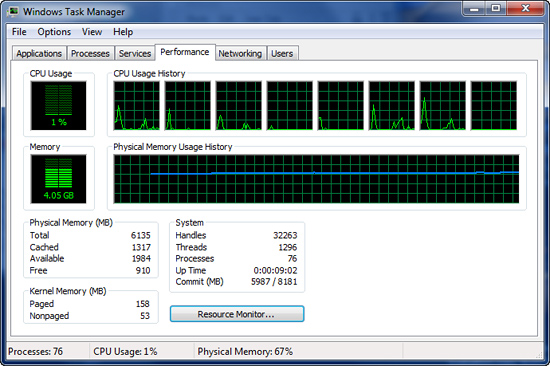
Before we start the benchmark process, our idle state memory usage is 4.05GB. Sa-weet!
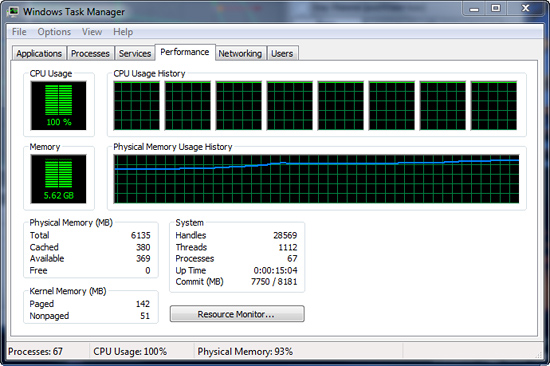
We wait two minutes for system activities to idle and then start playing Pinball Wizard via iTunes, start the render scene process in Cinema 4D R11, start a resize of our Photoshop image, and finally the render frame benchmark in Lightwave 3D. Our maximum memory usage during the benchmark is 5.62GB with 100% CPU utilization across all four or eight threads.
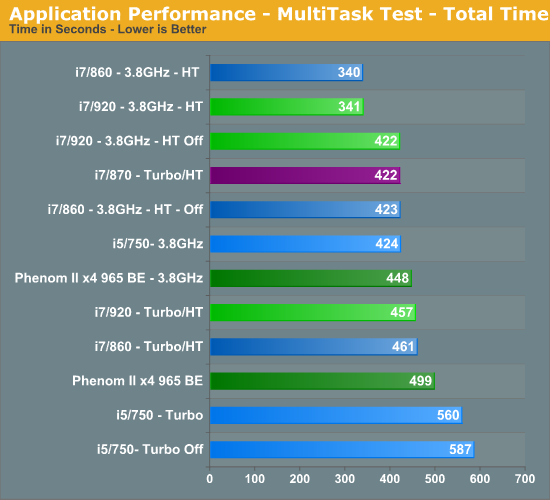
So far, our results have pretty much been a shampoo, rinse, and repeat event. I believe multitasking is what separates good systems from the not so good systems. I spend very little time using my system for gaming and when I do game, everything else is shutdown to maximize frame rates. Otherwise, I usually have a dozen or so browser windows open, music playing, several IM programs open and in use, Office apps, and various video/audio applications open in the background.
One or two of those primary applications are normally doing something simultaneously, especially when working. As such, I usually find this scenario to be one of the most demanding on a computer that is actually utilized for something besides trying to get a few benchmark sprints run before the LN2 pot goes dry.
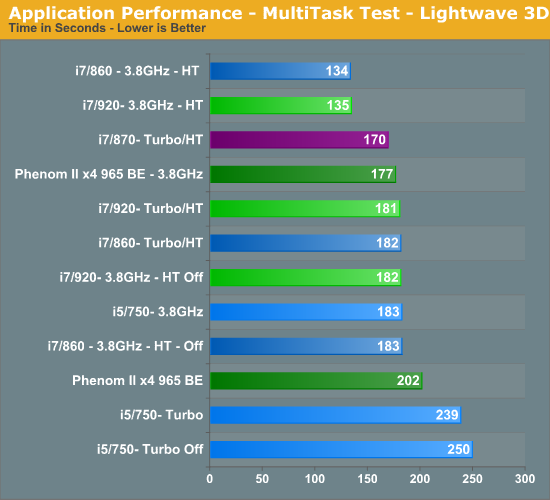
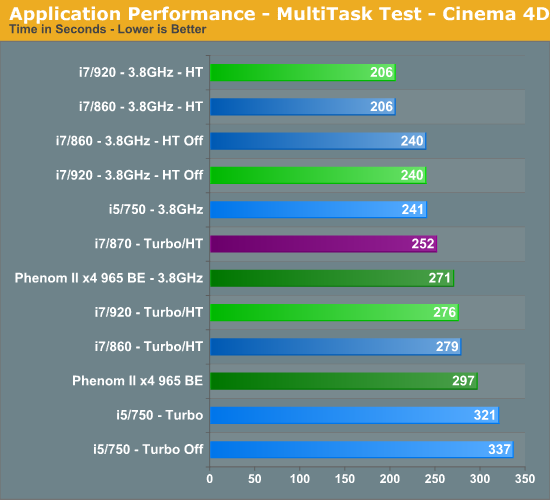
The i5/750 results actually surprised me. The system never once felt “slow” but the results do not lie. The i5/750 had its head served on a platter at stock speeds, primarily due to the lack of Hyper-Threading when compared to the other choices. The 965 BE put up very respectable numbers and scaled linearly based on clock speed. An 11% increase in clock speed resulted in a 10% improvement in the total benchmark score for the 965 BE. You cannot ask for more than that.
At 3.8GHz clock speeds, it is once again a tossup between the 920 and 860 processors with HT enabled. The 920 did hold a slight advantage over the 860 at stock clock settings, attributable to slightly better data throughput when under load conditions. Otherwise, on the Intel side the i7/870 provided excellent results based on its aggressive turbo mode, although at a price.
Gaming-
We utilize the Ranch Small demo file along with the FarCry 2 benchmark utility. This particular demo offers a balance of both GPU and CPU performance.
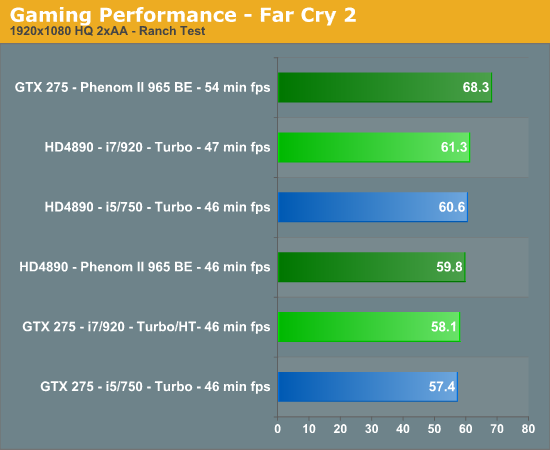
We utilize FRAPS to capture our results in a very repeatable section of the game and report the median score of our five benchmark runs. H.A.W.X. responds well to memory bandwidth improvements and scales linearly with CPU and GPU clock increases.
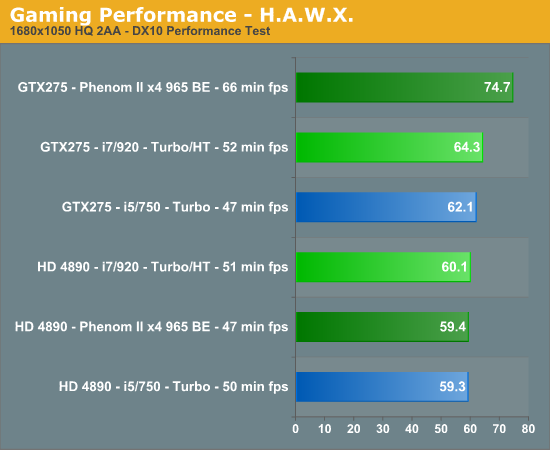
Your eyes are not deceiving you. After 100+ clean OS installs, countless video card, motherboard, memory and driver combinations, we have results that are not only repeatable, but appear to be valid. We also tracked in-game performance with FRAPS and had similar results. Put simply, unless we have something odd going on with driver optimizations, a BIOS bug, or a glitch in the OS, our NV cards perform better on the AMD platform than they do on the Intel platform. The pattern reverses itself when we utilize the AMD video cards.
It is items like this that make you lose hair and delay articles. Neither of which I can afford to have happen. However, we have several suppliers assisting us with the problem (if it is a problem) and hope to have an answer shortly. These results also repeat themselves in other games like H.A.W.X. and Left 4 Dead but not in Crysis Warhead or Dawn of War II. So, besides the gaming situation, we also see a similar pattern in AutoCad 2010 and other 3D rendering applications where GPU acceleration is utilized, it is just not as pronounced.


 Facebook
 Twitter
 RSS
RSS


77 Comments
View All Comments
pnot00 - Friday, September 25, 2009 - link
Where can i get the 2x4GB sticks in this article? I can't find them anywhere and would like to put 16GB in this board for a small server.pnot00 - Friday, September 25, 2009 - link
duh n/m i must have been hoped up on too much coffee... 4x2GB.I really need to find 4 sticks of 4GB and the only ones i've found are by Kingston and they want $1,000 for them.
Any suggestions?
FazliAmri - Wednesday, September 16, 2009 - link
Hello.I'm eagerly awaiting for the finished review. i'm currently upgrading my system, thinking of 920/x58 or 860/p55, been scouring the net for the information that'll affect my decision. i think i'm on the verge of choosing but the thing that 'i think' is missing is
cpu temp idle/load at OC 3.8;
power consumption idle/load at OC 3.8;
if you could include this data i thank you.
TA152H - Wednesday, September 16, 2009 - link
You'd have to be retarded to buy a Lynnfield if you have enough money to get an i7 920 setup.This site tries very hard to push the P55, while trying to appear unbiased. Why? Who the Hell knows? Maybe Anand decreed the P55 should be put in a good light. I really don't know, but at this point I'm sure they are being biased, either consciously or unconsciously.
But, you're really better off with Bloomfield if you can afford it.
In this article, they make the overclocked processors look similar, but what they don't tell you is they run the memory controller faster on the Lynnfield, as well as the L3 cache. Why don't they tell you? They don't want you to know.
So, clearly, the Bloomfield is faster even on the benchmarks they selected. I suggest you go to better sites and see the actual benchmarks, where you can see a slight performance increase on virtually any workload when the comparisons are apple to apple.
You get better expandability, better granularity with uncore clock speeds, and memory (since you can add in multiples of two or three), better performance, and a better upgrade path since you will be able to use multi-GPU cards without penalties, and will be able to upgrade to a 6 core CPU without yanking the motherboard.
Just make sure you get the D0 stepping of the 920. The C0 is slightly slower, and uses more power.
If you can't swing the price of the 920, probably the i5 750 is a decent processor. I wouldn't even think about the 860 or 870. They run into Bloomfield territory, and why suffer a brain-damaged platform when you don't need to?
erple2 - Thursday, September 17, 2009 - link
Curious. I don't see any actual difference between the 920 and the 860. I wouldn't consider anything under 3% to be significant, however.You're speculation on the bias of one site or another is just more bias, but on your part. I don't (and I'm pretty sure that you don't) know nor can prove (and neither can you) prove any bias one way or the other. From the benchmarks that I've seen from this site, it's clear to me that the P55 is a strong platform and competes well against the 920.
Who cares if the memory clock runs faster or slower? How much of a significant difference does it really make to the end user? I suspect that the answer is "No way to be noticeable".
I doubt that if you're concerned over saving a couple of bucks on the CPU/Mobo, you're not going to see any upgrade path along the X58 as an actual viable alternative. I seriously doubt that the 6 core processors will ever get to a "reasonable" price that will make it worthwhile to upgrade to, particularly if you're thinking about going the 920 route rather than a much more expensive CPU.
My prediction (and it's just that, a prediction) is that when the 6 core processors are "mainstream" (which Intel hasn't really suggested that they will be in the near future), the "next best thing" (i9? whatever the future Intel line is) will be out, and prices on those will make the 6 core upgrade path not worthwhile. All while using up more power without getting any tangible benefit in the short or long term.
You can argue that the memory controller is "brain-damaged", but from what I've seen from benchmarks here, there doesn't appear to be any tangible problem with that. Oh, a tangible difference would be in a real world scenario, not any synthetic memory stress test benchmark.
TA152H - Thursday, September 17, 2009 - link
You're not really comprehending what I'm saying.Of course this site won't show any appreciable difference, that's my point! They skew everything so it won't.
For example, did you know they had to set the 860 to 1.312 volts, while they set the i7 920 to 1.232. Hmmmm, you probably didn't.
Keep in mind, if you increase the uncore speed for the processor, you not only improve memory performance, but you increase L3 cache performance, which is important.
I've already given reasons for my comments, so don't say it's just speculation. You think running the uncore slower, without mentioning it, is by accident?
Look at other sites that really testing, and you see on a lot of benchmarks, the performance spread is different. This site will hide pertinent information, and then show benchmark results, knowing that most of the people won't really look at the details. And then they can say crap like, the difference wasn't really important.
You really don't think it was worth mentioning they were running the uncore 200 MHz lower? Or the processor required considerably less voltage to reach the same clock speed? This is computers we are talking about, and computers are precise. You can't come to conclusions without precision in how you test, but, strangely, they have become really sloppy, and all in a way that benefits the P55.
It's really bizarre. Not that I mind it, I'm past being irritated, and now I'm fascinated by just how gullible people are, and how unquestioning. People don't question what they want to see. It's been very educational. The sad part is, the ones who object to results are mostly doing it on partisan grounds (meaning, they are pro-AMD), although it's always refreshing to see others who realize the i7 920 is the best in it's price class, despite the disinformation spread by this site.
I don't think Intel made a mistake with the brain-damaged Lynnfield, by the way. I think stock, which is how most processors are sold, it's fine. Well, I do think they made a mistake; not adding a IGP with it. I realize it's more difficult with an IMC, but they've had plenty of time to get something out. So, it's really a nothing technology that will fade into obscurity until they come out with an IGP, or get rid of the i7 920. It's brain-damaged, so it's not going to attract the high-end buyer, but it also doesn't have a proper platform to be a true Celeron. So, I think it's going to sell poorly. I don't think they'll be very successful conveying the value of it, although I think the i5 750 is best in class for that market segment.
I think AMD's new Athlon will sell really well. It's quad core, and cheap, and runs at reasonable clock speeds. If you're the typical buying public, you see quad core, a lot cheaper, with higher clock speeds than the i5 750. The nice thing is, it's actually smaller too, or reusing dead parts that would have to be thrown out. For people that have a clue and want high end, it's the Bloomfield. I just don't see this having a big market near term.
Intel is a screwy company. They get some things so right, like the Atom, and screw up things like not getting it a good chipset. They come out with the Lynnfields, and don't give it a proper IGP. Most computers DO sell with IGPs. Why leave themselves out of this market with these new products? I just don't understand them.
erple2 - Thursday, September 17, 2009 - link
No, I do comprehend what you're saying. I believe that what you're saying isn't really all that relevant in the grand scheme of things. I'm just not seeing any tangible results (>3% difference) in actual usage.And fundamentally, that's my point. I've been following the computing industry since before Anand had anandtech, and one of the things that I have noticed is that synthetic benchmarks are, for most purposes, worthless. Who cares if CPU A has 30% more memory bandwidth, if the vast majority of tasks show an insignificant increase in performance in a game, or in encoding, or in compiling, general computing, or in some combination of those four?
The point is that you're complaining about, what I consider to be, more or less trivialities. I say this because based on the numbers of a non-overclocked system, Lynnfield is exceptionally competetive with the 920. Sufficient in my mind to make the 920's really not that relevant. In fact, if you don't overclock, the 920's are actually slower in the setups that I care about (ie more or less everything except some memory benchmarks that don't ultimately mean anything). All that I can say about synthetic benchmarks is that some thing is faster than another. In fact, in those synthetic benchmarks, you can't really make meaningful conclusions as to the degree to which one product is faster than the other in a real-world scenario.
I used to be like you. I used to put too much stake in a synthetic benchmarks. I used to think that they were important beyond making some generalized comments as to the which product was faster than another product. However, after about 20 years, I finally started to see the light.
However, I'd like to see where you believe this to be an important distinction. I've looked at a few other sites, and haven't found any tangible differences between the two. I've looked at this site, tomshardware, xbitlabs, and pcper. Where else are you seeing such a marked (and meaningful) difference in performance?
FazliAmri - Thursday, September 17, 2009 - link
hello.We all are trying to find " tangible differences " between 860 920 p55 x58 750 i5 i7 etc etc..
i don't think wanting to know the CPU Temperature and CPU Power Consumption at Overclock Speed of 3.8 Ghz is "More or less trivialities". because this is My "real-world scenario"
i'm deciding which to buy, 860 or 920. these are my deciding factors
the zorro - Thursday, September 17, 2009 - link
when overclocked to 4 ghz lynnfield temperatures are almost 100C, which is catastrophic.and the power consumption skyrockets.
people is already complaining.
Cons: 1) Lotsa of voltage increase needed to go past 3.6
2) no good coolers *yet* (I purchased coolermaster hyper 212 plus, better than stock but....)
Other Thoughts: Everytime i get a processor from newegg its like i'm destined to get the bottom of the barrel. after seeing initial reviews from various websites i was thinking 4ghz would be easy to obtain. Well i hit 3.6 ghz on stock voltage stable with prime 95, took 1.336 volts to get 3.8 ghz, and finally took me 1.375 volts to get to 4.0 ghz. Could run prime95 stable @ 4.0 ghz temps hitting mid 90's but i guess i'll back off 4.0 ghz til i find out more on this processor. initial reviews stated you wanted to stay under 1.4v, but i'm iffy on that if i want this thing to run for 6 months. kinda wish i woulda opted for the i920, i recommend anyone does if that can get a d0 stepping.
http://www.newegg.com/Product/ProductReview.aspx?I...">http://www.newegg.com/Product/ProductReview.aspx?I...
strikeback03 - Thursday, September 17, 2009 - link
For all your complaints about them hiding information and such, do you actually have any references to prove that there is more than a few % difference in multiple real-world applications between the 860 and 920 when everything is set as equally as you want? From the memory scaling articles I have seen you need large changes in bandwidth or latency to get noticeable improvements in real applications.The difference in voltage needed to OC is of much more interest to me. Gary mentions that the 860 might save a lot of power, which seems counterintuitive to needing more voltage. The 750 is meaningless to me, I can afford either the 860 920 platforms, and have no use for better SLI/CF performance, so if performance is equal than other factors like power/temps and stability will make my decision. Al else equal, I'll take the 920 on the extremely slim chance a Gulftown will actually be cheap enough to buy. If the 860 really does draw only ~2/3 the power, I'd go with that.