



ASRock X58 Extreme - $169.99 is not too Extreme
by Gary Key on July 2, 2009 12:00 PM EST- Posted in
- Motherboards
We always enjoy opening new boxes that come from ASRock. They are one of our favorite motherboard suppliers when it comes to delivering high value performance solutions. We were speaking with them just a couple of weeks ago about their BIOS updates for the X58 Supercomputer X58 motherboard that allows 2000+ memory clocking now along with general improvements when running all four x16 (x8 electrical) slots populated with the GTX295 boards.
They mentioned a new X58 motherboard design and asked if we wanted to look at it. We of course obliged and thought nothing else of it until the package arrived a few days ago. We ripped the box open, looked around, and thought to ourselves this is a nice update to the current X58 Deluxe board. That is until we started noticing a cleaner layout, power/reset/CMOS switches, a new 8-phase power delivery system, and an abundance of fan headers. However, the proverbial rock that hit us on the head was the little note with the suggested MSRP of $169.99.
Yes, that’s right, we finally have a full featured ATX X58 based motherboard below the $170 mark without a rebate or reduced feature set. While you could purchase a great AMD 780G board and processor in that price range, this a quite reasonable price for an X58 product. We wanted to provide a full review of the product before it launched, but it showed up for sale earlier than expected. This is good news for bargain hunters looking at upgrading to the X58/i7 combination, bad news for us. As such, we are providing a very quick first look (preview) of the ASRock X58 Extreme today with additional details to follow in the near future.
Board Layout
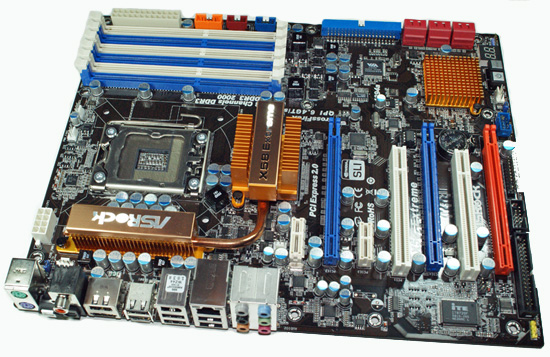
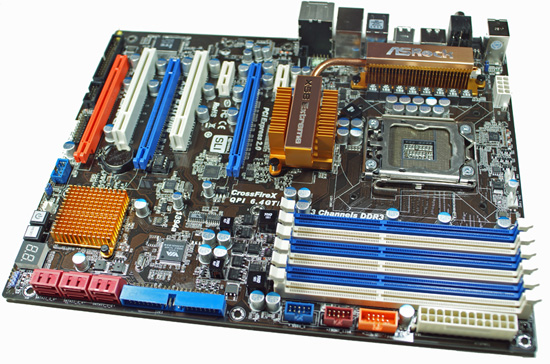


Taking a quick look around this board, we find the overall layout is excellent. ASRock placed the 24-pin and 8-pin ATX power connectors, IDE/Floppy connector, and the SATA ports along the edge of the motherboard. The board features two PCIe x1 slots, two PCI slots, and three PCIe x16 slots (x16/x16/x4). The CPU area is uncluttered and a push/pull CPU fan/heatsink design like the Vigor Monsoon III will not interfere with memory in the first dimm slot. The back of the board is clean and all of our various air/water coolers that required a back plate worked fine.
ASRock includes the standard array of components like the Realtek ALC890 HD audio codec, Realtek RTL8111D, VIA VT6330 IEEE 1394a/IDE combo chipset, Intel ICH10R for SATA and RAID support on six ports, along with full support for the Core i7 processor series. Five chassis fan headers offer speed but not temperature control along with full hardware monitoring and control via the BIOS or ASRock’s software utility. Last but not least, ASRock implemented a new 8-phase power delivery system along with having the first EuP (Energy using Product, 1W or less power consumption when off) compliant motherboard.
The rear panel features the standard PS/2 mouse and keyboard ports, optical/coaxial SPDIF out ports, seven USB 2.0 ports, powered eSATA/USB port, Gigabit LAN port, IEEE 1394a port, and a handy Clear CMOS switch. ASRock was generous enough at this price point to include Power and Reset switches along with an LED POST display. They also include a very good accessories bundle. You get the standard rear I/O panel cover along with 1 x IDE/Floppy cable, 4 x SATA cables, 2 x SATA power cables, and SLI bridge card. An informative manual and software CD is included that contains their IES, OC Tuner, and Instant Boot applications.
The board also features the new Instant Flash utility that allows the user to flash the BIOS from the POST screen or via a BIOS option setup. Yes, this functionality has been available on other boards for sometime, but it is a first for ASRock. Speaking of the BIOS, the overall design is geared for the general enthusiast with several auto overclocking options and a decent array of manual timings. ASRock includes enough options so that we did not have any problems maximizing our overclocks with air or water cooling options. We still think VTT voltage options should include finite (about a .05V difference between settings) settings of 0.01V steps. Overall, the AMI based BIOS design is clean and uncluttered.
Let’s take a quick look at the initial performance capabilities of the board.


 Facebook
 Twitter
 RSS
RSS


44 Comments
View All Comments
tommydokc - Monday, November 23, 2009 - link
Hey guys, beware of this board. check all the negative posts on differnt forums.been 3 weeks trying to rma this board. apparently from searching around this board dieing is a very common issue.
I’ve had this motherboard working for a total of two days and now it’s dead. It will not post. Just shows the A7 code on the LED readout. This no posting has been a problem since I bought this thing. It worked just long enough for me to load windows7, one day after it didn’t post on the original build, I took the thing apart and rebuilt it only changing the sata port where the hdd is plugged into then it posted and I loaded win7. Found all the drivers etc. everything was looking good. Then the next day I loaded my apps and then made an image / backup of the disk. This was all done over last weekend. Two days later I turn it on and it will not post. I’ve got an Antec truepower 650 i7 920, thermaltake v1, 6gb Corsair XMS ddr3 1600 nvidia gts 250 512mb. Sata and ide liteon DVDs. That’s it. nothing special. The monitors don’t even show to be receiving a signal from the video card. I swapped the GTS out for an ATI raedon and it made no difference. Tried the other pci-e slots also. As I stated above. This board was working for 2 days just fine. It’s now dead.
yummypaint - Wednesday, November 11, 2009 - link
This board turned out to be quite a headache. If you get this and there's any indication that something may not be right, return it before your 30 days. You DO NOT want to have to deal with asrock support, unless you enjoy waiting for weeks for responses and not being able to contact them at all via phone.First, there are some major ram compatibility issues which Asrock is not fixing that result in stability problems (firmware 1.4) which are causing problems for many people. there is no acknowledgement on their end that these problems even exist. in fact it's hard to get any response from them at all.
Second, if you think you might run linux and use any IDE drives at all, this board won't work. Asrock pulled shenanigans when they merged the ide and firewire controllers, which prevents the unix/linux kernel from even seeing let alone booting from ide devices. This will probably get fixed eventually in software, but who knows. there sure aren't going to be any linux drivers coming from asrock.
Third, there are problems with the network interface. you can do your own searching on this one, or check the newegg reviews to see people complaining about it.
InterClaw - Thursday, August 6, 2009 - link
Does the CPU fan header support temperature control?mi1stormilst - Wednesday, July 8, 2009 - link
Now if I could actually find one on sale for $169.00 or at all? :-)cube26 - Wednesday, July 8, 2009 - link
IDIOT,there is only one such idiot snakeoil - and he worships useless daamit in any possible way.You not another,stop lying dirty green bastard :D Im visiting VR Zone every day for 5 years,and know your way to post "comments" you asshole :D Here is typical your "comments" you inbredSoon more than half people in internet will know you,you green idiot gay,because of you idiocracy about how good daamit is - go in hospital you inbred,check your last half of brains,if you have some.
YOU ARE VERY WELL KNOWN IDIOT - and you just confirmed that.What can you expect from from loosers daamit fangays HAHAHAHAHA
Just get lost you inbred HAHAHA
snakeoil - Wednesday, July 8, 2009 - link
let me guess, the poor grammar, etc.... you suffer down's syndrome isnt it?, well don't be ashamed of you. you can live a normal and productive life, with the right therapy and medication.cube26 - Wednesday, July 8, 2009 - link
Jesus,SNAKEOIL,you even come here to post your trolling idiotic BS?Isnt enough VR-Zone alone,you start spreading your pathetic,n00bish,idiotic nonsence everywhere.Here is not VR-Zone,here you going to be f...ed up LOLLads - he is very well know idiot from VR-Zone forums,no point to talk to him,he doesnt have any sense of reality,living only for one reason - trolling against intel and nvidia for no reason at all,just because he is idiot - pure IDIOT.Not even tests can help him see real true.
Snakeoil - you are complete I D I O T rofl
snakeoil - Wednesday, July 8, 2009 - link
i'm another snakeoil, moron.snakeoil - Friday, July 3, 2009 - link
well for 170 dollars you get the crappiest of all core 17 motherboards which is asrock. that's sadinstead if you use phenom II you can get asus motherbords since 60 dollars
http://www.newegg.com/Product/Product.aspx?Item=N8...">http://www.newegg.com/Product/Product.aspx?Item=N8...
and if you pay 170 you get a fine motherboad asus deluxe
http://www.newegg.com/Product/Product.aspx?Item=N8...">http://www.newegg.com/Product/Product.aspx?Item=N8...
is so sad.
sotti - Saturday, July 4, 2009 - link
an the fastest phenom II they make is still only about 70% as fast as a core i7 on the asrock board.And aside from not having a name brand is there any reason to thing this asrock board is not an extremely solid mobo?
That $60 mobo doesn't hold a candle feature wise, and the $170 motherboard while comprable on features is the same on price and will be signfigantly slower than a core i7?
Amy I missing something or are you just a troll?