



Intel P965: MSI P965 Platinum and ECS PX1 Extreme
by Gary Key on December 6, 2006 4:30 AM EST- Posted in
- Motherboards
MSI P965 Platinum: Feature Set
The MSI P965 Platinum motherboard offers a significant amount of options for the price and has a BIOS designed for the performance user, although we wish the DRAM settings were expanded beyond the typical four settings. Still, the DRAM memory ratios are the best we have seen in a P965 motherboard. The Realtek ALC883 is a good onboard audio solution but we feel like the newer ALC885 or ALC888 would have been a better choice from a Realtek perspective. We understand the price pressures MSI is under to get this motherboard to market at $135 or less but other MSI Platinum motherboards offer the Creative sound chips and that choice would have set this board apart from others in the audio area.
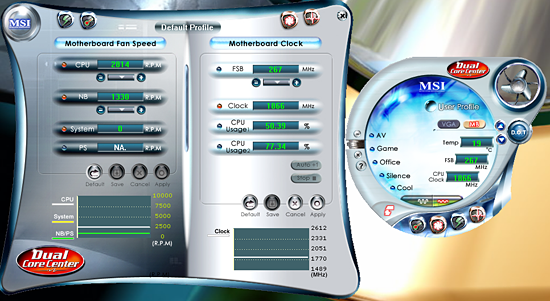
MSI includes several software utility functions under their Dual Core Center application: a Dynamic Overclock Program, Hardware Monitoring application, Smart Fan capability, and FSB overclocking. The dynamic overclock utility allows for automatic changes to the FSB based upon profiles or set percentages. The smart fan application allows control of the CPU and system fan headers within Windows although the BIOS options are more significant in regards to temperature control. The Hardware monitoring application allows for real time monitoring of temperature and basic system voltages. MSI also includes their Live Update program to download and install BIOS and driver updates. The DigiCell application is also included that ties all of the various software utilities together under a single interface and provides for hardware diagnostics.
Besides the Windows applications, MSI includes a dynamic overclocking utility in their BIOS that offers three different control points with CPU, PCI Express, or both as overclocking options along with percentages up to 23% available. The dynamic overclocking capability is based upon CPU loading as the system will gradually increase your set percentage overclock up to the maximum three values set in the BIOS or through Dual Core center.
We selected the maximum of 23% for the CPU overclock only (which also increases memory, voltages, fan speeds) and were greeted with a blank screen. This is not uncommon with these types of "automatic" systems as they require you to try several different settings to find the one that is optimal based upon your system components. We ended up with a 10% overclock that resulted in a 7x292FSB and memory speed is dependent on your set ratio and memory capability. Overall, the dynamic overclocking worked without any issues and provided an increase in speed although we expected a little more. As usual, you will still get much better results by manually tuning the BIOS.
| MSI P965 Platinum | |
| Market Segment: | Mid-Range Performance - $134.99 (Year End Rebate of $15.00 = $119.99) |
| CPU Interface: | Socket T (Socket 775) |
| CPU Support: | LGA775-based Pentium 4, Celeron D, Pentium D, Pentium EE, Core 2 Duo, Core 2 Extreme |
| Chipset: | Intel P965 + ICH8R |
| Bus Speeds: | 200 to 500 in 1MHz Increments |
| Memory Speeds: | Auto, 533, 667, 800, 709, 866, 1067 |
| PCIe Speeds: | Auto, 100MHz~133MHz in 1MHz Increments |
| PCI: | Fixed at 33.33 |
| Core Voltage: | Default CPU V to +0.7875V in 0.0125V increments |
| CPU Clock Multiplier: | Auto, 6x-11x in 1X increments if CPU is unlocked, downwards locked, Core 2 Duo |
| DRAM Voltage: | 1.85V ~ 2.45V |
| DRAM Timing Control: | Auto, 4 DRAM Timing Options |
| NB Voltage: | 1.2V~1.84V |
| Memory Slots: | Four 240-pin DDR2 DIMM Slots Dual-Channel Configuration Regular Unbuffered Memory to 8GB Total |
| Expansion Slots: | 2 - PCIe X16 (1-x16 electrical, 1-x4 electrical) 2 - PCIe X1 2 - PCI Slot 2.3 |
| Onboard SATA/RAID: | 6 SATA 3Gbps Ports - Intel ICH8R (RAID 0, 1, 5, 1+0, JBOD) 1 SATA 3Gbps Ports - JMicron JMB361 |
| Onboard IDE: | 1 ATA133/100/66 Port (2 drives) - JMicron JMB361 |
| Onboard USB 2.0/IEEE-1394: | 10 USB 2.0 Ports - 4 I/O Panel - 6 via Headers 1 Firewire 400 Port by VIA VT6308P - 1 via Header |
| Onboard LAN: | Realtek RTL8111B - PCI Express Gigabit Controller |
| Onboard Audio: | Realtek ALC883 8-Channel HD Audio Codec |
| Power Connectors: | ATX 24-pin, 8-pin EATX 12V, 4-pin Molex |
| I/O Panel: | 1 x PS/2 Keyboard 1 x PS/2 Mouse 1 x Serial Port 1 x S/PDIF Optical 1 x S/PDIF Coaxial 1 x IEEE 1394a 1 x Audio Panel 1 x RJ45 4 x USB 2.0/1.1 |
| BIOS Revision: | Award 1.2 |
| Board Revision: | 1 |
The MSI P965 Platinum motherboard offers a significant amount of options for the price and has a BIOS designed for the performance user, although we wish the DRAM settings were expanded beyond the typical four settings. Still, the DRAM memory ratios are the best we have seen in a P965 motherboard. The Realtek ALC883 is a good onboard audio solution but we feel like the newer ALC885 or ALC888 would have been a better choice from a Realtek perspective. We understand the price pressures MSI is under to get this motherboard to market at $135 or less but other MSI Platinum motherboards offer the Creative sound chips and that choice would have set this board apart from others in the audio area.
MSI includes several software utility functions under their Dual Core Center application: a Dynamic Overclock Program, Hardware Monitoring application, Smart Fan capability, and FSB overclocking. The dynamic overclock utility allows for automatic changes to the FSB based upon profiles or set percentages. The smart fan application allows control of the CPU and system fan headers within Windows although the BIOS options are more significant in regards to temperature control. The Hardware monitoring application allows for real time monitoring of temperature and basic system voltages. MSI also includes their Live Update program to download and install BIOS and driver updates. The DigiCell application is also included that ties all of the various software utilities together under a single interface and provides for hardware diagnostics.
Besides the Windows applications, MSI includes a dynamic overclocking utility in their BIOS that offers three different control points with CPU, PCI Express, or both as overclocking options along with percentages up to 23% available. The dynamic overclocking capability is based upon CPU loading as the system will gradually increase your set percentage overclock up to the maximum three values set in the BIOS or through Dual Core center.
We selected the maximum of 23% for the CPU overclock only (which also increases memory, voltages, fan speeds) and were greeted with a blank screen. This is not uncommon with these types of "automatic" systems as they require you to try several different settings to find the one that is optimal based upon your system components. We ended up with a 10% overclock that resulted in a 7x292FSB and memory speed is dependent on your set ratio and memory capability. Overall, the dynamic overclocking worked without any issues and provided an increase in speed although we expected a little more. As usual, you will still get much better results by manually tuning the BIOS.


 Facebook
 Twitter
 RSS
RSS


13 Comments
View All Comments
valnar - Friday, December 8, 2006 - link
I believe you missed the point of the ECS PX1 completely. While I agree that the moniker "Extreme" might be misguided to an overclocking nut, it qualifies when looking at the features. For HTPC use, it might simply be the best board available. Yes, you heard me right.Here are the features which seperate it from the rest of the 965 chipset pack. Some other boards have these features, but none have them all.
* Heatpipe on chipsets for cool, quiet operation
* Intel VIIV technology for quick powerup
* Three *usable* PCI slots for TV Tuner cards or whatever. (ie. the video card in the PCI-E slot won't render the 1st PCI slot useless)
* Realtek ALC885 audio. This is VERY important. Not too many boards have it yet since it has HDCP support. See here: http://newsko.blogspot.com/2006/04/realtek-shows-o...">Realtek info
* eSATA, S/PDIF and Firewire support
* Dual gigabit LAN (not important, but one of them is the Intel 82566DC, which is one of the best currently)
About the only board which comes close in features, while maintaining the critical three usable PCI slots, is the ASUS P5W DH Deluxe. The ASUS overclocks better for sure, but has the slightly older and non-HDCP compliant ALC882 audio.
For the application it is intended for, heck, even for regular non-overclocking folk, it truly is a bright star in the motherboard landscape of mediocrity. About the only surface level "component" they could improve on would be to include a TI chipset for firewire instead of VIA, but that's a small complaint.
I don't doubt for a second the major players like ASUS and Gigabyte will catch up, but for now, I'd buy this board in a heartbeat.
JarredWalton - Saturday, December 9, 2006 - link
"...a solid but not spectacular ECS offering that needs a name change before it can be taken seriously. ECS PX1 HTPC would be a much better description of what you're getting in the box."The board isn't terrible, but it is being marketed poorly. For HTPC use it would be good. For other use, it is far more questionable. HTPCs are still a limited market, and Blu-ray/HD-DVD support might be important to some people but it's not critical. I'm not entirely sure how important DRM support is audio -- it seems like HDCP support is still more a factor of having the correct video card and display rather than the motherboard. As far as I'm aware, if you have a motherboard that has an optical out connection to get one of the newer graphics cards that has an HDMI port, you can route the optical audio out over to the graphics card and it will send the audio along the HDMI cable.
As for Intel ViiV, it doesn't really seem to do much other than put the system into a slightly lower power state, and people that need a great HTPC solution will still need to get a good TV Tuner and software first and foremost. What can this board currently do that the MSI board cannot? Put a GPU like http://www.newegg.com/Product/Product.asp?Item=N82...">this ASUS 7600GT HDMI into both boards, and what DRM content won't work on the MSI platform but will work on the ECS? HDCP (Blu-ray content) worked fine http://www.anandtech.com/video/showdoc.aspx?i=2874...">on an Intel board that doesn't have a "DRM enabled" audio chipset, after all.
valnar - Sunday, December 10, 2006 - link
At the moment, DRM is not enabled for many BR/HD-DVD discs. When it is, it will need a secure audio path as well. It will still work, but won't be at full resolution. So at the moment, you can say the MSI is somewhat equal to the ECS in that respect, but the ECS still has a better sounding DAC in the ALC885 audio (better S/N ratio), has 3 PCI slots, eSATA and VIIV.For the non-overclocker, or mild overclocker, I can see no reason to get the MSI. :)
Xcom1Cheetah - Thursday, December 7, 2006 - link
Reading the review i feel that you are putting more efforts on the overclocking.. definitely there are some extreme overclockers but in my vicinity i see many people who like to play it safe and doesn't go too overboard and exotic with overclocking.My Suggestion is that if from now on you can post the benchmark of overclocked Motherboards. In which you overclock all the motherboards to a very reasonable level like if the normal FSB is 266 then overclock it to 300 or 325 (where you don;t have to increase the voltage and lower the memory timing)... and then benchmark them to see how the performance improve with the overclocking in each board. i mean is it linear or some boards show more gains than others... So that the vast number of people who like to keep it safe in overclocking can see which one is going to bring more gains at minimal risk. ( and they should be tested on atleast three different benchmark, one normal multitasking benchmark, one game benchmark and one encoding sort of benchmark.)
The catch here is that all board should be overclocked to same level irrespective of the fact how high they can go...
I think it will be a very nice addition to your already very extensive and perfect review.
JarredWalton - Thursday, December 7, 2006 - link
My personal experience is that if the boards maximum overclock is around 50%, long-term you will find that you will have to decrease the overclock in order to maintain stability. I have a couple systems that ran great with a 50% (sometimes more) overclock initially, and then a few months later I had to drop the overclock down to more like 40%. I even have one system now that I can hardly overclock at all, where is it used to hit a 30% overclock without difficulty.Basically, if you find a board that only offers mediocre overclocking performance initially, it is very unlikely that such a configuration will maintain the maximum overclock over the long haul. If ECS is only able to 345 MHz on the bus right now, in ideal circumstances, realistically you are probably looking at 320-333 bus speed for long-term use. That would be fine with typical motherboards, but just about all of the P965 boards are reaching much higher overclocks than that, many of them with lower prices than ECS, so the board definitely is not "extreme" in any way.
As for looking at motherboard performance had a "standardized" overclock, that sort of defeats the purpose of looking at overclocking. For people that don't care about overclocking, they can just ignore our overclocking results and look at the base performance. In our experience, once users start looking at overclocking, they would much rather have a board that easily overclocks to 333 MHz and can be pushed to much higher overclocks with a bit of effort rather than a board that can barely reach 345 MHz. In the case of the former, you are just about guaranteed to be able to overclock is much as you want (within reason), without having to pull your hair out.
Performance should scale just about linearly with overclocking, but that's only assuming that all of the other variables stay consistent. Unfortunately, that usually doesn't happen, as you get a lot of variation between the boards in terms of what sort of memory timings and speeds they can hit with overclocking. The ECS board starts out with worst timings, and they certainly don't get better as you start overclocking.
Just my take on the situation. Unless you need Intel ViiV support, there's really no reason to consider the ECS board. Better boards are available for less money, including the MSI board.
MaxisOne - Wednesday, December 6, 2006 - link
Ive been waiting for weeks to buy the Asus boards but i just couldnt bring myself to drop almost 200 dollars for one. I noticed the Msi board on the egg yesterday and i about died when i saw the price.I figured "something must be missing" from this board so i started to hunt for reviews last night. I never expected a review from AT so soon. The timing couldnt have been more perfect. From what im seeing the board is pretty decent for someone who has no desire or intention to pursue high overclocks. I just hope the egg doesnt jack up the prices by the time i order it tommorow.Hopefully with further bios updates the overclockers can get in on the price advantage but for now they may have to stick with the more expensive offerings.
Good review ... i appreciate it
Basilisk - Wednesday, December 6, 2006 - link
Thank you for the effort made in reviewing this product. But -please- re-think you prose style and put less effort into describing your emotional traumas: facts can tell the story without recurring analogies to your prom dates, etc.mostlyprudent - Wednesday, December 6, 2006 - link
I appreciate a little personality in writing, even in technology reviews. Afterall, this is not a data sheet or user manual. Like it or not, a critical review is a form of literary composition and, IMHO, ought to include some creativity. If you don't like it, then skip to the tables and graphs...all the facts with very little commentary.Sunrise089 - Thursday, December 7, 2006 - link
I agree with mostlyprudent. Sure there is a bit more personality being shown than normal, but variety is always nice, and it's still a great read.Basilisk - Wednesday, December 6, 2006 - link
I agree with you, but felt this article far exceeded "a little personality". This is NOT a criticism I've posted before, and maybe I'm just having a bad day? I didn't mean to damn the author, just to suggest that he spread it a bit thinner in the future. OMV....