



Done for 2009: The Holiday MacBook Pro Roundup
by Anand Lal Shimpi on November 10, 2009 12:00 AM EST- Posted in
- Mac
Snow Leopard: Bad for Battery Life
I've been very quiet on the Snow Leopard front, honestly in the condition it was released it was worth exactly what Apple was charging for it: $30. The bugs and incompatibilities weren't showstoppers, but they were annoying.

Since its release, Snow Leopard has improved tremendously. I'd say we're almost to the point where there's nothing I miss from Leopard. Is it worth the upgrade? Yeah, I'd say so, but do your research beforehand. There are still some incompatibilities that may make you want to wait before jumping. But if you don't use many 3rd party apps or non-Apple hardware, you'll be fine.
The title of this section says it all - Snow Leopard is worse for your Mac's battery life than Leopard. In the majority of cases it's not that big of a deal, take a few results from my 15-inch unibody MacBook Pro review and compare them to the same system under Snow Leopard:
| 15-inch MBP Battery Life | OS X 10.5.7 "Leopard" | OS X 10.6.1 "Snow Leopard" | % Drop |
| Light Web Browsing | 493 minutes | 444 minutes | 9.9% |
You're looking at nearly a 10% reduction in battery life, nothing to be proud of.
That's not the big issue however. The results on the previous page showed something troubling. The MacBook Pro is only able to deliver between 3.7 - 4.4 hours of battery life while browsing web pages with flash ads on them. Looking back at my 15-inch MBP results under Leopard, we see a problem:
| 15-inch MBP Battery Life | OS X 10.5.7 "Leopard" | OS X 10.6.1 "Snow Leopard" | % Drop |
| Flash Web Browsing | 403 minutes | 230 minutes | 42.9% |
I asked Apple on numerous occasions to help me understand what was going wrong, unfortunately I didn't get any response. I tried multiple things from my end. I updated the version of Flash, but that didn't help. It wasn't until I told our own Ryan Smith, one of the people instrumental in getting me to try a Mac years ago, that he gave me a brilliant suggestion: try 32-bit Safari.
Snow Leopard takes another step towards being a completely 64-bit OS, in many ways this step is the most disruptive. Many of SL's applications now ship with 64-bit binaries such as Finder, TextEdit and Safari. You can launch these 64-bit apps in 32-bit mode by selecting their .app icon and running Get Info (Command + I or File -> Get Info).
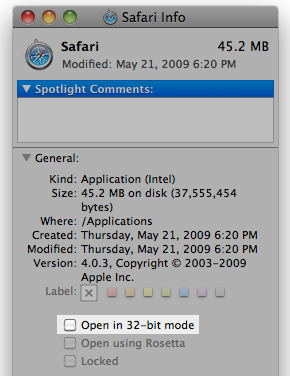
From there you can check the "Open in 32-bit mode" box. In my case, this gave me 32-bit Safari, which also gave me much better battery life in my heavy web browsing test:
| 13-inch MBP Battery Life | 64-bit Safari | 32-bit Safari | % Improvement |
| Flash Web Browsing | 222 minutes | 323 minutes | 45.5% |
My 3.7 hours of battery life that the 13-inch MacBook Pro gave me jumped up to 5.36 hours. That's an increase of over 45%.
I passed this data along to Apple but haven't gotten anything back from them. I'm guessing the silence on the matter means that it's a known issue and isn't something that's going to be addressed for a little while. Just to be sure, I spent most of last night running OS X 10.6.2 on three different systems to see if it fixed the problem. It didn't.
You'd think that with $1.67 billion in profit last quarter, Apple could afford to hire a couple of engineers to keep its OSes a bit more polished.


 Facebook
 Twitter
 RSS
RSS


115 Comments
View All Comments
v12v12 - Tuesday, December 1, 2009 - link
Try this: SAGER http://www.sagernotebook.com/category.php">http://www.sagernotebook.com/category.phpMy buddy built a custom laptop for $1500 that DOMINATES any MacPro, with a better to equal screen res, oh plus the caveat of a MATTE screen, thus it's a better screen actually. It's faster, better GFX, BUILT better, completely custom, looks nice and WORKS.
There's no comparison when the elitism and snobbery of blindly knowing you got ripped off for a fluffed up Intel machine in satin and lace gloves. I have a MacPro, and other PC laptops... Guess what machine gets WORK done in the corp environment more so than the Mac needing to run silly emulations of Windows in order to get things done. But why so? If these overpriced luxo-pads really ARE "superior" then ask yourself why again hasn't Mac broken into the working world of business and corps if they are user-friendly and problem free?
You'd think a smart corp would take note and thus spend a little extra capital for these machines, as it’s part of my job to support them... Guess what, Mac's aren't going to be adopted nor switched over b/c they are mere flash and dash for the foo-foo to keep fluffing their yaps about how great it is to get SUB-PAR performance at premium prices... Oh and don’t forget Apples RIDICULOUS (strike) LAUGHABLE service requirements…
Applecare Technician cert required to work on these toys? HAHA Anyone with ½ an A+ cert can take this BS machine apart just like a PC and then some. But with Apple at the helm, you’ve gotta agree to their pricing schemes and wanna-be island in the sky certs to do work that a teenage can do. Again more hidden costs and fees associated with the wanna-be Elite crowd. Do you know why they have to charge these exuberant fees out of sight? To long bait you into their way of things, to where there’s no point of turning back once committed. The fees also help keep them afloat; remember for it not for Creative’s ideas they stole, Intels hardware, and the stupidity or nativity of it’s fan(boy) user base… “Apple” would be rancid and a DECAYING company haha… and you all know it… Botching performance specs can only keep you “competitive” for so long, until your own flock began noticing how ailing those junk G-series were haha… What a joke.
Sorta like a hopping up Civic with "euro" lights and smooth lines and then getting dogged by an American competitor that's near 30% less = interior and those "build quality" upgrades that everyone's hollering about added to surpass you.
You can get a Porsche 911 C4S for near $90K... Vs a Base vette C6 (which is still faster lol) for $60K and CUSTOMIZE it way beyond what Porsche could dream of at such a price; yes that’s BETTER; performance in every category, interior upgrades also... Apple is all fluff when it comes down to it. IT's NOT a hardware brand, it's borrowed technology from INTEL; it's master, then some BS ideology slapped onto it to appease the easily swayed/coerced. Sorry but I'm sick of the people who pay MORE for > less and have the nerve to claim superiority.
But like OMG, it’s sOOOOOO PRETTY – YAAAAAYYyyyy! That subject to OPINION and thus a forever MOOT POINT.
Who knows... Apple has been found GUILTY more than once for stealing other's innovations and pawning/spinning them off as their own. Google that FYI...
Hype and flash; smoke and mirrors... Case dismissed.
mashi - Friday, February 12, 2010 - link
people never own a mac never understand. I have few ibm/lenovo thinkpad. but i always use my mac. osx is clean and fast OS. i think their kernel is more optimized than windows. if you using snow leopard and parallels 5 with windows xp. basically you don't even know it is VM. the response and everything is fast. Once you used to OSX. you don't want PC. that's my opinion.aucl - Wednesday, November 25, 2009 - link
I think blaming Apple for the bad performance is not totally fair.Long before the release of Snow Leopard Apple tried to drill all partners, driver vendors and so to deliver new 64bit builds for their plugins and extensions.
The flash plugin is provided by Adobe and only distributed by Apple. Probably cause most users would complain if flash content won't work any more.
so lets look what we got:
host-20i:~ aucl$ file /Applications/Safari.app/Contents/MacOS/Safari
/Applications/Safari.app/Contents/MacOS/Safari: Mach-O universal binary with 2 architectures
/Applications/Safari.app/Contents/MacOS/Safari (for architecture i386): Mach-O executable i386
/Applications/Safari.app/Contents/MacOS/Safari (for architecture x86_64): Mach-O 64-bit executable x86_64
host-20i:~ aucl$ file /Library/Internet\ Plug-Ins/Flash\ Player.plugin/Contents/MacOS/Flash\ Player
/Library/Internet Plug-Ins/Flash Player.plugin/Contents/MacOS/Flash Player: Mach-O universal binary with 2 architectures
/Library/Internet Plug-Ins/Flash Player.plugin/Contents/MacOS/Flash Player (for architecture ppc): Mach-O bundle ppc
/Library/Internet Plug-Ins/Flash Player.plugin/Contents/MacOS/Flash Player (for architecture i386): Mach-O bundle i386
Looks like Adobe Flash is not 64bit ready.
So i am not sure about the details in current Intel architecture, but switching between 32 and 64bit was always an expensive operation as i remember???
PS: On my mac quite everything is 64bit, and flash is "disabled" with the Click4Flash plugin.
fokka - Monday, November 16, 2009 - link
come on anand, i know apple articles create a lot of clicks, but this macbook/apple- fanboyism is getting ridiculous.yes, everyone knows that the unibodies are good computers and the battery-life is better than on most other pcs, but the price-aspect especially on the 17"-machine is just too big, that a normal person could honestly overlook it...
do you know what you get in the non-apple-world for 2500$+? other dimansion, just other dimension.
WhiskeyTangoFoxtrot - Monday, November 23, 2009 - link
Oh for cryin' out loud! The bloke writes an article relating to a tech issue that just happens to be on a Mac and suddenly he's a "fanboy"????!!!You Win-Nut trolls remind me of primary school kids - someone talks about something you're not into and suddenly you all start calling him names. If you're only interested in bashing Apple (and if Apple's so crap why do they threaten you so much?) go to the green grocer's, buy a box of granny smiths, and go hit them with a cricket bat. Get some of your frustration out that way. If you're interested in discussing the content of the article (ie. how to maximise battery charge) with some practical suggestions (other than "just buy a cheap windows brick and keep it plugged into the wall") then by all means post.
... why do I even bother reading Win-Nut posts??? .....
marraco - Sunday, November 15, 2009 - link
[I've been a staunch advocate of Apple's hardware and software for years now, but ......Apple is making the mistake of stating that non-Apple hardware isn't supported]
Big fail.
you pay 2,5X more than an i7 PC (not accounting the Windows license needed to run 99% of the software), gets obsolete hardware, and ZERO support.
If I pay extra for a computer, I want to get any luxe, including the expandability.
geok1ng - Sunday, November 15, 2009 - link
It is a PITA that i couldnt buy a decent notebook over the last two years: a decent CPU with good screen resolution and STATE-OF-ART integrated graphics; AMD had excelent integrated graphics paired with hot and 2 generatiosn older CPUs, Intel had decent CPUs paired with crap integrated graphis. And when NVDIA finally put a decent integrated graphics on the C2D platform, it is sold as MacBook- an expensive piece of good looks paired with all manner of junkware using an OS that simply cant game!Battery life is a mix of good hardware project and good OS drives. For that you need 45nm CPUs with at least 55nm chipstes with the OS installed in a SDD. And the OS cant suck!
I would be fine with a 2Ghz dual core (or an atom for a netbook), 9400m/4200 level graphics, 4GB RAM, 60GB SSD and at least 720p resolution together in a 11"-13" chassis. But every single netbook/subnotebook/notebook that comes close to this requirements costs an arm and a leg and fails to deliver one or more of these hardware requirements.
batmanuel - Sunday, November 15, 2009 - link
My wife picked up the new unibody plastic Macbook recently, and it is really a good deal compared to the 13" MacBook Pro. You get the same processor, multitouch trackpad, LED backlit screen, 7 hour battery, and RAM as in the Pro version, plus a bigger hard drive. If you don't need FW800, the SD reader, and the backlit keyboard, the plastic unibody Macbook is a great machine for $1000.Hrel - Friday, November 13, 2009 - link
I'd really love it if Asus could would make a 15-16" laptop with the specs on the 15" macbook except with a 1600x900 screen, a 320GB 7200rpm hard drive and the option to add a dedicated GPU to the integrated one. With a price ranging from 700-1000. I'm thinking MR HD4530/210M, HD4670, and the HD4850 as dedicated graphics options.Most importantly though; let's not forget that the screen needs to be at least 500:1 contrast ratio, preferably 1000:1 with very high color accuracy.
MonicaS - Thursday, November 12, 2009 - link
I can understand why Apple did it, but again, their reasons all but ignore the end user. Seriously, how hung up are people about the look of the underside of their laptop, that it needs to be made sleeker. Take a look at a Mac Pro and you'll see a beautiful and very accessible interior that even the most novice can access. Not the same here and its a shame.Monica S
Los Angeles Computer Repair
http://www.sebecomputercare.com/?p=1178">http://www.sebecomputercare.com/?p=1178