



Upgrading and Analyzing Apple's Nehalem Mac Pro
by Anand Lal Shimpi on July 13, 2009 5:00 PM EST- Posted in
- Mac
Upgrading the CPUs in the Nehalem Mac Pro
Let’s say you get over the $3299 price tag of the 8-core Mac Pro but aren’t really happy with the paltry 2.26GHz clock speed of the quad-core Nehalems in the box. Apple offers two upgrades: a pair of 2.66GHz or 2.93GHz Nehalems, how nice of them. The 2.66GHz upgrade will set you back $1400, while the 2.93GHz upgrade will basically cost you another Mac Pro at $2600.
To Apple’s credit, these CPUs are expensive. Here is Intel’s pricing:
| CPU | Intel's Price for Two CPUs | What Apple Charges for Two (BTO Upgrade) |
| Intel Xeon X5570 | $2772 | $2600 |
| Intel Xeon X5550 | $1916 | $1400 |
| Intel Xeon E5520 | $746 | |
| Intel Xeon W3540 | $1124 | $1000 |
| Intel Xeon W3520 | $568 |
A single Xeon X5570 costs $1386, Apple is charging you $2600 for two - but that’s on top of the base cost of the 8-core Mac Pro; you’re effectively paying for the two Xeon E5520 chips and the two X5570s, but only getting the latter.
The same applies to the single-chip Mac Pro. The only CPU upgrade offered there is the Xeon W3450; retail cost is $562, Apple’s benevolent self will only charge you $500.
I should also point out the sheer ridiculousness of Apple putting a pair of $373 CPUs in a $3300 machine. I get that Apple wants to commoditize everything that they don’t make, but that’s just ridiculous.
Do you smell motivation? Because I do.
If you don’t mind voiding your warranty, you are better off buying the base Mac Pro (4 or 8 core) configuration, upgrading the CPUs yourself and ebaying the originals.
The even more sensible option would be to wait a while and upgrade the Xeons once these ones fall in price.
Regardless of when or why you want to do it, I figured we should give it a try. They built sockets for a reason after all.
Voiding the Warranty
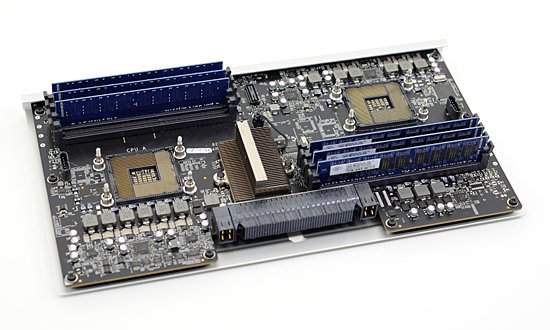
Getting inside the new Mac Pro is much easier than the old one. Remove the side panel then unlatch and remove the processor tray and you’ve got this:
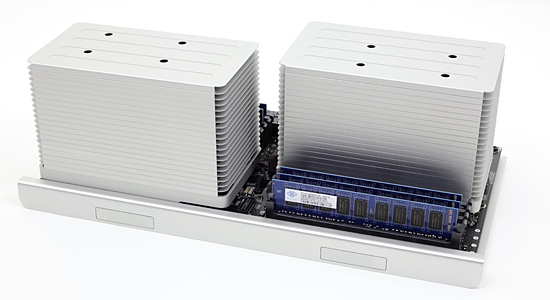
Two towering heatsinks, eight DIMM slots an X58 chipset are the main attractions. Remember all of the hoopla a few pages ago about Turbo Mode? That’s the reason for these beefy heatsinks; there’s actually a fan inside each heatsink, as well as two large fans moving air across the entire board in the case.
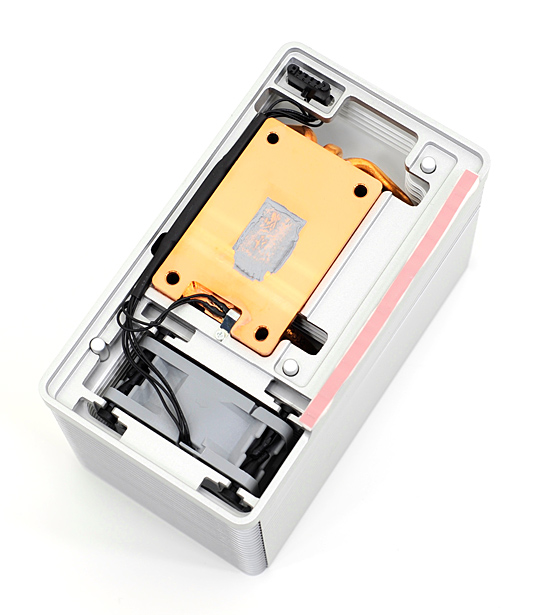
The heatsinks have an integrated fan and thermal sensor (black cable)
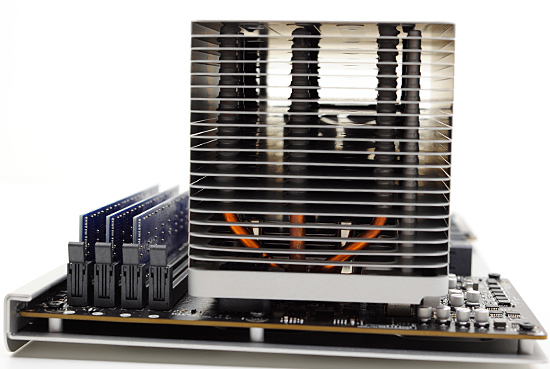
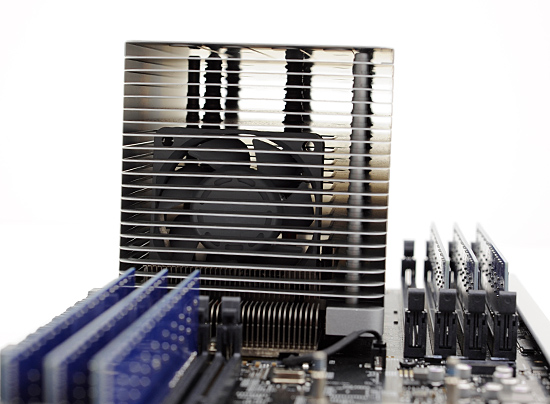
There are four screw holes at the top of the heatsink. Apple actually made removing the heatsinks very easy, all you need is a long 3mm hex key - about 3” long (plus a handle) should suffice.
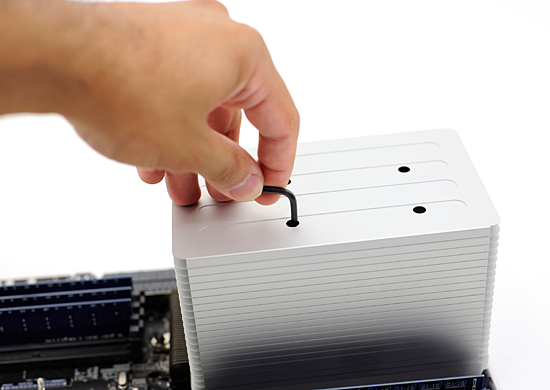
Stick the hex key in any one of the holes, move it around until it grabs, and then unscrew. Rinse and repeat. The screws are attached to the heatsink and spring loaded; you don’t have to physically remove any, just wait until they pop up.
With all four screws removed you can just lift the heatsink straight up. The CPU sockets don’t have clamps, so the chip will most likely lift out of the LGA socket attached to the heatsink.
Carefully twist and pull the CPU until it comes off of the heatsink and you’ll be greeted with the first surprise from Apple: the 8-core Mac Pro ships with lidless Nehalems.
Normally a Core i7 or Xeon processor will look like this:
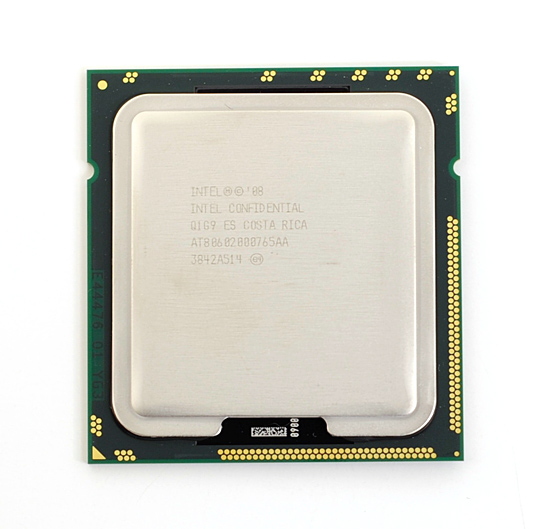
But the 8-core Mac Pro uses specially sourced parts from Intel that have no integrated heat spreader (IHS):
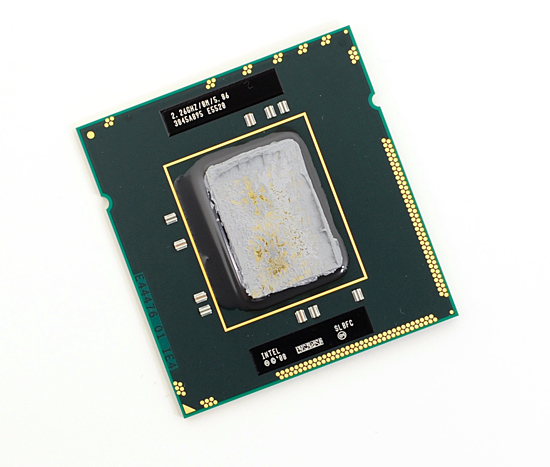
No lid, all Nehalem.
This is obviously a cooling play. The IHS is useful in preventing cracked cores from improperly installed heatsinks, but it does make cooling more difficult. With the heatsink flush against the bottom of the Nehalem die, it can remove heat faster from the chip. More efficient cooling results in lower CPU temperatures and lower fan speeds.
The lidless Nehalems are only used in the 8-core version as far as I can tell. The standard quad-core Nehalem Mac Pro uses regular Xeons with an integrated heat spreader.
The lidless Nehalems do provide a challenge: you can’t buy them. You have to buy a standard, lidded Nehalem Xeon and either remove the IHS or leave it intact and hope it works well. The first option isn’t a very good one; while removing a heat spreader isn’t impossible, you do run the risk of destroying your $1400 CPU. The second option, if it works, is the safest route.
We got a pair of Xeon X5570s and tried to install them, with heat spreaders and all, in our 8-core Mac Pro. Simply pull one chip out, replace it, apply thermal grease, remount the heatsink and screw it back in...or so we thought.
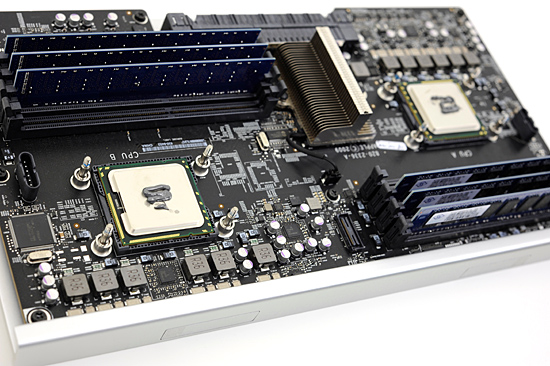
The lidless Nehalems were out, the new lidded processors should work - they should just be a bit more difficult to cool


 Facebook
 Twitter
 RSS
RSS


58 Comments
View All Comments
wackazong - Wednesday, September 9, 2009 - link
Hello,this may be the right place to ask: What's the difference between the Xeon and the (much cheaper) i7 processors? Couldn't you put an i7 into a Mac Pro?
sdevenshire - Saturday, August 29, 2009 - link
Hi,I purchased a 2xQuad core mac in Jan 2008 and I would like to upgrade the cpu to the new Nehalem. Apple suggested it could be done but they don't do it. I contacted a number of Mac repair places and they said it can't be done. I realize that upgrading the cpu probably means upgrading the motherboard, but that's fine with me.
Any suggestions on where I could get this done or where I might get instructions for doing it myself?
TIA,
Shane
529th - Thursday, July 30, 2009 - link
If you’ve read our Nehalem articles you’ll know that each chip has three 64-bit wide memory controllers, thus you’ll want to install DIMMs in triplets. You can install four DIMMs, but accessing memory in the fourth module will be slower - something you’ll never notice if you’re wondering. ???This is hindering me from buying a 4 channel UD3R X58 board. My main goal of an i7 build is for editing AVCHD files through Premiere Pro CS4. Being that tri channel will get me 6g and PP CS4 likes more memory, will adding memory to the 4th module screw things up?
newrigel - Tuesday, July 28, 2009 - link
Man, take your hackysack and go buy some laundry soap to clean the crap out of your drawers! You guy's talk about a couple thousand dollars like it's buying a damn house or some huge purchase LOL!Macs are really cost efficient and yes... PC's are cheaper but who gives a damn! If you want to be cheap... be cheap! Hackintoshes (LOL) are just that... a POS and your getting what you pay for! You cheap asses probably hit your ol' ladies up for gas money to get to work hehe...
MACS RULE!
ditchmagnet - Monday, July 27, 2009 - link
Just for fun I went to apples site and customized the mac pro, I just maxed out the hardware choices and then went to newegg and priced out an equivalent PC (Server board, with the same CPUs and everything except more RAM)Total for the apple including shipping and tax is over $20,000
the newegg build is under $9,000
I bet my 920 build at 4.5ghz is faster than the mac pro though, and all for under $1000
moltentofu - Tuesday, July 21, 2009 - link
wander over to the egg and buy a lian li. No flashy lights really, no idiot clear side panels. For some reason the hard drive access light and the power light are different colors on mine though.You can get a combo case with a seasonic 550W power supply with it. I put a phenom II x4 3.2Ghz 16 Gigs of RAM and a 1 Gig 4870 in there with aftermarket cooling all around (air not liquid) and it cost me 900 bucks - all from the egg.
If you think you're going to find performance arbitrage basically anywhere in the market you couldn't be wrong-er. Just pick your price/performance point and stick to it.
Thanks for the awesome reviews as usual Anand!
moltentofu - Tuesday, July 21, 2009 - link
With one big 'ol caveat to the arbitrage thing and that is: building your own system really does seem to be cheaper right now, and also I can't find component setups in the big name companies right now that make me quite happy.I miss when Dell Outlet used to be affordable. I'm afraid these Macs are just waaay out of range of my meagre salary.
fmaste - Monday, July 20, 2009 - link
Everybody talks about how expensive the Mac Pro is, but, has somebody compared with other brands? Look at this:I customize two Dell Precision Workstations with the same components as the base configurations Apple offers for the Mac Pro.
The results!!
Mac Pro Quad-Core: $2,499.00
Dell Precision T5500: $3,427
Mac Pro 8-Core: $3,299.00
Dell Precision T7500: $3,427
BOTH APPLE OFFERS ARE BETTER!!!!!
Both with the same processors, same amounts of memory at the same speed.
The only difference is instead of a NVIDIA GeForce GT 120 with 512MB you get a 256MB NVIDIA® Quadro® NVS 295. And that Dell options have hard drives with less capacity, 500GB vs 640GB. I also added the second Gigabit Ethernet card to both Dells. Dell has no bluetooth option and you may need to add a sound card to them.
Remember, you get a more expensive PC with windows Vista and an ugly chasis.
fmaste - Tuesday, July 21, 2009 - link
And here is HPMac Pro Quad-Core: $2,499.00
Same specs configurable HP Z800 Workstation: $3,942.00
Mac Pro 8-Core: $3,299.00
Same specs configurable HP Z800 Workstation: $3,702.00
excalibur3 - Friday, July 17, 2009 - link
So when you hypothetically created your i7 hackintosh, what were it's specs? I'm thinking about doing this (as a thought experiment only of course) and I'm wondering what such a system would price out. How would I know what motherboard to use to be compatible?