



Apple's 2009 MacBook Pro: Battery Life to Die For
by Anand Lal Shimpi on June 12, 2009 12:00 AM EST- Posted in
- Mac
The Best Battery Life I’ve Ever Seen
To find out how well the new lithium polymer battery does I ran my usual suite of Mac battery life tests. First up was my wireless web browsing test:
The wireless web browsing test uses the 802.11n connection to browse a series of 20 web pages varying in size, spending 20 seconds on each page (I timed how long it takes me to read a page on Digg and came up with 36 seconds; I standardized on 20 seconds for the test to make things a little more stressful). The test continues to loop all while playing MP3s in iTunes.
This is an extremely light test as none of the web pages have any flash ads, but it’s a valid test of very light wireless usage.
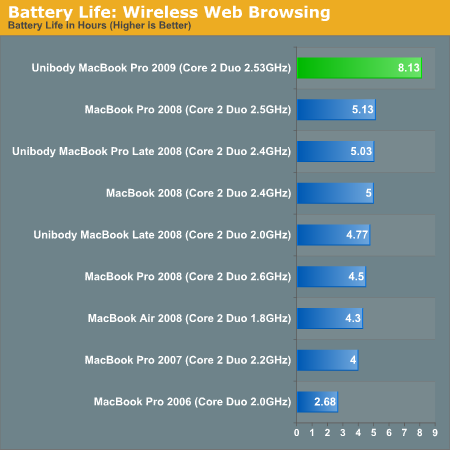
Eight, freakin, hours. I couldn't believe it. In my lightest test, the new 15-inch MacBook Pro lasted eight hours and eight minutes. That's with the screen at half brightness (completely usable) and no funny optimizations. The notebook is just playing music and surfing through a lot of my old reviews. There's no way this could be right. Maybe my test was too light?
I threw together another test just to make sure. The key flaw in my initial wireless web browsing test is that it none of web pages have any Flash on them. While constantly loading web pages will ensure the CPU can't go into deep sleep, Flash on the pages would make sure that the CPU utilization remains higher at all times. The next test I put together was this:
I strung together 8 reviews on AnandTech and put them each on a single page, images and all. I then scoured the web for big, animated Flash ads and added anywhere from 1 - 4 ads per page; all Flash. Each page is designed to forward to the next after 10 seconds and the loop continues indefinitely. On each machine I opened three Safari windows and pointed them at the first page in the sequence. In the background, once more, I had iTunes playing MP3s.
I found that CPU utilization varied from 5 - 35% during this test, which is about what I saw when I was actually surfing the web myself. The addition of Flash should make it more stressful, but it's still a fairly light usage test. My original web browsing test got us 8 hours, so what about this new one?
| MacBook Pro 2009 | MacBook Pro Late 2008 | |
| Wireless Web Browsing w/ Flash | 6.48 hours | 3.28 hours |
Six and a half hours, out of a 5.5 lbs notebook. For comparison, the older MacBook Pro could only manage 3 hours and 17 minutes in the same test. The new notebook lasted almost twice as long. Mathematically, this doesn't make sense. There's only a 46% increase in battery capacity, there shouldn’t be a ~100% increase in battery life...ever.
While the original web browsing test was using data from my original unibody MacBook Pro review, this second web test used a brand new MacBook Pro (purchased just weeks before this week's MacBook Pro announcement). The two notebooks had the same amount of memory (4GB), the older MacBook Pro had a slower CPU (2.4GHz vs. 2.53GHz) and a 7200RPM hard drive but the differences shouldn’t account for an extra 54% increase in battery life.
Apple must have done more than just increase battery capacity in the new MacBook Pro. My third test continues to support my findings. This is my heavy workload benchmark.
For this benchmark I'm downloading 10GB worth of files from the net (constant writes to the drive), browsing the web (same test as the first one) and watching the first two episodes of Firefly encoded in a 480p XviD format (Quicktime is set to loop the content until the system dies).
The older MacBook Pro managed 3.25 hours in this test. The new one? Just under 5:
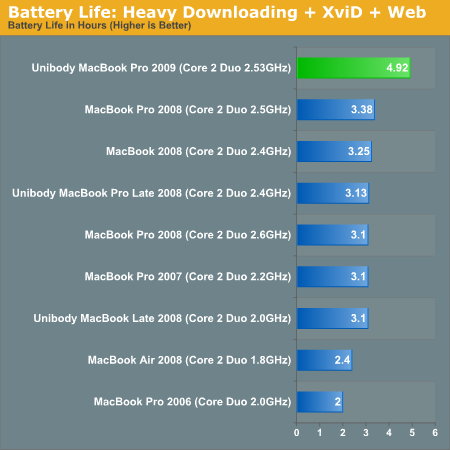
That's a 51% improvement in battery life. It's close enough to the max theoretical 46% improvement for me to think that the significant gains in wireless web browsing are due to improvements in idle power optimizations. It's possible that all of the components in the new MacBook Pro have been optimized for lower voltages at idle.
The battery tests are repeatable however. I saw anywhere from a 50 - 100% improvement in battery life over the old MacBook Pro. Given the increase in battery capacity alone, you should see no less than a 46% increase in battery life. Exactly what is accounting for the expanded life above and beyond that, I'm not sure.
Either way, Apple's 7 hour claim is well within reason. For light workloads, even on WiFi, you can easily expect 6.5 - 8 hours out of the new 15-inch MBP. As I write this article on that very system I'm told that I have nearly 8.5 hours left on my charge. If you do a lot of writing on your notebook, the new MBP is exactly what you'll want; it will easily last you on a cross-country flight if you need to get work done.
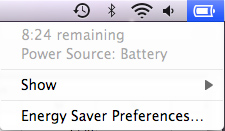
I think I've just found my new writer's companion
My heaviest workload delivered just under 5 hours of battery life, a figure that the old MBP could only attain while running my lightest workload. This thing rocks.
I also have to commend Apple for delivering realistic battery life specs on its laptop. While 7 hours definitely involves a light workload, it is more than attainable as I've shown in the tests above.
A quick search shows that even Dell's Studio 15 only offers a battery rating of up to 5.5 hours. It looks like, once again, other notebook makers will have to play catch up to Apple in this department.


 Facebook
 Twitter
 RSS
RSS


113 Comments
View All Comments
jyavenard - Friday, June 26, 2009 - link
I ran my own test, similar to the one listed here... With a combination of browsing site without flash and one with.The test...
Open Safari, open a window to news.google.com, display the page for 20s then refresh the content.
Close the window, open another window to www.cnn.com (it has flash animations changing all the time). Wait 30s, refresh page...
repeat every minute (so the Flash page is showing 2/3rd of the time)...
Test were done on brand new macbook pro, with original hard drive, wifi on (using 802.11n 5.8GHz, 3 metres away), bluetooth on, backlight set at 4 out of 16.
Screen was set to never goes to sleep nor display screen saver.
keyboard backlight was disabled and so was "Automatically adjust brightness".
All sharing services were disabled.
MBP 13", 4GB, 2.53GHz, battery capacity: 5605mAh:
First discharge: 6h45 (1)
After complete battery calibration: 7h30
MBP 15", 4GB, 2.66GHz, battery capacity: 6150mAh:
nvidia 9400: 7h35
nvidia 9600: 4h39
MBP 15", 2GB, 2.33GHz, Radeon X1600, battery capacity: 3450mAh
2h59 (2)
(1) Was my first test, when I realised the keyboard backlight was on, and it must have been a good ¾ of the time.
(2) This one has a battery with 318 cycles, so it may not mean much anymore.
adrivit - Wednesday, June 17, 2009 - link
How gigantic is the leap in the display of the new Macbook Pro 15 (June) from the old Macbook Pro 15 (before June). Except from the wonderful batter life increase and the SD card slot, is there any other significant increase? Having poor vision, I am concerned about the clarity and the proper color distribution/contrast/brightness of the screen, so in this case does the new Pro score hugely over the old Pro or is the old Pro good enough?CrArC - Wednesday, June 17, 2009 - link
The charging method Apple is referring to is called Balance Charging, and is almost a necessity for Lipo cells, as unlike other battery technology they are very susceptible to damage by overcharging or undercharging.The good news is, balance charging really works. Each cell is carefully charged by the microprocessor-controlled charging system such that they are kept at almost identical voltage, so you can be quite sure the packs will last through many hundreds of cycles.
The bad news is, Lipos are barely stable - they will happily (quickly) explode if overcharged, charged too fast, shorted, punctured or deformed, or if even you look at them funny. If people thought their laptop batteries fizzling into a fire were dangerous, then consider the Lipos to be small bombs. :)
iwodo - Tuesday, June 16, 2009 - link
Does anyone know what will happen to the battery if i keep constantly plug in to the wall.How long will it last? Another Laptop or Notebook tends to lose or die after 1 - 2 year of use.
Would Apple, with it controller chip be able to prolong this lifespan?
Jay2 - Monday, June 15, 2009 - link
About the last paragraph of page #1, about the "adaptative charging". It is called Battery Balancing in the battery industry. The whole point is that an aged cell will charge more slowly, and disbalance the whole charge curve of every cells in the pack. In the long term, the whole pack age prematurly because of repeated unecessary stress.I recommend those two reads:
This page (and whole site) is a good technical introduction:
http://www.batteryuniversity.com/partone-24.htm">http://www.batteryuniversity.com/partone-24.htm
This page is a TI application journal, well detailed and pictured:
http://focus.ti.com/lit/an/slyt322/slyt322.pdf">http://focus.ti.com/lit/an/slyt322/slyt322.pdf
Have fun!
l0nwlf - Monday, June 15, 2009 - link
Well I'm impressed heavily, and planning to buy it *NOW*. So can anyone tell me as to where can i buy one of the latest models launched in New Delhi (India) and what will be the approximate price in INR. The model i'm thinking of purchasing is entry-level 15.4'' screen laptop with default specs.Doormat - Sunday, June 14, 2009 - link
Some folks at other sites are noticing that if the MBP 13" or 15" comes with a regular HDD its only set to run at SATA 1.5Gb/s. If it comes with an SSD its at 3.0Gb/s. Replacing the HDD with a known SATA 3.0Gb/s drive wont cause the MBP to go into SATA 3.0Gb/s.araczynski - Sunday, June 14, 2009 - link
unfortunately, i think the major thing that will come out of this, is that manufacturers will now have another reason to overcharge even more for batteries.deslock - Sunday, June 14, 2009 - link
Thanks for the excellent review.There are some anecdotal claims of exceptionally long battery life for other model laptops in this thread. I'd be interested in Anandtech publishing detailed comparison of battery life between many laptops using uniform benchmarks.
Also FYI for anyone considering a MacBook, you can save $100 if you qualify for the educational price (frankly, it's absurdly easy to get them at that price even if you don't). Also, you get a free iPod touch and printer after rebate. Sell them on Ebay and the base 13" MacBook Pro drops to $1099 - ~$180 - ~$50 = ~$870.
Pirks - Sunday, June 14, 2009 - link
How can you fool Apple into thinking that you qualify for educational discount when you are not? Is it possible at all? I thought they require .edu email address like MS does, don't they?