



Introduction
Let's be honest: we like big displays. Given the choice between any two computer LCDs, we would almost invariably take the larger display - provided that price isn't an overriding concern, naturally. That being the case, and looking at the current prices of LCDs, we have a serious problem even considering anything smaller than a 20" LCD. The difference in price between a 17" LCD and a 22" LCD can be as little as $75, and by the time you're looking at reasonable quality displays, the price difference can narrow even more. Widescreen displays are the trend these days, which is all the more reason to get something a bit larger if possible - note that in terms of screen surface area, a 19" widescreen is actually slightly smaller than a standard 19" 5:4 aspect ratio LCD.
It wasn't all that long ago that a typical 20" LCD could cost well over $500. After watching 20-22" CRTs bottom out at around $500 for more than five years, you certainly won't find us complaining about LCD prices dropping by 30% or more per year! There is a point of diminishing returns, however, and it's quite difficult to find any size LCD for under $150. Should you go out and purchase the least expensive (and probably lowest quality) LCD you can find for $150, or is it better to spend a bit more money to get one of the larger displays? Considering that the display is what you're actually spending all of your time looking at when you use a computer, we continue to recommend that you spend more rather than less money on that particular component, and the fact that a good quality display can last through several computer upgrades is merely one more reason to do so.
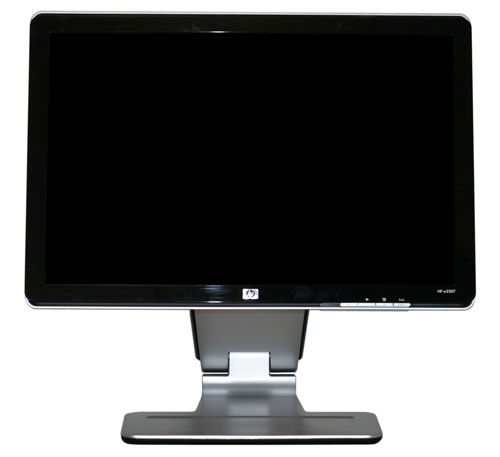
We're looking at HP's 22" w2207 display today, which at $360 costs quite a bit more than the entry level 22" LCDs on the market. We previously looked at one such monitor, the Acer AL2216W that currently sells for $230, so one of the first questions we need to answer is what exactly the w2207 provides that the Acer lacks. Other than a few extra features, we also need to look at performance, but for less demanding users we feel pretty confident in stating that you'll be hard-pressed to find an extra $130 of value in the HP offering. What about those of you who aren't so easy to please - is there a case to be made for the HP w2207? Let's find out....
Let's be honest: we like big displays. Given the choice between any two computer LCDs, we would almost invariably take the larger display - provided that price isn't an overriding concern, naturally. That being the case, and looking at the current prices of LCDs, we have a serious problem even considering anything smaller than a 20" LCD. The difference in price between a 17" LCD and a 22" LCD can be as little as $75, and by the time you're looking at reasonable quality displays, the price difference can narrow even more. Widescreen displays are the trend these days, which is all the more reason to get something a bit larger if possible - note that in terms of screen surface area, a 19" widescreen is actually slightly smaller than a standard 19" 5:4 aspect ratio LCD.
It wasn't all that long ago that a typical 20" LCD could cost well over $500. After watching 20-22" CRTs bottom out at around $500 for more than five years, you certainly won't find us complaining about LCD prices dropping by 30% or more per year! There is a point of diminishing returns, however, and it's quite difficult to find any size LCD for under $150. Should you go out and purchase the least expensive (and probably lowest quality) LCD you can find for $150, or is it better to spend a bit more money to get one of the larger displays? Considering that the display is what you're actually spending all of your time looking at when you use a computer, we continue to recommend that you spend more rather than less money on that particular component, and the fact that a good quality display can last through several computer upgrades is merely one more reason to do so.
We're looking at HP's 22" w2207 display today, which at $360 costs quite a bit more than the entry level 22" LCDs on the market. We previously looked at one such monitor, the Acer AL2216W that currently sells for $230, so one of the first questions we need to answer is what exactly the w2207 provides that the Acer lacks. Other than a few extra features, we also need to look at performance, but for less demanding users we feel pretty confident in stating that you'll be hard-pressed to find an extra $130 of value in the HP offering. What about those of you who aren't so easy to please - is there a case to be made for the HP w2207? Let's find out....


 Facebook
 Twitter
 RSS
RSS


43 Comments
View All Comments
Dantzig - Thursday, August 2, 2007 - link
I recently picked one of these up for $360 - 10% off coupon + tax at Circuit City. The final price was about $340 which I feel is very competitive when compared to the Samsung 226BW/CW. I could have purchased a 226BW for slightly less and had to wait for it to be shipped and played the panel lottery or spent more for the 226CW which doesn't have a high gloss screen and has an annoying silver bar on the bottom of the display frame.It's just simply a beautiful monitor. I switched my home monitor from a Dell 2005FPW with an S-IPS panel to the HP and took the Dell to work. While I know that the HP uses a 6-bit panel, the colors look better to me than those of the 2005FPW. The different in response time is definitely noticeable while gaming and moving mouse pointers quickly around the screen.
If you're in the market for a 22" widescreen display with a TN panel, this is the one to get.
zemane - Wednesday, August 1, 2007 - link
Isn't 4:3 the standard aspect ratio?
JarredWalton - Thursday, August 2, 2007 - link
Yes, for everything but your typical 1280x1024 (5:4) 19" LCDs. There are some 4:3 19" displays (1400x1050 resolution), but most are 5:4.Bonesdad - Wednesday, August 1, 2007 - link
Consider the Acer AL2051W if you want to do a MVA panel review. I just bought one for $190 on Newegg and am very pleased so far. Fantastic viewing angle, stated at 176 degrees and from the looks of it, its not far off. A bit of backlight bleeding, but not out of the ordinary. This is an excellent panel for the price.Pirks - Wednesday, August 1, 2007 - link
there are two nice 28" monitors at newegg, see models aboveboth are about $650 which is dirt cheap for 28"
could you guys do a review of one of those, or even both?
I'm sure EVERYBODY would be interested!
these two seem like a huge hit, they just BLOW dell's 27" panels
JarredWalton - Wednesday, August 1, 2007 - link
I asked for one from ViewSonic at one point. I don't recall why we didn't get one - we've been working on getting a ViewSonic contact. As far as quality, a few people are saying that they use a TN panel, so they certainly wouldn't be as good as stuff like the 27" Dell (which uses PVA). That would probably account for the lower price as well -- at least somewhat.CSMR - Wednesday, August 1, 2007 - link
Great to have the detailed light/dark/contrast measurements at different brightness settings. Good work.augiem - Wednesday, August 1, 2007 - link
Thank you so much for including viewing angle pictures! I can't tell you how important this aspect of a monitor is to me. Doing graphics work, TN panels are simply unusable because of the vertical viewing angle issues. This is the first site I've seen do photographic comparisons and it's AWESOME! :)zero2dash - Wednesday, August 1, 2007 - link
We bought this w2207 a few weeks ago to replace 2 aging 21" Trinitron CRTs...one that has a "too bright" problem (despite brightness being 0) and another in which the red gun is going out (causing the monitor to have 'red seizures').This monitor is great.
Originally I was going to get a 226BW but I didn't want to bother with getting one panel over another (ie trying to find an S panel but getting a C instead). The glossy coating on the w2207 makes it even better, even though (as mentioned) it's a PITA to keep it clean and clean it when it's dirty/dusty. Seems like it takes 5 minutes to completely clean the screen with a damp cloth and have it come out clean but without any dust at the same time.
That being said...I highly recommend this monitor. When we bought ours, it was on sale for $339 at Sears; a week later, it was down to $249 (and I called and got the $90 credit). Wish I would've had the money then to buy a 2nd for that price. =)
JarredWalton - Wednesday, August 1, 2007 - link
If you could find this on sale for $250, it would definitely be a no-brainer. At current prices, you'll have to think about it a bit more. It may very well be the best 22" monitor on the market, but I would take a 24" Gateway over it (even with the higher cost).