



In a continuation of Doom 3 Week, we're bringing you the next installment of our coverage, this time focusing on CPU performance. If you haven't already, be sure to read our guide to graphics performance under Doom 3 before proceeding with this guide.
When does Doom 3 Need a Fast CPU?
We know by now that the GPU requirements of Doom 3 are quite high; the days of ultra high resolutions bringing us triple digit frame rates on mid range cards are gone with Doom 3, even cards like the Radeon 9800 Pro are best played at resolutions as low as 800x600. But is a fast GPU all you need to get the most out of Doom 3?
Remember that while your GPU will handle all of the rendering of the scenes in Doom 3, it is the CPU that handles all of the physics, artificial intelligence and 3D setup for sending vertex data to your GPU. So in order to get the most out of a fast GPU, you will also need to pair it up with a fast CPU - but how fast? The basic rule of thumb is this: the faster your GPU is, the faster your CPU will have to be to keep up with it.
Let's take the GeForce 6800 Ultra for example; as you've already seen, the GeForce 6 series is the fastest set of GPUs for running Doom 3, making it an ideal reference point for our discussion.
Below we have a graph of frame rate vs. resolution taken on a Pentium 4 Extreme Edition running at 3.4GHz with a GeForce 6800 Ultra running at 400MHz core/1.1GHz mem. The curve on the graph is what you'll want to pay attention to. If the graph were perfectly flat, as in there was no drop from 640x480 up to 1600x1200, our test system would be completely CPU limited (or bound by something other than the GPU). On the flip side, if the graph showed a clearly negative slope then we would have a much more GPU limited scenario, where the burden of rendering more pixels was not masked by an overly slow CPU.
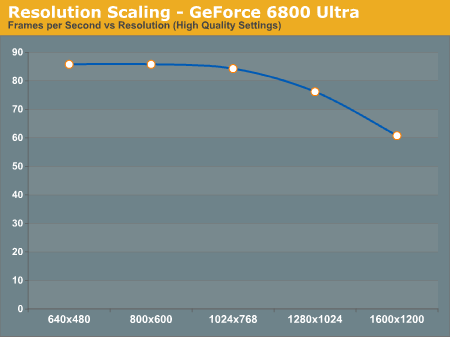
In this particular case we see that at resolutions below 1280x1024 the GeForce 6800 Ultra is primarily CPU limited, making all of the lower resolutions perform identical to one another. It isn't until we hit 1280x1024 and 1600x1200 that there is a significant performance drop off. So it's clear that if you have a GeForce 6800 Ultra, pairing the chip up with a fast CPU is quite important. But what about on a slower card like a Radeon 9800 Pro?
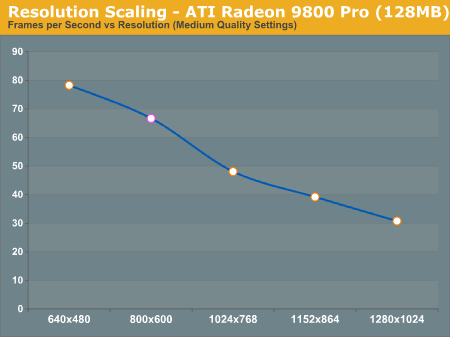
Here we have a completely different graph, where not even at 800x600 is the card CPU bound. With a Radeon 9800 Pro, having a fast CPU doesn't help as much since you are mostly GPU limited, especially at higher resolutions. This doesn't mean that you can pair up a Radeon 9800 Pro with a 1.4GHz Celeron and be fine, but it does mean that a Pentium 4 Extreme Edition is going to be overkill for your 9800 Pro.
When investigating CPU performance under Doom 3 it's clear that we'll want to use a GeForce 6800 Ultra to put as much stress on the CPU as possible, but we've also looked at how slower cards like the Radeon 9800 Pro react to CPU speed improvements as you'll see on the next page.


 Facebook
 Twitter
 RSS
RSS


59 Comments
View All Comments
kabob983 - Thursday, September 9, 2004 - link
kabob983 - Thursday, September 9, 2004 - link
So where does the A64 3200+ fit on this scale anyways...above or below the P4 3.4EE?T0918273645 - Monday, September 6, 2004 - link
this statement from their review is partially wrong."Doom 3 sees system memory as one big cache and drives performance up considerably. It is also the on-die memory controller that makes cache size less of an issue on the Athlon 64, while too small of a cache seems to make or break performance with the Pentium 4."
notice the 3.2 E with its 1mb cache gets 72.8 while the 3.2 C with 512KB cache gets 68.7. the only difference between this chips is the cache, which results in a difference of 4.1 FPS.
look at the FX53, with dual channel, and 1mb cache, it gets 103.4
and the 3800+ with 2.4ghz, 512kb cache, and dual channel gets 99.8
a difference of 3.6. So the larger cache does help. I think maybe anandtech might have mixed up the fact that they were comparing with amd the difference between dual channel, and cache. while with intel they were comparing only the difference between caches.
i think looking at the AMD charts you can see how close amd's view of the tradeoff for dual channel with the loss of half the cache actually is, at least as far as doom3 is concerned.
The 3400+ (no dual channel, 1mb cache, and 2.2ghz) performs at 80.4 FPS
The 3500+ (dual channel, 512KB cache, 2.2ghz) turns in 79.5FPS. So the dual channel/ cache tradeoff is so close you'd never be able to tell the difference.
So basically they mixed up the fact that the smaller cach size of the 3500+ compared to the 3400+ is masked by the dual channel ram which nearly completely makes up for the loss in cache.
I'm surpised they overlooked that fact.
Or maybe they thought that a difference of 4.1 is more of an issue than a difference of 3.6, but really that difference is nearly the same.
manson909 - Monday, August 9, 2004 - link
i can't believe no one has thought of this: since Doom 3 is capped at 60FPS, why not compare the MINIMUM framerates the CPU's encounter when playing? a system that has an average of 60FPS but is locked in at this speed (no dips) is far superior than a system that has an average of 70FPS but with lows in the 20's & high's in the 100's imo... anyone?HermosaBeach - Friday, August 6, 2004 - link
Short version:I would like to see the final graph comparing CPUs using 1600x1200, Highest Quality, 4xAA (Anti-Aliasing) and 16xAF (Anisotropic Filtering)
With this graph we may actually see a flattening of the frames per second where an increase in the CPU has no real impact on frames per second. This is where the GPU (GeForce 6800 Ultra) hits the wall and becomes the limiting factor.
Dave
HermosaBeach - Friday, August 6, 2004 - link
Dear 53, I disagree. Here's another way to look at the problem or question. Let's say I own an ATI X800 XT PE. I would like to know what computer (CPU/MB) to get. I want to play games at 1600x1200 with 6xAA and 16xAF. Starting from the slowest computer like the AMD XP 2000+. As you improve the CPU and climb the performance ladder we expect the frames per second to increase. But, there may come a time where an increase in CPU does not appreciably increase the frame rate. At this CPU level getting a faster CPU is not really going to help you. I was hoping to find this magical CPU point. Early 2003, with my ATI 9800 Pro, the sweet spot was the AMD XP 1800+. A faster CPU imporved frames per second, but not by much and was not worth the significantly increase in cost. For example, with FarCry and Doom3 the AMD 64 3000+ might be the sweet spot where getting the AMD 6400 3700+ really does not significantly increase your frame rate. If this is true, I would get the AMD 64 3000+. If the frame per second continue to significant improve as you increase the CPU then I would get the top end CPU. Sadly, at 1280x1024 without 4xAA and 16xAF you really can't tell.Dave
skiboysteve - Friday, August 6, 2004 - link
Dave, your retarded. Try reading the review, esp the first page.HermosaBeach - Thursday, August 5, 2004 - link
This article should have used 1280x1024 and 1600x1200. The 800x600 resolution was a waste of time and reading. Who's going to purchase any AMD 64 or any ATI X800 series or NVidia 6800 series card and play at such pathetic resolutions. I found the article a waste of time and it certainly did NOT answer the question - what CPU to get. I own a ATI 9800 Pro and it certainly did not help with what CPU to get when I purchase my next graphics card - sigh.Dave
xxxfubar187xxx - Thursday, August 5, 2004 - link
Thanks for the benchmarks guys! You do great work over there. Why wasn't the Athlon64 3700+ included in these benchmarks? Being the top of the line Socket 754 processor I figured it would be included in the tests.gimpyd00 - Thursday, August 5, 2004 - link