



Intel Core 2 Q6600 G0 Stepping: Cheap Quad Core Just Got Better
by Anand Lal Shimpi on August 16, 2007 11:53 AM EST- Posted in
- CPUs
Last month's price cuts not only made it tempting to build a new PC today, but they also brought quad-cores within the reach of mid-range budget systems.
| CPU | Clock Speed | FSB | L2 Cache | Availability | Pricing |
| Intel Core 2 Extreme QX6850 | 3.00GHz | 1333 | 4MBx2 | Now | $999 |
| Intel Core 2 Extreme QX6800 | 2.93GHz | 1066 | 4MBx2 | Now | $999 |
| Intel Core 2 Quad Q6700 | 2.66GHz | 1066 | 4MBx2 | Now | $530 |
| Intel Core 2 Quad Q6600 | 2.40GHz | 1066 | 4MBx2 | Now | $266 |
| Intel Core 2 Duo E6850 | 3.00GHz | 1333 | 4MB | Now | $266 |
| Intel Core 2 Duo E6750 | 2.66GHz | 1333 | 4MB | Now | $183 |
| Intel Core 2 Duo E6550 | 2.33GHz | 1333 | 4MB | Now | $163 |
| Intel Core 2 Duo E6540 | 2.33GHz | 1333 | 4MB | Now | $163 |
| Intel Core 2 Duo E4600 | 2.40GHz | 800 | 2MB | Q4 | $133 |
| Intel Core 2 Duo E4500 | 2.20GHz | 800 | 2MB | Q3 | $133 |
| Intel Core 2 Duo E4400 | 2.00GHz | 800 | 2MB | Now | $113 |
| Intel Pentium E2180 | 2.00GHz | 800 | 1MB | Q4 | $84 |
| Intel Pentium E2160 | 1.80GHz | 800 | 1MB | Now | $84 |
| Intel Pentium E2140 | 1.60GHz | 800 | 1MB | Now | $74 |
For $266 you now have a tough decision to make: do you buy two 3.0GHz cores or four 2.40GHz cores? In our last review we found that if you're doing any amount of 3D rendering or media encoding, the Core 2 Quad Q6600 at $266 ends up being the better value. Of course, if you want the best of both worlds you could always overclock the 2.40GHz Q6600, giving you four, much faster cores.
Hitting the S-Spec
In between major architectural revisions of processors, a core will go through multiple revisions or steppings. These steppings can be simple manufacturing tweaks, allowing for cooler operation, or they can include bug fixes and slight performance improvements. Performance improvements are rarely tangible, if even measurable in most cases, but the point is that these cores evolve over time. AMD and Intel learn better, more efficient ways to produce the chips over the lifetime of the processors and they incorporate the learnings into later revisions of the processors.
The original Core 2 processors that launched in July of last year were stepping B1, they were later replaced by a B2 stepping. Intel quietly introduced a new core with only 2MB of L2 cache (instead of 4MB with only half enabled), and thus we gained two more steppings: L2 and M0. The quad-core processors use a slightly different core stepping as well: B3. More recently, Intel introduced yet another revision to its Core 2 microprocessors: the G0 stepping.
G0 fixes a handful of bugs, but most of them were minor and or have software workarounds in play. The more noticeable aspect of G0 is its lower power consumption, which some have proposed as meaning G0 cores may be better overclockers.
Only a subset of Intel processors are presently available with G0 stepping cores: the Core 2 Duo E6540, E6550, E6750, E6850, Q6600, Q6700, QX6800 and QX6850. Of those listed, the E6540, E6550, E6750, E6850 and QX6850 are only available in G0, while the remainder are offered in B2 or B3 as well.
How do you know what stepping you've got? CPU-Z will tell you exactly what you're running, but you can also look at the CPU itself or the box it came in if you've got a retail chip.
Intel encodes the core stepping, cache size, frequency, package, FSB and more into a five character code called an S-Spec. You can use Intel's Processor Finder to decode almost any S-Spec, although there are some limitations.
The new G0 stepping chips have the following S-Specs:
| S-Spec | Core Stepping | CPU |
| SLAFN | G0 | QX6850 |
| SLACP | G0 | QX6800 |
| SLACQ | G0 | Q6700 |
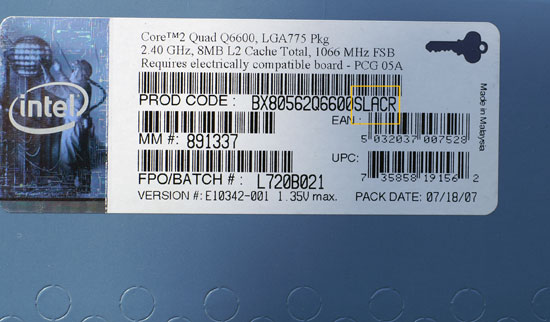
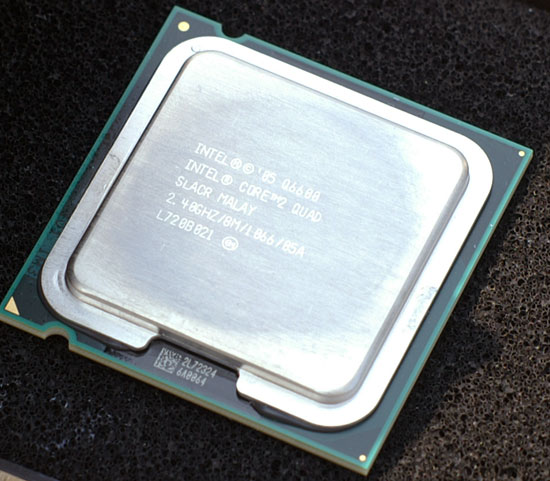
| SLACR | G0 | Q6600 |
| SLAA5 | G0 | E6540 |
| SLA9X | G0 | E6550 |
| SLA9V | G0 | E6750 |
| SLA9U | G0 | E6850 |
Here we have the new G0 based SLACR S-Spec on a processor box:
...and on the Q6600 itself:
Some vendors will even go as far as to hand select only G0 processors, advertising them as such. The question we're here to answer is whether or not the G0 based Q6600, (S-Spec: SLACR), is noticeably better than its B3 predecessor (S-Spec: SL9UM).
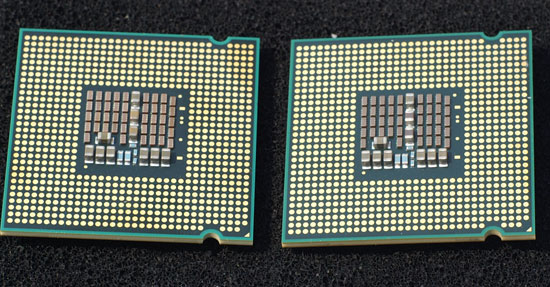
The G0 based SLACR (left) and the B3 based SL9UM (right)
Test Configuration
| CPU: | Intel Core 2 Quad Q6600 (2.40GHz/1066MHz) B3 Intel Core 2 Quad Q6600 (2.40GHz/1066MHz) G0 Both chips used the same VID |
| Motherboard: | Gigabyte GA-P35C-DS3R (Intel P35) |
| Chipset: | Intel P35 |
| Chipset Drivers: | Intel 8.1.1.1010 (Intel) |
| Hard Disk: | Seagate 7200.9 300GB SATA |
| Memory: | Corsair XMS2 DDR2-800 4-4-4-12 (1GB x 2) |
| Video Card: | NVIDIA GeForce 8800 GTX |
| Video Drivers: | NVIDIA ForceWare 158.18 |
| Desktop Resolution: | 1600 x 1200 |
| OS: | Windows Vista Ultimate 32-bit |


 Facebook
 Twitter
 RSS
RSS


34 Comments
View All Comments
comc100 - Monday, December 31, 2007 - link
hi i have q6600 g0 and geforce 6600 gt. do i have to upgrade my psu because mine is 305 wattsDrew Martell - Tuesday, January 19, 2010 - link
I have a Q6600 and a 300 watt PSU. I overclocked to 3GHz and still running fine with stock cooling and the 300 watts :Dk8fox - Friday, August 6, 2010 - link
Are you still using your Q6600? I would like to overclock mine but have no idea where to start as I have never done this. Suggestions?sheeple - Monday, October 19, 2015 - link
The Q6600 stands as Intel's greatest CPU EVER, due to it being FIRST, it's the Garagov of Cpu's!tjaisv - Thursday, August 23, 2007 - link
So what are the temp differences? Thxlemonadesoda - Sunday, August 19, 2007 - link
The system power draw is a very interesting statistic.But for CPU power comparisons I suggest some other analysis. Since so much of the system power is drawn by all anciliary components, the % improvement calculations show overall system improvement BUT NOT the CPU improvement. The CPU improvement is really the more interesting figure.
Can you isolate the system power draw excl. the CPU? Perhaps the best way to do this would be to put a ULV low clock CPU into the socket and use that as the "base line" for the system draw. Alternatively, write a utility to put the CPU into "deep sleep HALT" and check the power in this condition. Use this as the baseline.
You will probably see the baseline around 100W, so the difference betweem say 150W and 160W would be calculated as (160-100)/(150-100)-100%=20% and not the very small figures as article currently shows.
iamezza - Tuesday, August 21, 2007 - link
I agree.Considering this article was all about a core stepping the claimed better power consumption, I think they totally underplayed the power improvements. A reduction in total system power of 5-7% soley from a CPU stepping is very impressive. This works out to around 20% for the CPU alone. And it only gets better when it's overclocked.
Also its wrong to write off an entire stepping for overclocking potential when you have only tested 1 CPU and only used stock cooling at that.
cdrsft - Sunday, August 19, 2007 - link
In the article, the author asks,I'm not sure I fully understand the answer. IF you are doing some media encoding, the Q6600 is a better value. What about regular desktop usage? For the average person, which of these is the better value?
VapoChill - Saturday, August 18, 2007 - link
Why you not use the lastest Intel driver ?*********************************************
* Product: Intel(R) Chipset Device Software
* Release: Production Version
* Version: 8.3.0.1013
* Target Chipset#: Q33/G33/G31/P35
* Date: March 05 2007
*********************************************
Blacklash - Friday, August 17, 2007 - link
go back and try working from an 8x multi. A lot of overclockers seem to be doing well with that approach.