



Intel Santa Rosa Preview: Centrino V Evolves
by Anand Lal Shimpi on May 10, 2007 12:00 AM EST- Posted in
- Laptops
Centrino has been with us now for four years and for the fifth time since its introduction, we are seeing the platform updated. You've been hearing about this most recent Centrino upgrade for almost a full year; originally due out in Q1 2007, Intel's latest Centrino platform codenamed Santa Rosa has been a bit delayed.
The road to Santa Rosa has been a ridiculously successful one for Intel. The first Centrino platform was introduced in March of 2003 under the codename Carmel. The Carmel platform featured the very first Centrino CPU, codenamed Banias. Adding the first mobile Centrino chipset and an Intel 802.11b wireless solution completed the Centrino package. The first Centrino was honestly a success mainly because of its CPU; it was much better from a power efficiency standpoint than anything else in Intel's arsenal and competed favorable with the best AMD offered in notebooks at the time.
Almost 16 months later, in July 2004, Intel updated Carmel with support for its second generation Centrino CPU, codenamed Dothan. Dothan added a larger cache and introduced a number of architectural fixes that couldn't be included in time for Banias' launch the previous year. Dothan didn't shatter performance expectations as Banias did, but performance did go up thanks to the minor improvements here and there. The Centrino platform as a whole eventually got an update with Sonoma, which combined Dothan with a new chipset and 802.11g wireless.
Next up was Napa, which was the most revolutionary change to Centrino that we had seen since its introduction. The first dual core notebook platform from Intel, Napa amazingly enough offered better performance than its predecessor at no detriment to battery life. You got twice the cores, but under the same workload battery life didn't go down. Napa was eventually updated to support the latest Core 2 Duo processors, but it launched with the Yonah based Core Duo CPUs. As the first dual core Centrino, Napa introduced us to the Centrino Duo name.
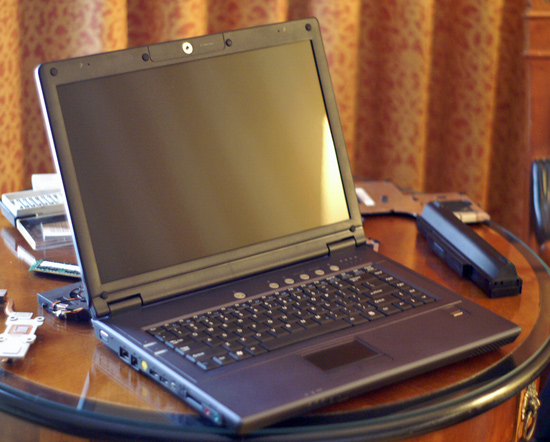
Today is the official launch of the new Centrino, and just by following history we can expect Santa Rosa to be an evolutionary improvement akin to what we saw with the Carmel -> Sonoma transition. We're also getting the impression that despite the delays, availability is still not up to par with previous Centrino platforms. We contacted all of the usual suspects for their new Santa Rosa based designs but have yet to see any in house. While we've been promised that many are coming, this article will have to serve as more of a preview than a review given that we've only been able to test a single Santa Rosa platform and as you will soon see, it was not without flaws.
As with previous Centrino platforms, if the OEM building the system buys all of the right components (CPU, chipset, wireless adapter) then it gets to call its notebook a Centrino system. More specifically, with the Core 2 Duo processors, the platform name OEMs get to use is Intel Centrino Duo. There's another moniker that can be used, which is Intel Centrino Pro, however this one is reserved for systems targeted at the business environment where Intel vPro technology is implemented. The hardware requirements for Centrino Duo and Centrino Pro are the same, the only difference being whether or not vPro is supported.
Later this year, Santa Rosa will be updated to support Penryn based mobile CPUs much like Napa was updated in the middle of its life cycle to support Merom, albeit launching with support only for Yonah. Santa Rosa will be replaced in about a year by Montevina, which will add WiMAX support among other things.
The road to Santa Rosa has been a ridiculously successful one for Intel. The first Centrino platform was introduced in March of 2003 under the codename Carmel. The Carmel platform featured the very first Centrino CPU, codenamed Banias. Adding the first mobile Centrino chipset and an Intel 802.11b wireless solution completed the Centrino package. The first Centrino was honestly a success mainly because of its CPU; it was much better from a power efficiency standpoint than anything else in Intel's arsenal and competed favorable with the best AMD offered in notebooks at the time.
Almost 16 months later, in July 2004, Intel updated Carmel with support for its second generation Centrino CPU, codenamed Dothan. Dothan added a larger cache and introduced a number of architectural fixes that couldn't be included in time for Banias' launch the previous year. Dothan didn't shatter performance expectations as Banias did, but performance did go up thanks to the minor improvements here and there. The Centrino platform as a whole eventually got an update with Sonoma, which combined Dothan with a new chipset and 802.11g wireless.
Next up was Napa, which was the most revolutionary change to Centrino that we had seen since its introduction. The first dual core notebook platform from Intel, Napa amazingly enough offered better performance than its predecessor at no detriment to battery life. You got twice the cores, but under the same workload battery life didn't go down. Napa was eventually updated to support the latest Core 2 Duo processors, but it launched with the Yonah based Core Duo CPUs. As the first dual core Centrino, Napa introduced us to the Centrino Duo name.
Today is the official launch of the new Centrino, and just by following history we can expect Santa Rosa to be an evolutionary improvement akin to what we saw with the Carmel -> Sonoma transition. We're also getting the impression that despite the delays, availability is still not up to par with previous Centrino platforms. We contacted all of the usual suspects for their new Santa Rosa based designs but have yet to see any in house. While we've been promised that many are coming, this article will have to serve as more of a preview than a review given that we've only been able to test a single Santa Rosa platform and as you will soon see, it was not without flaws.
As with previous Centrino platforms, if the OEM building the system buys all of the right components (CPU, chipset, wireless adapter) then it gets to call its notebook a Centrino system. More specifically, with the Core 2 Duo processors, the platform name OEMs get to use is Intel Centrino Duo. There's another moniker that can be used, which is Intel Centrino Pro, however this one is reserved for systems targeted at the business environment where Intel vPro technology is implemented. The hardware requirements for Centrino Duo and Centrino Pro are the same, the only difference being whether or not vPro is supported.
Later this year, Santa Rosa will be updated to support Penryn based mobile CPUs much like Napa was updated in the middle of its life cycle to support Merom, albeit launching with support only for Yonah. Santa Rosa will be replaced in about a year by Montevina, which will add WiMAX support among other things.


 Facebook
 Twitter
 RSS
RSS


22 Comments
View All Comments
Lord Evermore - Saturday, May 12, 2007 - link
Mobile sockets are just oh so cute!Just what we needed. A nice new proprietary memory card that you can only get from an OEM included in a system. What actual interface type does it use? Can the amount of the flash that's reserved for ReadyBoost or ReadyDrive be changed? Seems kind of stupid if not, a total waste of half the flash you paid for. Even with 1GB completely available, in some cases that will be useless for speeding up hibernation since it might not be enough to store the system state.
For that matter, if you've got the money to be buying the flash, which is guaranteed to be more expensive than a 1GB flash thumbdrive, wouldn't you be buying with enough memory to start with, and possibly also getting a hybrid hard drive that already had flash (possibly more than just a piddly 1GB)? Really I still just don't see a point other than to sell more flash memory. Put more DRAM into the drives, they need it. With enough memory in the system, you already have a disk cache in memory that can be used for the often-needed data, which is faster than even the Flash. One of the big things with Vista is how it always seems to be using so much memory, and this is exactly the reason.
IS 802.11n ever actually going to be finalized? Or have they contracted beta-fever from software developers? And dang, that laptop maker is serious about keeping that wireless card in place.
coolme - Wednesday, May 16, 2007 - link
The intel turbo memory module uses PCI express x1 interface.The major thing about flash is that it's non-volatile meaning that it can be used for boot-up and/or hibernation sequences.
jediknight - Thursday, May 10, 2007 - link
There were really three things I wondered about this platform:1) Performance of robson
2) Performance of GMA X3000
3) Battery life improvements
None of which were answered in this one.
I second the suggestion to hold off on reviews until you have something to really.. review.
IntelUser2000 - Thursday, May 10, 2007 - link
The power consumption figures are certainly interesting. The only difference between two systems is the video cards and the CPU, and I doubt the Geforce 8600M consumes less idle power than the Radeon X1600. The power consumption figures indicate there may be a battery life increase of 25-30%.rexian96 - Thursday, May 10, 2007 - link
Many questions posted above & none answered. Well, I'll add mine. Are these new T7300 processors compatible with current socket 479? Did I miss it or the article never talked about it.Freddo - Thursday, May 10, 2007 - link
On the second page; "Despite the minor changes to the CPU, Intel has introduced a new socket pinout with Santa Rosa, meaning that these new Merom chips won't work in older platforms and vice versa."TA152H - Thursday, May 10, 2007 - link
What a worthless review.Why even bother with it? If Intel is too arrogant to provide something worthwhile, why do them the favor of reviewing their item. Am I missing something here? They send an item with two big changes - a new IGP and a new solid state memory that is supposed to be the greatest thing since Cheddar Cheese, and neither can be reviewed properly. It's either the height of audacity or stupidity, and I don't think they're stupid. My guess is they just want press for their items without having to reveal too much, assuming there is anything rational about it. I don't get it.
I wouldn't do them the favor of even reviewing stuff like this. They get exposure, albeit not particularly positive, and they give essentially nothing. If they want to play weird games, let them play it alone. Sending something like this is just arrogant.
mongoosesRawesome - Thursday, May 10, 2007 - link
How does linux support the Robson technology? Does it see half the memory as part of the hard drive?solipsism - Thursday, May 10, 2007 - link
Is it 8GB or are we stuck with the same 4GB limitation as in the 945PM chipset?
solipsism - Friday, May 11, 2007 - link
It's still a 4GB maximumPage 30 :: http://cache-www.intel.com/cd/00/00/33/40/334087_3...